
Local service guide
Arrange software installation in Laval
For software installation in Laval, request a written quote naming your device, programs, account setup and completion tests before booking. Discuss remote help if you can start the computer and connect to the internet, or an in-person appointment if you need help with those steps. Separate installation, licences, data transfer and proposed repairs so you can approve each part.
Define the result before requesting a quote
Give the technician your computer model, operating system and requested programs. Describe what you need to accomplish, such as editing a document, opening an existing project or printing from an application. Ask them to confirm compatibility before you purchase a licence or authorize changes.
Distinguish a new application installation from an operating-system replacement or repair. Describe error messages and previous installation attempts, and identify files you want preserved. Require a separate approval before the technician erases a drive, removes an existing program or expands the work.
Choose an appointment you can participate in
For remote service, ask which connection tool the technician will use and how you will end access afterward. Plan to stay at the computer, enter your own passwords and approve changes as the technician explains them. Discuss any administrator access and include removal of temporary access in the handover.
For an in-home visit, identify the printer, external drive or other devices you want tested. For drop-off service, agree on accessories to bring, approval arrangements and a demonstration at collection. Request explanations and handover notes in your preferred language.
Compare the full payable amount
Request separate amounts for labour, software purchases, subscriptions, travel and data transfer. Confirm whether the technician charges a fixed amount or an hourly rate. Set a spending limit and require approval before further work. Keep licence purchases in an account you control, and agree on who will handle renewals.
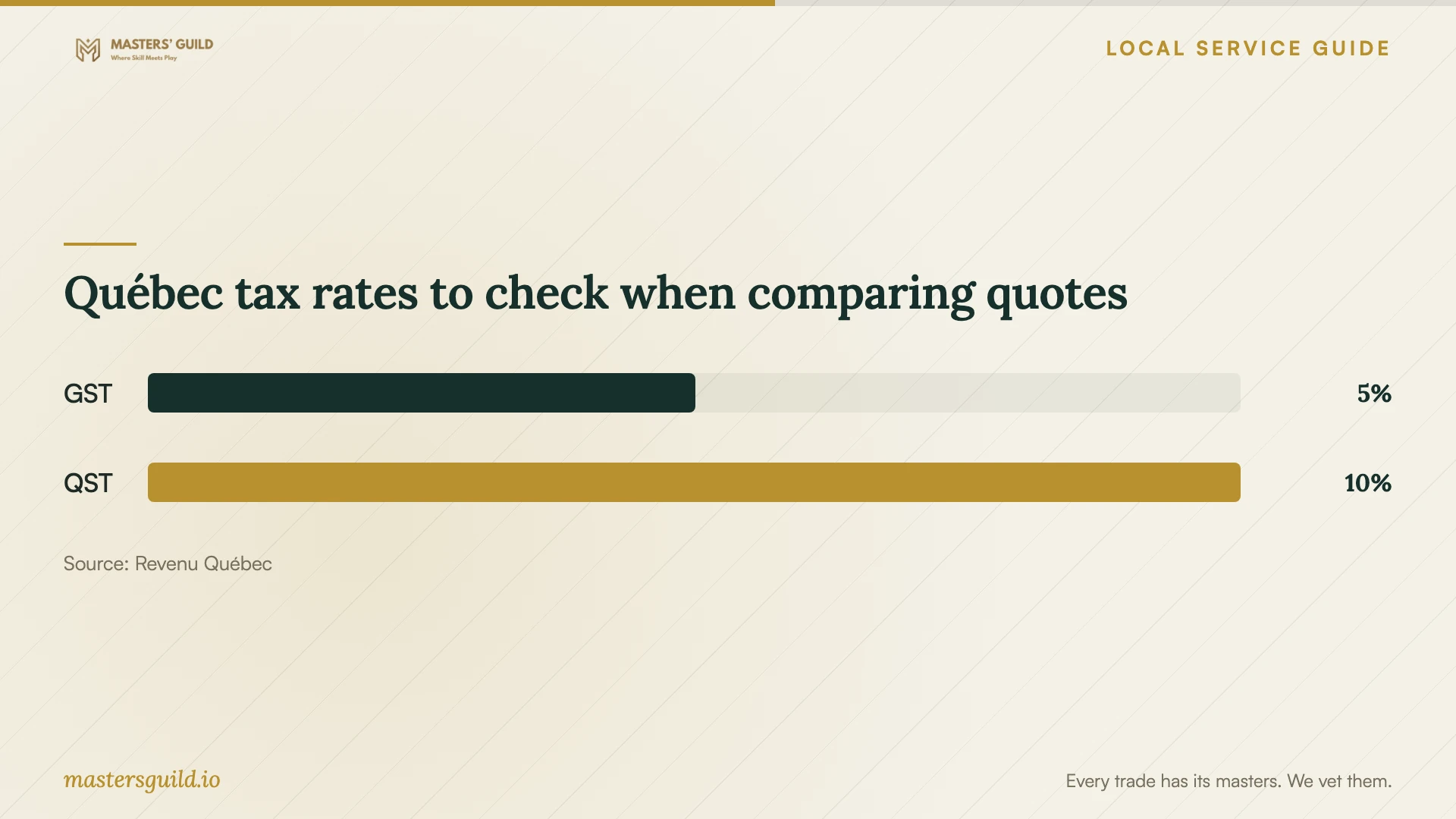
Revenu Québec says GST and QST apply to most goods and services. It lists GST at 5% of the price and QST at 9.975% of the price excluding GST. Ask the provider to show applicable taxes and the final total so you can compare quotes on the same basis. [3]
Authorize repair work as a separate step
For computer repair expected to cost more than $50, the Office de la protection du consommateur says the repairer must provide a written estimate. To waive it, you must write and sign the waiver yourself; signing a preprinted document does not suffice. The office exempts repairs performed without charge from the estimate requirement. [1]
The repairer must obtain your authorization before beginning repairs or adding work beyond the estimate. The office says the repairer cannot charge more than the estimated total plus subsequent repairs you authorize. It also requires a detailed repair invoice and states a three-month guarantee for computer or tablet repairs. Keep these repair protections distinct from the agreed terms of a standalone installation. [1]
Prepare your files and check the finished setup
Make a backup of files you want preserved and check that you can open a copy. Gather purchase confirmations, licence information and access to your recovery email or phone. Identify private folders and agree on what the technician may access or copy.
Before accepting the work, open the installed program yourself, check activation and complete your intended task. Restart the computer and repeat the test. Ask the technician to explain update settings, subscription terms and unresolved errors. Keep the invoice, installation notes and agreed follow-up terms together.
Québec tax rates to check when comparing quotes
Local details that affect your job
Consider Laval library resources for temporary access
Ville de Laval lists computer tools, study spaces, a digital space and free wireless internet through LAVALPublic among its library services. Laval residents can obtain a free library card to access several services. Consider these resources if you need computer access while your device is unavailable. Confirm access arrangements and ask about personal-device assistance before relying on staff for installation help. [2]
Use Québec repair protections when the scope changes
For a Laval household whose installation appointment expands into computer repair, apply Québec’s repair guidance before approving the added work. The consumer office requires the repair estimate to identify the device, proposed repair, total price, date and validity period, along with customer and repairer details. Ask for that information and authorize the repair as a separate step. [1]
Choose the next step for your setup
| Your situation | Suggested arrangement | Confirm before proceeding |
|---|---|---|
| Computer starts and you can connect to the internet | Discuss a remote installation appointment | Connection tool, access permissions and completion test |
| You need help connecting or testing a peripheral | Discuss an in-home visit | Devices included, travel charge and testing scope |
| Computer will not start or installation keeps failing | Request an assessment before approving further work | Assessment charge and separate authorization for repairs |
| You need temporary computer or internet access | Check Laval library computer resources and LAVALPublic Wi-Fi | Access arrangements and whether available tools meet your needs |
Your hiring checklist
- Record the device model, operating system, requested programs and error messages.
- Confirm compatibility and who will purchase each licence.
- Back up important files and check that the copies open.
- Agree on password entry, account access and removal of temporary remote access.
- Request labour, licences, extras, applicable taxes and the final total.
- Set an approval limit for troubleshooting or additional repairs.
- Test activation, a restart and your intended task before handover.
Frequently Asked Questions
How much should I budget for installation?
Request a quote for your device and programs, including activation, testing, data transfer and applicable taxes. Ask the technician to separate software purchases and subscriptions from labour. Agree on a troubleshooting allowance and require approval before the technician exceeds it.
Does the $50 written-estimate rule cover every software installation?
The consumer office describes the rule for computer-equipment repairs expected to exceed $50. Keep that repair scope distinct from a standalone installation. If the technician proposes repairs, ask them to define the work and provide the applicable estimate before you authorize it. [1]
Should I give the technician my account password?
Arrange to enter passwords yourself during the appointment. Ask the technician to explain any administrator access they need. If you agree to a temporary account or remote connection, include removal of that access in the handover steps.
Sources and scope
This guide combines the sources below with practical planning guidance. Figures apply to the stated geography and period; request a written quote for your property.