
Local service guide
Home Office Setup in Laval, QC
Arrange your Home Office Setup in Laval by defining the work before choosing a provider: desk assembly, monitor installation, cable routing and equipment testing. Separate any construction work in the quote. Laval requires an occupation certificate before fitting out a professional office within a dwelling and instructs applicants to wait for receipt before office occupancy. Its guidance does not establish how ordinary employee telework is classified, so describe your proposed use to the city before planning the installation. [1]
Define the installation before comparing quotes
Prepare an itemized scope: assemble the desk and chair, attach monitor arms, connect the dock and peripherals, route cables and test the finished workstation. Identify who supplies mounts, adapters, cable trays and fasteners. Ask the provider to list exclusions, cleanup, packaging removal and any return visit in the quote.
For a monitor arm, share the screen model, weight and mounting information from its manufacturer. Photograph the desktop edge and underside if you want a clamp mount. For a wall installation, ask the installer to assess the wall and mounting method before committing to a position. Check your seated posture before agreeing on the final screen position.
Request separate prices for furniture work, technology setup and any renovation. Compare the same list of tasks across offers, including travel charges, materials and applicable taxes. Resolve allowances for extra work before booking.
Resolve office use and construction before installation
Laval requires an occupation certificate before fitting out a professional office within a dwelling. Applicants must also wait for receipt before occupying the office. Prepare a scaled layout showing the office area and proposed location. Describe your activity when checking permitted use, including whether clients will visit. The city’s home-office guidance does not establish a blanket exemption or requirement for ordinary employee telework. [1]
Check construction requirements before ordering fitted furniture or fixing a desk layout. Laval requires an interior renovation permit when work changes room dimensions, room count or the dwelling’s structure. Its published approximate processing time is 30 days, counted after the city receives all required documents, and additional delays can apply. [2]
For paid renovation work, ask the contractor for licence details matching the proposed tasks. The RBQ states that a person carrying out residential renovation for an owner for profit needs the necessary contractor licence subclasses. Ask a furniture installer to identify construction work separately so you can check the appropriate credentials. [3]
Fit the workstation to the person
Sit at the proposed desk before finalizing screen height or cable positions. CNESST recommends supported forearms, relaxed shoulders and elbows at wrist height. Keep feet flat on the floor or use a footrest. Position the screen about an arm’s length away, with its upper portion at eye level. [4]
For laptop work, CNESST recommends an external keyboard to let you raise and move the laptop screen. Place an external mouse beside the keyboard. Include these accessories in the installation plan, then test typing, pointer use and a video call before the provider leaves. [4]
If you choose a standing desk, have the installer test its movement with the equipment connected and check cable slack throughout its travel. CNESST recommends varying posture and warns that prolonged static standing can also cause discomfort. Ask for seated and standing adjustments. [4]
Check lighting and finish with a working test
Check the proposed screen position from your chair with daylight and room lights present. CCOHS recommends matte work surfaces and adjustable local lighting to address glare. Position the desk so windows sit beside your viewing direction, and inspect the screen for reflections before securing equipment. [5]
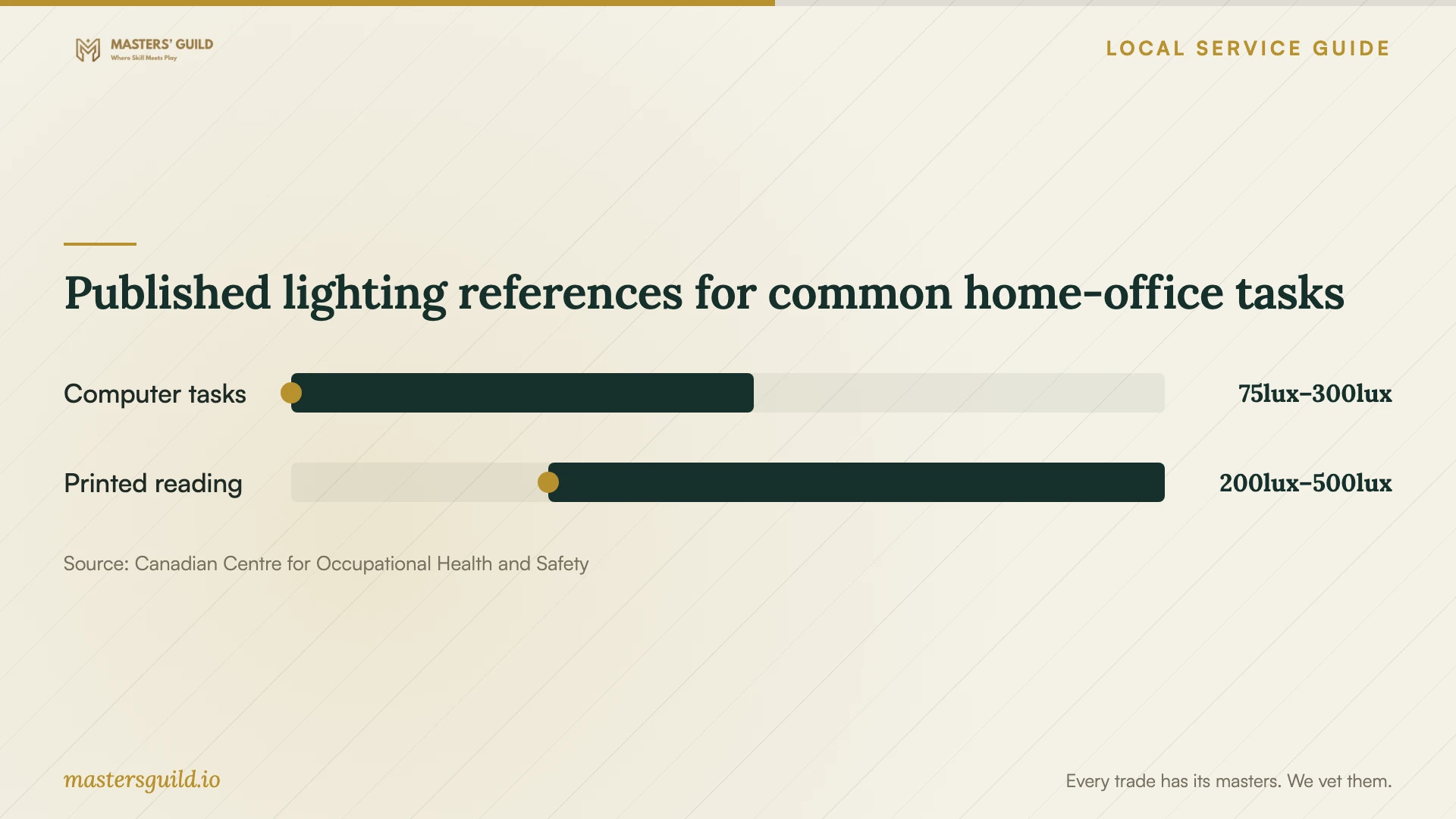
Use the lighting ranges below as task references. CCOHS publishes different ranges for computer work and reading good-quality printed material. Choose lighting around your actual tasks, then check shadows and reflections from your normal working position. [5]
Before accepting the work, open your usual applications, check each display and test the camera, microphone, speakers and network connection. Try the chair’s adjustments and reach for daily supplies. Ask the provider to identify unresolved compatibility issues and record any agreed follow-up work.
Published lighting references for common home-office tasks
Local details that affect your job
Prepare Laval’s professional-office application
Obtain Laval’s occupation certificate before fitting out a professional office within your dwelling, and wait for receipt before occupying it. The city lists an $84 fee. Prepare a scaled plan showing the office area and location; the city may also require a lease copy and authorization if you do not own the property. Laval says it will email an application-status update within five business days. That update does not mean approval. Display the certificate inside the office after receipt. [1]
Allow time for an interior office conversion
If your project changes room dimensions, room count or structure, Laval requires an interior renovation permit. The published fee is $92 for the first $20,000 of work, plus $2.50 per additional $1,000 or part thereof. Keep this municipal fee separate from the installer’s price. The city lists an approximate 30-day processing period starting when it receives all required documents, so resolve the permit before setting a construction start date. [2]
Choose the next step for your scope
| Proposed work | Who to involve | Before booking |
|---|---|---|
| Freestanding desk and equipment setup | Furniture assembler or setup provider | Request an itemized assembly, connection and testing scope. |
| Professional office within the dwelling | Ville de Laval and your setup provider | Check permitted use. Obtain the occupation certificate before fitting out the office, and wait for receipt before occupancy. |
| Changes to room dimensions, count or structure | Ville de Laval and a renovation contractor | Obtain the interior renovation permit and check the contractor’s relevant licence subclasses. |
| Laptop workstation adjustment | Setup provider, with you present | Plan an external keyboard and mouse so you can adjust the screen separately. |
Your hiring checklist
- Measure the room, desk location and delivery route; photograph access constraints.
- List furniture models, monitor models, mounting accessories and equipment to connect.
- Describe your proposed activity to the city to clarify whether it constitutes a professional office.
- Schedule professional-office fitting out and occupancy after receipt of the required occupation certificate.
- Separate assembly, technology work and construction in the written quote.
- Confirm who supplies fasteners, adapters, cable trays and replacement parts.
- Agree on screen position and seated adjustments before securing mounts.
- Test desk movement, connected equipment and a video call before accepting the work.
Frequently Asked Questions
Do I need an occupation certificate to work from home?
Laval requires an occupation certificate before fitting out a professional office inside a dwelling and tells applicants to wait for receipt before office occupancy. Its guidance does not settle how ordinary employee telework is classified. Describe your activity to the city before assuming that your arrangement triggers, or avoids, this requirement. [1]
How much should I budget for installation?
Request a written quote based on your furniture, mounting method, equipment and cable-routing scope. The sources cited here do not establish a local installation price range. Keep furniture purchases, installation charges, construction and municipal fees as separate budget lines.
Can I raise my laptop instead of buying another screen?
CNESST describes raising a laptop with a support such as books or a box when using an external keyboard and mouse. Aim for the upper screen portion at eye level and a viewing distance of about an arm’s length. Test the arrangement before buying a permanent mount. [4]
Does a five-business-day city response mean approval?
No. Laval describes an application-status email within five business days. The city analyzes the application and issues the certificate when the application is complete and compliant. Obtain it before fitting out the professional office, and wait for receipt before occupying that space as an office. [1]
Sources and scope
This guide combines the sources below with practical planning guidance. Figures apply to the stated geography and period; request a written quote for your property.