
Local service guide
Data recovery and backup in Laval: hiring guide
Data recovery and backup in Laval starts with a clear scope: ask a provider to assess the affected device, check whether you can restore the files you need, and quote recovery and future backup work separately. Before handing over customer or employee records, confirm who will handle them and where. Québec’s privacy regulator specifies written confidentiality terms for service contracts involving necessary personal-information disclosure. [2]
Define the recovery job before booking
Prepare a short inventory: device model, storage type if known, symptoms, events before the failure, and the files you need. Tell the provider whether you have a backup and its last successful restore date. Ask for instructions before reconnecting or testing affected equipment, especially after water exposure.
Separate urgent access from the full recovery request. For example, name the accounting file you need to run payroll and the project folders you can wait for. Ask the provider to state what they will assess, what work requires your approval, and how you will check the returned files. Request a written explanation of any recovery limitations.
Compare quotes by scope and acceptance terms
Ask each provider to itemize assessment, recovery labour, transport, return storage and any priority service. Have them state the amount you owe if you decline the proposed work or they cannot return the requested files. Set a spending limit that requires your approval before they proceed.
For backup installation, request a separate setup price and recurring charges. Include the computers, shared folders and applications you want covered. Ask who checks failed backups, who contacts you, and what assistance the recurring fee includes during a restore. Get these details so you can compare equivalent scopes.
Agree on acceptance before work begins. Ask to open representative recovered files and complete a sample restore onto a suitable separate device. Specify who will provide the destination storage and who will retain account ownership, administrator access and recovery instructions.
Put privacy terms in the handover agreement
Québec’s Commission d’accès à l’information says businesses must restrict personal-information access to authorized people who need it for their duties. For necessary disclosure under a service contract, its guidance calls for a written mandate specifying confidentiality measures, use limited to the contract, and no retention after the contract ends. It also requires prompt notice to the privacy officer after a confidentiality breach and the ability to verify confidentiality. [2]
Translate those requirements into hiring questions: which staff can view your records, which subcontractors will receive them, how the provider protects transfers, and when it will remove working copies. Ask for a handover receipt identifying the device and agreed work. Choose a secure method for sharing any required access credentials.
Ask for the actual laboratory and storage locations before authorizing shipment or cloud upload, even when you use a Laval drop-off address. The regulator describes additional obligations before a business entrusts personal information to an organization outside Québec, including a privacy impact assessment and a written agreement. Involve your privacy officer before approving that arrangement. [2]
Specify a backup you can restore
The Canadian Centre for Cyber Security recommends the 3-2-1 approach: three copies of information, including the original and two backups, on two media types, with one copy offsite. It also recommends an offline backup and testing the recovery process. Ask your installer to explain how the proposed setup meets these recommendations. [3]
Set backup frequency around the amount of work you can afford to recreate. Tell the provider how long you can operate without scheduling, payment or accounting access. Request a documented restore procedure, a named person responsible for checking failures, and a demonstration using files you select.
The federal guidance warns that ransomware can spread to network-attached storage and compromise backups. It recommends disconnecting removable backup media after the backup, encrypting sensitive data, and protecting cloud accounts with a strong password or passphrase and multi-factor authentication. Ask the provider to include these safeguards in the scope. [3]
Budget for recovery and continuity separately
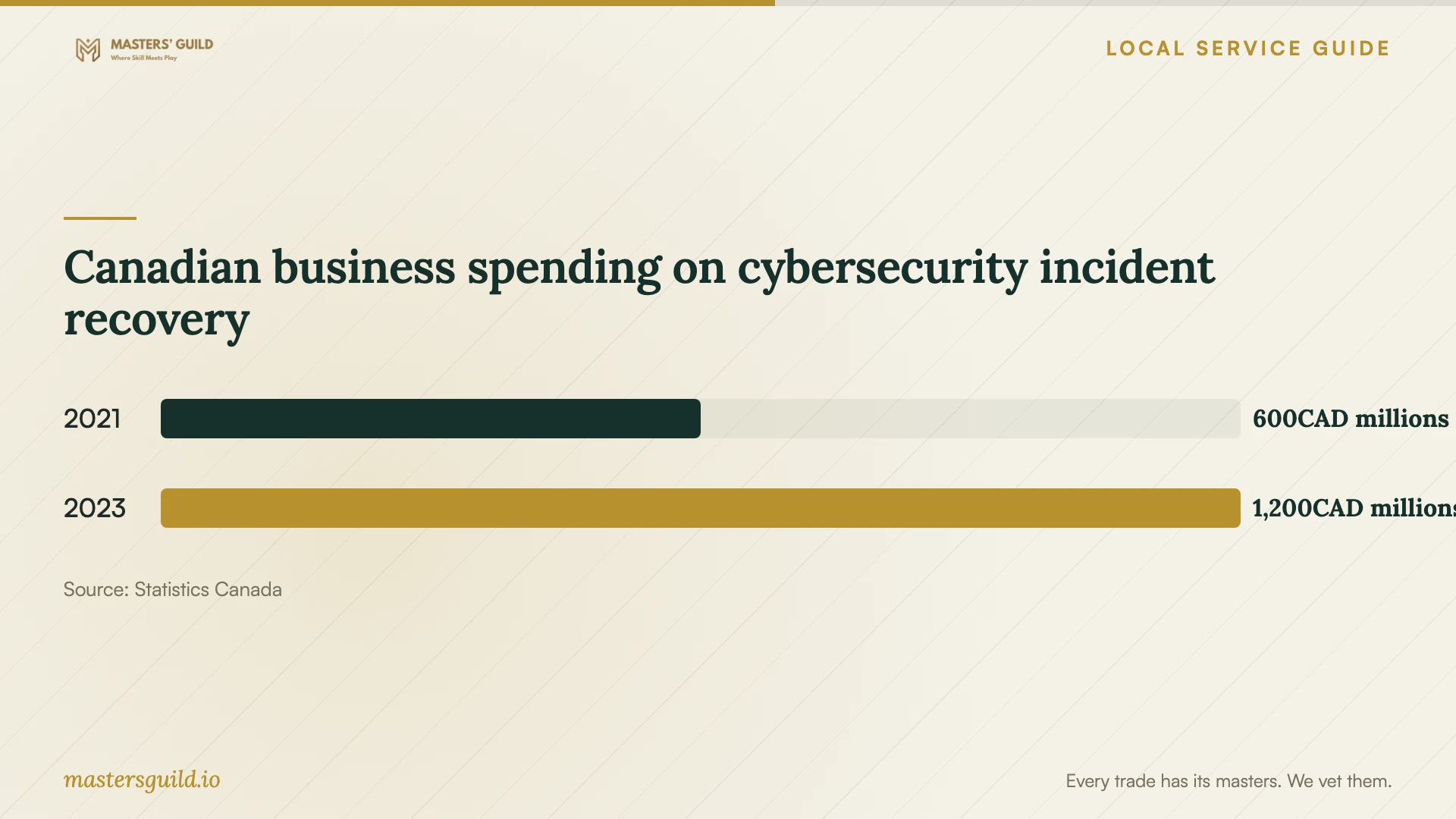
Statistics Canada reported approximately 600 million Canadian dollars in national business spending on recovery from cybersecurity incidents in 2021 and 1.2 billion in 2023. These totals describe incident recovery across surveyed businesses. They do not establish a price for retrieving files from your drive or installing backups in Laval. [4]
Request offers with immediate file recovery, backup installation and ongoing monitoring as separate items. If you suspect a cybersecurity incident, ask who will assess the affected systems before you resume business use. Request an incident-response scope alongside the file-return quote.
Canadian business spending on cybersecurity incident recovery
Local details that affect your job
Laval flood access and offsite records
Laval directs residents to call 311 when their home floods and 911 if water reaches electrical installations. Follow those instructions before arranging retrieval from a home office. For preparation, the city recommends keeping property photographs in secure cloud storage or on a USB key outside the home. Include those insurance records in your backup request and keep the offsite copy outside the same premises as your equipment. [1]
Québec rules affect laboratory and cloud selection
Before a Québec business entrusts personal information to a provider outside the province, the privacy regulator calls for a privacy impact assessment and a written agreement, alongside the applicable information and consent obligations. This includes an organization elsewhere in Canada. Ask where a prospective recovery lab or backup provider will process and retain your records, and have your privacy officer review the arrangement before transfer. [2]
Choose the scope that fits your situation
| Situation | Request | Check before approval |
|---|---|---|
| You have a backup | A restore assessment and sample restore | Which required files you can open and use |
| You need files from an affected device | A device assessment and written recovery proposal | Approval limit, return format and unsuccessful-recovery charges |
| Equipment sits in a flooded home office | Safe access before equipment retrieval | Follow Laval guidance: 311 for a flooded home; 911 if water reaches electrical installations |
| A laboratory or storage provider operates outside Québec | Processing locations and a privacy review before transfer | Privacy impact assessment and written agreement for entrusted personal information |
| You need an ongoing backup service | Offsite and offline protection with a restore demonstration | Backup frequency, failure monitoring and assigned responsibilities |
Your hiring checklist
- Record the affected device, symptoms and files you need first.
- Identify available backups and ask for a sample restore.
- Request separate recovery, setup and recurring-service quotes.
- Confirm assessment fees, unsuccessful-recovery charges and your approval limit.
- Get the laboratory, subcontractor and storage locations in writing.
- Agree on confidentiality, permitted access and working-copy removal.
- Choose a secure credential handover and retain ownership of backup accounts.
- Complete a restore demonstration and obtain written recovery instructions.
Frequently Asked Questions
How much should I budget for recovery?
Request a written assessment and itemized quote for your device and required files. Ask about fees if you decline the work or recovery fails. Set your budget using comparable written quotes for your device and required files.
Can I use a recovery lab outside Québec?
Ask your privacy officer to review the arrangement first if the device contains personal information held by your business. Québec’s regulator describes additional obligations before entrusting such information outside the province, including a privacy impact assessment and written agreement. [2]
Is a backup drive in the same office enough?
The Canadian Centre for Cyber Security recommends an offsite copy because a fire or flood can affect the entire premises. It also recommends an offline backup to reduce exposure to network threats. Ask your installer to show how you will restore from each copy. [3]
Will backups solve a ransomware incident?
Backups can help you restore systems and information. The Canadian Centre for Cyber Security cautions that they do not prevent an attacker from selling or leaking stolen data. Ask for incident-response assistance as a separate scope when you suspect ransomware. [3]
Sources and scope
This guide combines the sources below with practical planning guidance. Figures apply to the stated geography and period; request a written quote for your property.