
Local service guide
Computer virus removal in Laval, QC
For computer virus removal in Laval, choose a technician who separates cleanup, file preservation and operating-system repair in a written scope; Québec’s consumer office says computer repairs expected to exceed $50 require a written estimate, subject to its stated exceptions. Before authorizing work, agree on the assessment charge, access to personal files and whether the technician may reinstall the system. Arrange help through contact details you have checked, rather than accepting access requests from an unexpected caller. [1] [2]
Describe the problem before choosing the repair
Tell the technician what you saw: the exact warning, unwanted browser changes, an unfamiliar application, inaccessible files or a failed startup. Include what you clicked and whether you let someone control the computer. Ask for diagnosis before committing to a particular repair.
Separate your priorities. If family photos or documents matter most, ask the technician to propose a preservation plan before changing the system. If you need the computer for a deadline, ask for an assessment appointment and a separate completion estimate. Do not treat the appointment time as a promise that the repair will finish that day.
Compare the full scope and total charge
Request separate descriptions for diagnosis, malware cleanup, file backup, operating-system repair and reinstallation. Ask whether the quoted amount includes any return visit, travel, security software or follow-up check. Compare offers using the same requested work and ask for the total payable, including taxes.
For covered computer repairs expected to exceed $50, Québec’s Office de la protection du consommateur requires a written estimate. It must include the customer’s and repairer’s names and addresses, the device description, the nature and total price of the repair, the estimate date and its validity period. The repairer must disclose the exact assessment charge beforehand if charging for that estimate. [1]
The repairer needs your authorization before starting and before performing repairs outside the estimate. The office says the repairer cannot charge above the estimated total except for additional repairs you subsequently authorize. Put your approval limit and preferred contact method in writing. [1]
Agree on access and file handling
Before handing over the device, identify the folders you want preserved and tell the technician whether you have a backup. Ask who will access personal files, where any temporary copies will go and when the technician will delete those copies. Request approval before erasing the drive or reinstalling the operating system.
Choose the service format after discussing access. For remote help, ask how you will approve and end the session. For drop-off, request an intake receipt describing the device and accessories. For a home visit, confirm the arrival window, visit charge and what happens if the technician needs to take the computer away.
Handle suspected fraud alongside the repair
Laval police advise residents to refuse computer access to unexpected callers and to avoid disclosing passwords. They also recommend keeping antivirus, anti-spyware protection and a firewall updated. Use contact information you have checked when arranging support. [2]
If you paid a suspected scammer or disclosed financial information, contact your financial institution through a known channel. Preserve messages, receipts and a timeline for your report. Tell the repair technician about any remote access you granted, and ask for a written account of what they inspect and change.
The Canadian Anti-Fraud Centre advises fraud victims to contact local police. For questions about reporting an incident in Laval, the police service lists 450 662-4242. Ask which reporting route fits your circumstances rather than assuming that a computer cleanup also resolves the fraud report. [3] [5]
Check the computer before accepting completion
Ask the technician to explain the diagnosis, work performed and any remaining concerns. Check the original problem with them, open a sample of the files you asked them to preserve and confirm which applications need reinstallation. Ask them to demonstrate how to remove any remote support access used during the job.
Québec’s consumer office requires a detailed invoice for covered computer repairs, including the work, billed labour, installed parts, taxes, total and guarantee terms. It states that computer and tablet repairs carry a three-month guarantee and recommends recording the repair date on the invoice. Ask the repairer how to raise a concern if the original problem returns. [1]
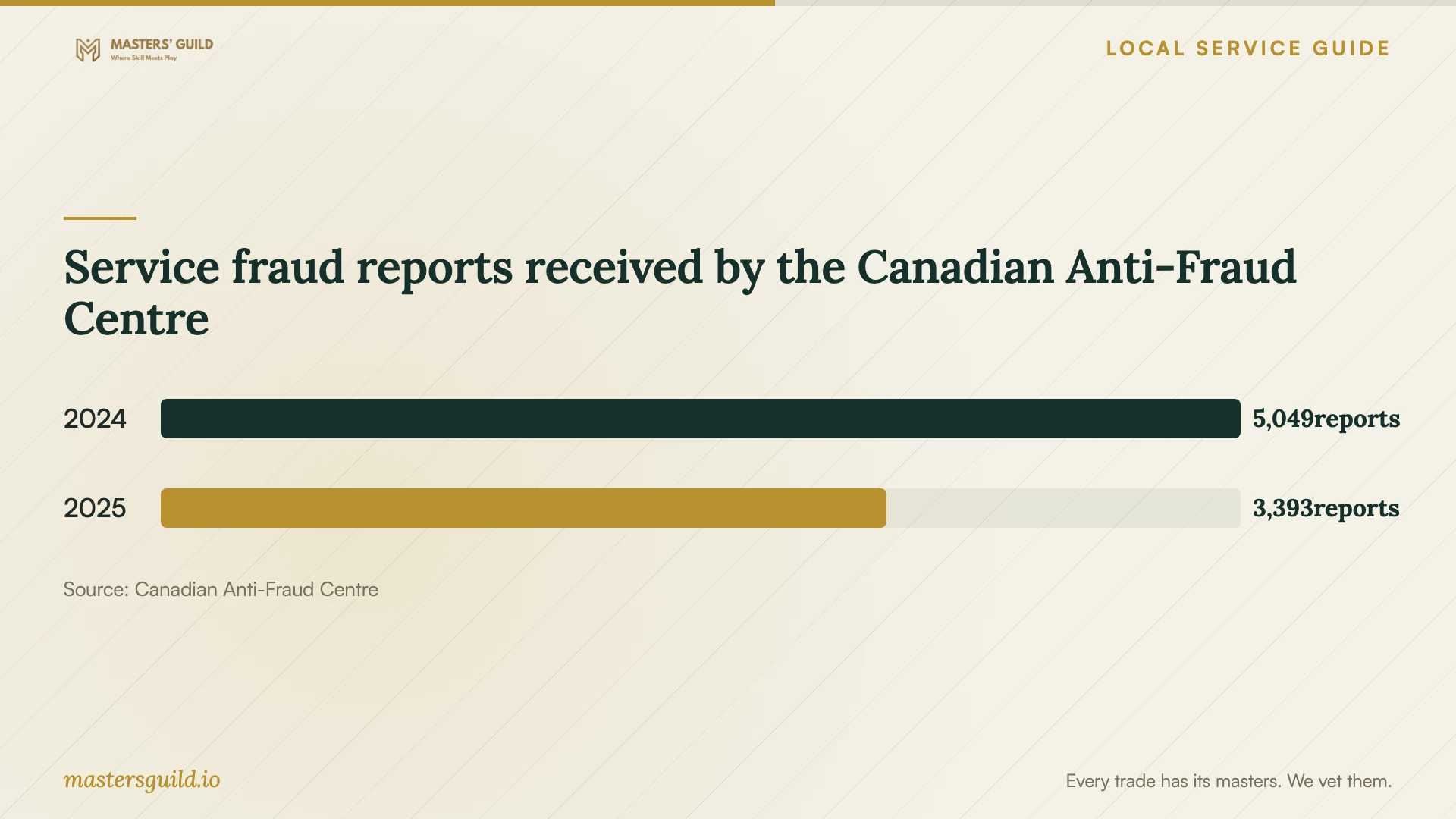
Service fraud reports received by the Canadian Anti-Fraud Centre
Local details that affect your job
Québec estimate rules apply to the repair decision
For a household computer repair in Laval, use Québec’s consumer guidance when reviewing the estimate. For expected repairs above $50, the office requires a written estimate unless an exception applies. A preprinted waiver you sign has no value; to waive the estimate, you must write and sign the waiver yourself. Keep the estimate instead of accepting a routine waiver at intake. [1]
Laval’s warning changes how to arrange remote help
The Service de police de Laval warns residents against granting computer access to an unexpected caller. If someone phones claiming to have detected a virus, end that contact and arrange an assessment through details you have checked before approving remote access. [2]
A local contact for suspected fraud
For reporting questions, Laval police list 450 662-4242. Their Centre des enquêtes service counter is at 2911, boulevard Chomedey, open Monday through Friday from 8:15 a.m. to 5:30 p.m. Call before travelling to ask how to submit your account and supporting documents. [3]
Choose the next step before approving work
| Your situation | Next step | Ask before proceeding |
|---|---|---|
| An unexpected caller requests computer access | End the call and arrange support through checked contact details | How will I approve and end a remote session? |
| You need to preserve personal files | Request a file-handling plan before system changes | Will you seek approval before erasing or reinstalling? |
| The proposed repair exceeds $50 | Request the written estimate required under Québec consumer guidance, subject to exceptions | What is the assessment charge and total repair price? |
| You suspect a fraudulent payment or stolen information | Contact your financial institution and ask Laval police about reporting | Which messages, receipts and access details should I preserve? |
| The technician proposes additional repairs | Review and authorize the added work before it starts | What will the added work cost? |
Your hiring checklist
- Write down the symptoms, warning text and actions you took.
- List the files you want preserved and describe your existing backup.
- Request a scope covering diagnosis, cleanup and any proposed system repair.
- Confirm assessment, travel, software and follow-up charges before approval.
- Require permission before data erasure, reinstallation or added work.
- Agree on personal-file access and deletion of temporary copies.
- Check the original problem and preserved files at handover.
- Keep the estimate, approvals, dated invoice and any fraud-related records.
Frequently Asked Questions
How much should I budget for cleanup?
Ask for a device-specific quote after describing the symptoms and file-preservation needs. Compare the total for the same scope, including assessment, cleanup, any system repair, software and taxes. Do not approve an open-ended repair without a spending limit.
Can the technician charge for an estimate?
Québec’s consumer office says the estimate should be free unless the repairer disclosed the exact charge beforehand. Confirm that charge before leaving the device or starting an assessment. [1]
Should I authorize a system reinstall?
Ask why the technician recommends it, which files and applications they will preserve, and what you must restore afterward. Require separate approval before erasure and ask them to explain the alternative repair scope.
Does the repair guarantee cover a returning problem?
Québec’s consumer office states that computer and tablet repairs carry a three-month guarantee. Keep the dated invoice, describe the returning symptoms and ask the repairer to assess them under the guarantee rather than assuming the cause. [1]
Sources and scope
This guide combines the sources below with practical planning guidance. Figures apply to the stated geography and period; request a written quote for your property.