
Local service guide
Cloud Service Setup in Laval, QC
For Cloud Service Setup in Laval, choose a technician who will define the migration scope, itemize setup and recurring charges, and demonstrate the agreed file access and recovery steps before handover. If customer or employee information will move outside Québec, arrange the required privacy review before authorizing the transfer. Québec’s regulator describes additional obligations for businesses that entrust personal information to providers outside the province. [1]
Define the work you need
Describe the outcome before choosing a platform: shared office folders, recoverable copies, a move from an existing service or access across staff devices. Identify which accounts and files belong to the business. List email, calendars and business applications separately so bidders can include or exclude them in writing.
Give bidders an inventory with approximate data volume, device types and staff roles. Flag folders containing customer or employee information without sending their contents during quotation. Ask for a proposed folder structure and access plan, including which people can edit, share or administer each area.
Choose remote or on-site assistance around the demonstration you want. Request an on-site walkthrough if staff need help using their own devices. For remote work, agree on the session method and who will approve access. Specify the language for training and handover notes.
Assign responsibility for personal information
Name a person in your business to resolve privacy questions before the technician begins. The Commission d’accès à l’information says businesses must restrict access to personal information to authorized people who need it for their duties. Ask the technician to describe the access they need and how they will handle temporary copies. [1]
For necessary communication under a service contract, the Commission describes written terms covering confidentiality, use limited to the mandate and no retention after the contract ends. It also requires notification without delay of confidentiality failures and provision for confidentiality checks. Include these matters in the service agreement where that arrangement applies. [1]
Assign privacy documents to someone with authority to approve them. Ask the bidder to distinguish technical configuration from any assessment, notice revision or contract review included in its proposal. Avoid leaving those responsibilities unstated between your business and the technician.
Get an itemized quote and workable schedule
Request separate amounts for labour, subscriptions, storage, training and continuing support. Have each bidder state its assumptions about users and data volume, the currency, applicable taxes and any travel charge. Agree on how you will approve additional work before the technician incurs it.
Request a schedule that distinguishes technician attendance from the transfer window. Identify who needs access first, when staff can stop editing the old files and who can authorize a pause. Ask who will investigate failed transfers and whether the quoted price includes the final acceptance session.
Choose a technician who can explain a comparable migration and walk you through a proposed test plan. Ask for a reference relevant to your scope and permission to contact that client. Review the support terms, including response arrangements and charges after handover.
Approve completion through practical tests
Use the agreed inventory to check a selection of transferred files and review unresolved items with the technician. Test a staff account against both an allowed folder and a restricted folder. Confirm the sharing settings you requested before staff resume normal work.
For backup work, have the technician restore a test file to an agreed location. Record the recovery steps and assign someone to check failure notifications. Keep the original data until you finish the agreed checks and approve what happens to those copies.
At handover, confirm that your authorized representative controls billing, administrator access and recovery methods. Collect an account inventory and written support instructions. Remove temporary technician access and practise revoking access so you can manage future staff or supplier changes.
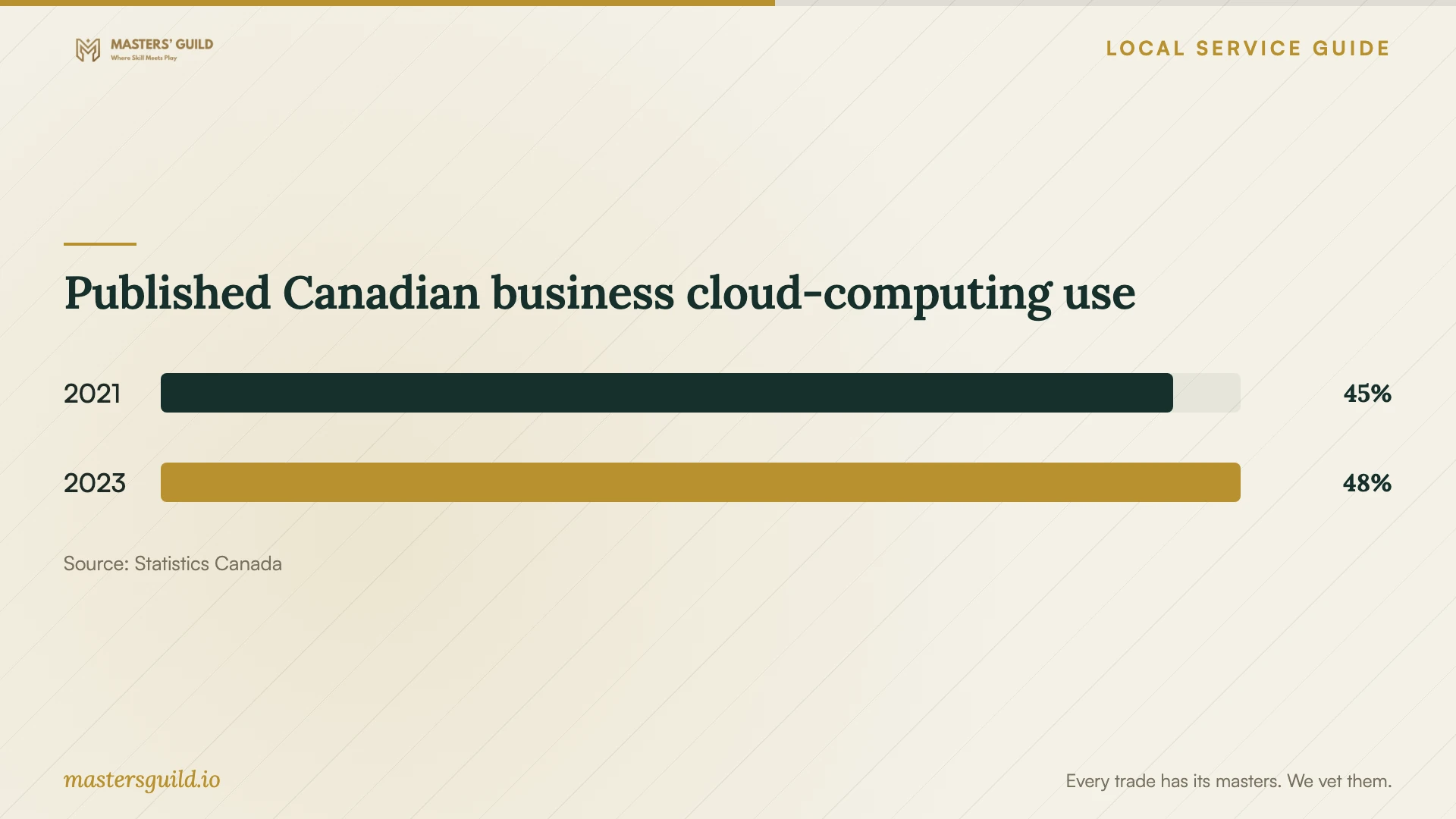
Published Canadian business cloud-computing use
Local details that affect your job
Québec provider-location review before transfer
For a Laval business, Québec guidance applies before communicating personal information outside Québec or entrusting its collection, use, communication or storage to a person or organization outside Québec. The Commission describes a privacy impact assessment, adequate protection and a written agreement for outside-Québec communication, along with information and consent obligations. Ask your privacy lead to determine the applicable requirements and exceptions before approving the move. Obtain provider locations and contractual details during procurement. [1]
Québec collection notices need a separate review
Review what your business tells people when collecting their information. The Commission requires disclosure, when applicable, of relevant third-party recipients and the possibility of communication outside Québec. Its example names storage with a cloud provider in Ontario. For this migration, assign someone to check collection forms and notices against the proposed handling arrangements. Choosing a Canadian location does not remove the need to examine provincial boundaries. [2]
Match the requested scope to your task
| Your task | Request | Acceptance check |
|---|---|---|
| Share office files | Named users, folder structure and permissions | Test allowed and restricted access |
| Create recoverable copies | Backup configuration and recovery instructions | Restore an agreed test file |
| Leave an existing service | Migration inventory and unresolved-item report | Review exceptions before closing the old account |
| Use an outside-Québec provider for personal information | Resolve assessment and written-agreement requirements before transfer | Obtain approval from your privacy lead |
Your hiring checklist
- Inventory business accounts, devices, users and approximate data volume.
- Identify sensitive folders without attaching their contents to quote requests.
- Assign technical approval and privacy-document responsibilities.
- Agree on a staff editing cutoff and a process for pausing migration.
- Record exceptions and complete the agreed acceptance tests.
- Collect recovery instructions and confirm the final administrator list.
Frequently Asked Questions
How should I compare prices?
Compare the same deliverables and inventory. Ask bidders to separate one-time work from recurring charges and identify exclusions. Include follow-up testing and failed-transfer handling in the comparison.
Should I close the old account when the transfer finishes?
Wait until you complete the agreed file checks and resolve migration exceptions. Decide in advance who approves closure and what happens to retained copies. Record that decision in the handover notes.
Can a technician handle the privacy review?
Ask what assistance the technician includes, but keep an authorized person in your business responsible for approval. The Commission states that a business remains responsible for personal information entrusted to another organization. [1]
Sources and scope
This guide combines the sources below with practical planning guidance. Figures apply to the stated geography and period; request a written quote for your property.