
Local service guide
Computer Virus Removal in Las Vegas, NV
Arrange Computer Virus Removal in Las Vegas by choosing a technician whose contact details you verify and agreeing on diagnosis, file preservation, charges and completion checks before granting access. Request approval before extra work or a reinstall. If an unexpected caller or pop-up prompted your search, follow Nevada’s Attorney General’s advice: refuse unsolicited computer control and verify the message through the computer company’s customer support website. [2]
Describe the problem before choosing a repair package
Write down the alert text, the application you were using and what happened before the problem started. Mention unfamiliar software, browser changes, failed startup attempts and access you granted to another person. Separate what you observed from what a warning claimed. Ask the technician to explain the diagnosis before recommending work.
Include the computer model and operating system if you know them. Explain which files you need preserved and when you need the device back. Request a deadline for the initial assessment and agree on the next update. Ask what you will owe if the technician finds no infection or you decline the repair.
Choose remote help, drop-off or a home visit
Ask which service format the technician recommends for your symptoms. For remote work, arrange a session you can attend. Have the technician explain the access tool, what they intend to inspect and how they will remove or disable access afterward. Keep permission specific to the agreed task.
For drop-off service, obtain a receipt identifying the computer, charger and accessories you leave. Confirm collection arrangements and who can approve changes. For a home visit, settle the arrival window, travel charge and arrangements if the technician proposes taking the computer to a workshop.
Nevada’s Attorney General warns that scammers can manipulate caller ID to display a legitimate company name. Check the provider’s contact details outside the incoming call or warning screen before arranging help. [2]
Set spending and file-handling limits
Request an estimate that distinguishes diagnosis, malware cleanup, operating system repair and reinstall work. Set a spending limit and require approval before additional work. Ask the technician to identify optional subscriptions, replacement hardware and any backup or restore charge so you can compare the total you would authorize.
Identify essential photos and documents, along with your latest backup. Ask how the technician will handle copies and when they will delete them. Require permission before drive erasure or a reinstall. Discuss which applications, account details and installation materials you would need to restore afterward.
Ask why the technician needs a password and whether you can enter it yourself. Require a separate explanation before allowing access to email, financial accounts or cloud storage. Keep passwords out of the general job description.
Evaluate add-ons and check the finished work
For a proposed antivirus subscription, ask who will own the account, what renewal will cost and how cancellation works. Request an explanation of how the product fits your device and existing software. AV-Comparatives advises readers to consider price, ease of use, compatibility and support alongside multiple tests. [3]
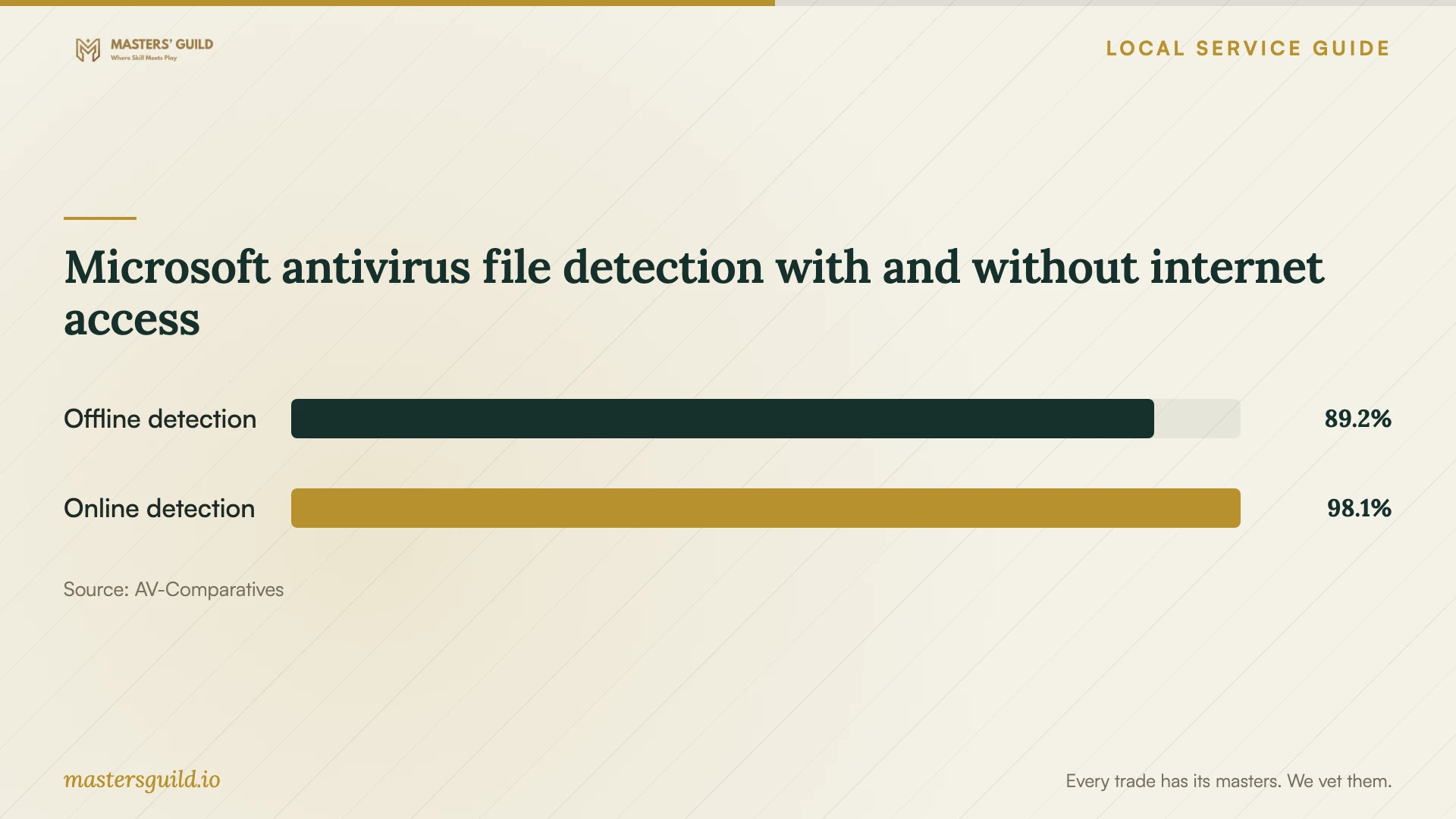
AV-Comparatives’ March 2026 Windows test recorded different Microsoft antivirus detection rates for offline and online scans, as the chart illustrates. These laboratory measurements concern malicious-file detection under specified conditions. They do not measure a technician’s cleanup success or establish whether your computer has an infection. [3]
At handover, ask the technician to demonstrate startup, browser operation and access to the files you identified. Request a written diagnosis, a summary of changes and a list of unresolved symptoms. Settle whom to contact if symptoms return, whether another assessment carries a charge and what any written service guarantee covers.
Microsoft antivirus file detection with and without internet access
Local details that affect your job
Request an itemized invoice under Nevada tax guidance
Nevada’s Department of Taxation exempts repair and reconditioning labor when the seller lists it separately on the invoice. It also exempts electronically delivered software from sales and consumer use tax, while treating software on a disk as taxable tangible property. For your repair, request distinct labor, hardware and software lines, including the delivery format. Ask the provider to explain tax on bundled charges before paying. [1]
Use Nevada’s warning-verification advice before granting access
In its March 2019 tech support scam advisory, Nevada’s Attorney General describes imitation security alerts and pressure to buy unnecessary repairs. The office advises consumers to verify email or pop-up messages through the computer company’s customer support website and refuse computer control to unsolicited callers. Apply this statewide guidance before hiring someone behind an unexpected warning. The advisory does not establish current scam frequency in Las Vegas. [2]
Match your situation to the next step
| Your situation | Recommended next step | Question to settle |
|---|---|---|
| An unexpected caller or pop-up offers repair | Follow Nevada’s advice: refuse unsolicited control and verify the message through the computer company’s support website | Have I checked the warning through a separate contact route? |
| You need files preserved | Discuss backup and copying before authorizing work | Which changes require my permission? |
| The bill combines repair labor and purchased items | Request separate lines because Nevada exempts separately stated repair labor | Which items attract tax, and why? |
| The technician recommends an antivirus subscription | Consider compatibility, support and price alongside testing, as AV-Comparatives advises | What will renewal cost, and who controls the account? |
Your hiring checklist
- Record the symptoms and actions you took before seeking help.
- Check the provider’s contact details outside any unsolicited warning.
- Confirm the diagnostic fee, work scope and approval limit.
- Identify essential files, backup status and access restrictions.
- Require approval before erasure, reinstall work or added subscriptions.
- Agree on the next update and device collection arrangements.
- Review the repair summary and demonstration before accepting completion.
Frequently Asked Questions
How much should I budget?
Request written quotes for your device, symptoms and file-preservation needs. Compare the included work, diagnostic charge and exclusions. Ask providers to identify optional subscriptions and replacement items. Agree on a maximum authorized charge and require approval before the technician exceeds it.
Can I arrange remote virus removal?
Ask your chosen technician whether remote work suits your symptoms and the access you can provide. Agree on the session and how access will end. Nevada’s Attorney General advises against giving computer control to an unsolicited caller. [2]
Should I approve a reinstall at the start?
Ask the technician to explain the reason and what it means for your files, applications and settings. If you want a diagnosis first, state that in the work order. Require a separate decision before erasure or reinstall work, and settle backup and restoration responsibilities.
Does a strong antivirus test result guarantee a successful repair?
AV-Comparatives tests security products under laboratory conditions, including scans and execution of malicious files. Those results do not establish a particular repair outcome. Ask your technician for a diagnosis, a written account of the work and completion checks on your own device. [3]
Sources and scope
This guide combines the sources below with practical planning guidance. Figures apply to the stated geography and period; request a written quote for your property.