
Local service guide
Plan software installation in Laredo, TX
Arrange software installation in Laredo, TX by sending the technician your computer model, operating system, program names, and intended tasks. Get a written quote that separates labor, software purchases, file transfer, and follow-up support. Agree on a completion test before booking. Check local library connectivity or eligible student lab access if you need a place to work while arranging setup. [1] [2]
Define the installation before comparing quotes
Write down the program name and version, your computer model, and the result you want. For an office application, specify installation, activation, opening an existing document, and printing a test page if printer setup matters. Include the exact error message if an earlier attempt failed. Tell the technician whether you already own the software.
Separate application setup from an operating-system change, account recovery, and file transfer in your request. Require approval before the technician adds work or erases anything. Agree on a spending limit and ask what you owe if the technician finds that your computer cannot run the requested program.
Send each provider the same task list. Request separate amounts for labor, software, travel, and follow-up support. Ask who pays subscription renewals and whether activation, updates, or a return visit fall within the quoted price. Compare the total for identical work before choosing.
Choose how and where to get help
Consider a supervised remote appointment if you can start the computer, reach the desktop, and connect to the internet. Have the provider explain the remote-access application, the permissions they want, and how they will end access. Stay present to enter account credentials and approve changes.
Request an assessment with the device if you cannot reach the desktop or need help with connected equipment. Bring the charger and accessories included in the scope. For drop-off work, confirm who will hold your computer, where they will store it, and when you can collect it. Request a receipt identifying the device and agreed work.
Laredo Public Libraries confirms Wi-Fi at all library locations. If home connectivity prevents preparation, contact a branch about downloading the installer on your own laptop. Confirm download rules, current opening hours, and permission for any technician session before planning your visit. [1]
Prepare files, accounts, and accessibility settings
Back up the files you want to preserve and open several copies before authorizing changes. Identify the folders the technician should transfer, and agree on where those files should go. Require your approval before a reset, erasure, or operating-system replacement.
Use an account you control for software purchases and subscriptions. Enter passwords and verification codes yourself. Request a list of installed programs, purchase receipts, renewal terms, and any new accounts. Keep passwords out of the job description and written handover notes.
Specify text size, screen-reading tools, captions, or input preferences before booking. Texas Comptroller guidance lists qualifying adaptive computer software for people with visual or hearing impairments under exemption-certificate requirements. Ask the seller to review eligibility and documentation before purchasing adaptive software. [3]
Check student software access before purchasing
Laredo College offers currently enrolled students academic and productivity software access in the CLASS Computer Lab, Room 166 of Yeary Library. The college says some services may require a Palomino ID or sign-in. Contact the lab about your exact application before buying software for an assignment. [2]
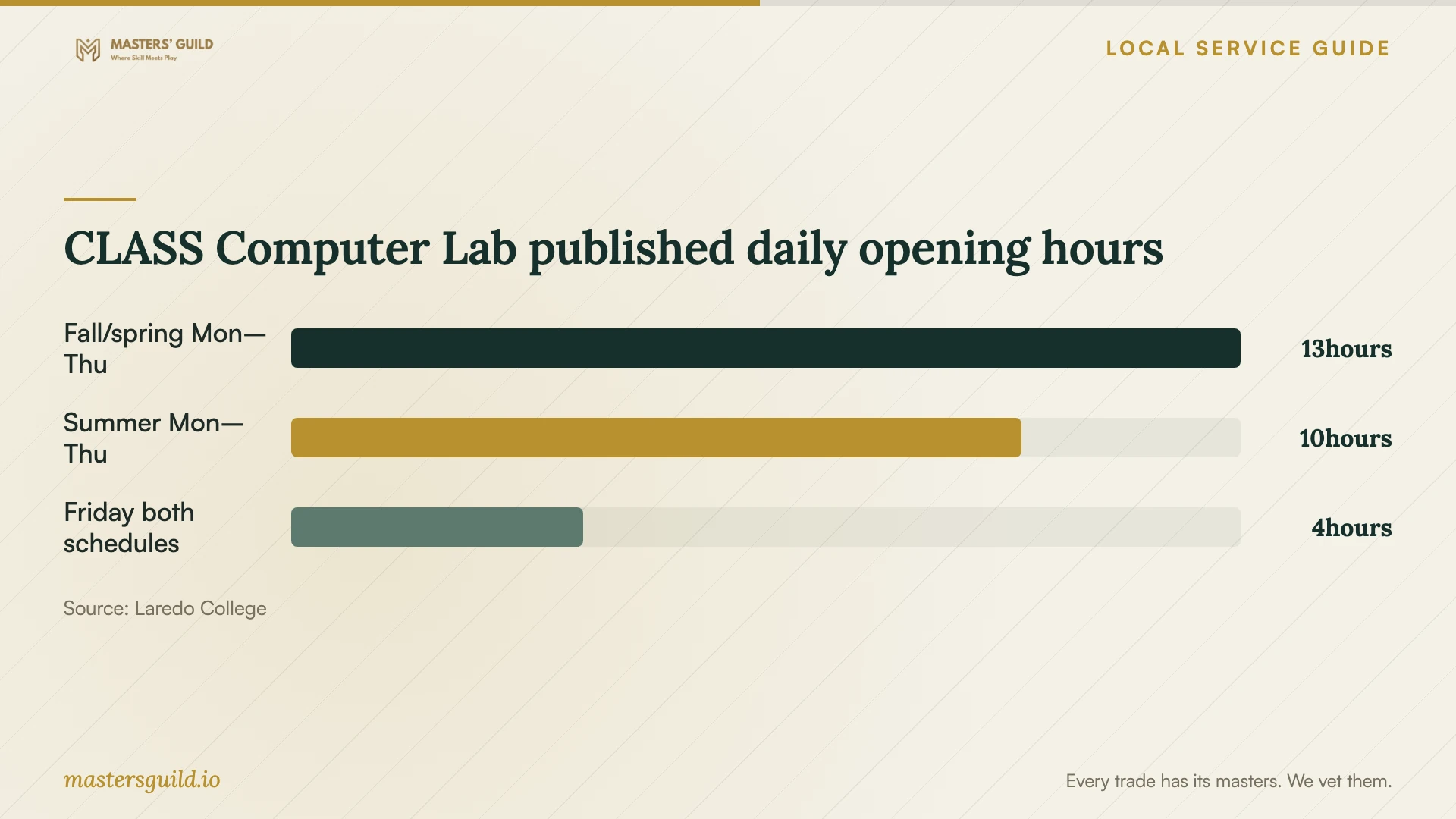
Consider completing coursework in the lab while arranging your personal computer setup. Confirm the hours for your intended visit and ask how to save and retrieve your work. For installation on your own computer, ask the college about any separate student licensing options before including a software purchase in the technician's quote.
Check the invoice and demonstrate completion
Request an itemized invoice if the job includes data conversion or storage. Texas Comptroller guidance lists those tasks as taxable data-processing services and lists consulting among nontaxable services. Have the provider explain the tax treatment of each part of your job rather than assigning one rule to all installation work. [4]
Restart the computer with the technician present. Open the program, confirm activation in your account, and complete your agreed sample task. Save and reopen a file; test the printer or accessibility settings if those formed part of the job. Request instructions for updates and a contact method for reporting a setup problem.
Review any remote-access software before ending the appointment. Have the technician remove temporary access you no longer want and explain any access you choose to retain. Keep the invoice, program list, and support terms together so you can describe the work if you need follow-up help.
CLASS Computer Lab published daily opening hours
Local details that affect your job
Library Wi-Fi as a preparation option
Laredo Public Libraries offers Wi-Fi at all locations. If you need connectivity to prepare your laptop, contact your chosen branch about personal-device downloads. Ask about installation assistance and permission for technician appointments as separate questions, and confirm arrangements before traveling. [1]
Enrolled students can check the CLASS lab first
Laredo College limits CLASS Computer Lab access to currently enrolled students. The lab occupies Room 166 of Yeary Library and provides academic and productivity software. Check application availability and any Palomino ID or sign-in requirement before paying for software you need for coursework. [2]
Texas exemption paperwork for adaptive software
Texas Comptroller guidance places qualifying adaptive computer software for visual and hearing impairments under exemption-certificate requirements. Discuss your purchase with the seller before payment and include the accessibility tasks you want the technician to demonstrate. Ask the seller to confirm eligibility for the particular product. [3]
Match the next step to your situation
| Your situation | Next step | Confirm before booking |
|---|---|---|
| Computer starts and connects | Discuss a supervised remote installation | Access permissions, total charge, and how the technician will end access |
| Computer cannot reach the desktop | Request an assessment with the device | Assessment charge, collection arrangements, and approval before erasure |
| You need connectivity for preparation | Contact a Laredo Public Libraries branch about its Wi-Fi | Personal-device download rules and permission for any technician session |
| You are currently enrolled at Laredo College | Check academic and productivity software in the CLASS Computer Lab | Required application, current hours, and any ID or sign-in requirement |
| You plan to purchase adaptive software | Discuss Texas exemption eligibility with the seller | Product eligibility and exemption-certificate documentation |
Your hiring checklist
- 1. Record your computer model, operating system, required program, and any error message.
- 2. Define the task you want to demonstrate at completion, including printing or accessibility settings.
- 3. Compare itemized written quotes for the same scope and approve a spending limit.
- 4. Back up important files and open the copies before authorizing changes.
- 5. Confirm software ownership, account access, and subscription renewal responsibility.
- 6. Arrange connectivity, the charger, and equipment needed for the appointment.
- 7. Enter your own credentials and approve changes during the session.
- 8. Restart, complete the agreed tests, end temporary remote access, and keep the handover records.
Frequently Asked Questions
How much should I budget for installation?
Compare written quotes for identical work on your device. Separate labor, software purchases, subscriptions, file transfer, travel, and follow-up support. Ask for a total charge and require approval before the technician adds work.
Can I arrange installation at a local library?
Laredo Public Libraries offers Wi-Fi at all locations. Contact your branch about personal-device downloads, installation assistance, and permission for a technician appointment before making arrangements. [1]
Can I use Laredo College software before buying a copy?
Currently enrolled students can access academic and productivity software in the CLASS Computer Lab at Yeary Library. Ask whether the lab has your required application and confirm access requirements. Discuss personal-device licensing as a separate request. [2]
What should I test before accepting the installation?
Restart the computer, open the program, check activation in your account, and complete your agreed task. Save and reopen a file. Include printer and accessibility tests if you requested them, then review temporary remote access with the technician.
Sources and scope
This guide combines the sources below with practical planning guidance. Figures apply to the stated geography and period; request a written quote for your property.