
Local service guide
Data Recovery and Backup in Laredo, TX
For Data Recovery and Backup in Laredo, choose a provider who will assess the affected device, define which files you need and get your approval before recovery work. For ongoing backup, request a demonstrated restore and written responsibility for monitoring failures. Compare diagnostic charges, return media, privacy terms and backup subscriptions as separate items.
Define the recovery job before handing over equipment
Tell the provider what happened: accidental deletion, a failed update, an unreadable drive, unusual sounds or an interruption during a save. Record what you tried afterward. As a precaution, stop using the affected device and ask the specialist how to preserve it before running repair utilities or installing recovery software.
List the folders, applications and date ranges that matter. For example, specify the accounting database and its attachments, rather than asking for everything on the office computer. Give the provider a way to confirm success: named files that open, a usable database or a copy you can review on separate media.
Ask whether the person accepting the device will perform the work or send it to another facility. Get the destination, shipping arrangements, approval process and equipment-return terms in writing. For a courier handoff, request a receipt identifying the device and the person who receives it.
Compare the full quote and the recovery outcome
Request a written diagnostic price and a separate recovery proposal. Ask the provider to identify charges for specialist work, shipping, replacement media, expedited handling and unsuccessful attempts. Agree on a spending ceiling and require approval before the provider exceeds it.
Define partial success before work starts. If the provider retrieves photographs but cannot restore the business database you need, what would you owe? Ask how you will inspect the recovered file list and test priority files before accepting the result. Treat a promised completion date as a question to resolve after assessment.
For recurring backup, request separate lines for setup, storage, monitoring, restore assistance and hardware. The Texas Comptroller includes offsite backup of electronic files within taxable data processing and exempts 20 percent of the data-processing charge. Ask the seller to explain each item's tax treatment rather than applying that exemption to the entire recovery and backup package. [2]
Plan for an outage during backup or restoration
Ask the provider to walk through a restore while your office lacks normal power or internet access. Identify where you could retrieve essential files, who holds the credentials and how you would obtain return media. Request a plan for safe equipment shutdown and restarting interrupted backup jobs.
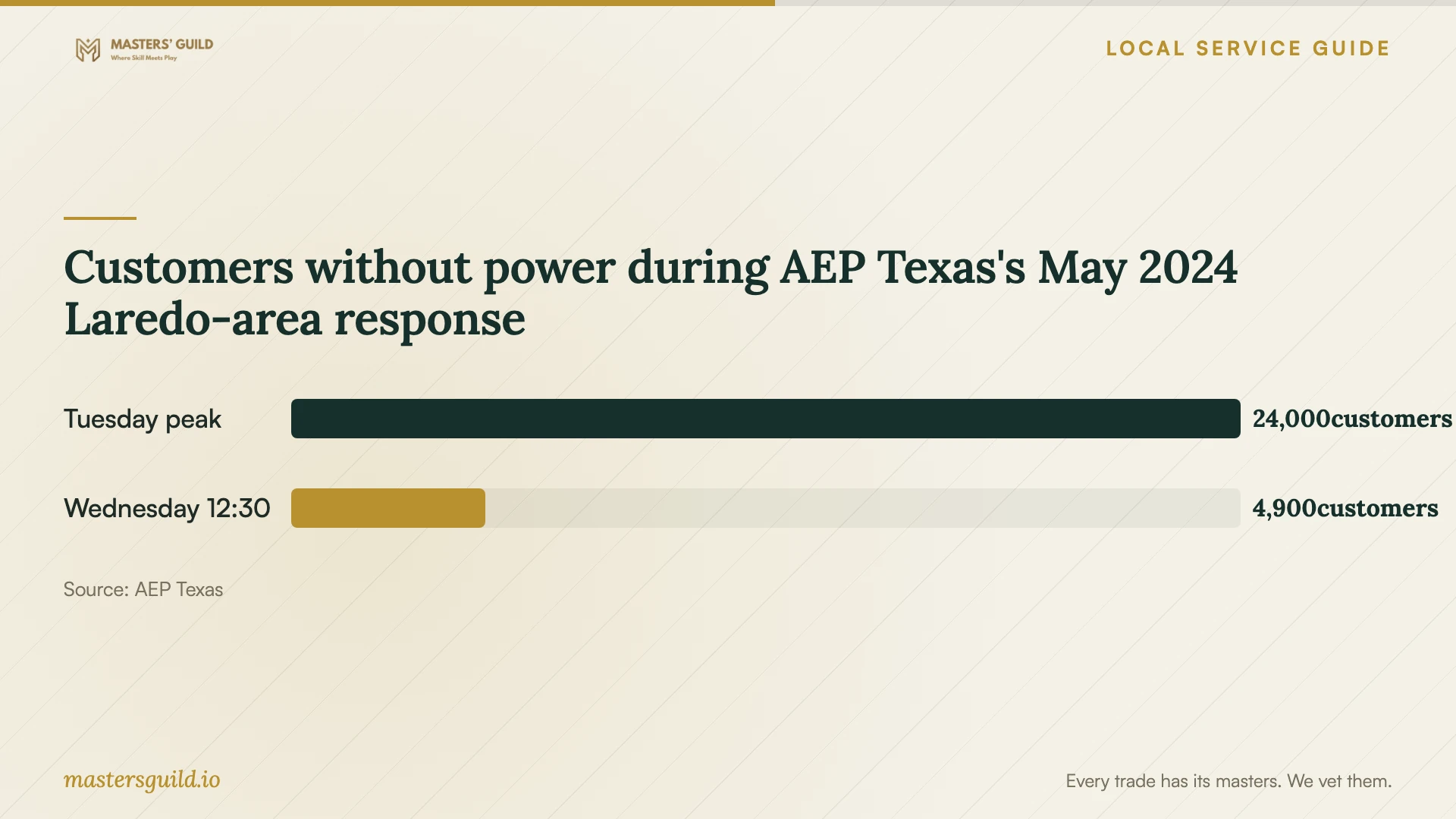
This is a concrete local planning issue: AEP Texas's May 29, 2024 report described approximately 24,000 customers without power at the late-Tuesday peak and approximately 4,900 remaining at 12:30 p.m. Wednesday. Its remaining-outage breakdown included 3,700 in the Laredo District and 1,000 in Eagle Pass. These regional figures are not Laredo city totals. [1]
Use that history to question a proposal that requires uninterrupted access to your office. Ask whether the provider can deliver essential files to an alternate device or location, and agree on who will authorize that transfer.
Set file-access and disposal terms
The Texas Attorney General explains that businesses must maintain reasonable safeguards for sensitive personal information. Its examples include a person's name combined with financial account information, identification numbers or health-related information. The state also requires businesses disposing of personal-information records to make the information unreadable or indecipherable. [3]
Before handing over client or employee records, ask who may view the files, whether subcontractors will receive copies and how the provider will protect transfers. Request a retention deadline for temporary recovery copies and written confirmation of their disposal. Identify who will contact you if the provider discovers suspected unauthorized access.
Require a restore demonstration before closing the job
Ask the provider to restore representative files to a separate destination and open them with you. Include the business application or database you depend on, rather than checking folder names alone. Record the steps and confirm who controls the backup account and recovery credentials.
For ongoing service, agree on backup frequency, how far back you need copies and who responds to failed jobs. Set your acceptable amount of lost work and your target time to resume operations. Ask the provider to explain what equipment, internet access and staff availability those targets require.
Customers without power during AEP Texas's May 2024 Laredo-area response
Local details that affect your job
Laredo-area outage history changes the restore plan
AEP Texas reported 3,700 customers still without power in its Laredo District at the May 29, 2024 update. The district figure does not describe city-only outages. When arranging backup here, request an alternate location or device for retrieving essential files and ask how the provider will resume interrupted jobs. [1]
Texas backup taxation changes quote comparisons
Texas lists offsite electronic-file backup as data processing and exempts 20 percent of that service's charge from tax. For a Laredo business comparing subscriptions, request the pretax charge, taxable portion and tax as separate amounts. Ask the seller to explain recovery labor and hardware charges on their own terms. [2]
Choose the scope to request
| Your situation | Request | Acceptance question |
|---|---|---|
| You have a backup to assess | A restore to a separate destination | Can I open the priority files and use the required application? |
| The device is unreadable or damaged | A specialist assessment with an approval limit | Who will attempt recovery, and what do I owe if it fails? |
| You need recurring backup | Setup, monitoring and a demonstrated restore | Who responds to failed jobs and controls the account? |
| You need continuity during an outage | An alternate-device and alternate-location restore plan | How will I obtain essential files without office access? |
Your hiring checklist
- Record the device model, symptoms and actions taken after the failure.
- List priority folders, applications and the last usable backup you know about.
- Agree on diagnostic charges, a spending ceiling and partial-recovery payment terms.
- Confirm the work location, any subcontractors and device handoff arrangements.
- Specify file-access permissions, transfer protection and temporary-copy disposal.
- Request itemized backup charges and an explanation of tax treatment.
- Test priority files and document the restore procedure before accepting completion.
Frequently Asked Questions
Should I try recovery software before hiring someone?
If the files matter to your business, pause and describe the symptoms to a specialist before making further changes. Ask what you can do without altering the affected device. Keep a record of recovery tools or repair steps you have already tried.
What should a no-data, no-fee promise cover?
Ask the provider to define recoverable data and partial success in writing. Confirm whether diagnostics, shipping and return media remain payable. Name the files that determine success for your business before approving the attempt.
Is offsite backup taxable in Texas?
The Texas Comptroller includes offsite backup of electronic files in taxable data processing. Twenty percent of the data-processing charge is exempt from tax. Request an itemized explanation when the package also includes hardware, recovery or other services. [2]
What should I ask about confidential files?
Ask who can access them, where copies will go and when the provider will erase temporary copies. Texas requires businesses to safeguard sensitive personal information and make personal information unreadable or indecipherable when disposing of records. [3]
Sources and scope
This guide combines the sources below with practical planning guidance. Figures apply to the stated geography and period; request a written quote for your property.