
Local service guide
Computer Virus Removal in Laredo, TX
Arrange Computer Virus Removal in Laredo by requesting a written diagnosis, a cleanup quote, and your approval before the technician erases files or reinstalls the operating system. Describe the symptoms, identify files you need to preserve, and agree on remote support, drop-off, or a home visit. Get a completion estimate and an itemized total before authorizing work.
Define the job before comparing quotes
Give each technician the same description: your computer model, operating system, warning messages, when the problem started, and whether you can sign in. Photograph messages with another device. Mention recent downloads or remote-access sessions, and describe previous attempts to fix the problem.
Have the technician diagnose the cause before you approve a malware-removal package. Request separate prices for cleanup, operating-system repair, backup, and reinstalling applications. Establish a spending limit and require approval for extra work. Find out whether a diagnostic charge applies if you decline the repair and whether the technician credits that charge toward approved work.
Set file and account boundaries
List the folders you want preserved, such as family photos, tax records, and schoolwork. Tell the technician which files contain sensitive information. Require permission before a reset, drive replacement, or operating-system reinstall, and agree on how the technician will check the files you want returned.
Agree on how the technician will access the computer. Consider entering credentials yourself or providing a temporary account. Keep banking and email passwords out of the job description. For any backup service, establish where the technician will store copies, who can access them, and when the technician will delete them.
If your concern involves suspected theft, fraud, or evidence for a dispute, explain that before authorizing cleanup. Request a separate scope for investigative work. The Texas Comptroller includes computer forensic services and computer support that reviews data to investigate potential civil or criminal matters within its taxable security-services guidance. [3]
Choose the appointment around access and downtime
Discuss which service format fits your symptoms. Before agreeing to remote support, confirm how you will identify the technician, start the session, supervise access, and end the connection. For drop-off service, settle the intake location, pickup arrangements, and whether to bring the charger. For a home visit, check travel charges and the appointment window.
Request both an initial assessment time and a target return time. Explain any deadline for schoolwork, bills, or household paperwork. Arrange access to another trusted device for essential accounts, and avoid reconnecting the suspect computer just to meet a deadline.
Read the total and tax treatment
Request a quote that separates cleanup, backup, software, replacement parts, and travel. Compare written totals for your device and the work you authorize. Have the provider identify optional services and explain what happens to the price if diagnosis reveals a need for additional repair.
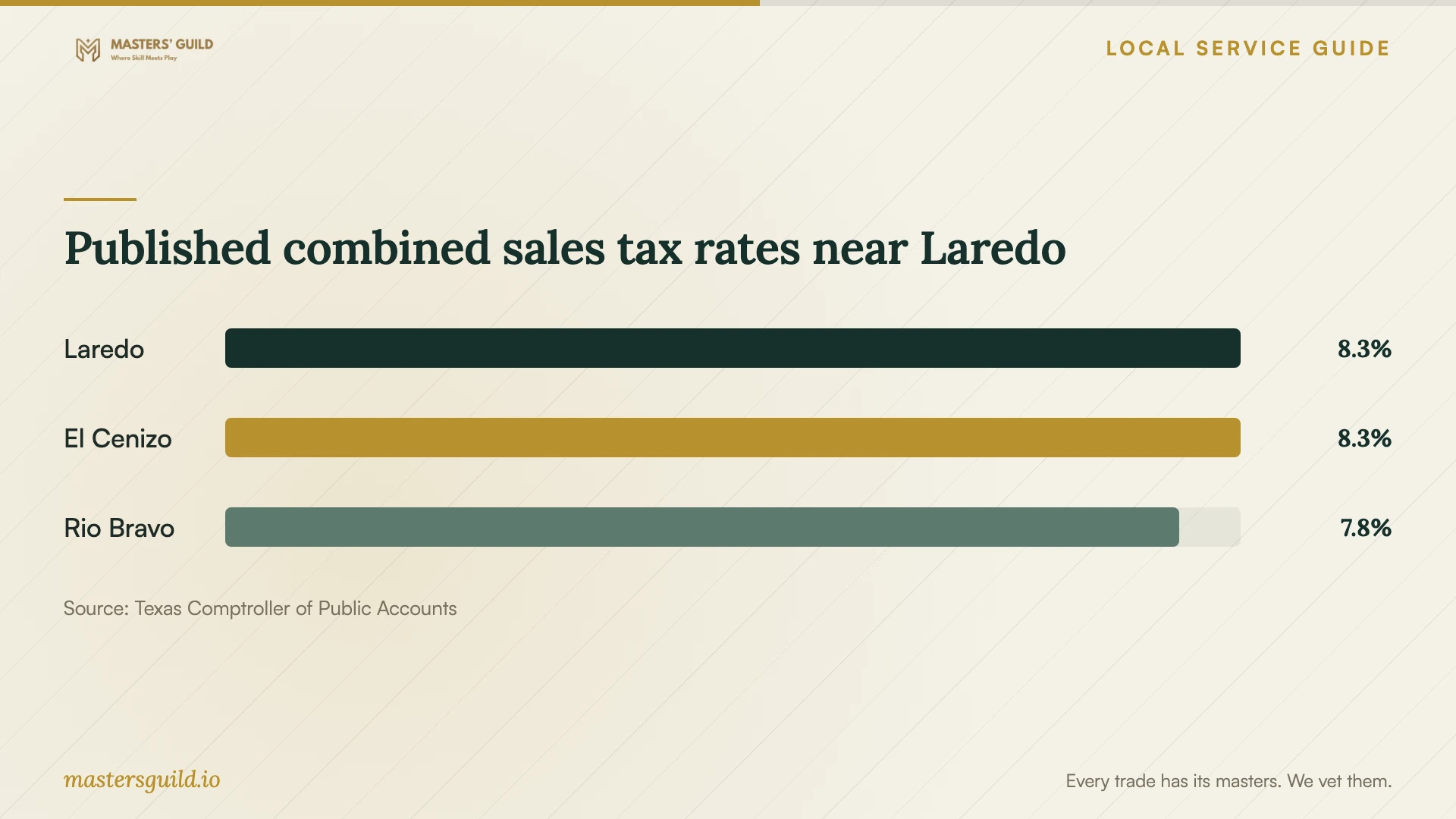
The Texas Comptroller lists Laredo's combined sales and use tax rate as 8.25 percent. Its service guidance identifies data storage, including offsite electronic-file backup, as data processing and exempts 20 percent of data-processing charges. Confirm the tax treatment of the quoted work with the provider, including which invoice items attract tax, the taxable amount, and the applicable rate. [2] [3]
Agree on the handover before paying
Obtain a written record of the diagnosis, work performed, software installed, and any remaining concerns. At pickup, open the files you identified, test the applications you need, and confirm how to contact the provider if symptoms return. Establish what follow-up work the quoted price includes and what would trigger another charge.
If the provider recommends replacement, request separate repair and replacement scopes. Decide whether to retain the old drive, authorize data removal, or arrange specialist help before handing over the device for disposal. Include responsibility for the old computer in the written agreement.
Published combined sales tax rates near Laredo
Local details that affect your job
Use library access to plan around the repair
Laredo Public Libraries confirms WiFi at all locations and printing from desktops at its branches; it offers black-and-white output. Before leaving your computer for repair, identify essential printing tasks and ask your chosen branch about access arrangements. Use a separate trusted device for WiFi access and keep the suspect computer disconnected. [1]
Confirm a disposal route before replacing the computer
City of Laredo Solid Waste Services lists computers and computer monitors among prohibited landfill items. It directs residents to call (956) 796-1098 for instructions on how and where to dispose of them. Confirm those arrangements before accepting a technician's disposal offer, and specify who will handle the drive and personal files. [4]
Choose what to authorize
| Your situation | Ask for | Approval boundary |
|---|---|---|
| You can sign in and describe the symptoms | Diagnosis and a cleanup quote | Approve additional repair after the diagnosis |
| You need files and have no confirmed backup | A file-preservation plan before repair | Require consent before erasure or reinstallation |
| You suspect fraud or need evidence for a dispute | A separate investigative scope | Discuss preservation before approving cleanup |
| The technician recommends replacement | Separate repair, transfer, and disposal scopes | Decide who retains the old drive |
Your hiring checklist
- Record symptoms and photograph warning messages before the appointment.
- List essential files and explain whether you have an existing backup.
- Confirm the service format, intake arrangements, and target return time.
- Request itemized charges and a limit for work without further approval.
- Require permission before erasure, reinstallation, or drive replacement.
- Agree on access credentials, backup storage, and deletion of temporary copies.
- Test important files and applications at handover and obtain the repair record.
Frequently Asked Questions
What should I ask when booking?
Describe the symptoms and ask what diagnosis costs, what the cleanup quote includes, and when you should expect an assessment. Identify files you need preserved and require approval before extra charges or destructive changes.
Should I approve a reset at the first appointment?
Have the technician explain the proposed repair and file-preservation plan before you decide. Specify which documents and applications you need back, and request a separate price for restoration work.
Can I print documents while my computer is being repaired?
Laredo Public Libraries offers printing from branch desktops and limits output to black and white. Ask the branch about access before planning your visit, and arrange a safe way to access the document. [1]
Can I take a replaced computer to the city landfill?
The city lists computers and computer monitors as prohibited landfill items. Call Solid Waste Services at (956) 796-1098 for disposal instructions, and settle personal-data handling before giving up the device. [4]
Sources and scope
This guide combines the sources below with practical planning guidance. Figures apply to the stated geography and period; request a written quote for your property.