
Local service guide
Cloud Service Setup in Laredo, TX
Arrange Cloud Service Setup in Laredo by listing the files and devices you want included, checking upload performance, and comparing written quotes for that scope. Include transfer verification, a recovery demonstration, and handover notes in the agreement. Before scheduling a large migration, confirm your connection options: AT&T says available speed tiers can differ between nearby homes. [2]
Define the result you want
Describe what you want to do after the appointment. You might want to open household documents on a laptop and phone, move a photo collection into a chosen account, or recover files after losing a device. Have the technician explain how the proposed service handles deletion, older versions, and recovery before choosing a plan.
Prepare a device list with operating systems, existing accounts, folders, external drives, and approximate data sizes. Identify who should see shared files and which collections should remain private. Record exclusions, such as an old drive you want assessed before anyone copies its contents. Use this inventory as the scope for each quote.
Check the connection before scheduling
Measure upload performance from the computer that will send the files. AT&T explains that household devices share the connection and that wiring, equipment, Wi-Fi distance, and other device activity affect speed. Its guidance recommends wired Ethernet for consistent performance. Have the technician consider those factors when assessing a slow transfer. [3]
If you are considering a different internet service, search your address on the FCC National Broadband Map. Compare the reported technologies and maximum advertised upload speeds, then confirm the options with the provider. The FCC uses provider-reported availability, so the map does not measure your home's current performance. [4]
Set separate completion milestones for configuration and verified transfer. Name the person responsible for checking pending uploads and resolving errors, and include any follow-up charge in the agreement. Keep the original files while you review the completed transfer.
Compare the full cost
Compare written quotes for the same devices, folders, and acceptance checks. Each quote should state whether labor uses a fixed fee or hourly rate, what triggers extra work, and whether travel or remote follow-up costs extra. Set a spending limit that requires your approval before the technician exceeds it.
Separate one-time setup from recurring storage or backup subscriptions. Review the storage allowance, renewal charge, cancellation terms, and responsibility for future support before agreeing. Include duplicate review or file organization as named tasks if you want that work; avoid leaving their extent open to interpretation.
Have the seller explain tax by line item. Texas classifies data storage, including offsite electronic backup, as taxable data processing and exempts 20 percent of data processing charges from tax. Confirm how the seller classifies the setup and ongoing services in your particular quote. [5]
Choose the appointment format and access
Consider remote help if you can sign in, connect the required drives, and identify the files yourself. Prefer an in-home assessment if you want someone to inspect several devices, trace cables, or review unfamiliar drives with you. Have candidates describe their experience with your chosen platform and the access they need for the proposed work.
Enter your own passwords and verification codes. Agree on whether the technician may open personal files, and select non-sensitive files for demonstrations. Keep the account, recovery email, verification method, and subscription billing under your control. Include removal of temporary technician access in the handover.
Verify the work before accepting it
During the handover, open the intended files on the devices you named in the scope. For backup work, have the technician restore a sample file and show you where to check status or failed runs. Record any exclusions, pending transfers, or unresolved errors with an agreed next step.
Collect a short note covering included folders, subscription details, backup schedule, recovery steps, and support terms. Use it to repeat the status check yourself before the appointment ends. For a shared household setup, review permissions with the person who will manage future access.
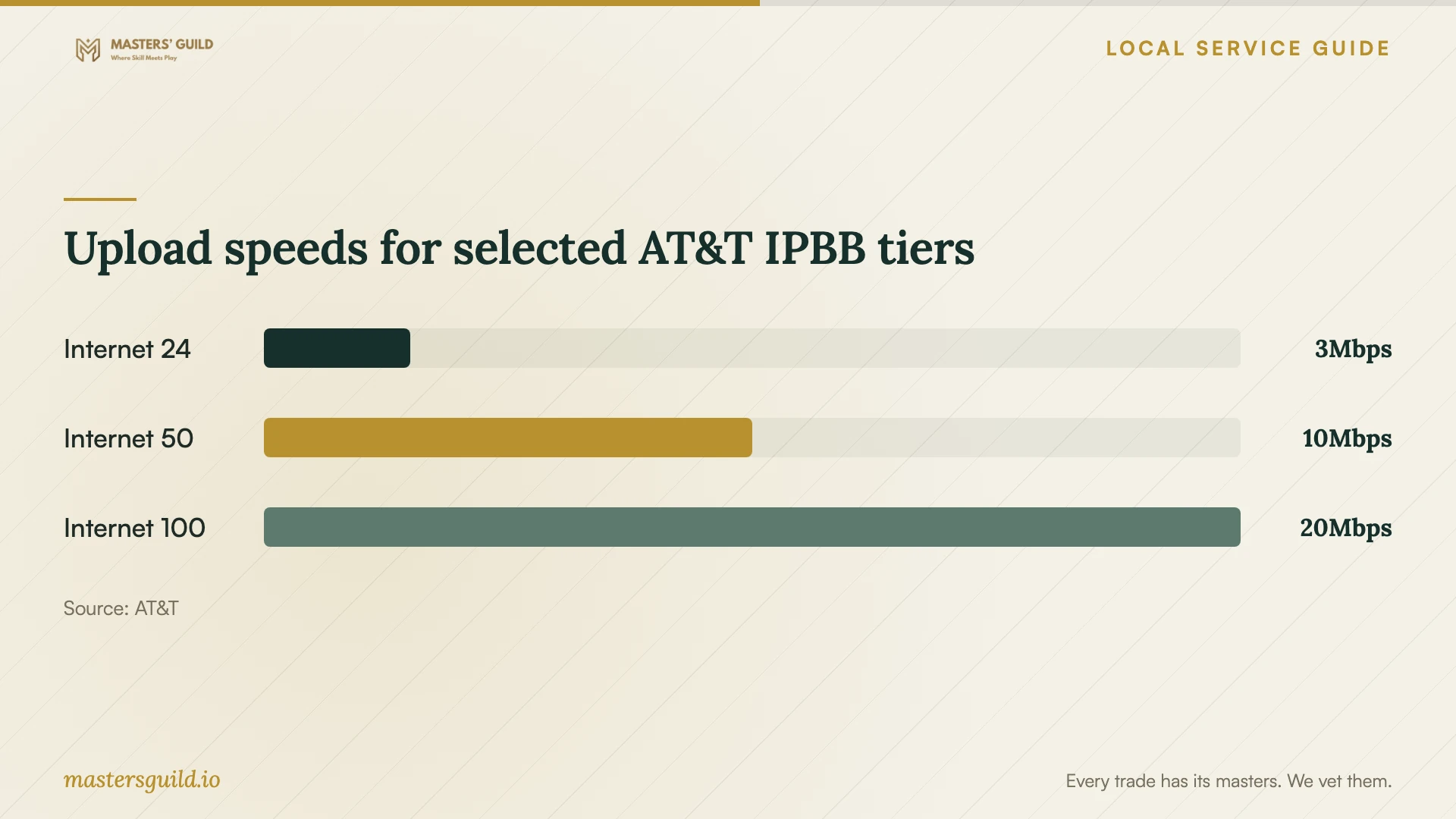
Upload speeds for selected AT&T IPBB tiers
Local details that affect your job
Check service at your exact Laredo address
AT&T's local page says infrastructure differs between neighborhoods and buildings, with different speed tiers possible even at nearby homes. Confirm availability for your address before tying a large migration appointment to a planned internet upgrade. Do not choose a transfer schedule from a citywide advertised speed. [2]
Use library Wi-Fi for basic preparation
Laredo Public Libraries confirms Wi-Fi at all library locations. If home connectivity prevents preparation, consider taking your own device there to review account access or assemble your inventory. Treat this as a connectivity option and arrange any technician-led setup or migration as a separate service. [1]
Review Texas tax treatment on backup charges
The statewide data processing guidance applies to the quote you review here: Texas includes offsite electronic backup and exempts 20 percent of data processing charges from tax. An itemized quote lets you check how the seller treats backup, configuration, and other work rather than assuming one treatment for the entire bill. [5]
Choose the next step for your setup
| Your situation | Recommended next step | Include in the scope |
|---|---|---|
| You want documents on a laptop and phone | Choose a focused account and folder setup | Device access, sharing permissions, and an access demonstration |
| You want to recover files after a loss | Include backup configuration and a recovery demonstration | Folder coverage, recovery steps, and status checks |
| You have a large collection and uncertain connectivity | Measure upload performance before setting the schedule | Transfer monitoring and a completion review |
| You have unfamiliar drives or several devices | Consider an in-home assessment | An inventory and approval before moving or deleting files |
Your hiring checklist
- Prepare one inventory of devices, accounts, folders, drives, and approximate data sizes.
- Decide which household members should access shared folders.
- Measure upload performance from the sending computer.
- Confirm access to your recovery email and verification method.
- Compare itemized quotes against the same scope and spending limit.
- Agree on transfer verification and responsibility for unfinished work.
- Choose a non-sensitive sample file for the recovery demonstration.
- Collect handover notes and remove temporary technician access.
Frequently Asked Questions
How should I set a budget?
Compare written quotes for the same device list, folders, and completion checks. Review the total commitment, including one-time labor, recurring subscriptions, travel, and follow-up. Agree on an approval limit for extra work before the appointment.
Do I need a faster internet plan first?
Measure upload performance before deciding. AT&T identifies home equipment, connection type, and other device activity as speed factors. If you consider an upgrade, confirm service at your exact address because available tiers vary within Laredo. [2] [3]
Must the technician stay until the upload finishes?
Set that expectation in the agreement. You can arrange a configuration appointment followed by a completion review, with a named person responsible for checking errors. Confirm whether that review carries another charge.
What should I do before the appointment?
Gather the devices and drives in your scope, confirm account access, and decide which folders to include. Leave uncertain collections intact for review. Prepare a non-sensitive sample file so you can follow the access and recovery demonstrations without opening private documents.
Sources and scope
This guide combines the sources below with practical planning guidance. Figures apply to the stated geography and period; request a written quote for your property.