
Local service guide
Software Installation in Knoxville, TN
Arrange Software Installation in Knoxville by naming the programs, devices, and tasks you need completed, then ask a technician for an itemized quote and a working demonstration before you accept the job. Choose remote help if you can connect and sign in; request an in-home visit if you need hands-on assistance. Before booking, decide whether you need an application installed, help with your internet connection, or instruction in using the software.
Define the work before requesting offers
Give the technician your computer model, operating system, application names, and the number of devices involved. Describe the result you want: an email account that sends and receives, an office application that opens your existing documents, or a security application you know how to update. Include the exact error message if an earlier installation failed.
Separate installation from migration and training. Ask whether the price covers moving documents, importing settings, connecting a printer, or explaining the application. For operating-system work, require the technician to explain whether they plan an upgrade or a clean installation and how they will protect your files. Agree on a backup and recovery plan before approving changes.
For remote service, ask how you will authorize access, supervise the session, and end it. For an in-home visit, give the provider your service address and ask about travel charges, minimum fees, and the appointment window. Request a revised quote before the technician adds work beyond your agreed scope.
Check local network support before hiring
KUB offers residential Smart Gig Managed WiFi for $15 per month, including a compatible router and additional technical support. Its FAQ says subscribers receive home visits to add devices or troubleshoot without a visit charge. If you already subscribe and your download or sign-in problem involves connectivity, ask KUB to check the network first. [3]
KUB describes its managed WiFi service as WiFi and network management. Ask KUB whether your particular problem falls within that service before assuming it covers application installation, license activation, or file migration. Give a software technician the same clear boundary: identify whether you want them to diagnose connectivity or work on a named application. [3]
If you are considering KUB Fiber to support a home setup, check your address before planning around it. KUB says it is expanding within its existing electric territory and that only households with KUB Electric will have access once the buildout is complete. For apartments, condos, and other multi-dwelling properties, KUB says installation may require cooperation from the landlord or property owner. [3]
Compare the complete quote
Request a written price for the defined work rather than accepting an open-ended description such as computer setup. Ask who will buy the license, which account will own it, whether you will incur recurring charges, and what follow-up the provider includes. Agree on the point at which the technician must stop and seek approval for extra troubleshooting.
Tennessee Department of Revenue says optional telephone support sold independently from software maintenance contracts, software sales or customization, installation, or repair is not subject to sales tax. It says support bundled with those sales, or charged for one lump price without separate itemization, is taxable as part of the sale. Request separate descriptions and ask the seller to explain how they apply this guidance to your purchase. [4]
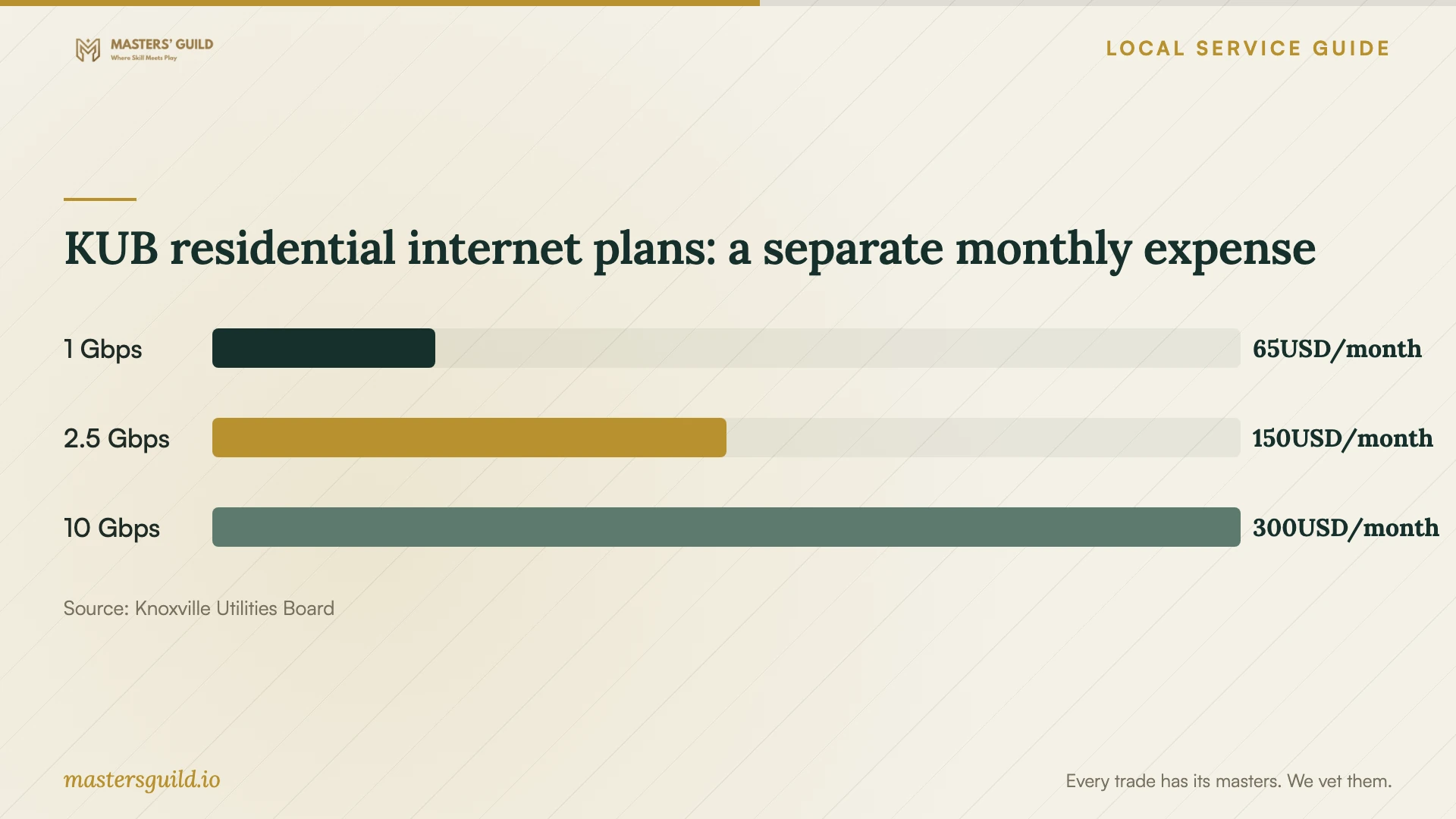
The chart compares KUB's published residential internet plan prices to help you budget for connectivity apart from the installation job. Use your technician's quote to budget for software work. Discuss any proposed internet-plan change with your internet provider before adding it to the project. For its 10 Gbps plan, KUB requires additional consultation and says a customer service representative will contact you after ordering to schedule installation. [2]
Protect access and test the finished setup
Back up the files you want to preserve and check that you can open the backup. Keep recovery information available, but enter passwords and verification codes yourself. Ask the technician to use the software publisher's installation source and to explain any remote-access application they want you to approve.
Before ending the appointment, restart the computer and complete the tasks you agreed on. Open a document, send a test email, or print a page as appropriate. Confirm activation in your own account, record any remaining issue, and ask for instructions for updates and follow-up help. Remove temporary remote access when the work ends unless you have agreed on continuing access.
For help learning an installed application, Knox County Public Library provides LinkedIn Learning courses and task-based tutorials. You can sign in through a browser with your library card and password. In the mobile app, select library-card sign-in and enter knoxlib in lowercase as the library ID. Review the library's linked privacy and use policies before starting. [1]
KUB residential internet plans: a separate monthly expense
Local details that affect your job
Use existing KUB WiFi support
KUB's residential Smart Gig Managed WiFi costs $15 per month and includes a compatible router and additional technical support. KUB says subscribers receive home visits to add devices or troubleshoot without a visit charge. Check your subscription and ask whether your connection issue qualifies before paying another provider for the same network work. [3]
Use the library for application training
Knox County Public Library offers LinkedIn Learning through library-card access. Browser users sign in with their card and password; mobile users select library-card sign-in and enter knoxlib in lowercase as the library ID. If your application opens and works but you need help using it, explore the courses before booking another installation appointment. [1]
Request Tennessee-specific tax itemization
Tennessee's telephone-support guidance distinguishes optional support sold independently from support bundled with software, installation, or repair. Ask the provider to describe these charges separately and explain the sales tax, especially if you are purchasing installation and continuing telephone help together. Separate itemization alone does not establish that support qualifies for the exemption. [4]
Choose the next step for your problem
| Your situation | Next step | Confirm before proceeding |
|---|---|---|
| You can connect and sign in, but need an application installed | Request a remote-installation quote | Supported device, application scope, access method, and completion test |
| You need physical help with the computer or peripherals | Request an in-home appointment | Travel charge, minimum fee, and included setup tasks |
| You have a connection problem and subscribe to KUB Smart Gig | Ask KUB about its included network support | Whether your issue falls within managed WiFi support |
| The application works, but you need instruction | Explore the library's LinkedIn Learning access | Library card and password; mobile library ID knoxlib |
| The quote combines installation and telephone support | Request separate descriptions and a tax explanation | Whether support is optional and independently sold or bundled |
Your hiring checklist
- List each application, device, and task you want completed.
- Record the operating system and exact installation error, if any.
- Check whether your existing internet support covers a connection problem.
- Back up important files and verify that you can open the backup.
- Confirm license ownership, subscription charges, and who purchases the software.
- Agree on access permissions and enter account credentials yourself.
- Get an itemized quote and require approval for additional work.
- Restart the device and test the agreed tasks before accepting completion.
Frequently Asked Questions
How much should I budget for installation?
Request a written quote for your applications, devices, migration, and training needs. Ask the provider to separate installation, licenses, subscriptions, and follow-up help so you can compare the complete purchase. Confirm any minimum charge and the approval process for extra work before booking.
Can KUB handle my software problem?
KUB describes Smart Gig Managed WiFi as a network-management and technical-support service. Ask whether your issue qualifies and whether the service covers the application work or file transfer you need before arranging an appointment. [3]
Can I get local help learning an application?
Knox County Public Library offers LinkedIn Learning courses and tutorials. Use your library card and password in a browser, or select library-card sign-in in the mobile app and enter knoxlib in lowercase as the library ID. Explore the available courses for your learning goal. [1]
What should I test before the technician leaves?
Restart the device, open the application, confirm activation in your account, and complete the task you hired the technician to enable. Ask them to document unresolved issues and explain how you can obtain follow-up help.
Sources and scope
This guide combines the sources below with practical planning guidance. Figures apply to the stated geography and period; request a written quote for your property.