
Local service guide
Smart Appliance Setup in Knoxville, TN
Arrange Smart Appliance Setup in Knoxville by listing your appliance models, the app features you want, and any connection problems before requesting a quote. Ask for separate prices for appliance pairing and router troubleshooting. If you subscribe to KUB Smart Gig Managed WiFi, check your included support first: KUB says in-home visits to add devices or troubleshoot carry no extra charge. Confirm whether your appliance-specific request falls within that support. [1]
Define the setup job before comparing quotes
Write down each appliance’s brand and model, whether someone has completed its physical installation, and the features you want to use. Separate app pairing, notifications, household account access, and schedules in the request. Ask the provider to identify any model-specific limits before accepting the job.
Keep physical installation outside the app-setup quote unless you want the provider to price it as a separate task. Describe any unfinished water, drain, gas, electrical, or mounting work. Ask who will handle those connections and confirm the appropriate requirements before that work begins.
Request a written price with the device list, included troubleshooting, extra-work approval process, and handoff steps. Ask whether the provider charges for a return visit if pairing fails during the appointment. Compare quotes against the same requested outcome rather than a broad description such as smart-home help.
Choose between utility support and separate setup help
KUB distinguishes managed Wi-Fi from customer-owned router support. Smart Gig subscribers receive a compatible router, the Intellifi app, and enhanced technical support. KUB also includes an extender when needed under that service; its standard internet service does not include extenders. Ask KUB to review coverage at the appliance’s location before buying network equipment. [1]
For customers who supply their own router, KUB helps connect it during fiber installation, but the customer manages its settings, updates, and troubleshooting. KUB says it provides in-person support at no charge for problems with the connection or fiber equipment. Describe the symptom to KUB before deciding who should attend. [2]
When hiring separate help, ask the provider to distinguish a network connection problem from an appliance account or app problem. Describe whether the appliance has never paired, lost its connection after a router change, or connects but fails to perform a requested feature. Keep passwords out of the job description and enter them yourself during the visit.
Prepare access and agree on a useful handoff
Have your phone, manufacturer account access, model information, and home network details ready. Check that you can receive account verification messages. If you bought a used appliance, ask the provider to check the manufacturer’s ownership-transfer instructions before the visit.
Ask the provider to follow the appliance manufacturer’s connection instructions and explain any proposed router changes before making them. Agree on which household member will own the appliance account and how others will receive access. Avoid creating the main account under the installer’s email address.
Before the appointment ends, operate the appliance from your phone and test each agreed feature. Ask for a demonstration of notifications, schedules, and manual controls where applicable. Keep a short record of the app name, account owner, changes made, and unresolved issues, without recording passwords.
Set schedules against your actual electricity plan
Check your electricity rate plan before asking anyone to schedule dishwasher or laundry use around utility prices. KUB offers a Time of Use estimator based on your usage. Use that account-specific estimate when considering enrollment, and follow the appliance manufacturer’s instructions for delayed operation. [3]
For enrolled KUB Time of Use customers, weekday on-peak hours run from 2 p.m. to 8 p.m. during April through October and from 5 a.m. to 11 a.m. during November through March. KUB lists weekends as off-peak. Ask the setup provider to review the appliance’s clock and seasonal schedule with you. [3]
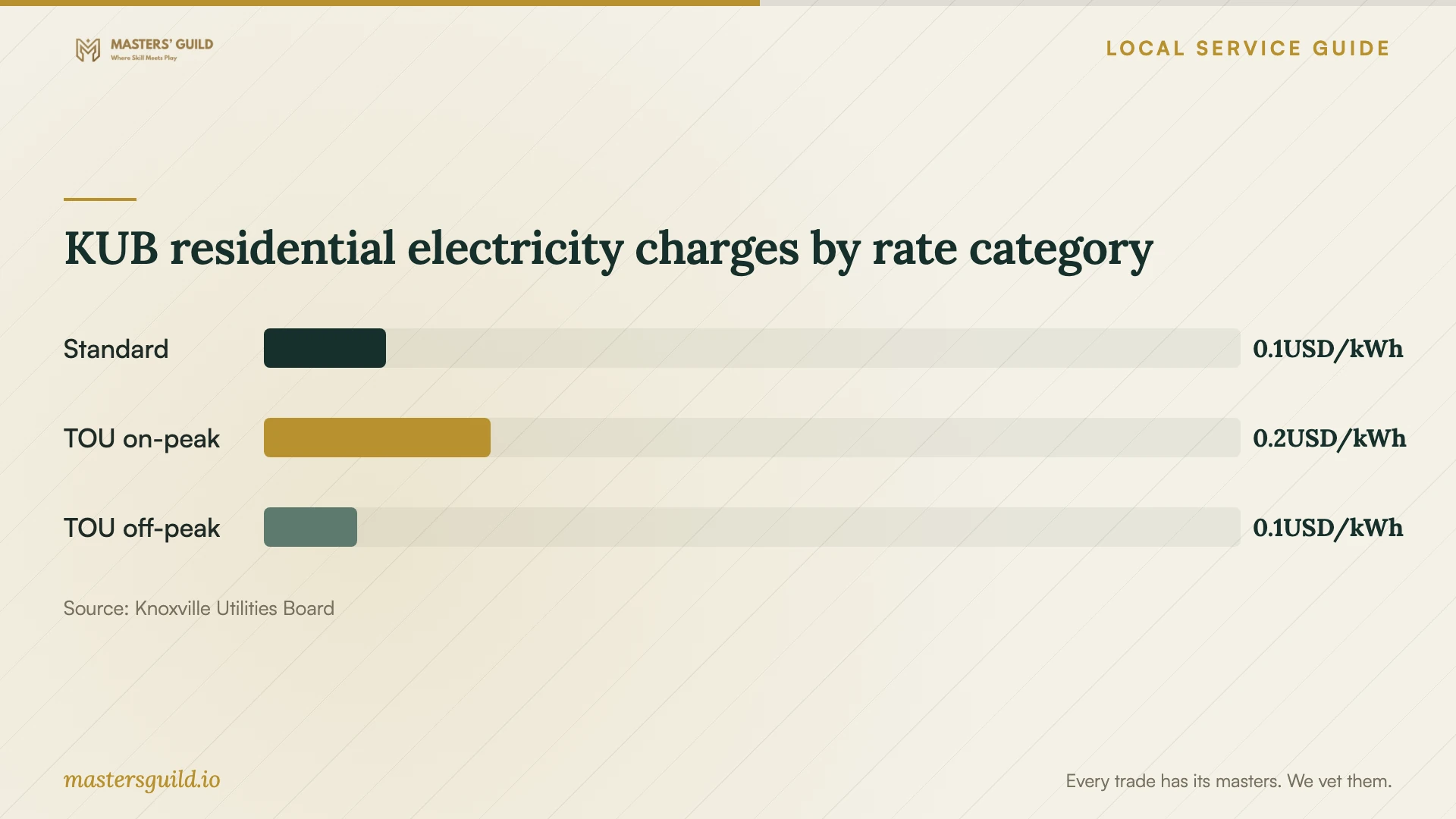
KUB’s September 2026 residential table lists $0.12513 per kilowatt-hour for standard single-family service, $0.23192 for Time of Use on-peak use, and $0.09551 for off-peak use. These are electricity charges, not setup prices. KUB says residential electric rates vary monthly with the fuel cost adjustment, so check the current schedule before making a cost comparison. [4]
KUB residential electricity charges by rate category
Local details that affect your job
Check your KUB support arrangement before booking
KUB Smart Gig subscribers have included in-home support for adding devices and troubleshooting, while customers with their own router manage router settings and updates themselves. Ask KUB whether your request concerns covered network support or appliance-specific configuration, then use that answer to scope any separate appointment. [1] [2]
Review October schedules before November
KUB changes its Time of Use weekday peak window from afternoon and evening in April through October to morning in November through March. If you participate in that rate plan, review any dishwasher or laundry schedule created during an October setup before November begins. [3]
Choose the next step for your setup
| Your situation | Next step | Scope to confirm |
|---|---|---|
| You subscribe to KUB Smart Gig | Ask KUB about included device-addition and troubleshooting support | Confirm whether the appliance-specific task falls within its support |
| You use your own router on KUB Fiber | Ask KUB about connection or fiber-equipment issues; arrange router help as needed | Customer responsibility includes router updates, settings, and troubleshooting |
| You want app pairing and household access | Request a model-specific setup quote | Agree on account ownership, access, and feature tests |
| You participate in KUB Time of Use rates | Review schedules against the seasonal peak window | Confirm appliance instructions and your current rate plan |
Your hiring checklist
- List appliance models and the app features you want tested.
- Describe unfinished physical installation or utility connections.
- Confirm your internet support arrangement before booking network troubleshooting.
- Prepare account access and keep your phone available for verification.
- Ask for separate prices for pairing, network work, and additional devices.
- Approve proposed router changes before the provider makes them.
- Test agreed features and record unresolved issues before the visit ends.
Frequently Asked Questions
How much should I budget for appliance setup?
Request a written quote for your appliance models and requested features. Ask the provider to separate app setup, network troubleshooting, and physical installation, and state how you will approve extra work. Do not use the electricity rates on this page as installation prices.
Does KUB provide a router for Fiber customers?
KUB lets customers supply their own router and recommends WiFi 6. Its optional Smart Gig Managed WiFi service includes a compatible router and enhanced support for an additional $15 per month. [1]
Will scheduling appliances reduce my electricity bill?
Check your rate plan and usage first. KUB offers an account-specific Time of Use estimator, and its September 2026 table lists different on-peak and off-peak energy charges. Those rates alone do not establish your household’s savings. [3] [4]
Sources and scope
This guide combines the sources below with practical planning guidance. Figures apply to the stated geography and period; request a written quote for your property.