
Local service guide
Network Setup and Support in Knoxville, TN
Arrange Network Setup and Support in Knoxville by defining the rooms and devices that need attention, checking your internet provider’s support coverage, and requesting a written scope for router configuration, Wi-Fi coverage, or Ethernet cabling. KUB Fiber subscribers should check their equipment options before buying hardware: KUB supplies an RJ45 Ethernet connection, accepts customer-owned routers, and offers a paid managed Wi-Fi service. [1]
Define the problem before choosing equipment
Write down where the connection fails, which device you use, and what you are doing when it happens. Distinguish a dropped video call in an upstairs office from trouble connecting a printer or a complete loss of internet access. Give the technician examples they can reproduce during the appointment.
Ask the technician to compare a wired connection with Wi-Fi in the affected rooms before recommending replacement equipment. KUB describes its advertised internet speed as the maximum capability of the wired service to the home and says wireless results vary with compatible devices. Treat the subscription speed and your room-level Wi-Fi experience as separate checks. [1]
Choose who will manage your home network
KUB’s residential internet packages exclude a Wi-Fi router. You can supply your own, or add Smart Gig Managed WiFi for a published $15 per month. KUB says that add-on includes a router, setup, and round-the-clock support. Compare that option with an independent installer’s equipment ownership, support charges, and handover terms. [2]
For a customer-owned setup, ask who will hold the router administrator account, apply updates, and help after the installation. Request an equipment list before approving purchases. If you want the technician to reconnect printers, televisions, or other household devices, name those devices in the scope.
If you are arranging service for separate business premises, request commercial terms. KUB publishes a distinct business service schedule and a $20-per-month Smart Gig at Work add-on. Use its business offering when comparing support for a shop or office rather than applying the residential managed Wi-Fi price. [3]
Make the installation quote specific
Ask for separate descriptions of router setup, access-point or mesh placement, and any Ethernet work. For cabling, identify the start and end locations, proposed route, wall plates, labels, testing, and responsibility for patching openings. Ask the contractor to identify any permissions or local requirements that apply to the proposed work before it starts.
Request a total that separates labor, hardware, materials, and recurring support. Ask how the installer will handle an inaccessible cable route or additional device setup, and require approval before extra work. The KUB subscription rates shown here do not establish independent installation prices; obtain a quote for your layout and requested tasks. [2]
Coordinate the provider appointment and home setup
For a new KUB Fiber connection, coordinate independent network work around the utility installation. KUB schedules the in-home appointment for four hours, reports an average installation time of two hours, and requires someone over 18 to remain present throughout. It also describes exterior preparation two to four days before the appointment. [1]
Discuss the service-entry location and your preferred router location before either appointment. Tell both parties about locked gates, furniture blocking access, and the rooms where you need connectivity. Agree on who will connect and configure your own equipment after the provider completes its work.
Set completion checks and support terms
Ask the installer to demonstrate the activities you named in the brief, using your devices in the affected rooms. Check a video call, printing, or streaming as relevant. For new Ethernet outlets, request labels and the agreed test results. Record remaining issues before approving completion.
Keep the administrator login, equipment inventory, network name, and support contact in a place you control. Ask the technician to explain any changes to existing settings and remove temporary access after handover. Agree on the follow-up period and charges for return visits in writing.
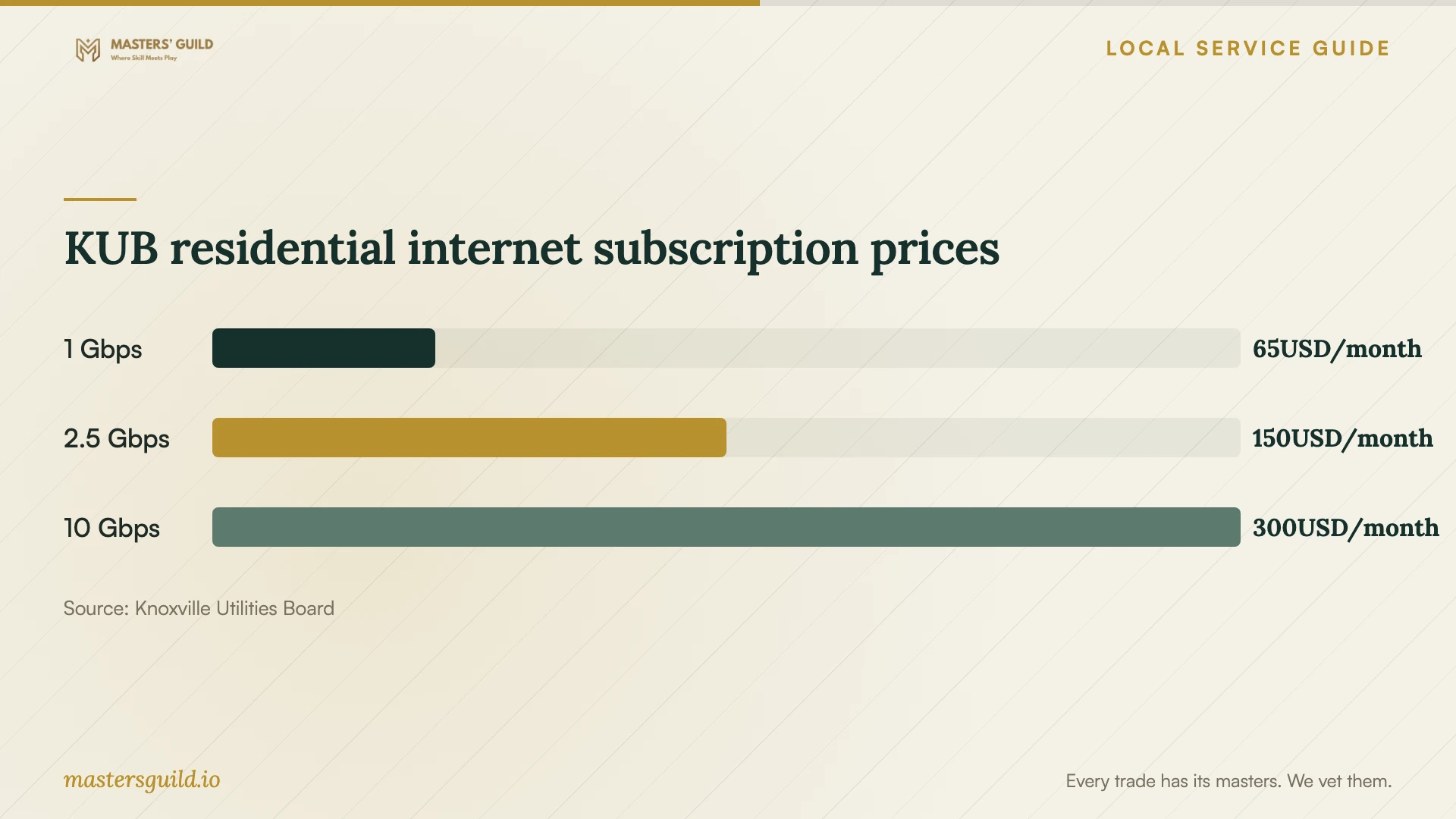
KUB residential internet subscription prices
Local details that affect your job
Confirm address eligibility and property-owner involvement
KUB says its fiber expansion follows its existing electric territory and that only households with KUB Electric will have access when the buildout finishes. Check your address before scheduling a provider change. For apartments, condos, and other multi-dwelling properties, KUB says installation may require landlord or property-owner cooperation; arrange that discussion before booking network work dependent on the new connection. [1]
Check included KUB troubleshooting before booking a visit
KUB lists technical support at 865-524-2911, available 24/7/365. Its FAQ says residential Smart Gig Managed WiFi includes an extender when needed and in-person visits to troubleshoot or add devices without an additional charge. Ask KUB to confirm coverage for your requested task, then specify any remaining work in an independent installer’s quote. [1]
Choose the next step for your setup
| Your situation | Next step | Scope to confirm |
|---|---|---|
| You already subscribe to KUB Smart Gig Managed WiFi | Ask KUB to assess the issue first | Its FAQ includes in-person troubleshooting and device-addition visits without an additional charge |
| You want to supply your own KUB-compatible router | Request router configuration and room-level checks | KUB provides an RJ45 Ethernet connection and accepts customer-owned routers |
| You want new Ethernet outlets | Request a cabling scope | Agree on routes, terminations, labels, testing, and wall repair |
| You rent in a multi-dwelling property and want KUB Fiber | Coordinate with the property owner | KUB says fiber installation may require owner or landlord cooperation |
| You are arranging service for business premises | Compare commercial support terms | KUB lists Smart Gig at Work as a separate $20-per-month add-on |
Your hiring checklist
- List affected rooms, devices, and examples of connection failures.
- Record your provider, plan, router model, and existing support package.
- Choose whether you want provider-managed equipment or your own administrator account.
- Mark proposed Ethernet outlet locations and ask the installer to explain cable routes.
- Request itemized equipment, labor, materials, and recurring charges.
- Arrange property access and any owner permission before the appointment.
- Agree on device checks, documentation, and follow-up terms before work begins.
Frequently Asked Questions
Do I need to buy a modem for KUB Fiber?
KUB says customers do not need a modem because it provides an RJ45 Ethernet connection. You can supply a router; KUB recommends WiFi 6. Check the proposed equipment list before approving a purchase. [1]
How much should I budget for independent network installation?
Request an itemized quote for your rooms, equipment, and cable routes. The supplied local sources publish KUB subscription prices, rather than independent installation labor rates. Ask whether diagnosis, device reconnection, testing, and follow-up visits fall within the quoted total. [1] [2] [3]
Should I upgrade my internet plan to fix poor Wi-Fi?
Ask for wired and room-level Wi-Fi checks before choosing an upgrade. KUB distinguishes the wired service capability from wireless performance, which varies with compatible devices. Have the technician explain the results and proposed remedy before you commit to equipment or a different plan. [1]
Can I arrange home networking during a KUB installation?
Confirm responsibilities with both parties before booking. KUB schedules its in-home installation for four hours and requires an adult over 18 throughout. Ask who will configure your router and reconnect devices, then schedule any separate installer around that agreed handover. [1]
Sources and scope
This guide combines the sources below with practical planning guidance. Figures apply to the stated geography and period; request a written quote for your property.