
Local service guide
Home Office Setup in Knoxville, TN
For Home Office Setup in Knoxville, hire against a written task list covering furniture assembly, monitor installation, computer connections, and cable routing. Before booking network help, check address availability, settle router responsibilities, coordinate property access, and confirm your internet appointment. KUB’s Smart Gig Managed WiFi includes a router and technician home-network setup; ask which tasks you would still need a separate installer to complete. [2]
Follow this sequence before booking the office visit
First, check service at your exact address. KUB says its fiber expansion follows its electric territory and that only households with KUB Electric will have access after buildout. Use its address-availability check before choosing equipment or arranging a visit around a new connection. [1] [2]
Next, decide who supplies and configures the router. KUB provides an RJ45 Ethernet connection and says customers do not need a modem. You can supply your own router; KUB recommends WiFi 6. Its standard internet packages exclude a WiFi router, and its Smart Gig Managed WiFi option includes a router and technician home-network setup. [1] [2]
Then resolve property coordination. For an apartment, condo, or other multi-dwelling property, KUB says you may need landlord or property-owner cooperation to install fiber infrastructure. Ask the owner to discuss installation with KUB before you schedule work that depends on that connection. For office mounting or drilling, obtain approval for the proposed work from the relevant owner or association. [1]
Finally, confirm the fiber appointment before arranging separate network-dependent office work. KUB describes outside preparation 2 to 4 days before installation, a 4-hour in-home appointment, and a 2-hour average installation. It requires someone over 18 to remain present throughout. Reserve the full appointment and arrange the office connection tests after you have working internet. [1]
Choose the help your equipment requires
Send prospective installers your desk, monitor, docking-station, and computer model numbers, plus room photos. Name each task: assemble the desk, attach monitor arms, connect displays, configure the dock, connect the printer, or route cables. Ask whether one person accepts the complete scope and which accessories you must supply.
For KUB managed-WiFi subscribers, ask KUB about coverage at the proposed desk location before buying an extender or hiring overlapping network help. KUB says its managed service includes an extender if needed; its standard internet service excludes extenders. Keep furniture assembly and computer configuration explicit in the separate office quote. [1]
Describe wall mounting and concealed cable routes before accepting an offer. Ask the installer to explain the attachment method, bracket compatibility, cable path, and repair responsibilities. For new outlets or household wiring changes, request a separate electrical scope and confirm applicable credentials and permit requirements before authorizing work.
Mark the desk footprint and sit in the intended position. Check chair movement, door clearance, daylight on the screen, and outlet access. Ask your employer’s IT team about device permissions and remote access before the visit. Enter account passwords yourself and keep control of your credentials.
Separate installation charges from ongoing costs
Request a written total for the agreed tasks. Ask for separate lines covering labor, mounting hardware, cables, adapters, cleanup, and any return visit. Decide how the provider will handle a missing furniture part or incompatible accessory, including the charge for unfinished work and a second appointment.
Budget internet subscriptions separately. On its residential page retrieved October 12, 2026, KUB lists its 1 Gbps plan at $65 per month and Smart Gig Managed WiFi at an additional $15 per month. These amounts describe subscriptions, not home-office installation labor. Ask what network work KUB will handle before paying another installer for the same tasks. [2]
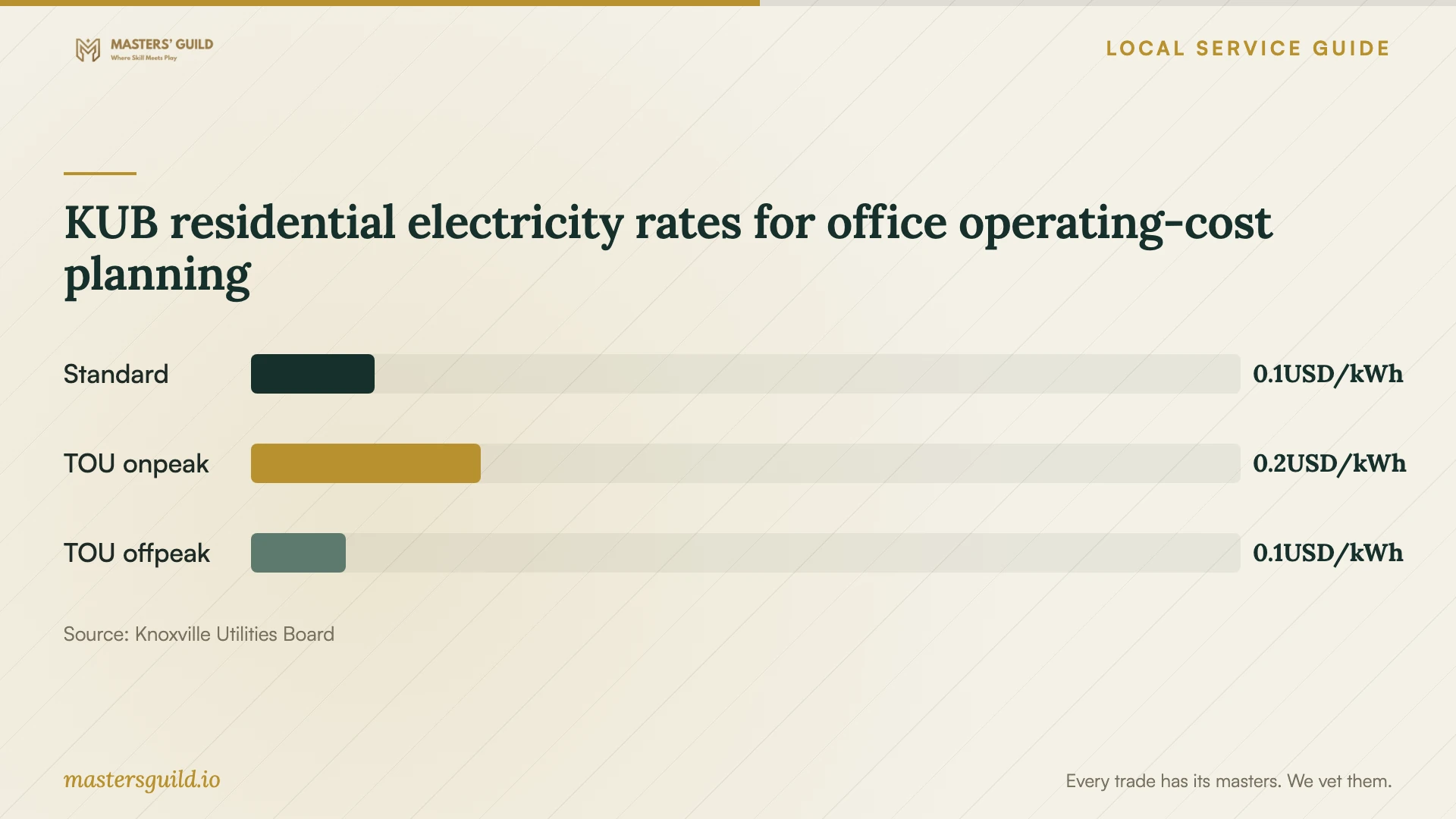
For equipment operating costs, use the electricity rate that applies to your account. KUB’s September 2026 table lists standard and time-of-use rates for single-family residential service. KUB says residential electric rates vary each month. Check your current bill and the equipment’s energy use before calculating a monthly office budget. [3]
Agree on tests and support responsibilities
Write the handover checks into the task list. Ask the installer to demonstrate desk stability, monitor adjustment, display connections, docking, and printing where those tasks belong to the scope. Move a standing desk through your intended range while checking cable slack and clearance. Try a work call from the finished desk.
Test at the workstation rather than relying on the advertised internet tier. KUB describes its stated internet speeds as the maximum capability of wired service to the home under the recommended setup and says actual wireless speeds vary with WiFi 6-compatible devices. Ask the person responsible for networking to test your intended wired or wireless connection. [1]
Identify who handles problems after the visit. KUB lists technical support at 865-524-2911, available 24/7/365. It says Smart Gig Managed WiFi includes free in-person technician visits to add devices or troubleshoot. Ask the office installer to document their own return arrangements, and record any unfinished furniture or computer task before handover. [1]
KUB residential electricity rates for office operating-cost planning
Local details that affect your job
Address eligibility comes before equipment purchases
KUB Electric service establishes the territory condition for eventual fiber access, not current availability. Check your exact address before purchasing a router for KUB Fiber or scheduling a visit that depends on activation. [1] [2]
Managed WiFi changes the hiring scope
KUB’s $15 monthly managed-WiFi add-on includes a router, technician home-network setup, and support. Ask KUB to define its work at your desk location, then quote the remaining assembly, mounting, and computer tasks separately. [2]
Multi-dwelling properties need early coordination
KUB says apartment and condo fiber installations may require landlord or property-owner cooperation. Resolve that discussion before arranging an office networking visit or assuming that nearby fiber service means your unit can connect. [1]
Reserve the full fiber appointment
KUB schedules in-home fiber installation for 4 hours and requires someone over 18 to remain present throughout. Its reported 2-hour average does not replace that appointment window. Plan separate office connection work after activation. [1]
Choose the next step for your unfinished work
| Your situation | Recommended next step | Confirm before booking |
|---|---|---|
| You are considering KUB Fiber | Check your address | Current availability; eventual access is limited to KUB Electric households |
| You want KUB managed WiFi | Ask KUB to define its network work | Included router, technician setup, and remaining office tasks |
| Your apartment or condo needs fiber | Coordinate with the property owner | Whether KUB needs owner cooperation |
| Internet works; furniture or displays need setup | Request an assembly or technical visit | Equipment models, accessories, and completion tests |
| You want wall mounting or new outlets | Define mounting and electrical work separately | Attachment method, approvals, credentials, and applicable permits |
Your hiring checklist
- Check internet availability at the exact service address.
- Confirm who supplies the router and which network tasks your provider handles.
- Resolve property access and approval for installation or drilling.
- Send equipment model numbers, room photos, and the complete task list.
- Agree on hardware, cable routes, desk movement, and cleanup.
- Request an itemized total and terms for extra tasks or return visits.
- Prepare employer IT requirements and enter credentials yourself.
- Test desk movement, displays, networking, and agreed peripherals before handover.
Frequently Asked Questions
Can I use my own router with KUB Fiber?
Yes. KUB allows customer-supplied routers and recommends WiFi 6. It provides an RJ45 Ethernet connection and says you do not need a modem. Confirm your router’s connections and your planned device setup before purchasing it. [1]
Does KUB’s monthly internet price include office setup?
KUB’s standard internet packages exclude a WiFi router. Its $15 monthly managed-WiFi add-on includes a router and technician home-network setup. Ask KUB about the network tasks you need, then specify furniture assembly, monitor mounting, and computer configuration in your office installer’s quote. [2]
How much time should I reserve?
Ask the office installer to estimate time from your task list. For fiber installation, KUB schedules a 4-hour in-home appointment and reports a 2-hour average. These figures describe fiber installation, so obtain a separate estimate for furniture and computer work. [1]
How should I compare setup quotes?
Give each provider the same equipment list, room photos, and completion checks. Compare the total, materials, extra-task charges, cleanup, and return arrangements. Agree on what happens if a missing part prevents completion.
Sources and scope
This guide combines the sources below with practical planning guidance. Figures apply to the stated geography and period; request a written quote for your property.