
Local service guide
Data Recovery and Backup in Knoxville, TN
For Data Recovery and Backup in Knoxville, arrange an assessment of the affected device and any existing backups before approving recovery work. Ask who will handle the device, what the diagnostic fee covers, and how you will check the recovered files. For backup installation, require a demonstrated restore, clear account ownership, and a plan for power interruptions.
Define the recovery job before handing over your device
Give the provider a short written account of what happened: accidental deletion, an unreadable device, liquid exposure, an unusual sound, or a problem after a power interruption. Include the device model, any encryption you use, and what you have tried. Ask for handling instructions before attempting more repairs.
List the files you need by priority. Name specific photo folders, documents, or projects rather than requesting everything without a way to check the result. Tell the technician whether you have another copy and whether you can open it. Ask the provider to assess that copy before authorizing work on the affected device.
Confirm whether the person receiving your device will perform the work or send it elsewhere. Request a receipt identifying the device and accessories, the destination of any shipment, and the person responsible for updates. Agree on how you will provide any necessary credentials without putting passwords on the device label.
Compare written scopes and acceptance terms
Request separate amounts for assessment, approved recovery work, return storage, shipping, and any optional priority service. Ask what you owe if you decline the quote or if the provider cannot recover your priority files. Set a spending limit that requires your approval before the technician continues.
Ask the provider to distinguish the assessment date from the expected completion date. Describe any deadline before handing over the device, and request an update if the technician changes the scope. Avoid accepting a completion promise without knowing what work it covers.
Agree on acceptance checks before work begins. Choose representative files to open, confirm that the provider will return the original device, and specify how long the provider may retain working copies. Request written deletion terms for those copies after you accept the result.
Specify a backup you can restore yourself
Ask the installer to document which devices and folders the backup covers, when it runs, and how you will learn about a failed job. Specify how far back you want to retrieve an earlier file version. Request a demonstration using a file you choose, restored to a different folder or device.
Keep backup accounts under your control. Ask the installer to document subscription charges, renewal dates, storage limits, and the steps for changing providers. Agree on where you will keep recovery credentials and who else in your household should know how to find them.
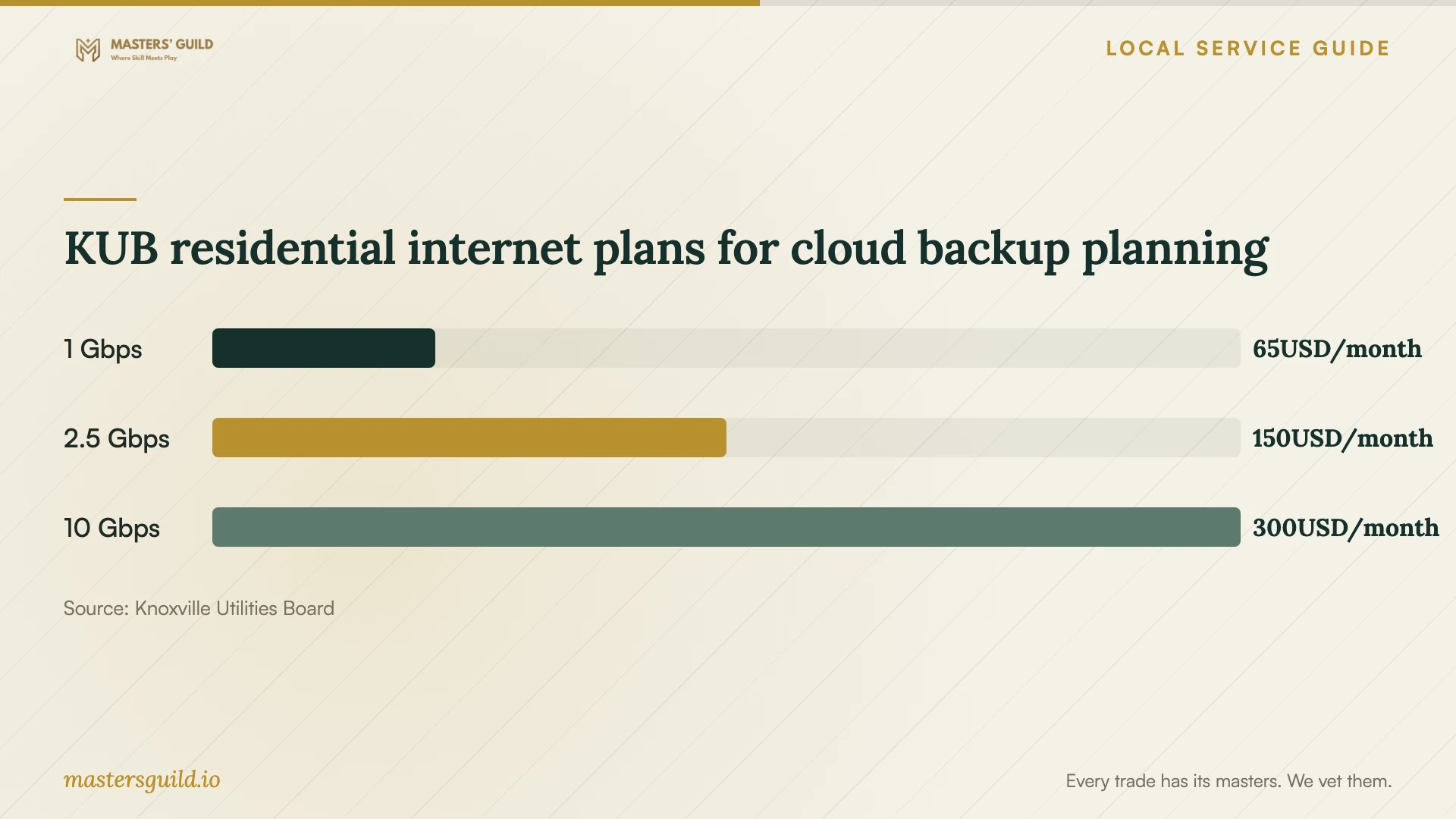
KUB describes its residential 1 gig service as offering symmetrical upload and download speeds, while noting that advertised speeds represent maximum wired capability and actual wireless speeds vary. Ask your installer to measure the connection used by the backup device and demonstrate progress with your files before recommending an internet upgrade. [2]
Include power protection and equipment retirement
KUB recommends an uninterruptible power supply with built-in batteries for computers during momentary outages, along with frequent saves and regular backups. Ask the installer which equipment the UPS will power, how you will check its battery, and how to shut down your computer during a longer interruption. [1]
KUB distinguishes momentary switching interruptions from the faults that can trigger them: it says some faults, including lightning strikes, may cause damaging surges. Discuss surge protection as part of the equipment scope rather than treating a backup subscription as the whole protection plan. [1]
Before retiring the original device, open your recovered files and check your new backup. Ask the technician to explain the proposed data erasure or destruction method and what record you will receive. Keep disposal separate from your acceptance of the recovery work.
KUB residential internet plans for cloud backup planning
Local details that affect your job
Check address eligibility before designing cloud backup
KUB says its fiber buildout serves its existing electric territory and directs residents to check availability. Do that before accepting a plan based on its residential fiber service. Ask the backup installer to scope the job around the connection available at your home, including the first upload and a large restore. [2]
Plan household electronics disposal at Elm Street
The city lists computer systems and accessories among accepted materials at the Household Hazardous Waste Facility, 1033 Elm Street. It limits computer systems to three per visit, with charges above that limit, and requires visitors to drive across the scale. Its electronics acceptance information does not establish a secure data destruction service; arrange that step with your technician before drop-off. Businesses and other nonresidential entities must contract privately for hazardous waste disposal. [3]
Choose the scope to request
| Your situation | Scope to request | Acceptance check |
|---|---|---|
| You have a backup copy | Assess the copy and quote restoration | Open your priority files on the destination device |
| You cannot access the only copy | Assess the affected device before approving recovery | Review recoverable priority files and approve a written price |
| You want ongoing protection | Document backup coverage, account ownership, and restore steps | Watch a selected file restore to another location |
| You are replacing the device | Separate transfer, backup setup, and data disposal | Check files and backup access before releasing the original |
Your hiring checklist
- Record the device model, symptoms, incident date, and repair attempts.
- List priority folders and check whether another copy opens.
- Confirm who performs the work and whether the device will leave the receiving location.
- Get diagnostic charges, approval limits, and unsuccessful-recovery terms in writing.
- Agree on file checks, return of the original device, and deletion of working copies.
- Require a demonstrated restore and written backup account details.
- Arrange power protection and data handling before retiring equipment.
Frequently Asked Questions
How much should I budget for recovery?
Request a device-specific assessment and written quote. Separate assessment charges from recovery, shipping, and return storage. Ask what you owe if the provider recovers only part of your priority list, and set an approval limit before work starts.
Should I upgrade my internet before installing cloud backup?
Ask the installer to test your existing connection first. KUB advertises symmetrical residential fiber service but requires an availability check and distinguishes wired capability from actual wireless speeds. Request a measured upload and restore demonstration before approving an upgrade. [2]
Can I take my old computer to the city facility?
Knoxville lists household computer systems and electronics among accepted materials at its Elm Street facility, with a three-system limit per visit and charges above that limit. Complete recovery checks and arrange data erasure or destruction before disposal. [3]
Sources and scope
This guide combines the sources below with practical planning guidance. Figures apply to the stated geography and period; request a written quote for your property.