
Local service guide
Computer Virus Removal in Knoxville, TN
For Computer Virus Removal in Knoxville, choose a technician who agrees in writing on file preservation, cleanup scope, and approval before a reset or reinstall. Ask for a total quote with applicable tax and separate charges for backup, operating-system repair, and follow-up work. Describe the symptoms and your backup situation before choosing remote help, drop-off service, or a home visit.
Define the work before handing over your computer
Describe what you see rather than naming an infection you have not confirmed. Record unwanted pop-ups, browser changes, warning messages, or the point where startup stops. Tell the technician what happened before the symptoms began and whether anyone gained remote access. Ask for diagnosis before approving a cleanup package.
Write down which documents, photos, and other files you need preserved. Identify your most recent backup and ask the technician to explain how they will handle files before making changes. Require a separate approval for erasure, a reset, or an operating-system reinstall. Agree on what happens if the technician cannot preserve the files within your budget.
Compare the full repair quote
Ask each technician to quote the same work: diagnosis, malware cleanup, any operating-system repair, file preservation, and a handoff check. Request separate prices for optional work and an approval limit for additional charges. Confirm whether you owe a diagnostic fee if you decline the repair.
The Tennessee Department of Revenue states that software installation and repair performed in Tennessee are subject to sales tax. It also explains that services necessary to a taxable sale can remain taxable even when the seller lists them as separate charges. Ask for a tax-inclusive total rather than assuming a labor or consulting line is exempt. [1]
Ask how the technician charges for backup work, a reinstall, replacement storage, travel, or a second visit. Compare the approved total with the cost of replacing the computer and transferring the files you need. Set a spending limit and require the technician to contact you before exceeding it.
Choose a service format and control access
Before arranging remote service, ask the technician whether your computer’s symptoms and connection allow that approach. Agree on how you will identify the technician, approve access, and end the session. For drop-off work, request a receipt identifying the device and accessories. For a home visit, confirm travel charges and the work the technician expects to finish there.
Ask what account access the technician needs and how they will protect private files. Plan to enter passwords yourself where practical. Do not include banking credentials in the job notes. If you suspect account misuse, use a separate trusted device to review account access and contact the affected service.
Agree on the handoff before approving repair
Request a written summary of the work, files preserved, software installed or removed, and remaining concerns. Ask the technician to demonstrate startup and the tasks that prompted your service request. Review your important files before accepting the work as complete.
Confirm the follow-up terms in advance. Ask what the technician will do if the original symptoms return, whether another diagnostic charge applies, and how to report a problem. If you choose replacement, arrange file preservation and storage erasure as explicit tasks before taking the old equipment for recycling.
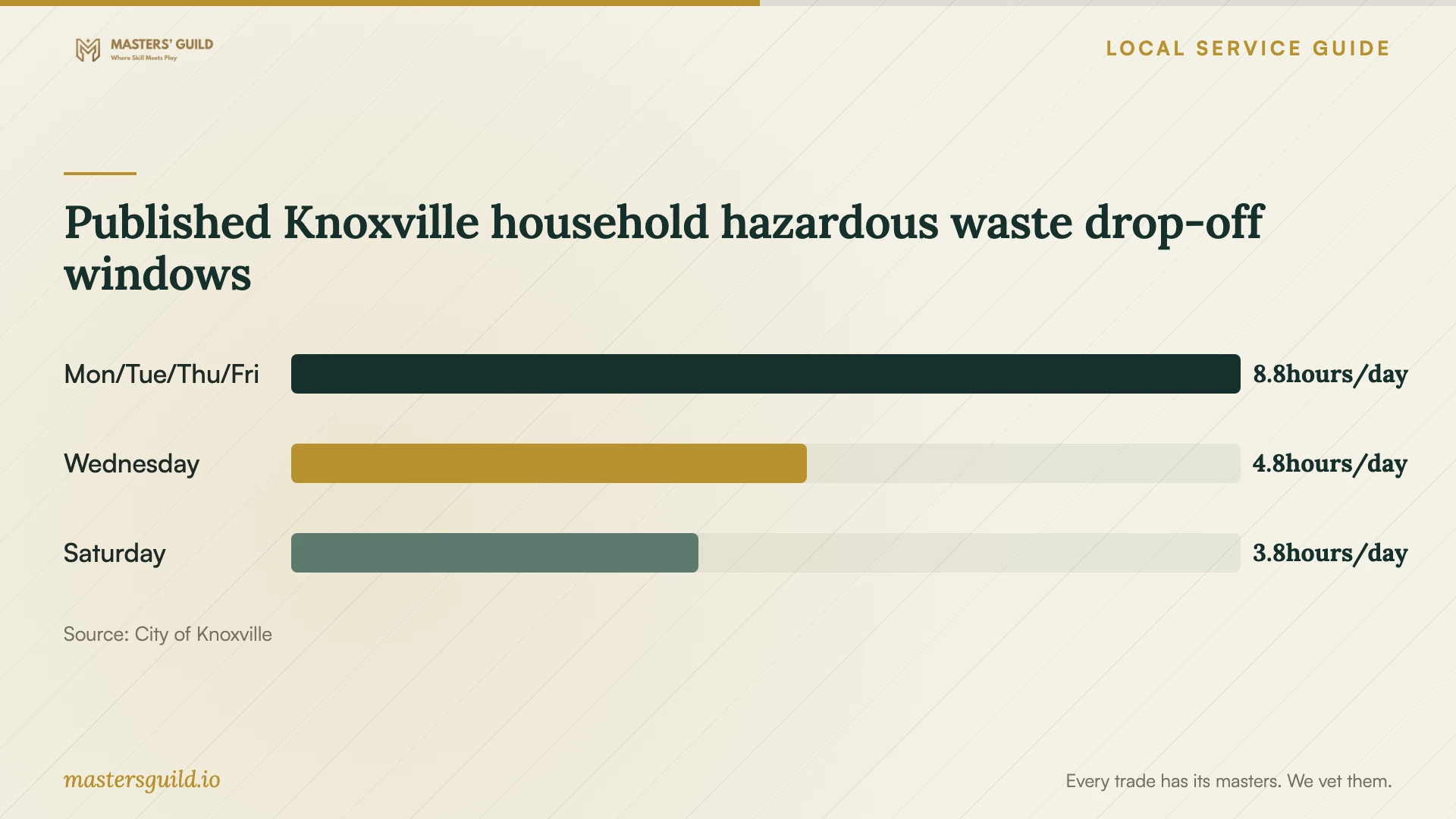
Published Knoxville household hazardous waste drop-off windows
Local details that affect your job
Plan a household computer drop-off at Elm Street
The City of Knoxville lists computer systems among accepted items at its Household Hazardous Waste Facility, 1033 Elm Street. It sets a three-system limit per visit and says charges apply above that limit. Visitors must drive across the scale. The city excludes business-generated hazardous waste from this household program. For a household replacement, confirm acceptance of your equipment and finish data handling before the trip. [2]
Confirm UT access before choosing its recycling option
UT’s public recycling page lists computers and laptops as accepted e-waste and identifies 521 North Concord Street as the public drop-off. The page gives both daily and weekday-only hours, so confirm the schedule at 865-974-4945. It directs visitors to put batteries in a designated bin. Ask about your complete equipment list before combining a computer, loose batteries, and accessories in one trip. [3]
Choose the next step for your computer
| Your situation | Planning choice | Question to settle |
|---|---|---|
| You want to keep using the computer | Request diagnosis and a defined cleanup scope | What work does the quoted total include? |
| You need files without a confirmed backup | Make file preservation an approval condition | What will you do before changing or erasing storage? |
| You are considering a reset or reinstall | Approve that work as a separate step | Which files, applications, and settings will you restore? |
| You choose replacement and household recycling | Consider the city facility’s three-system visit limit | Have you finished data handling and confirmed any excess-item charge? |
Your hiring checklist
- Record the symptoms and any recent remote-access session.
- List the files to preserve and identify your latest backup.
- Require approval before a reset, reinstall, or storage erasure.
- Get a written total covering applicable tax and agreed extras.
- Confirm device custody, account access, and return arrangements.
- Agree on the handoff check and follow-up charges.
- Finish data preservation and erasure before recycling.
Frequently Asked Questions
Should I approve a factory reset at the first appointment?
Ask for an explanation of the proposed repair and file-preservation plan first. Give written permission for a reset only after agreeing on what you need retained, what the technician will restore, and the total charge.
Does Tennessee charge tax on software repair?
Yes. The Department of Revenue identifies software installation and repair performed in Tennessee as taxable. Ask the technician to include applicable tax in the written total. [1]
Can I recycle a household computer through the city?
Knoxville’s Household Hazardous Waste Facility lists computer systems as accepted, with a limit of three per visit and charges above that limit. Arrange file preservation and erasure before disposal. [2]
Sources and scope
This guide combines the sources below with practical planning guidance. Figures apply to the stated geography and period; request a written quote for your property.