
Local service guide
Cloud Service Setup in Knoxville, TN
Arrange Cloud Service Setup in Knoxville by requesting a written scope covering your devices, files, account security, migration, and a restore test. Compare help around those tasks, with separate prices for technician work and recurring subscriptions. Before booking, check your home connection and review any network support you already purchase.
Define the files and devices you want covered
Give each prospective technician the same inventory: computers, phones, tablets, external drives, existing cloud accounts, and the folders you want included. Describe the outcome in everyday terms, such as accessing household documents from two computers or recovering family photos after replacing a phone. Have the technician identify anything outside the proposed scope.
Have the technician explain the proposed sync and backup settings before moving files. Discuss what happens when you delete a file, edit it on another device, lose a device, or stop paying for the account. Request a recovery demonstration using a sample file. Keep your original copies until you have reviewed the transferred files and completed that test.
Resolve internet and WiFi work before migration
Check service at your address before planning around KUB Fiber. KUB says it is expanding within its electric territory and that, after buildout, only households with KUB Electric will have access. For apartments and condominiums, KUB says installation may require cooperation from the landlord or property owner. [2]
KUB advertises symmetrical upload and download speeds, but describes its advertised speed as the maximum capability of the wired service under its recommended setup. It says actual wireless speeds vary. Have the technician check the connection on the device that will upload your files and explain how they will monitor unfinished transfers. [1] [2]
KUB lists Smart Gig Managed WiFi at $15 per month, including a compatible router and technical support; it also describes technician setup of a home networking solution. If you subscribe, confirm what KUB covers before arranging separate help. Have your cloud technician quote account configuration, file migration, and recovery testing as distinct tasks. [1] [2]
Compare an itemized setup quote
Request separate amounts for account setup, migration, additional devices, network troubleshooting, and follow-up help. Confirm whether the technician charges a fixed fee or bills for time, whether upload monitoring counts as billable time, and what happens if the transfer continues after the appointment. Set an approval limit for extra work before the session starts.
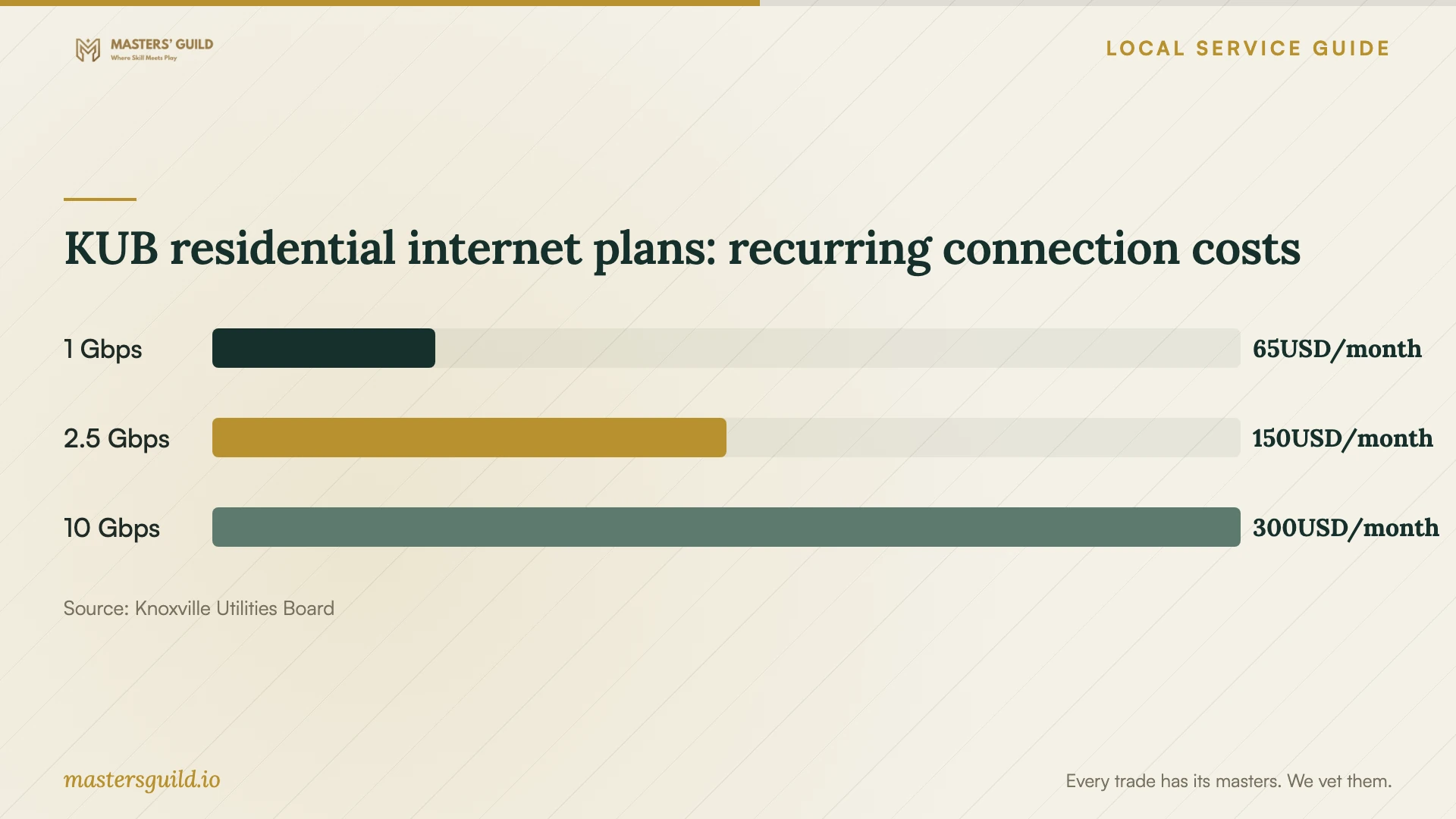
Use the chart to review KUB's published recurring internet charges. Budget for technician work and cloud subscriptions as separate purchases. Compare your current connection with the proposed transfer before choosing a faster plan. [1]
Tennessee Department of Revenue says access to remotely accessed software from a Tennessee location is subject to sales and use tax, while its exclusions include internet access and data storage. Have the seller explain how it classifies each subscription, including any bundle combining software and storage. Request a separate explanation of taxes on technician work rather than applying this software guidance to the entire job. [4]
Keep control of accounts and sharing
Create the account under an email address you control and enter your own password during the appointment. Have the technician help you configure multifactor authentication, review recovery details, and store recovery information somewhere you can access without that device. Agree on the access they need and remove temporary access after the handoff.
Make a short sharing plan for household documents and private files. Have the technician demonstrate access from each intended account, including a person who should have view-only access. Practice removing a shared link and changing access. Review any remote-support software they installed before closing the job.
Agree on completion and interruption handling
Separate appointment completion from transfer completion in the written scope. Agree on who checks pending uploads, how you will hear about errors, and whether a follow-up review costs extra. Before accepting the work, open selected documents and photos from another device and recover a sample file using the agreed recovery method.
Include a plan for power interruptions. KUB recommends an uninterruptible power supply for a computer during momentary outages, frequent saving, and regular file backups. Ask the technician whether battery backup suits your computer and networking equipment, and have them show you how to check transfer status after a restart. [3]
KUB residential internet plans: recurring connection costs
Local details that affect your job
KUB availability can change the appointment order
KUB restricts its eventual fiber availability to KUB Electric households, and apartment or condominium installations may need owner cooperation. Confirm address eligibility and building access before coordinating an internet installation with a cloud migration. [2]
Existing managed WiFi may cover the network visit
KUB says Smart Gig Managed WiFi customers receive in-person help to add devices or troubleshoot without an additional visit charge. If you subscribe, ask KUB whether it covers your network issue before accepting a separate networking charge in a cloud setup quote. [2]
Tennessee distinguishes software from storage
State guidance treats remotely accessed software used from Tennessee as taxable and excludes data storage from that category. Request separate descriptions for software, storage, and technician work so you can question unexplained tax charges without assuming the whole purchase receives one treatment. [4]
Choose help around the task you need completed
| Your situation | Next step | Ask the provider to demonstrate |
|---|---|---|
| You want selected files on another device | Request a defined sync setup | Access, edits, and deletion behavior on both devices |
| You want recovery after losing files or a device | Request backup configuration and a restore test | Recovery of a sample file and the location of recovery controls |
| You are moving files from several accounts or drives | Request a migration plan before approving the transfer | Selected transferred files, exceptions, and remaining originals |
| Your connection needs troubleshooting | Check existing internet support before adding networking work | Connection checks on the device used for the upload |
Your hiring checklist
- List devices, existing accounts, selected folders, and approximate data volume.
- Confirm internet availability and resolve any required property-owner coordination.
- Review network support you already pay for before requesting overlapping work.
- Request separate setup, migration, subscription, and follow-up charges.
- Prepare an account email, recovery contact, and authentication device you control.
- Agree on sharing permissions and temporary technician access.
- Keep original files until you review the transfer and test recovery.
- Obtain written instructions for checking errors and unfinished uploads.
Frequently Asked Questions
How much should I budget for technician setup?
Ask providers for an itemized quote for your devices and migration tasks, including a recovery test. Keep technician charges separate from internet and cloud subscriptions. Confirm how the provider bills unfinished uploads, extra devices, and follow-up work before approving the job.
Should I upgrade my internet before booking?
Arrange a connection check first. KUB advertises symmetrical speeds but distinguishes wired service capability from actual wireless speeds. Have the technician assess your upload device and proposed transfer before you approve a plan change. [1] [2]
Does KUB managed WiFi include cloud migration?
KUB describes router provision, home networking setup, and technical support. Confirm whether KUB covers your requested task before booking separate cloud migration or recovery testing. Obtain a written scope for any additional cloud work you arrange. [1] [2]
What should I receive at the handoff?
Request an account and device list, selected backup folders, sharing settings, recovery instructions, and any unresolved transfer errors. Have the technician demonstrate recovery and explain the follow-up arrangement. Confirm that you control the account and remove temporary access.
Sources and scope
This guide combines the sources below with practical planning guidance. Figures apply to the stated geography and period; request a written quote for your property.