
Local service guide
Website Design in Kitchener: Plan and Compare
For Website Design in Kitchener, hire against a written brief that names your customers, the action you want them to take, required pages, content responsibilities and account ownership. Ask designers to quote the same scope, demonstrate a relevant working site and explain testing, handover and ongoing charges before you commit.
Write the brief around a customer task
Choose the main task first: requesting an estimate, booking an appointment, finding your shop or buying a product. Give the designer an example of a successful visit. For an appointment business, describe how a customer selects a service, checks availability and receives confirmation. For a service business, specify what information you need in an enquiry.
List the pages and features you want priced. Assign responsibility for copy, photographs, product information and approvals. Identify anything you intend to keep from the current site, including its domain and useful content. For a redesign, ask the designer to inventory existing page addresses and propose how visitors will reach replacement pages.
Give bidders the same brief and ask them to identify assumptions. Request separate prices for optional features so you can decide whether to include them at launch. Ask for a schedule tied to content delivery, design approval, testing and handover rather than accepting an unexplained completion date.
Compare the full cost and ownership terms
Ask each bidder to separate design and build work from content preparation, migration, integrations and ongoing support. Request a list of recurring charges, renewal dates, currency and applicable taxes. Specify how the designer will price extra pages, additional revisions and changes after approval.
Put account control in the agreement. Ask who will hold the domain registration, hosting account, website administrator access and software subscriptions. Require a handover list and an explanation of what you can export or transfer if you change providers. Clarify ownership and permitted use of photography, fonts, copy and custom code.
For online sales, have the bidder demonstrate the proposed purchase process before approving the scope. Include payment testing, shipping or collection choices, order notifications and refund handling in your acceptance checklist. Ask who will enter products and who will maintain that information after launch.
Specify accessibility and how the designer will test it
Ontario says designated public-sector organizations and businesses or non-profits with 50 or more employees must meet its public-website accessibility requirements. The guidance covers websites and web content published after January 1, 2012, and specifies WCAG 2.0 Level AA, with exceptions for live captions and pre-recorded audio descriptions. [3]
Ontario recommends asking developers about their accessibility experience and requesting a project plan covering testing, maintenance, deliverables and timelines. Its guidance calls for automated and manual assessments and testing with assistive technology. Ask bidders to explain their methods and provide examples of work you can inspect. [3]
Include practical acceptance tasks: navigate with a keyboard, submit a form, enlarge text and check error messages. Ask the designer to record issues and their resolution. Request training for whoever will add images, headings, documents and product descriptions so your staff can maintain the agreed standard. [3]
Approve launch through a working demonstration
Review the site on your own phone and computer before approving launch. Complete the main customer task from start to finish. Confirm that enquiries reach the right person, appointment confirmations arrive and test orders follow the agreed process. Check contact details, opening hours and service boundaries against your brief.
Ask a staff member to make an ordinary content change during handover. Confirm who handles backups, software updates and support requests, along with response expectations and charges. Agree on a period for reporting defects and distinguish fixes to the agreed scope from requests for new work.
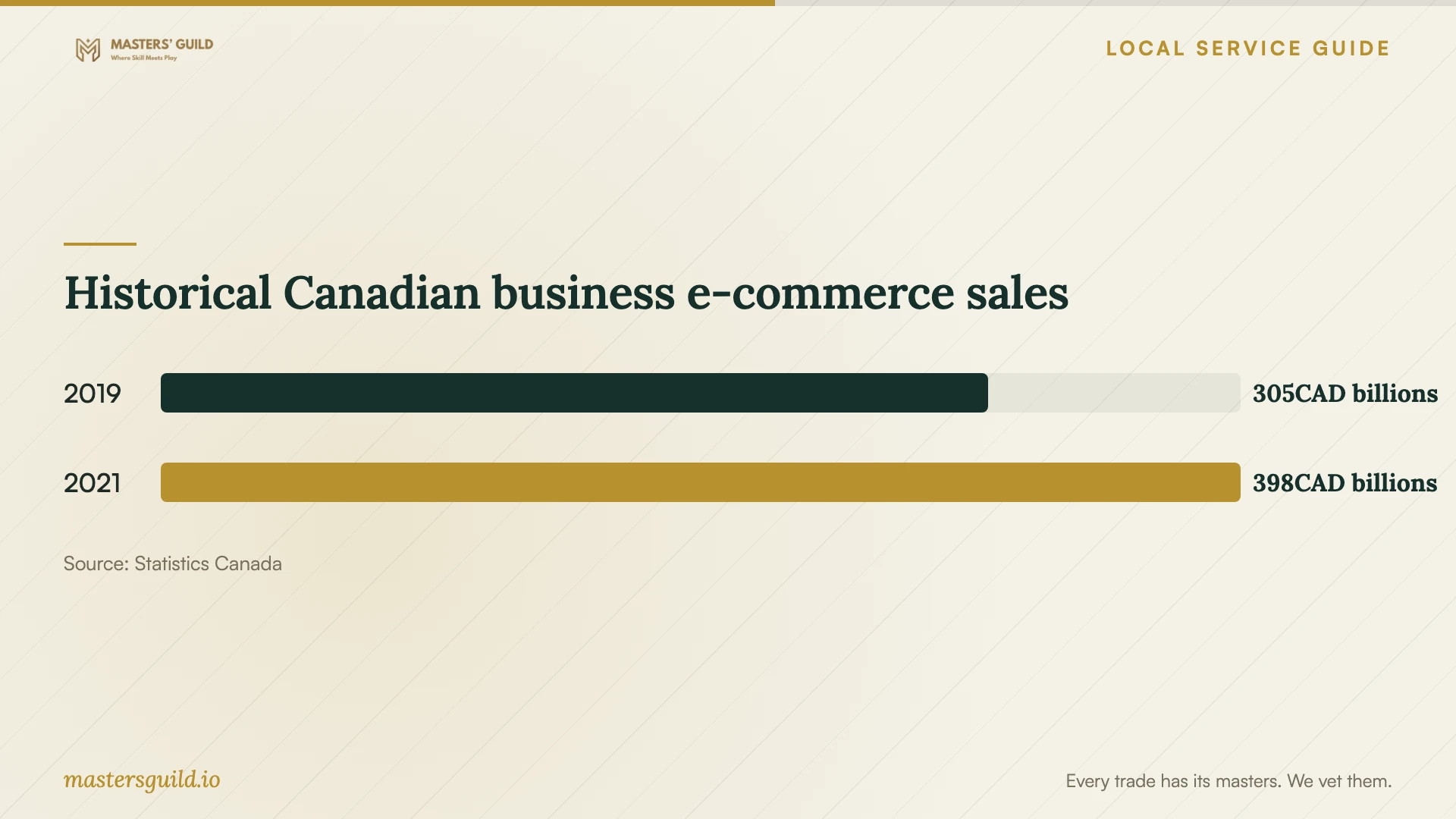
Historical Canadian business e-commerce sales
Local details that affect your job
Regional advice before you buy a redesign
The Waterloo Region Small Business Centre offers free, confidential advisory services if you live and own a business in Waterloo Region. Advisors can help review marketing and sales strategy or plan a brand refresh. Its Kitchener location is the SDG Idea Factory, 2 King St W., Suite 100. If you cannot explain what the new website should achieve, consider an advisory session before paying for design concepts. [1]
Choose local discovery channels to include in the brief
The City of Kitchener's Support Local page points readers to Downtown Kitchener BIA for downtown shops, restaurants and services, Explore Waterloo Region for visitor experiences, and the Greater Kitchener Waterloo Chamber of Commerce for member businesses. Choose the channels relevant to your business and check their participation terms. Ask your designer to prepare suitable destination pages and consistent business details; the City's page does not promise eligibility, placement or enquiries. [2]
Choose what to ask designers to price
| Your situation | Scope to request | Proof to request before approval |
|---|---|---|
| You need visitors to enquire | Service pages, contact details and an enquiry form | A completed test enquiry reaching your inbox |
| You take appointments | Booking steps, availability and confirmations | A test booking and cancellation |
| You sell products | Catalogue, checkout, fulfilment choices and order management | A test purchase and refund |
| You are replacing an existing site | Content inventory, migration and old-page handling | A reviewed list of retained, replaced and removed pages |
| Staff will maintain the site | Editing access, training and support terms | A staff member completing a routine update |
Your hiring checklist
- Write the main customer task and the information needed to complete it.
- List pages, features, existing content and responsibility for new material.
- Request separate launch costs, recurring charges and optional extras.
- Confirm account control, content rights and transfer arrangements.
- Agree on accessibility expectations and documented testing.
- Test enquiries, bookings or purchases before approving launch.
- Collect administrator access, training and written support terms.
Frequently Asked Questions
How much should I budget?
Request a written quote for your defined scope rather than choosing a budget from an unrelated example. Compare launch costs and ongoing charges separately. Ask each bidder to name exclusions and explain how they will charge for changes.
Does a small business need an accessible website?
Ontario's cited public-website requirements apply to designated public-sector organizations and businesses or non-profits with 50 or more employees. Avoid treating that threshold as an answer to every accessibility obligation. Ask the designer to specify accessible navigation, forms and content practices regardless of your staff count. [3]
Should I commission online sales from the start?
Include online sales when you can define the products, order process and staff responsibilities. Statistics Canada's historical national sales figures provide context for online commerce, but they cannot predict demand for your business. Ask bidders to price checkout as a separate option if your immediate priority is enquiries. [4]
What should I ask to see in a portfolio?
Ask for a working example with a customer task similar to yours. Try that task on your phone, then ask which parts the bidder completed. Request an explanation of their testing, content responsibilities and handover process.
Sources and scope
This guide combines the sources below with practical planning guidance. Figures apply to the stated geography and period; request a written quote for your property.