
Local service guide
Technical Skills Training in Kitchener, ON
Arrange Technical Skills Training in Kitchener around a task you need to complete, such as preparing a spreadsheet or managing business files. Before paying for private coaching, consider Kitchener Public Library for basic device help or Conestoga College for a structured Excel course. For tailored instruction, ask a trainer to quote against your software, starting skill level and a specific practice task. Confirm equipment compatibility before booking: Conestoga’s Excel Core course excludes Mac users. [1] [4]
Define the task before choosing a trainer
Write a short brief that names the learner, the software and the result you want. For example: an office administrator needs to turn a weekly sales export into a spreadsheet with formulas and a chart. Specify whether the learner needs introductory instruction, help with an existing file or a repeatable process for coworkers.
Ask the trainer to explain how they would teach that task and check progress. Request a relevant sample lesson or demonstration using invented business data. For coding, data analysis or cybersecurity coaching, name the language, platform or system involved and ask the instructor to describe their experience with it. Avoid purchasing a broad package before agreeing on the work it will cover.
Compare library help, independent study and a course
For help learning a computer, smartphone, tablet or e-reader, KPL offers one-hour appointments with library staff. Its booking form lets you select a library computer or your own device and choose a preferred branch. Describe the problem in the request so staff can assess whether the session fits your needs. [1]
For independent study between coaching sessions, check KPL’s Virtual Library. It lists LinkedIn Learning, Learning Express and Get Set Up, with access inside or outside the library. KPL describes Learning Express as a resource for academic skills, test preparation and career development. Choose a resource after checking that its lessons cover your intended task. [2]
For a structured spreadsheet course, Conestoga’s Excel Core covers workbook creation, formatting, formulas, functions and charts. The listing specifies 42 hours, three credits and no prerequisites. It describes asynchronous delivery as online study without scheduled instructor meeting times, with assigned due dates. Decide whether you can meet those deadlines alongside business work. [4]
Compare the full cost and the teaching format
Conestoga lists Excel Core at $386.54 for the November 2, 2026 to February 8, 2027 offering. Treat that as a dated price for one college course. Do not use it as a private tutoring rate or assume its 42 course hours represent individual instruction. Check the current registration total and OntarioLearn information about textbooks, exams and grading before enrolling. [4]
For private training, request the session length, number of learners, preparation charges, travel charges and any software or material costs. Ask the trainer to state whether tax applies and whether the quoted total includes it. Confirm how much live instruction you receive, what practice you should complete between sessions and whether follow-up questions cost extra.
Start with a limited commitment and a review point. Ask the learner to complete the agreed practice task without the instructor taking over. Use that attempt to decide whether to continue, change the pace or narrow the topic. For staff training, agree on what lesson notes or reusable instructions the trainer will leave with your team.
Prepare devices and business examples
Give the trainer your operating system, software version and subscription level before the session. Ask them to confirm compatibility in writing. Conestoga’s Excel Core explicitly excludes Mac users, so a Mac-based business should resolve that restriction before registering or choose instruction that supports its equipment. [4]
Prepare a sample file with customer names, employee details and account information removed. Keep control of passwords and account recovery details, and ask the trainer before installing software or granting remote access. For online instruction, test screen sharing and audio in advance. For an on-site session, agree on workspace, device access and the time staff can step away from normal duties.
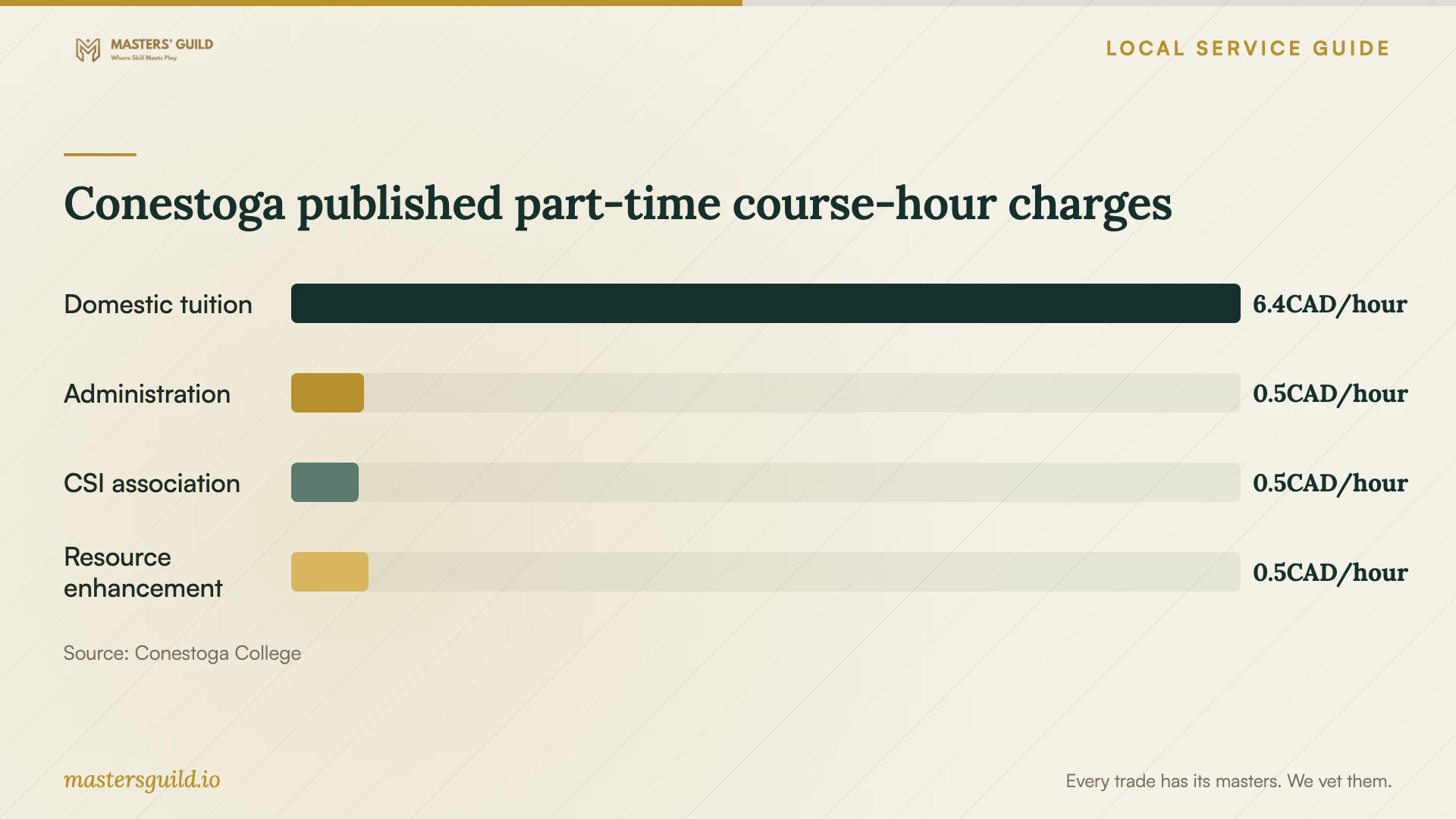
Conestoga published part-time course-hour charges
Local details that affect your job
Choose a KPL appointment or Central Library drop-in
KPL’s Tech Help form accepts appointment preferences for Central, Grand River Stanley Park, Forest Heights, Country Hills, Pioneer Park and Southwest libraries. Central Library also hosts Tuesday evening volunteer Tech Tutors without registration. Choose an appointment when you need to describe a device issue in advance; check the current drop-in timing before travelling. KPL provides service questions by phone at 519-743-0271. [1]
Check membership before paying for online learning
KPL offers free memberships to Waterloo Region residents. For in-person registration, bring identification showing your name and address, or separate documents establishing each. Its Virtual Library lists LinkedIn Learning for access inside or outside the library. Test access to your chosen resource before purchasing a separate subscription. A business may also apply for up to three memberships under its organization’s name. [2] [3]
Plan around the dated Excel offering
As retrieved on October 16, 2026, Conestoga lists an Excel Core offering starting November 2, 2026 and ending February 8, 2027. The course runs online through OntarioLearn rather than requiring attendance at the Kitchener–Doon campus. Check the assigned-deadline format and Mac restriction before arranging staff study time. [4]
Choose instruction around your immediate need
| Your need | Option to consider | Check before committing |
|---|---|---|
| Basic computer or mobile-device help | KPL one-hour Tech Help appointment | Describe your device and question in the booking form. |
| Informal help without registration | Tuesday evening Tech Tutors at Central Library | Confirm the current session timing before travelling. |
| Independent online learning | KPL Virtual Library, including LinkedIn Learning | Test membership access and inspect the relevant lessons. |
| Structured introductory Excel study | Conestoga Excel Core | Check deadlines, current fees and the restriction on Mac users. |
| Instruction using your business workflow | Request a tailored private-training proposal | Agree on a practice task, compatible software and total cost. |
Your hiring checklist
- Name one task the learner should complete without help.
- Record the device, operating system, software version and subscription.
- Ask the instructor for a lesson approach relevant to that task.
- Request a total quote covering preparation, travel, materials and applicable tax.
- Confirm session format, cancellation terms and follow-up support.
- Prepare a practice file with confidential information removed.
- Agree on a progress review before purchasing more sessions.
Frequently Asked Questions
Can I get basic technology help before hiring a trainer?
KPL offers one-hour appointments for learning to use computers, e-readers, smartphones and tablets. Central Library also hosts Tuesday evening volunteer drop-ins without registration. Explain your question first rather than assuming the service covers specialist business software. [1]
Does Conestoga’s Excel Core support a Mac?
The published course description says it does not support Mac users. Ask about a compatible alternative before registering if your staff use Macs. [4]
How much should I budget for private training?
The supplied sources do not establish a private-training price range. Request comparable written quotes using the same task, learner count and session format. Conestoga’s listed $386.54 Excel Core fee applies to its dated course offering and does not establish a private hourly rate. [4]
What should staff bring to a training session?
Ask the instructor to confirm the equipment and software in advance. Prepare a sanitized example file, a written learning goal and a list of steps that currently cause difficulty. Ask staff to practise the task themselves during the session.
Sources and scope
This guide combines the sources below with practical planning guidance. Figures apply to the stated geography and period; request a written quote for your property.