
Local service guide
Smart Appliance Setup in Kitchener, ON
For Smart Appliance Setup in Kitchener, ask for a written scope covering your appliance models, Wi-Fi connection, account pairing, updates, and a demonstration on your phone. Arrange electrical alterations through a Licensed Electrical Contractor and gas connections through a licensed gas professional. Before approving schedules, check your Enova electricity plan so the installer configures them around the plan you use. [1] [2] [4]
Define the job before comparing quotes
Describe the result you want: a washer that sends completion alerts, a refrigerator connected to its app, or several appliances under one household account. List the model numbers and the phone you intend to use. Ask the provider to confirm support for those models and your requested features before you book.
Ask the quote to separate appliance positioning and utility connections from Wi-Fi troubleshooting, app pairing, and instruction. Identify who will handle any unfinished installation work. If the appliance has arrived but still needs a connection, arrange that work before the connected-feature appointment.
Request a total for the agreed scope, plus the terms for extra troubleshooting, additional devices, replacement networking equipment, and a return visit. Ask how the provider will handle an unsupported feature or an account that you cannot recover. Compare quotes against the same list of tasks.
Choose the right person for connection work
For a new outlet, circuit change, or hardwired electrical connection, hire a Licensed Electrical Contractor. ESA tells homeowners to ask for an ECRA/ESA licence number and verify it through its contractor search. Ask the contractor to identify the electrical notification requirements and provide the Certificate of Acceptance when the work is complete. [4]
For a gas range or dryer that needs a connection, arrange a licensed natural gas service professional. Kitchener Utilities directs homeowners seeking new gas service to a licensed heating contractor, who submits the application and quotes the heating installation and inside piping. [2]
If you plan interior alterations alongside the appliance installation, confirm the permit scope with the City before scheduling the work. Kitchener requires building permits for interior alterations and offers online applications. Its residential permit contact number is 519-741-2312. Describe the proposed alterations rather than asking whether a smart appliance needs a permit. [3]
Prepare access and keep control of your accounts
Have your phone charged, the appliance manuals available, and access to your household email and manufacturer accounts. Sign in yourself during the visit. Ask the provider to leave account recovery details under your control and agree on how they will remove any temporary access after the appointment.
Get Cyber Safe recommends changing manufacturer default usernames, using strong passwords, and keeping connected devices updated. It also recommends separating smart devices from the main network and disabling unused features such as cameras, microphones, Bluetooth, and geolocation. Ask the provider to review these choices with you. [5]
If you choose a separate network for appliances, ask the provider to demonstrate the controls you need from your phone before leaving. Record the network name and where you will find update settings. Keep passwords in your own password manager rather than in the provider’s job notes.
Agree on a useful handover
Ask the provider to demonstrate each agreed feature while you operate the phone. Check an appliance status screen, trigger a suitable notification, and review any schedule you requested. Follow the manufacturer’s operating instructions when choosing a test or enabling remote features.
Request a short record of the appliances paired, accounts used, settings changed, and tasks left unresolved. Ask the provider to show you the first troubleshooting steps to take after a router or password change, and to explain which problems belong with the appliance manufacturer.
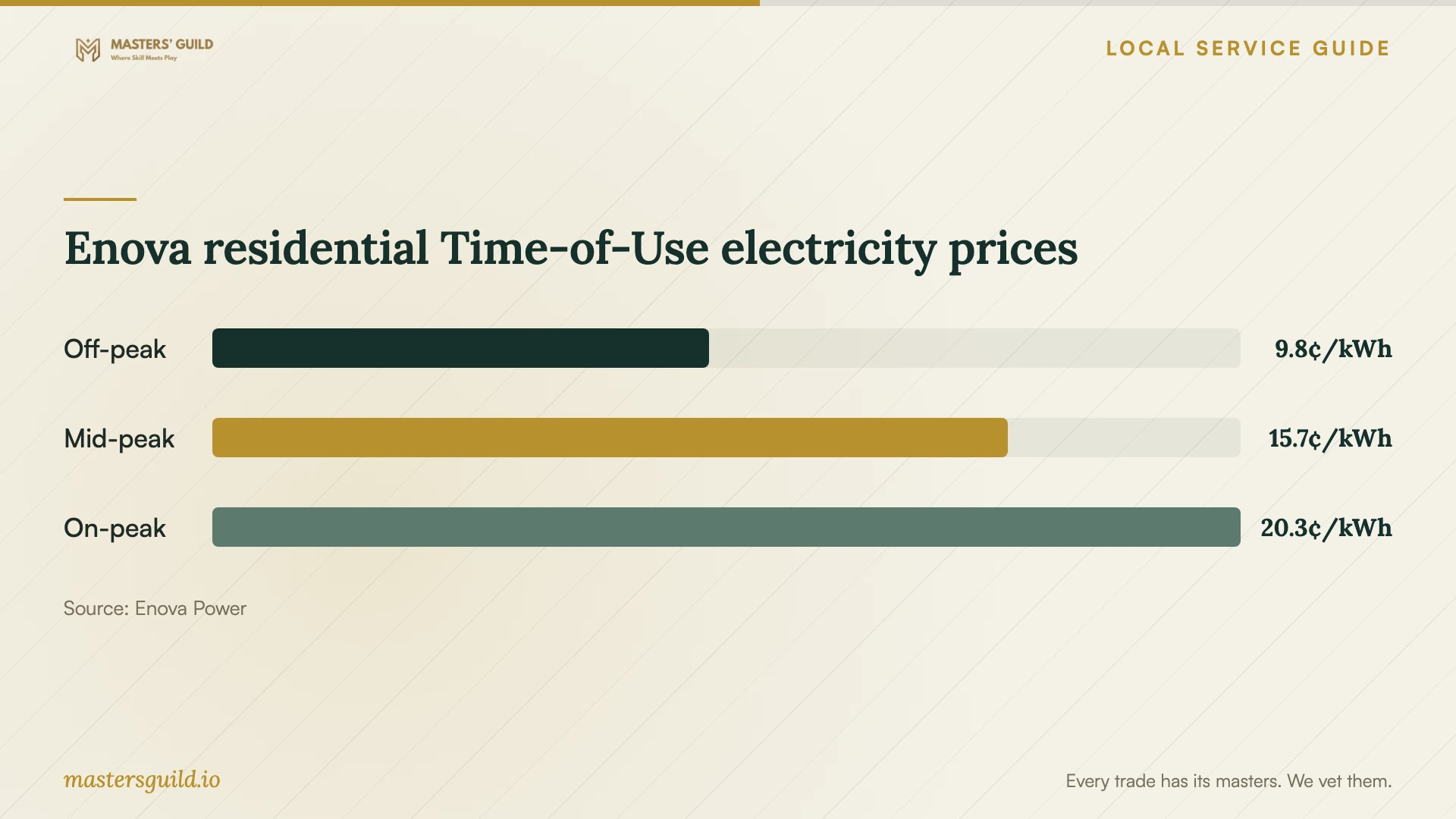
Before accepting a recurring schedule, check your Enova plan and the applicable time periods. Enova provides a Price Comparison tool through the Smart Meter section of My Account. Use your household consumption history to assess a plan change rather than treating an appliance timer as proof of savings. [1]
Enova residential Time-of-Use electricity prices
Local details that affect your job
Use the Kitchener or Wilmot electricity information
Enova publishes separate customer information for Kitchener or Wilmot and for Waterloo, Woolwich, or Wellesley. Choose the residential Kitchener or Wilmot section when checking your plan. Enova changes Time-of-Use seasonal periods on May 1 and November 1, so review configured schedules around those dates. [1]
New gas service needs a separate timeline
If your project needs a new gas service line, Kitchener Utilities gives an installation timeline of six to eight weeks under normal conditions, or up to six months for addresses on regional roads. Your heating contractor submits the application. Confirm the utility and contractor appointments before setting a date for connected-feature setup; these timelines concern new gas service, not app pairing or a routine appliance replacement. [2]
Match the appointment to the work
| Your situation | Who to arrange | What to confirm |
|---|---|---|
| Installed appliance needs app pairing | A setup provider who confirms support for your model | Pairing, updates, desired features, and a demonstration |
| New circuit, outlet, or hardwired connection | A Licensed Electrical Contractor | ECRA/ESA licence verification, notification requirements, and Certificate of Acceptance |
| Gas appliance needs a connection | A licensed natural gas service professional | Connection scope and completion before connected-feature setup |
| New gas service line | A licensed heating contractor and Kitchener Utilities | Application, inside piping, utility timing, and inspection arrangements |
| Appliance installation includes interior alterations | Confirm scope with the City’s building staff | Permit requirements before work begins |
Your hiring checklist
- Send model numbers and a list of the features you want configured.
- Confirm who will finish physical installation and connection work.
- Ask for an itemized scope and terms for extra troubleshooting.
- Have your phone, account access, manuals, and router access ready.
- Plan to enter passwords yourself and retain account recovery access.
- Check your electricity plan before requesting recurring schedules.
- Demonstrate agreed controls and notifications before the provider leaves.
- Keep a record of settings, unresolved tasks, and follow-up arrangements.
Frequently Asked Questions
How much should I budget for setup?
Request a written quote for your appliance models and desired features. Ask the provider to price app pairing, network troubleshooting, equipment, and connection work as separate items. Compare written quotes for the same scope, including terms for extra troubleshooting or a return visit.
Should the installer use my account?
Ask them to configure the appliance under an account you control. Enter your own credentials and retain recovery access. Get Cyber Safe recommends strong passwords, changed default usernames, and device updates; include those steps in your requested setup. [5]
Will scheduling my appliances reduce my electricity bill?
The result depends on your electricity plan and consumption. Enova’s Time-of-Use plan charges by time period, while Tiered pricing uses consumption thresholds. Check your plan and use Enova’s account comparison tool before changing plans or setting schedules. [1]
Does app setup cover a gas dryer connection?
Ask for separate scopes. Kitchener Utilities identifies a licensed natural gas service professional for adding appliance connections. Arrange that work before asking a setup provider to pair the dryer with its app. [2]
Sources and scope
This guide combines the sources below with practical planning guidance. Figures apply to the stated geography and period; request a written quote for your property.