
Local service guide
Computer Virus Removal in Kitchener: Hiring Guide
For Computer Virus Removal in Kitchener, choose a technician who will agree in writing on diagnosis, file preservation, cleanup or operating-system reinstallation, and checks before you reconnect. Request an itemized quote and require approval before anyone erases files. Disconnect a suspected infected computer from networks and use a separate, trusted device for sensitive accounts while you arrange help. [3]
Contain the problem before arranging repair
The Canadian Centre for Cyber Security lists browser redirects, unfamiliar programs, disabled antivirus protection, inaccessible files and unusual account activity among possible infection signs. Tell the technician which symptoms you observed and when they started. Request a diagnosis before authorizing a particular repair. [3]
Disconnect the affected computer from networks and stop using it to sign into email or banking. If malware appears active or spreading, follow the Cyber Centre’s advice to power off the device. Contact your repair provider from another device and describe any ransom demand, unexpected remote access or missing files before attempting cleanup. [3]
Write down what happened before the symptoms appeared, including downloads, attachments or a caller’s instructions. Keep photographs of warnings and a record of payments or messages. Give the technician this history without repeating the actions that preceded the problem.
Compare the full repair scope and total quote
Have each provider separate diagnosis, malware removal, operating-system reinstallation, file backup and restoration in the quote. Request a total identifying taxes, travel, software purchases and any diagnostic charge you would owe if you decline the repair. Set a spending limit and require approval for additional work.
Discuss how the technician will decide that you can return the computer to use. The Cyber Centre’s organizational guidance recommends offline scans where possible, restoration from known clean backups, scanning backup files and reconnecting after operating-system reinstallation and clean malware scans. Use those recovery steps to assess whether a proposed scan-only service covers your situation. [3]
For drop-off service, confirm the address, intake time, collection arrangements and whether to bring the charger. For a home visit, discuss the call-out charge and work that may require taking the computer away. If someone proposes remote service, have them explain how that fits the advice to disconnect an infected device before agreeing to reconnect it. [3]
Request an expected completion window after diagnosis. Require the provider to contact you before reinstalling the operating system, replacing storage or attempting file recovery. Keep those permissions separate so your cleanup request gives the technician clear boundaries.
Set privacy and file-preservation boundaries
Review the provider’s data-handling policy before handing over your computer or login details. In original research accepted for the 2023 IEEE Symposium on Security and Privacy, researchers examined repair-provider practices and documented unauthorized access to personal data. Use that research to frame privacy questions without assuming it describes any Kitchener technician. [4]
Identify the folders you need preserved, such as family photographs, tax records and personal documents. Agree on who can access them, whether the technician will copy them to another device, where that copy will remain and when they will delete it. Require separate approval before formatting storage or deleting files.
Tell the technician whether you have a backup and when you last made it. The Cyber Centre advises restoring from known clean backups created before infection and scanning backup files before restoration. Have the provider explain how they will assess your backup before using it. [3]
Plan account recovery and the handover
Include account recovery in your plan. The Cyber Centre advises resetting passwords associated with the affected device, revoking active sign-in sessions and access tokens, and re-enrolling multi-factor authentication. From a separate trusted device, arrange these steps for affected accounts. Keep banking passwords under your control. [3]
At collection, request a written summary of the work, scan results, files restored and any remaining concerns. Confirm which applications need reinstallation and who will supply their licences. Discuss the next step if symptoms return, including whether further diagnosis carries a charge.
For ongoing protection, the Cyber Centre recommends software and operating-system updates, protective security tools, unique passwords and backups. Have the technician show you how to check updates and backups yourself, then agree on any paid follow-up before accepting it. [3]
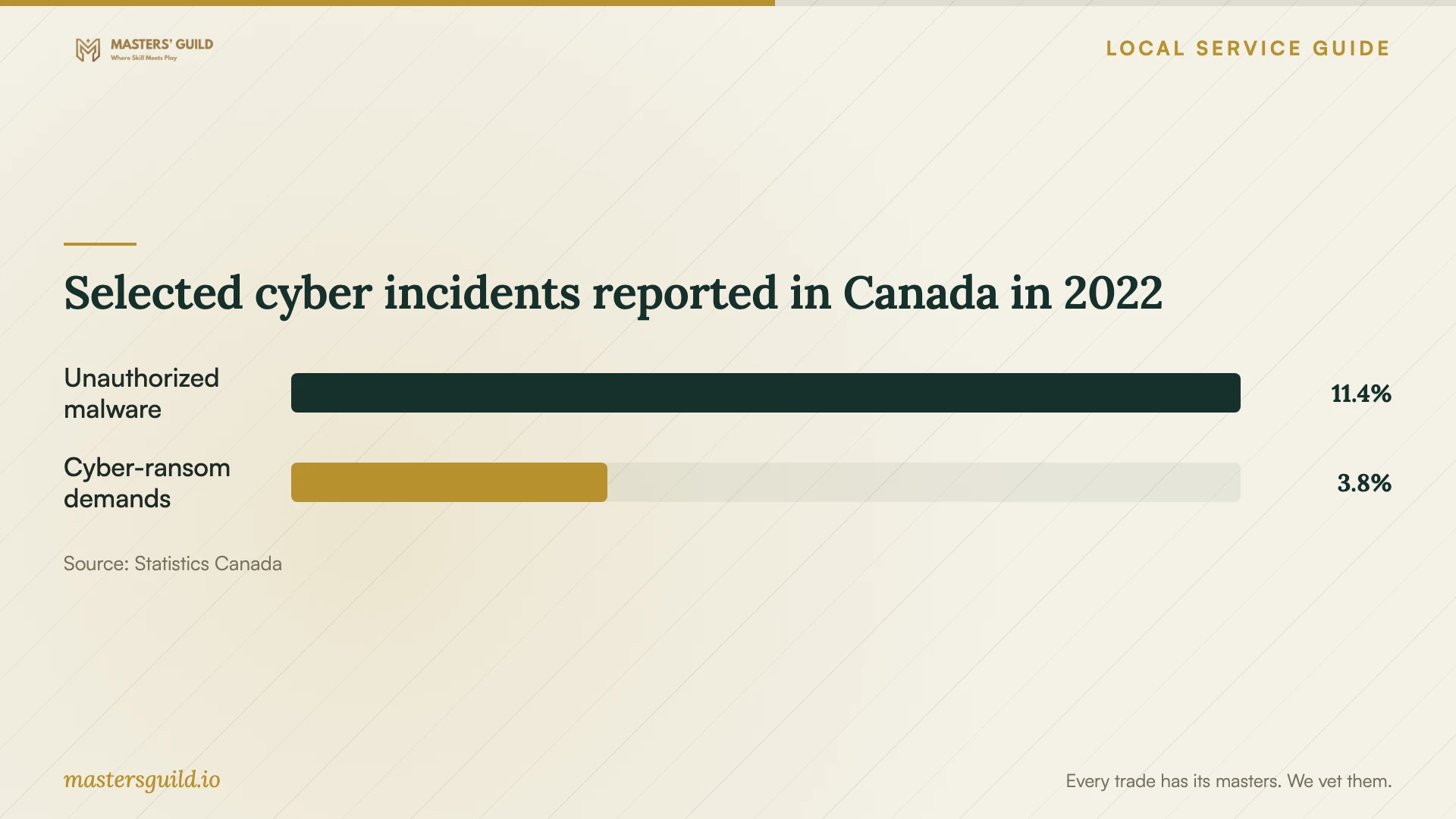
Selected cyber incidents reported in Canada in 2022
Local details that affect your job
Report fraud through Waterloo Regional Police
If the incident involved fraudulent use of personal or financial information, Waterloo Regional Police lists online reporting for losses under $25,000 and directs losses over $25,000 to 519-570-9777. Its page does not specify the route for exactly $25,000; call the non-emergency number for direction in that case. Arrange reporting alongside repair and ask the technician to preserve relevant messages before erasing the device. [1]
Arrange data handling before local recycling
If you choose replacement, include file recovery and erasure in the repair scope. The Region of Waterloo states that electronics covered by its e-waste guidance, including computers, are banned from curbside collection. It directs residents to EPRA for current free drop-off locations and device-wiping guidance. Confirm your data arrangements before taking the computer to a collection point. [2]
Match the appointment to the problem
| Your situation | Scope to request | Question before approval |
|---|---|---|
| Browser redirects or unfamiliar programs | Diagnosis, browser inspection and malware assessment | What did you find, and what work do you recommend? |
| Encrypted files or a ransom demand | Containment and a recovery assessment before erasure | How will you preserve files and assess clean backups? |
| Unusual account logins or password changes | Device recovery plus an account-security plan | Which sessions, passwords and authentication settings need attention? |
| Considering replacement | File recovery and secure erasure before recycling | Who will complete the data work before recycling drop-off? |
Your hiring checklist
- Record symptoms, warning text and the events that preceded them.
- List the files you need preserved and identify your existing backups.
- Request an itemized total and set an approval limit for extra work.
- Agree on access to personal files and deletion of repair copies.
- Require permission before erasure, reinstallation or storage replacement.
- Confirm intake, collection and the expected completion window.
- Request a repair summary and instructions for checking backups and updates.
Frequently Asked Questions
How much should I budget for removal?
Request a quote after describing the symptoms and file-preservation needs. Compare totals for the same scope, including diagnosis, backup, reinstallation and follow-up. Confirm what you owe if you decline the proposed repair.
Can the technician guarantee all my files will survive?
Have the technician assess recovery before promising an outcome. The Cyber Centre describes malware that encrypts files and malware that destroys data. Require approval before erasure and discuss which clean backups you can use. [3]
Should I give the technician my passwords?
Ask which device access they need and why. Agree on a method that limits access to the repair task, and enter credentials yourself where practical. Handle banking and other sensitive account recovery from a separate trusted device. [3] [4]
Does removing malware finish the recovery?
Include affected accounts and backups in the recovery plan. The Cyber Centre recommends password resets, session and token revocation, multi-factor authentication re-enrolment and continued monitoring after device recovery. [3]
Sources and scope
This guide combines the sources below with practical planning guidance. Figures apply to the stated geography and period; request a written quote for your property.