
Local service guide
Cloud Service Setup in Kitchener: Hiring Guide
For Cloud Service Setup in Kitchener, hire a technician against a written scope covering your accounts, files, devices, access permissions and recovery checks. Request separate setup and subscription charges, and agree on who confirms completion after uploads finish. For basic device instruction, consider Kitchener Public Library’s one-hour Tech Help sessions before booking paid work; confirm whether staff can address your question. [1]
Define the work before requesting quotes
Write down what you want to accomplish: shared folders for staff, a move from an existing account, access from another device, or a recoverable copy of business records. Identify the folders and accounts involved. Ask the technician to explain how the proposed service handles file changes, deletion and recovery before you authorize the transfer.
Give bidders the same inventory. Include your approximate data volume, device operating systems, staff access needs and existing subscriptions. Identify anything you want excluded, such as personal photos on a work laptop. Ask the technician to list assumptions and exclusions in the quote, including any work on email, accounting software or shared links.
Compare the full quote and completion plan
Get written quotes for your actual scope. Request separate amounts for setup labour, migration, recurring subscriptions and follow-up support. Ask whether the quote covers a return visit or remote check after transfers finish, and how the technician will charge for work beyond the agreed scope.
Agree on a completion test before work begins. Ask the technician to demonstrate access from the intended devices, open a sample of transferred files, check staff permissions and recover a test file using the agreed recovery method. Keep the original data until you have reviewed the transfer and accepted the results.
Name the person who will monitor unfinished uploads, resolve errors and contact you when the job is ready for review. If you need staff to stop editing files during a migration, agree on that window in advance. Include a plan for staff who need access to business records during the transfer.
Review privacy before moving customer records
The Office of the Privacy Commissioner of Canada says businesses remain accountable for personal information they outsource to cloud providers. Its guidance calls for reviewing provider terms, limiting access and using safeguards suited to the sensitivity of the information. Ask who needs access to customer records and have the technician document those permissions. [4]
Ask where the provider stores and processes information, including backups. The regulator explains that information transferred abroad falls under the laws of that jurisdiction and that providers may keep backup servers in a different location from primary servers. Review the proposed arrangement before authorizing a transfer of customer information. [4]
The regulator recommends stronger authentication, including multi-factor authentication, and an exit strategy that covers retrieving and deleting information. Ask the technician to configure authentication and recovery access under your business’s control. Request a handover record naming the account owner, administrator and person responsible for future access changes. [4]
Plan local learning and connectivity help
Kitchener Public Library offers one-hour appointments for learning to use computers, e-readers, smartphones and tablets. Its booking form lets you select a library location and identify your own device. Describe your question when booking so staff can assess the help you need. [1]
KPL provides free Wi-Fi at all locations and warns that its wireless network environment is unsecured. If you plan a learning visit, ask your technician how to protect confidential records and account access on the device you bring. Choose a connection and device setup you have assessed before handling sensitive business information. [3]
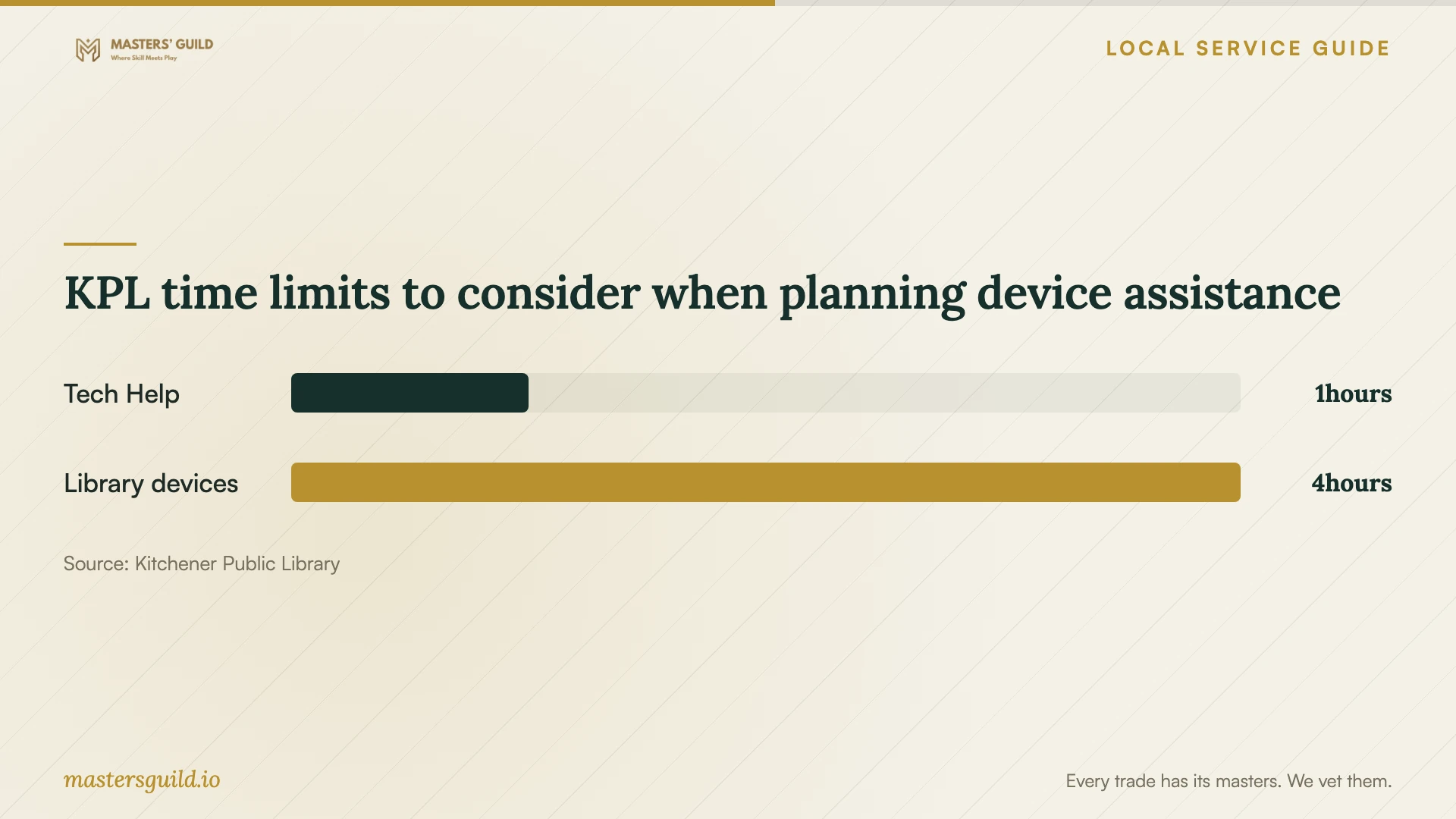
KPL time limits to consider when planning device assistance
Local details that affect your job
Choose an appointment or a drop-in learning session
KPL offers bookable one-hour Tech Help sessions and Tuesday evening drop-in Tech Tutors at Central Library without registration. Use the appointment form to describe a specific device question, or check the drop-in schedule before travelling. Confirm the scope of assistance before relying on it for a business task. [1]
Check temporary connectivity before scheduling transfers
KPL lists wireless hotspots with a three-week loan period and permits holds and renewals. Renewals depend on the borrowing conditions, including whether another borrower has placed a hold. If you are waiting for internet service at your premises, confirm availability, eligibility, data allowances and suitability for your upload before scheduling work around a borrowed hotspot. [2]
Choose help that matches the task
| Your situation | Suggested next step | Confirm before proceeding |
|---|---|---|
| You need help learning a device | Consider a KPL one-hour Tech Help appointment | Describe the question and confirm staff can assist |
| You want informal device guidance | Check Tuesday evening Tech Tutors at Central Library | Confirm the current session schedule before travelling |
| You need a business file migration | Request a technician’s written transfer and testing scope | Agree on exclusions, completion checks and follow-up |
| You will move customer personal information | Review provider terms, access controls and data locations | Confirm retrieval, deletion and incident procedures |
Your hiring checklist
- List the source accounts, folders, devices and staff members included in the job.
- Identify customer information and files you want excluded from the transfer.
- Request separate setup, subscription and follow-up charges.
- Agree on a transfer window and who checks unfinished uploads.
- Keep account ownership, billing and recovery access under business control.
- Require sample-file, permission and recovery demonstrations before acceptance.
- Obtain a handover record and remove temporary technician access when work ends.
Frequently Asked Questions
Can the library perform my business cloud migration?
KPL describes its Tech Help service as device learning assistance. Ask staff whether they can address your specific question. Arrange a technician’s written scope for business file transfers, permission changes and recovery testing. [1]
Should the technician own the cloud account?
Ask to retain account ownership, billing access and recovery details within your business. Give the technician the access needed for the agreed work, then review and remove temporary access during handover.
Must my business keep cloud data in Canada?
The federal privacy regulator’s guidance says Canada’s private-sector privacy legislation does not prohibit transfers abroad for processing, while noting that specific provincial obligations may apply. Assess your own obligations, the information’s sensitivity and the provider’s storage locations before deciding. [4]
What should I receive when setup ends?
Request a record of the accounts, selected folders, permissions, recurring charges and support arrangements. Have the technician demonstrate the agreed recovery process and explain any unfinished work before you accept completion.
Sources and scope
This guide combines the sources below with practical planning guidance. Figures apply to the stated geography and period; request a written quote for your property.