
Local service guide
Cloud Service Setup in Kansas City, MO
Arrange Cloud Service Setup in Kansas City, MO by asking for a written scope covering your devices, files, account access, and a recovery demonstration. Hire help when you want someone to manage a migration or configure household permissions. Before booking, check your internet installation benefits and consider the library’s free technology learning support for basic questions. [1] [2]
Define the work before comparing quotes
Write down what you want to accomplish: share household documents, move a photo collection, connect a replacement computer, or arrange a recoverable copy of important files. Ask the technician to explain the proposed approach in ordinary language. Include a demonstration of what happens when you edit or delete a test file and how you would recover it.
Give each person quoting the job the same device list, approximate file volume, and starting location of the files. Include external drives and older accounts you want reviewed. Ask them to identify anything outside the quote, such as sorting duplicates, repairing a device, purchasing storage, or returning to resolve an incomplete upload.
Check your connection before scheduling the upload
For an eligible address, gFiber advertises Kansas City residential plans with upload and download speeds up to 1, 3, or 8 gigabits per second. The provider describes these as maximum wired speeds and says actual internet and Wi-Fi performance can vary. Check address eligibility and measure performance on the device you intend to use before choosing an appointment. [1]
Ask the technician to separate active setup time from unattended transfer time in the quote. Agree on who will monitor progress, how you will learn that the upload has finished, and what follow-up covers interrupted transfers. Avoid committing to a completion deadline until the technician has reviewed your files and connection.
Before purchasing a faster internet plan for this job, review the connection you already have. Ask the technician to explain which task requires an upgrade and what they measured. Include the proposed ongoing internet and cloud subscription charges in your budget alongside the setup labor.
Compare labor, subscriptions, and follow-up
Request separate amounts for setup labor, cloud subscriptions, equipment, and follow-up support. For hourly work, ask for an approval limit before the technician spends more time. For a fixed quote, name the devices and accounts it covers and agree on what happens if the technician discovers inaccessible files or an account you cannot recover.
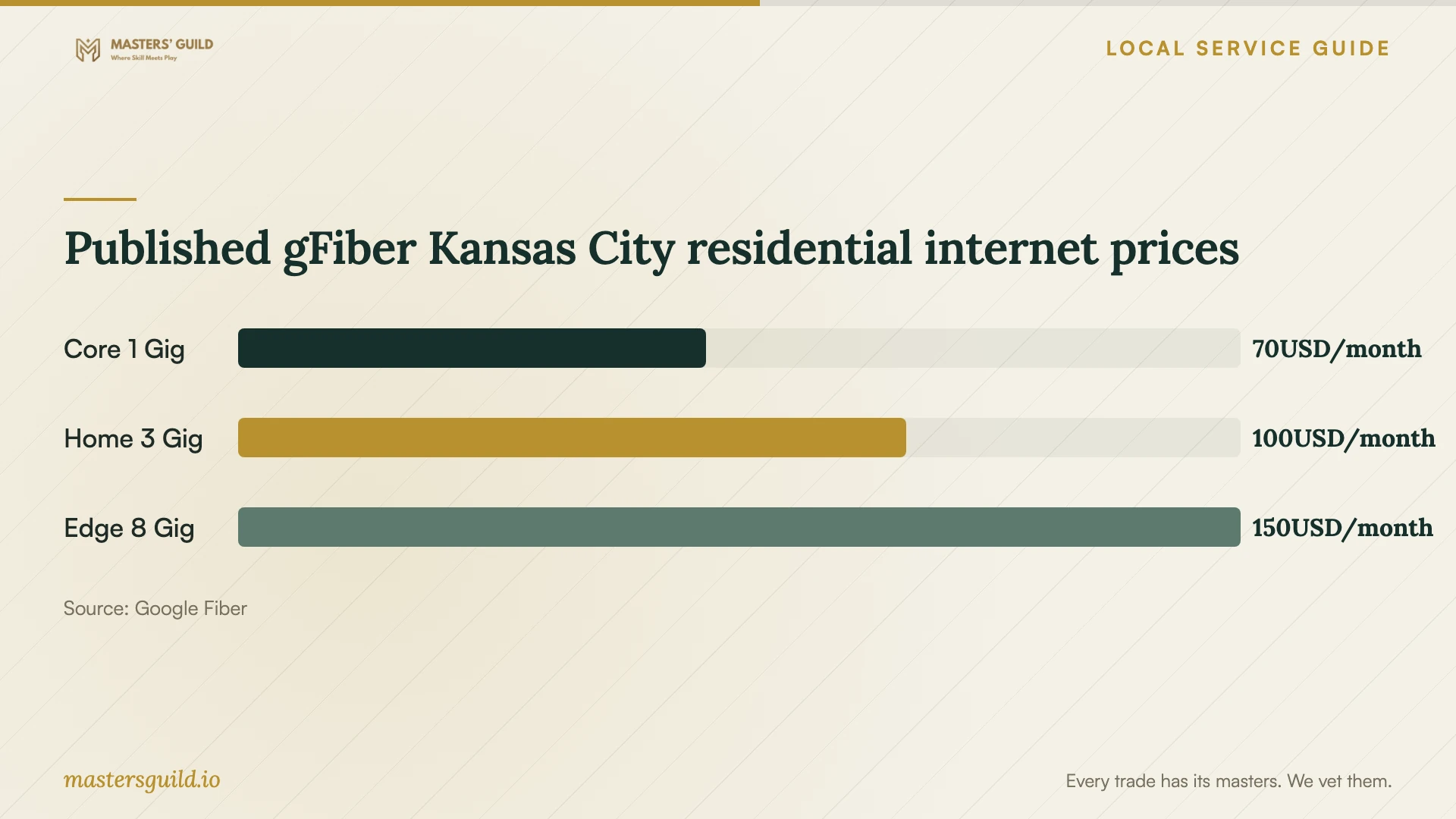
Use the internet plan chart as a household connectivity reference. gFiber lists monthly residential prices of $70, $100, and $150 for the plans shown, plus taxes and fees. Those figures describe internet service; they do not establish a local price for cloud setup labor or cloud storage. [1]
Keep control of accounts and approve the handoff
Use an account you control and enter passwords yourself. Ask the technician to configure recovery details with you present and explain any access they need. Before permitting remote support, agree on how you will end the session and remove any continuing access after the work.
Keep the original files until you have checked the destination and approved the transfer. Open a selection of photos and documents, check the folders you named in the scope, and test access from each intended device. Ask the technician to demonstrate recovery using a disposable test file rather than an important original.
Request a short handoff note naming the accounts, selected folders, subscription renewal arrangements, and remaining tasks. Have the technician show you how to recognize a failed transfer and where to seek support. Record account recovery instructions somewhere you can access without signing into the account you need to recover.
Published gFiber Kansas City residential internet prices
Local details that affect your job
Check gFiber installation inclusions before hiring network help
gFiber’s Kansas City residential page offers free professional installation with performance verification. Its Home 3 Gig and Edge 8 Gig offerings also describe an in-home consultation and hard wiring to up to two high-use areas for eligible households. Confirm your address and plan benefits before adding overlapping network work to a cloud setup quote. Ask a separate technician to itemize account configuration and file migration. [1]
Use free local learning support for basic questions
Kansas City Public Library describes Tech Access as a free service for learning to use technology and digital tools, including smartphones and internet resources. Consider that route if you want instruction before deciding whether to hire someone. Ask whether the library can help with your specific task. [2]
Arrange temporary connectivity before the appointment
The library’s Internet to Go program lends hotspots for 21 days with no renewals and requires a library card. Borrowers must be at least 13, accept the program terms, and meet its proof-of-address or listed school eligibility conditions. The hotspots use T-Mobile LTE coverage. Place a hold and wait for pickup notice before scheduling dependent work; test the connection at home before approving a large upload. [3]
Choose the next step for your household
| Your situation | Next step | Confirm before proceeding |
|---|---|---|
| You want help learning basic device or internet skills | Consider the library’s free Tech Access service | Ask whether current assistance covers your question |
| You need network installation at a gFiber-eligible address | Review the provider’s included installation options | Confirm plan benefits and eligibility before paying for overlapping work |
| You lack home internet during the planned setup | Consider an Internet to Go hotspot | Check borrowing eligibility, pickup availability, and T-Mobile LTE coverage |
| You want files moved and household access configured | Request a written migration and permissions scope | Include destination checks, recovery testing, and follow-up responsibilities |
Your hiring checklist
- List the devices, accounts, folders, and external drives you want included.
- Choose which household members should see or edit each shared folder.
- Confirm that you can sign in and access your recovery email or phone.
- Keep an untouched copy of the files you plan to transfer.
- Check internet installation benefits and test the intended connection.
- Request an itemized quote with a spending limit and follow-up terms.
- Agree on file checks, a recovery demonstration, and written handoff notes.
Frequently Asked Questions
How much should I budget for cloud setup?
Ask technicians for a written quote based on your devices, file volume, and requested work. Ask for separate labor and recurring subscription amounts, plus the cost of any follow-up visit.
Does internet installation include moving my files?
Ask the provider to confirm its scope. gFiber’s local page describes internet installation, Wi-Fi equipment, and performance verification. Specify account setup and file migration in any separate technician agreement. [1]
Can I use a library hotspot for the setup?
The library lends hotspots with free wireless service through its Internet to Go program. They operate at 4G/LTE speeds within T-Mobile coverage, with a 21-day borrowing period and no renewals. Confirm eligibility and test the connection before relying on one for your transfer. [3]
What should I check before approving completion?
Open selected files at the destination, test the intended devices and sharing permissions, and watch a recovery demonstration. Confirm any unfinished upload and follow-up arrangements in writing. Keep your originals until you approve the results.
Sources and scope
This guide combines the sources below with practical planning guidance. Figures apply to the stated geography and period; request a written quote for your property.