
Local service guide
Network Setup and Support in Jersey City
Arrange Network Setup and Support in Jersey City by requesting a diagnosis and written scope before approving equipment purchases or cable installation. Describe where connections fail, which devices matter, and whether you want work inside walls. For proposed building alterations, confirm requirements with the city’s Construction Code office before agreeing to an installation date. [2]
Choose the scope before choosing equipment
Write down a problem the technician can reproduce: a dropped call at your desk, a television that disconnects, or a bedroom where your laptop loses its connection. Include whether the problem affects one device or several, and whether it happens near the router. Ask the technician to record a baseline before changing settings.
Request separate prices for diagnosis, equipment setup, and permanent cabling. For a router or mesh proposal, ask the technician to identify device locations and explain how they plan to connect the units. For Ethernet work, request a route sketch showing outlets, wall openings, and termination points. Approve the route before drilling begins.
Check internet service at your address
The FCC’s National Broadband Map lets you search an address and inspect the providers, connection technologies, and maximum advertised download and upload speeds they report. Use that information when discussing whether to troubleshoot your existing connection or investigate another service. [3]
The FCC describes these entries as provider-reported availability and advertised speeds. Use them to prepare questions about service at your address. Confirm your unit address, installation arrangements, and service offer with the provider before approving equipment for a proposed connection. [3]
If a provider cannot supply service that the map lists at your address, the FCC offers an availability challenge process. Keep your provider correspondence so you can describe the discrepancy when submitting a challenge. [3]
Resolve cable access and city requirements
For work involving building alterations, contact the Division of the Construction Code Official with the proposed scope. The city administers construction permits and inspections. Ask whether your cable route needs a permit, technical application sections, or inspections. Its published guidance does not establish a blanket permit rule for home Ethernet installations. [1] [2]
The city’s application guidance requires building plans to show how communication-system penetrations will maintain required structural and fire-resistance ratings. For a route through a wall or floor assembly, ask the installer to explain the penetration and sealing details and identify who will handle any required documentation. [1]
For a condo or shared building, ask management about permission to enter service spaces, approved cable routes, and access arrangements. Put those answers in the scope. If you prefer to avoid opening finished walls, request a separate price for a visible cable route and ask the installer to show you its appearance before approval.
Compare quotes by deliverables
Ask each bidder to separate diagnosis, labor, hardware, cable materials, and wall repairs. Specify who supplies equipment and who controls the administrator account after setup. For permanent wiring, request outlet labels, a matching route record, and a test result for each installed connection. Ask what testing the quoted price includes.
Agree on a change process for inaccessible routes or additional wall openings. Require the installer to explain the added work and price before proceeding. Ask whether the quote includes a return visit if the agreed checks fail, and define the support period in writing.
Prepare for the visit and check the result
Gather your internet plan details, equipment model names, and a floor sketch. Mark the rooms and devices you want the technician to test. Arrange access to the router and proposed cable route, and have the account holder available for provider questions. Enter account passwords yourself when you can.
Before accepting the work, repeat the original problem task in each agreed location. Ask the technician to demonstrate the installed wired connections, identify the equipment, and explain how to restart it. Keep administrator access under your control, remove temporary access, and retain configuration notes with your invoice.
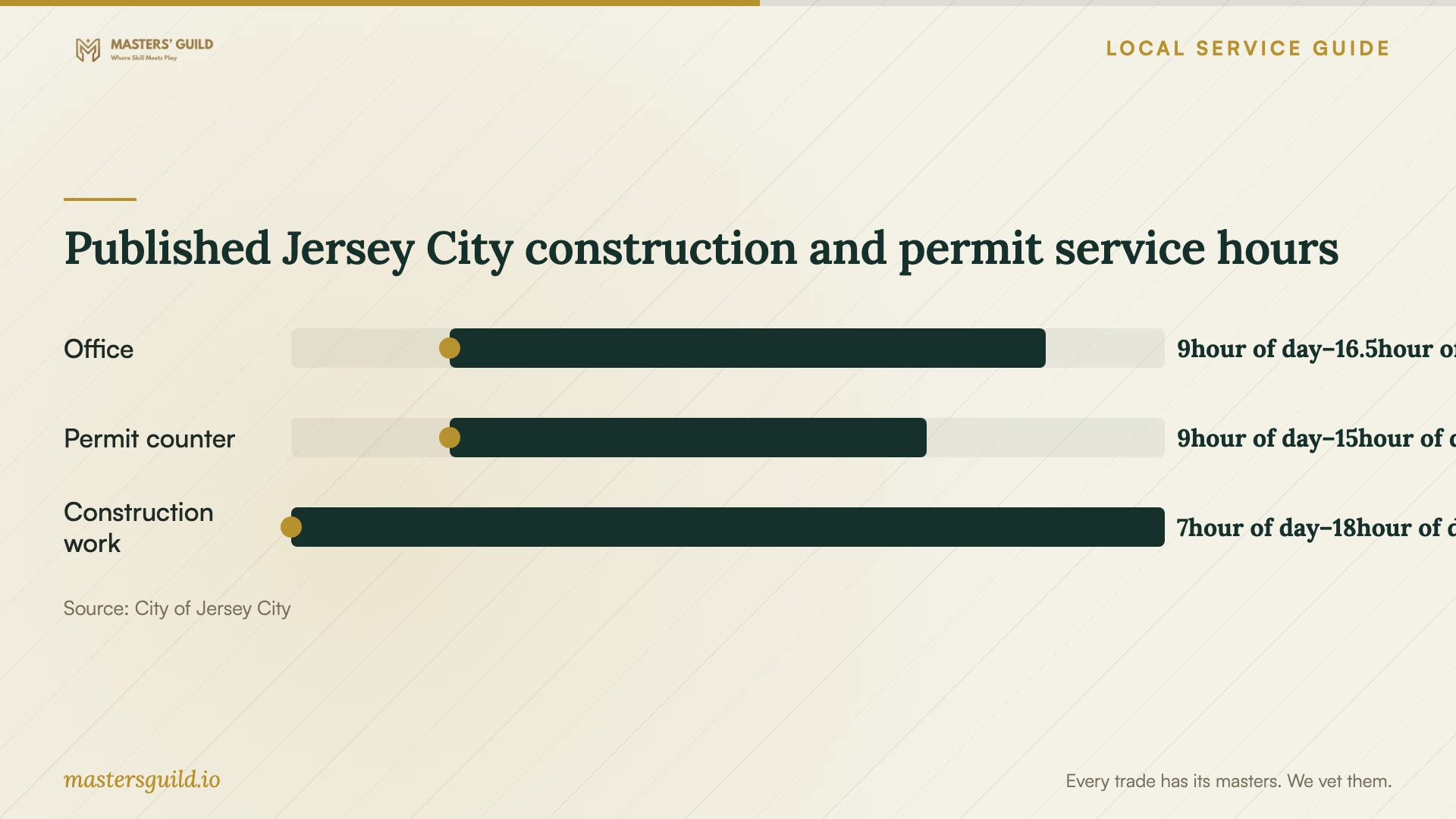
Published Jersey City construction and permit service hours
Local details that affect your job
Complete the linked technical applications
Jersey City directs applicants to submit the main construction permit application through its portal, then return to the application’s sub-records to apply for the appropriate technical cards. If your cable project requires a permit, have the contractor identify the required sections and who will submit them. The city says plan review can take up to 20 business days. Confirm this step before setting a firm installation date. [1]
Plan permit-counter visits around its shorter hours
The Construction Code office lists 201-547-5055 and City Hall Annex, One Jackson Square, 364 MLK Drive. Its permit counter operates from 9:00 a.m. to 3:00 p.m., while office hours extend to 4:30 p.m. Call with your proposed route and scope before making a permit-counter trip. [2]
Match your request to the work you need
| Your situation | Request first | Clarify before approval |
|---|---|---|
| Connection problems without a clear cause | A diagnostic visit | How the technician will compare wired and wireless results |
| Coverage concerns in particular rooms | A placement and coverage proposal | Device locations and acceptance checks |
| A permanent connection at a desk or television | A cable-route proposal | Openings, repairs, testing, and responsibility for checking permit requirements |
| A move or possible provider change | An address-level availability check | Provider confirmation of the offer and installation arrangements |
Your hiring checklist
- Record affected rooms, devices, symptoms, and times of failure.
- Gather provider plan details and equipment model names.
- Request a diagnosis before approving replacement hardware.
- Approve outlet locations, cable routes, and wall openings in writing.
- Confirm building access and assign responsibility for checking permit requirements.
- Separate equipment, labor, testing, and repairs in the quote.
- Repeat the agreed checks before accepting the work.
- Keep administrator access, connection labels, and setup notes.
Frequently Asked Questions
How much should I budget?
Request an itemized quote after describing your symptoms and access conditions. Separate the diagnostic charge from equipment, cable work, repairs, and follow-up support. Ask bidders to price the same outlet locations and testing requirements so you can compare the scope as well as the total.
Does installing Ethernet require a permit?
Confirm your specific scope with Jersey City Construction Code. Its published guidance covers construction applications and communication-system penetrations, but does not give a blanket answer for all Ethernet jobs. Describe the cable route, proposed openings, and affected wall or floor assemblies. [1] [2]
Does the FCC map show the speed I will get indoors?
The fixed broadband map lists provider-reported availability and maximum advertised speeds. Use an on-site test to assess your room-by-room Wi-Fi performance. The FCC states that its mobile coverage map describes outdoor or in-vehicle coverage and excludes indoor coverage. [3]
Sources and scope
This guide combines the sources below with practical planning guidance. Figures apply to the stated geography and period; request a written quote for your property.