
Local service guide
Computer Virus Removal in Jersey City, NJ
For Computer Virus Removal in Jersey City, choose a technician after describing your symptoms, whether the computer starts, and which files you need to keep. Request a written diagnosis and repair scope before committing to cleanup or reinstallation. Choose remote help, drop-off, or a home visit after discussing access, timing, and the total charge.
Describe the problem before choosing the repair
Tell the technician what you saw: an unexpected warning, a changed browser page, a failed sign-in, or a computer that stops during startup. Include when the problem began and what you installed or opened beforehand. If you let someone connect remotely, describe that session and any payment request.
Ask the technician to explain what they plan to inspect and what you will receive after diagnosis. Request separate prices for cleanup, operating-system repair, backup, and reinstallation where they propose those services. Confirm the diagnostic charge if you decline further work, and set a spending limit.
Choose remote help, drop-off, or a home visit
Discuss remote help if you want to remain present during the session. Ask what access the technician needs, how you can end the connection, and how they will remove their access afterward. Establish the next step and any additional charge if they cannot finish remotely.
For drop-off, request a receipt identifying the computer and accessories you leave. For a home visit, confirm the arrival window, travel charge, and workspace requirements. Tell the technician your deadline, then ask for an assessment time and a completion estimate after diagnosis. Arrange another way to handle essential household tasks while the computer is unavailable.
Protect files and control account access
Identify the photographs, documents, and other files you want preserved. Tell the technician when you last checked your backup. Require separate permission before they erase the drive or reinstall the operating system, and ask them to explain what they intend to retain and restore.
Agree on where the technician may store copied files and when they will delete their copy. Arrange to enter account credentials yourself where possible. If someone else manages the device, involve that person before authorizing changes. Ask the technician to identify any backup media you should bring or collect.
Check a support request before granting access
The FTC describes Microsoft impersonation scams that start with a fake security pop-up and a number to call for help. It also describes phony Geek Squad emails claiming that an unwanted service will renew. If a warning or message prompted your search, contact the business through a phone number or website you know is real. [3]
The FTC advises you to pause and talk with someone you trust when a person rushes you to send money. It warns against demands for gift cards, cryptocurrency, money transfers, or payment apps as the only way to pay. Use that pause to verify who is requesting access to your computer. [3]
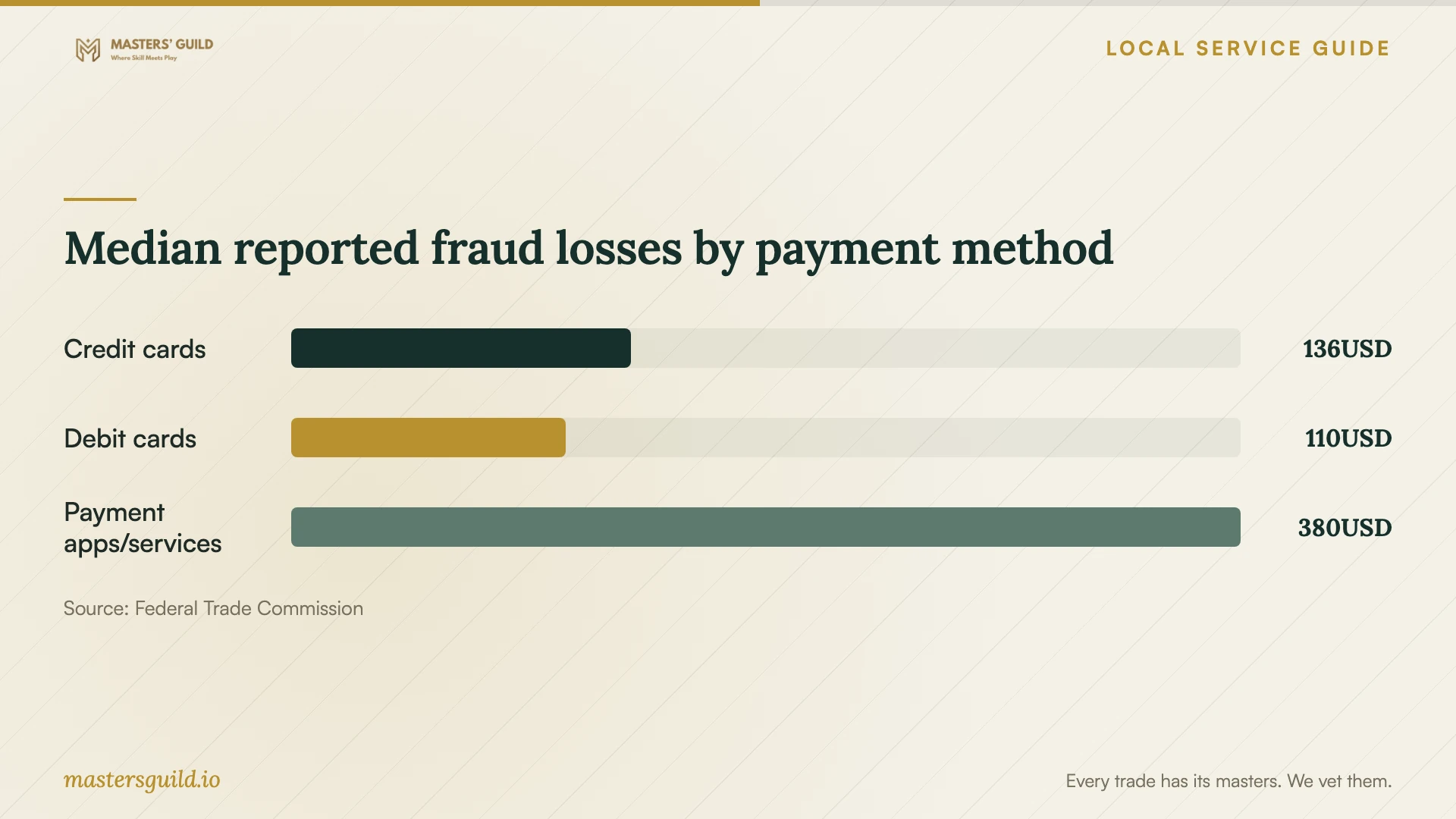
The payment-loss chart gives historical national context for this caution. The FTC figures cover all fraud types, so they do not measure repair-scam risk or establish which payment method you should choose for a particular technician. [3]
Check the work before closing the job
Ask for a written account of what the technician found, what they changed, and what remains unresolved. At handover, open your priority files and try the household tasks you need the computer to perform. Have the technician explain any software, subscription, or account they added.
Confirm how to report a returning symptom, what the technician includes in follow-up support, and when another assessment would carry a charge. If they recommend replacement, ask them to explain the repair and replacement options before you decide. Include file transfer and drive sanitization in that discussion.
Median reported fraud losses by payment method
Local details that affect your job
Compare quotes with New Jersey tax included
New Jersey assesses a general sales-tax rate of 6.625% on most tangible personal property, specified digital products, and certain services unless exempt. Ask the technician to identify applicable tax rather than assuming the same treatment for each charge. For an out-of-state remote or mail-in provider, ask whether they collect New Jersey tax. The state says use tax can apply to taxable out-of-state purchases when you pay no sales tax or pay less than New Jersey requires. Confirm the treatment of your quoted service before comparing totals. [2] [4]
Confirm city pickup before setting equipment out
Jersey City Sanitation directs residents to schedule curbside electronic-waste pickup at 201-547-4400 and lists computer monitors among its examples. If you choose replacement, call to confirm acceptance of your specific computer or monitor and ask how to prepare it for collection. Complete your data-transfer and drive-sanitization arrangements before handing over equipment for disposal. [1]
Choose your next step
| Your situation | Next step | Question to resolve |
|---|---|---|
| You want remote help | Discuss the session before granting access. | Can I observe and end the connection? |
| The computer will not start | Describe where startup stops and request an assessment. | Should I bring the charger or other accessories? |
| You need the computer by a deadline | Explain the tasks you must resume. | When will you assess it and update me? |
| A security pop-up supplied a support number | Verify the business through a contact route you trust; the FTC documents this scam tactic. | Have I confirmed who will receive access? |
Your hiring checklist
- Record the exact warning or startup behavior without calling a number displayed in the warning.
- List the computer model, accessories, and software you need to keep using.
- Tell the technician about any remote session or payment you already authorized.
- Confirm the service location, access arrangements, and assessment time.
- Read the proposed scope and identify any recurring software charges.
- Keep the receipt and repair record with the agreed follow-up terms.
Frequently Asked Questions
How much should I budget for removal?
Request an itemized quote after describing your symptoms. Ask whether the total includes diagnosis, the proposed repair, travel, and applicable tax. Establish what you owe if you decline the repair after assessment.
What should I bring to a drop-off appointment?
Ask the technician which accessories they need. Bring your symptom notes and a list of essential files and applications. Request a receipt that identifies everything you leave.
Does a warning with a support number prove I need repair?
Verify the warning before responding. The FTC documents fake Microsoft security pop-ups that direct people to call for help. Contact the business through information you know is real. [3]
Sources and scope
This guide combines the sources below with practical planning guidance. Figures apply to the stated geography and period; request a written quote for your property.