
Local service guide
Cloud Service Setup in Jersey City, NJ
Arrange Cloud Service Setup in Jersey City by asking for a written scope covering your devices, files, account access, and a recovery demonstration. Before booking, check internet options at your address and measure your connection’s upload speed. The FCC provides address-level listings of provider-reported services and advertised upload speeds; use those listings to investigate your options, then ask the technician to plan around your measured connection. [2]
Choose the task you want the technician to complete
Describe your goal in everyday terms. For example, ask to access selected household documents from a laptop and phone, copy an existing photo collection into a new account, or arrange a backup with a demonstrated recovery process. Ask the technician to explain which actions they propose and what you will need to do afterward.
Make a device and account list before requesting a quote. Include the computers and phones involved, the folders you want included, your approximate data volume, and any existing subscription. Flag shared family accounts and files that should remain private. Ask the technician to identify what they will leave out, including old devices or accounts you cannot access.
Check the connection at your home
Start with an address search on the FCC National Broadband Map. The FCC explains that its location points can represent homes, apartment buildings, and condo buildings. Providers report the available services and maximum advertised speeds. Treat the result as a starting point and confirm service for your unit with the provider before arranging a change. [2]
Ask the technician to measure upload speed where the computer will run and explain how they will supervise the first transfer. Agree on what happens if it remains unfinished when the appointment ends: who checks progress, how you report an error, and whether a return visit costs extra. Avoid agreeing to a completion deadline based on the advertised speed alone.
If you intend to use a phone connection as a fallback, test it inside your home before relying on it. The FCC states that its mobile map describes outdoor or in-vehicle coverage and does not show indoor coverage. [2]
Compare complete quotes
Request separate amounts for setup labor, subscriptions, optional equipment, and follow-up support. Ask whether the technician charges a fixed amount or bills for time, what triggers an added charge, and whether waiting for uploads counts as billable work. Use the same device and folder list for each quote so you can compare the proposed work.
For remote help, ask how the technician will connect and how you end that access. Consider an in-home appointment if you want someone to inspect the devices and connection with you. Ask any candidate to describe their experience with your chosen platform and explain the handover in terms you understand.
Agree on account control and acceptance
Enter your own password and authentication codes during setup. Ask the technician to review recovery details with you and avoid using their email address or phone number as your recovery contact. Request an explanation of any access they retain for support, including how you can remove it.
Before approving completion, open a selected file from each intended device and ask the technician to demonstrate the recovery process you agreed on. Review shared-folder access together. Keep your original files until you have checked the transfer and agreed that you can retrieve what you need.
Request a short handover note naming the account owner, included folders, unfinished transfers, subscription responsibilities, and next support step. Ask for instructions you can follow without the technician present. Keep passwords and recovery codes out of that general handover note.
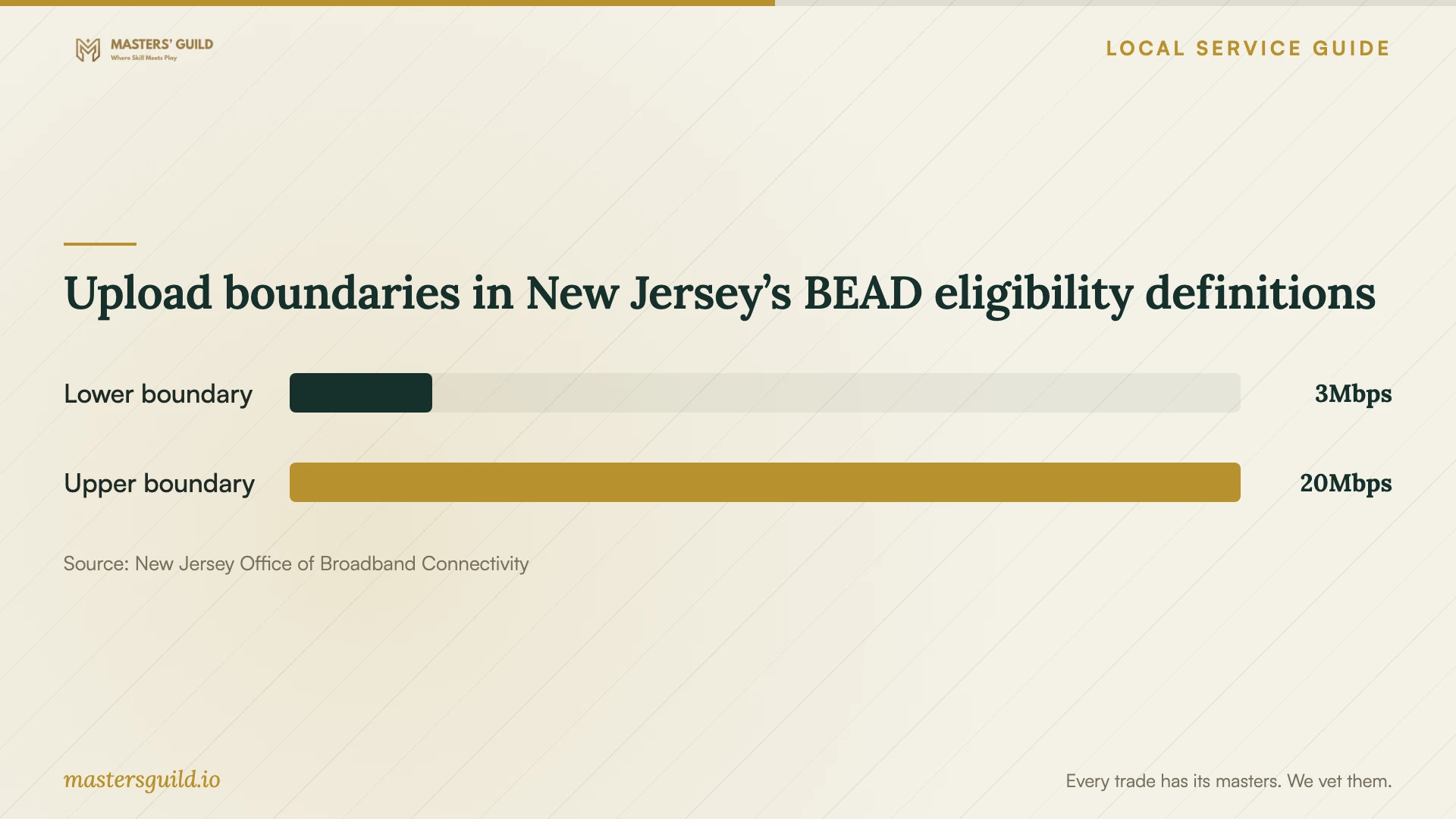
Upload boundaries in New Jersey’s BEAD eligibility definitions
Local details that affect your job
JCHA residents can check assistance before buying instruction
The Jersey City Housing Authority describes digital literacy programming, device resources, and affordable broadband assistance on its Digital Inclusion page. It lists a coordinator at 201-706-4786. If you live in a JCHA development, ask about current training and your building’s internet arrangements before paying for an introductory setup visit. The page also contains older subsidy and rollout language; confirm current eligibility and charges with the coordinator and provider rather than budgeting from those passages. [3]
Use New Jersey’s mapping resources when connectivity needs attention
The New Jersey Office of Broadband Connectivity’s Mapping Hub links to broadband availability resources and an asset map of organizations serving digital inclusion needs. This is a statewide resource, not a Jersey City service guarantee. If connection access is your first obstacle, use it to investigate support and address-level availability before commissioning a cloud migration. Ask each organization whether it serves your household and offers the help you need. [1]
Match the appointment to your household’s task
| Your situation | Scope to request | Acceptance check |
|---|---|---|
| You want selected files on several devices | Account setup, folder selection, and sharing review | Open a selected file on each intended device |
| You want a recovery arrangement | Backup configuration and a recovery demonstration | Retrieve a selected file using the agreed process |
| You are changing accounts or platforms | Migration plan, original-file retention, and transfer review | Check selected folders and record unfinished work |
| You cannot confirm a workable connection | Connection assessment before migration | Review measured upload speed and agree on transfer supervision |
Your hiring checklist
- List the devices, accounts, folders, and approximate data volume involved.
- Check address-level internet options and record a measured upload speed.
- Confirm that you can sign in and access your recovery email or phone.
- Ask for separate labor, subscription, equipment, and follow-up charges.
- Agree on who monitors any transfer that continues after the appointment.
- Demonstrate file access and recovery before approving completion.
- Keep a handover note and remove technician access you no longer need.
Frequently Asked Questions
Should I book remote or in-home help?
Ask for remote help if you can sign in, follow the technician’s connection instructions, and identify the relevant files. Consider an in-home visit if you want help inspecting devices or testing the connection in the room where you use them. Confirm the access method and charges before booking.
Does the broadband map tell me how fast my upload will run?
The FCC map lists maximum advertised speeds reported by providers. It does not establish your measured upload performance. Check the listing for available options, then ask the technician to test your connection before agreeing on the transfer schedule. [2]
What should I ask about an unfinished first upload?
Agree on who will check it, how to recognize completion, and what to do if it stops. Put any follow-up fee in the quote. Ask the technician to record pending work in the handover rather than treating account creation alone as completion.
Sources and scope
This guide combines the sources below with practical planning guidance. Figures apply to the stated geography and period; request a written quote for your property.