
Local service guide
Jacksonville network setup and support
Arrange network setup by asking for a written scope that separates troubleshooting, equipment configuration, permanent cabling and any electrical work. For a Jacksonville business, have the installer confirm the applicable low-voltage permit category before you accept the quote. Specify the desks, payment devices and rooms you want tested, then agree on downtime and the records you will receive at handover. [1]
Define the job before buying equipment
Give each bidder the same brief: your address and unit, a floor plan, current equipment models, internet provider, affected rooms and the tasks that fail. Describe whether the problem affects one device, wireless devices or wired connections too. Ask for diagnosis as a separate line item if you have not identified the cause.
Mark the locations where staff need dependable connections, including payment counters, shared printers, meeting rooms and workstations. Ask the installer to propose router and access-point locations and explain any cable routes. For a leased space, obtain the landlord’s approval for drilling, mounting and access above ceilings before scheduling that work.
Request an equipment list before authorizing purchases. Include model numbers, quantities, ownership, subscriptions and who will manage the accounts. Ask whether the installer can reuse your existing equipment and request a reason for each replacement. Keep new power outlets or circuits as a distinct part of the proposed scope.
Resolve permits and contractor responsibility
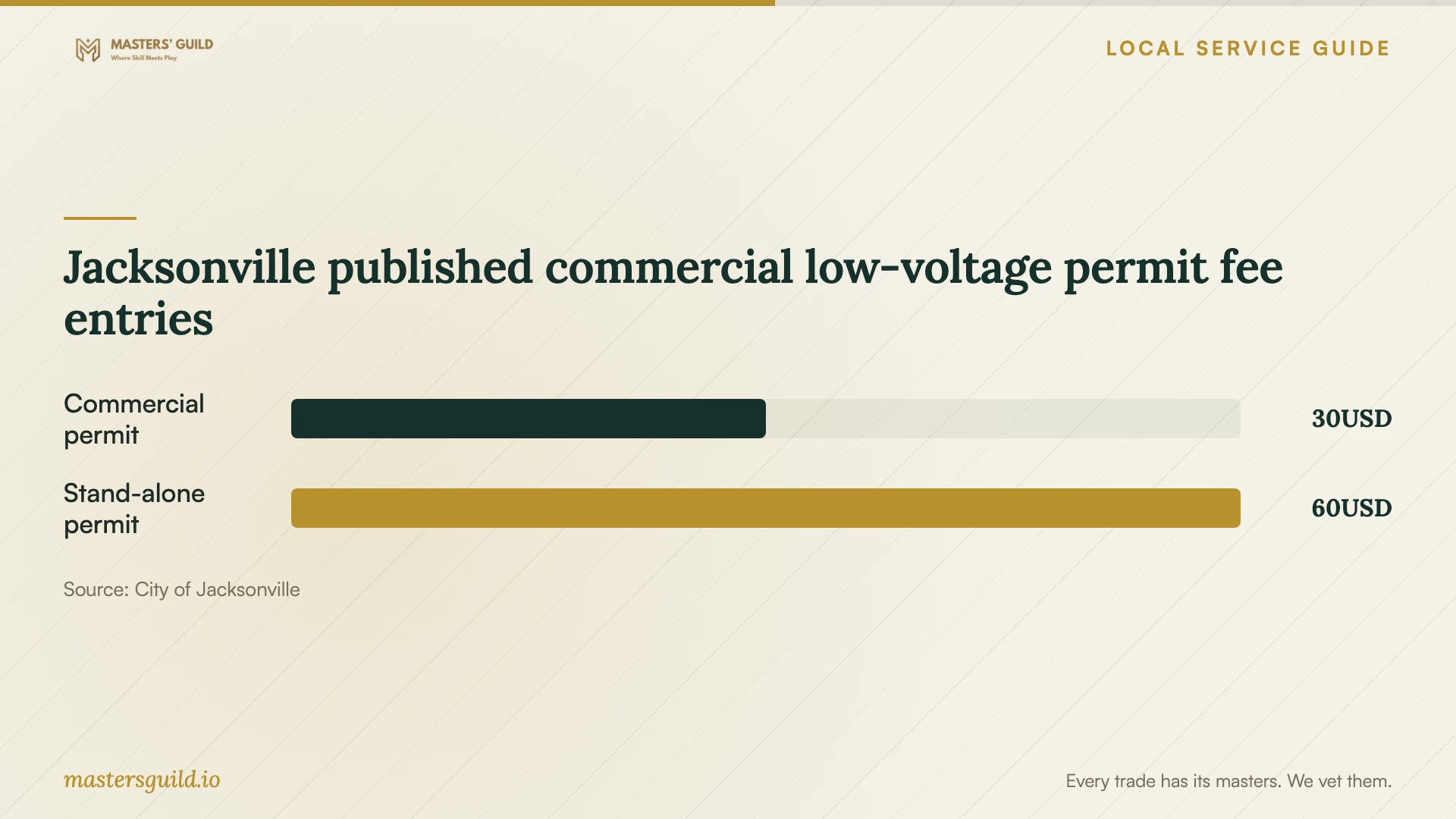
Jacksonville’s electrical fee schedule includes a $30 category for non-fire-alarm low-voltage work as part of a commercial permit and a $60 category for non-fire stand-alone low-voltage permits. These are published permit fee entries, not installation prices. Ask the bidder to identify the category, who will obtain any required permit and which charges the quote includes. [1]
Do not accept a blanket claim that all communications wiring has the same licensing and permitting treatment. Florida Statutes section 489.503(14) provides an exemption for specified communications work by employees, contractors, subcontractors and affiliates of qualifying communications companies. The statute limits the covered work and does not remove alarm-system contractor licensing obligations. [3]
If a bidder relies on that exemption, ask them to identify the qualifying company relationship and explain how your work fits its limits. For permanent cabling, conduit or power changes, give Building Inspection the address and a written description of the proposed work to resolve the permit question before work begins. [3] [4]
Compare complete quotes and schedule the interruption
Compare quotes against the same desk, room and cable-location list. Request separate amounts for diagnosis, hardware, installation, cabling, configuration, testing and follow-up support. For cable work, ask the installer to state the cable specification, termination locations, labeling, testing method and responsibility for patching or repainting.
Set a spending limit for additional troubleshooting and require approval before the technician exceeds it. Ask how the contractor will price an inaccessible cable route or an extra visit. Use itemized project quotes to set your installation budget.
Agree on an interruption window around your business operations. List the services that must work before staff resume using the network, and ask for a recovery plan if the new configuration fails. Coordinate internet-service activation with the equipment installation, and assign one person to approve changes during the visit.
Test the finished network and keep control of it
Write the acceptance checks into the scope. Ask the installer to test the agreed work areas and demonstrate the devices your business depends on. Record the test locations and conditions so you can distinguish a completed check from a promise of coverage. Request cable test results for the installed runs and confirm that the labels match the handover diagram.
Keep administrator accounts under business control. Have the installer document equipment locations, account ownership, configuration backups and the agreed method for remote support. Enter passwords yourself where practical, and agree on how the technician will remove temporary access after handover.
Ask for written support terms covering contact hours, response commitments, return visits and charges. Define who handles an internet-provider fault, a failed device and a configuration issue. Before signing off, have the installer explain the steps your staff should take when a connection fails.
Jacksonville published commercial low-voltage permit fee entries
Local details that affect your job
Use the electrical permitting contact for a scope decision
Jacksonville Building Inspection lists 904-255-8500 and [email protected] for electrical permits and inspections. Send the proposed cable routes, mounting details and any power changes when asking which requirements apply. The division identifies JaxEPICS as its route for viewing permit information and scheduling or canceling inspections. [4]
Check occupancy before wiring a new business space
The city advises prospective tenants and owners to confirm the intended use and occupancy classification with Building Inspection before buying or leasing. A mismatch requires a Converting Use permit; the city also requires a Certificate of Use application for a new business, expansion or change of use. For unresolved building, zoning or fire questions, it offers appointment-only, half-hour Small Business Help consultations twice a month. Bring the lease, plans and occupancy information before finalizing your network layout. [2]
Confirm jurisdiction for a Beaches or Baldwin address
Atlantic Beach, Neptune Beach, Jacksonville Beach and Baldwin maintain their own zoning and building departments. If your premises fall within one of those municipalities, confirm requirements with that department before budgeting from Jacksonville’s fee schedule. [2]
Choose the scope to request
| Your situation | Scope to request | Before authorizing |
|---|---|---|
| Connection trouble with an unclear cause | Diagnosis with documented findings | Set a spending limit before equipment replacement. |
| Coverage concerns in named rooms | An equipment-placement proposal and room-by-room acceptance checks | Identify the work areas and devices to demonstrate. |
| New permanent network cabling | Cable routes, terminations, labels and test results | Ask which local low-voltage permit category applies and who handles it. |
| Business move or change of use | A layout coordinated with the approved use of the premises | Confirm occupancy classification and Certificate of Use requirements with the city. |
Your hiring checklist
- Prepare a floor plan showing affected rooms and required device locations.
- List equipment models, account owners and the problems staff encounter.
- Obtain landlord approval for the proposed mounting and cable routes.
- Ask the bidder to document permit responsibility and any claimed exemption.
- Compare itemized quotes using the same installation and testing scope.
- Agree on downtime, change approval and a recovery plan.
- Collect administrator access, labels, diagrams, test results and support terms.
Frequently Asked Questions
Does every network installation need the same permit?
Do not assume one rule covers the whole job. Jacksonville publishes distinct low-voltage fee categories, while Florida provides a limited exemption for specified work associated with qualifying communications companies. Ask the installer to explain the treatment of your scope and confirm unresolved questions with Building Inspection. [1] [3] [4]
Do the published fees tell me what installation will cost?
No. The $30 and $60 commercial low-voltage entries describe permit fee categories. Ask for a project quote that separates equipment, labor, cabling, testing and permit-related charges. [1]
Should I choose mesh Wi-Fi or new Ethernet cabling?
Ask for a proposal based on your floor plan, device locations and acceptance checks. Have the bidder explain the proposed equipment connections and cable routes, then compare the disruption, ownership costs and support terms before selecting the approach.
What should I receive when the installer finishes?
Request a device inventory, administrator access, labeled cable locations, configuration records and the agreed test results. Keep warranty and support terms with those records, including any charge for a return visit.
Sources and scope
This guide combines the sources below with practical planning guidance. Figures apply to the stated geography and period; request a written quote for your property.