
Local service guide
Data Recovery and Backup in Jacksonville, FL
Arrange Data Recovery and Backup in Jacksonville by matching the provider to your problem: restoring a backup, assessing damaged storage, or responding to suspected ransomware. Set a written scope, spending limit, secure handover process, and acceptance test before authorizing work. For ongoing protection, include offline encrypted backups and restoration testing, as CISA recommends. [3]
Define the recovery job before handing over equipment
Give the provider a short incident history: the device or account involved, symptoms, water exposure, error messages, and previous repair attempts. Name the folders or applications you need first. Include available backups and any encryption recovery keys you control, using a secure handover method.
For damaged storage, request an assessment plan that preserves the original media and requires approval before recovery attempts. Confirm who will perform the work and whether another facility will receive your equipment. Get a receipt identifying the device and a record of transfers.
For suspected ransomware, choose an incident-response scope. CISA directs organizations to isolate affected systems from the network first and recommends shutdown only if network disconnection is impossible. Shutdown loses potential evidence held in volatile memory. Have the responder coordinate containment and evidence preservation before routine repair or restoration. [3]
Make the quote and completion standard specific
Request separate charges for assessment, recovery attempts, shipping, return storage, and urgent handling. Have the provider explain charges for recovering none or only some of the requested data. Put any advertised no-recovery fee policy, its exclusions, and its definition of recovery into the agreement.
Set a spending ceiling and identify who can approve changes. Distinguish the assessment date from the proposed delivery date. Before accepting recovered data, open representative files and test the application that uses them with a staff member who knows the records.
For ongoing backup service, separate setup charges from storage, monitoring, restore assistance, and data export. Include a cancellation handover: who receives the files, credentials, configuration notes, and remaining retained copies.
Specify protection and demonstrate a restore
Write down how much recent work you can afford to lose and how long you can operate without each system. Set a restoration order for essential applications and their supporting files. Document backup frequency, retention, storage locations, failure alerts, and the person responsible for acting on them.
CISA recommends offline encrypted backups of critical data and regular availability and integrity tests. It warns that ransomware can delete or encrypt accessible backups. Have the provider explain how it separates protected copies from everyday devices and accounts, and how your business will access them during an outage. [3]
Include a demonstration that restores representative files and a critical application into a clean test environment. Record the recovery point, elapsed time, missing dependencies, and steps your staff must perform. Keep the recovery instructions somewhere you can reach without the affected computer.
Limit access and settle data-handling responsibilities
Name the people and subcontractors permitted to access your data. Specify secure delivery, retention of working copies, and removal of temporary access after completion. CISA recommends contractual security requirements for managed providers and limiting third-party access to their responsibilities. [3]
Florida Section 501.171 requires covered entities and third-party agents to take reasonable disposal measures for customer records containing personal information when they no longer retain them. Those measures must make the information unreadable or undecipherable. Include disposal instructions and a record of completion in your agreement. [2]
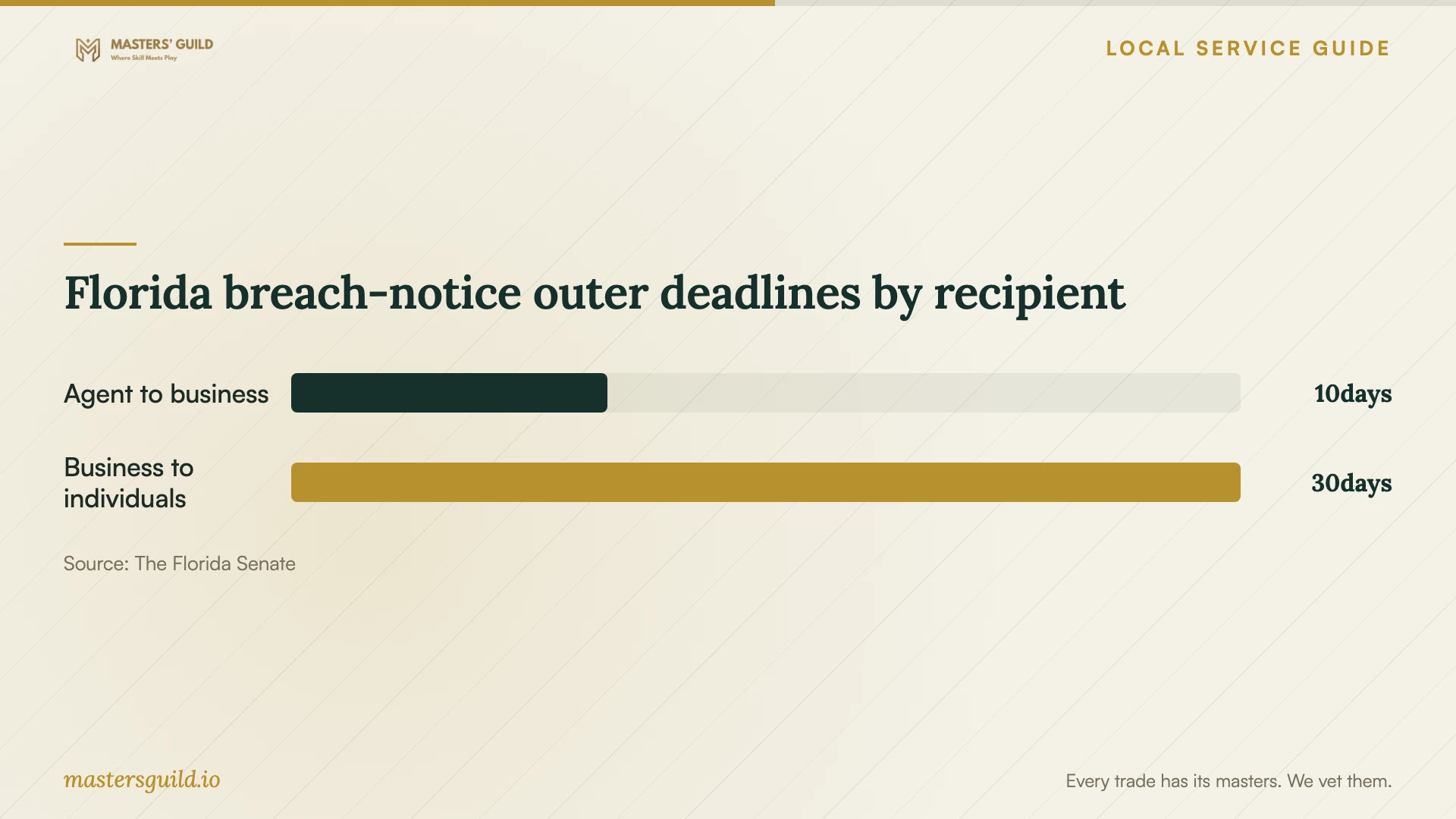
Florida breach-notice outer deadlines by recipient
Local details that affect your job
Screen the proposed backup address for flood exposure
Jacksonville identifies coastal, inland, and river flooding in Duval County, with the most common flooding from June through November. Use the FEMA Flood Map Service Center identified on the city’s flood-protection page to check your premises and any proposed nearby backup location. For official flood-zone determinations, contact Development Services at 214 N. Hogan St., Second Floor, or (904) 255-8310. The city warns that risk can remain outside mapped floodplains. Discuss a geographically separate copy before approving two locations that could share an exposure. [1]
Preserve Florida’s breach-notification conditions
For a breach of a system maintained by a third-party agent, Florida law requires that agent to notify the covered entity as expeditiously as practicable, no later than 10 days following determination of the breach or reason to believe it occurred. The agent must also provide information the covered entity needs for its notice obligations. Put the reporting contact, escalation process, and information-sharing duties in the service agreement. If personal information may have been accessed, have the person responsible for compliance assess notification duties alongside technical recovery. [2]
Choose the scope for your situation
| Situation | Scope to request | Completion check |
|---|---|---|
| Missing files with a backup available | Backup assessment and controlled restore | Open requested files in the application that uses them. |
| Failed or damaged storage | Assessment with approval before recovery attempts | Verify the agreed files before accepting completion. |
| Ransom note or suspected compromise | Containment, evidence preservation, and clean recovery | Identify who checks for remaining compromise before reconnection. |
| Ongoing backup planning | Offline encrypted backups and restoration testing | Demonstrate recovery of a critical application and its files. |
Your hiring checklist
- List affected devices, accounts, essential folders, and applications.
- Record symptoms, water exposure, error messages, and previous attempts.
- Identify available backups and the last completed restore test.
- Set diagnostic charges, a spending ceiling, and approval authority.
- Confirm work locations, subcontractors, and equipment-transfer records.
- Document secure delivery, retention, disposal, and access removal.
- Assign a staff member to check recovered files and application usability.
Frequently Asked Questions
Can a second office nearby hold the backup?
Screen both addresses before choosing that arrangement. Jacksonville warns that flooding can occur outside mapped floodplains. Discuss whether you need another copy at a geographically separate location and how staff would retrieve it if they could not reach either office. [1]
Which cloud backup settings belong in the proposal?
Include retained versions, deletion protection, account permissions, and recovery access. CISA discusses cloud versioning and deletion protection alongside offline backups. Have the provider identify the protections it will configure and document who can change them. [3]
Does recovering files complete a ransomware response?
Include investigation and cleanup in the scope. CISA warns that ransomware can follow an earlier compromise and directs responders to address persistence and vulnerabilities before reconnecting and restoring systems. Assign responsibility for that assessment and any breach-notification review. [3]
Sources and scope
This guide combines the sources below with practical planning guidance. Figures apply to the stated geography and period; request a written quote for your property.