
Local service guide
Data Recovery and Backup in Jackson, MS
For Data Recovery and Backup in Jackson, choose a provider whose written scope matches your immediate need: recovering missing files, responding to ransomware, or setting up tested backups. Ask who will handle the device, where they will work, what you must pay if recovery fails, and how you will verify the returned files. For ongoing protection, require a documented restore test and agree on how much recent work you can afford to lose.
Choose the right recovery scope
Tell the provider what happened before you approve work. Record the device model, symptoms, last successful access, and any recovery attempts. List the files you need first, such as accounting records, customer orders, or project folders. Ask whether the provider proposes a backup restore, file recovery, hardware assessment, or incident response.
For a device that clicks, has physical damage, or no longer appears on your computer, pause further attempts and ask a recovery specialist for handling instructions. Do not authorize formatting, operating-system reinstallation, or other changes until the provider explains how those steps affect your recovery goal. Request an assessment before agreeing to repair or replacement.
If you see a ransom note or unexpected file encryption, contact an incident-response provider. CISA advises isolating affected systems from the network and restoring critical services on a clean network. Its guidance reserves powering down affected devices for situations where network isolation is impossible, because shutdown loses evidence in volatile memory. [4]
Compare written quotes and handling terms
Request separate charges for assessment, recovery work, replacement media, shipping, and urgent service. Ask what happens if you decline the estimate and what the provider means by successful recovery. Agree on whether success means returning named priority files, a usable application database, or another result you can check.
Ask whether the business performs the work at its own premises or sends devices elsewhere. Request a receipt identifying the device and serial number, a record of transfers between handlers, and written permission requirements before subcontracting. Specify who may view recovered files, how the provider will deliver them, and when it will delete working copies.
Set expectations for assessment updates and completion separately. Ask the provider to identify dependencies, including parts, shipping, account access, encryption keys, and your approval of added charges. Keep recovery and backup installation as separate line items, with a spending limit for each.
Specify the backup service you need
Start with two business decisions: how much recent work you can afford to lose and how long you can operate without the files or application. Give the provider concrete examples. You might need yesterday's invoices by opening time while allowing more time for an archive. Ask the provider to price and test your chosen targets.
Require the proposal to name the protected computers, shared storage, business applications, and cloud accounts. Specify backup frequency, retention periods, encryption, account ownership, and who receives failure alerts. Ask how you will obtain your data and administrator access if you change providers.
CISA recommends keeping critical backups offline and encrypted because ransomware can delete or encrypt accessible backups. It also recommends regular restoration testing. Ask the provider to demonstrate a restore into a separate destination, open representative files with you, and document the result before you accept the installation. [4]
For a managed service, put security responsibilities in the contract. CISA recommends contract language that formalizes security requirements and limits third-party access to the systems needed for their role. Ask who can change retention settings, delete backup copies, and approve restores. [4]
Prepare for equipment and site interruptions
Ask the installer to document what happens when power or internet service stops. Include the intended runtime of any uninterruptible power supply, the shutdown procedure, and the person responsible for restarting equipment. Request a recovery procedure you can use from another location if you cannot enter the premises.
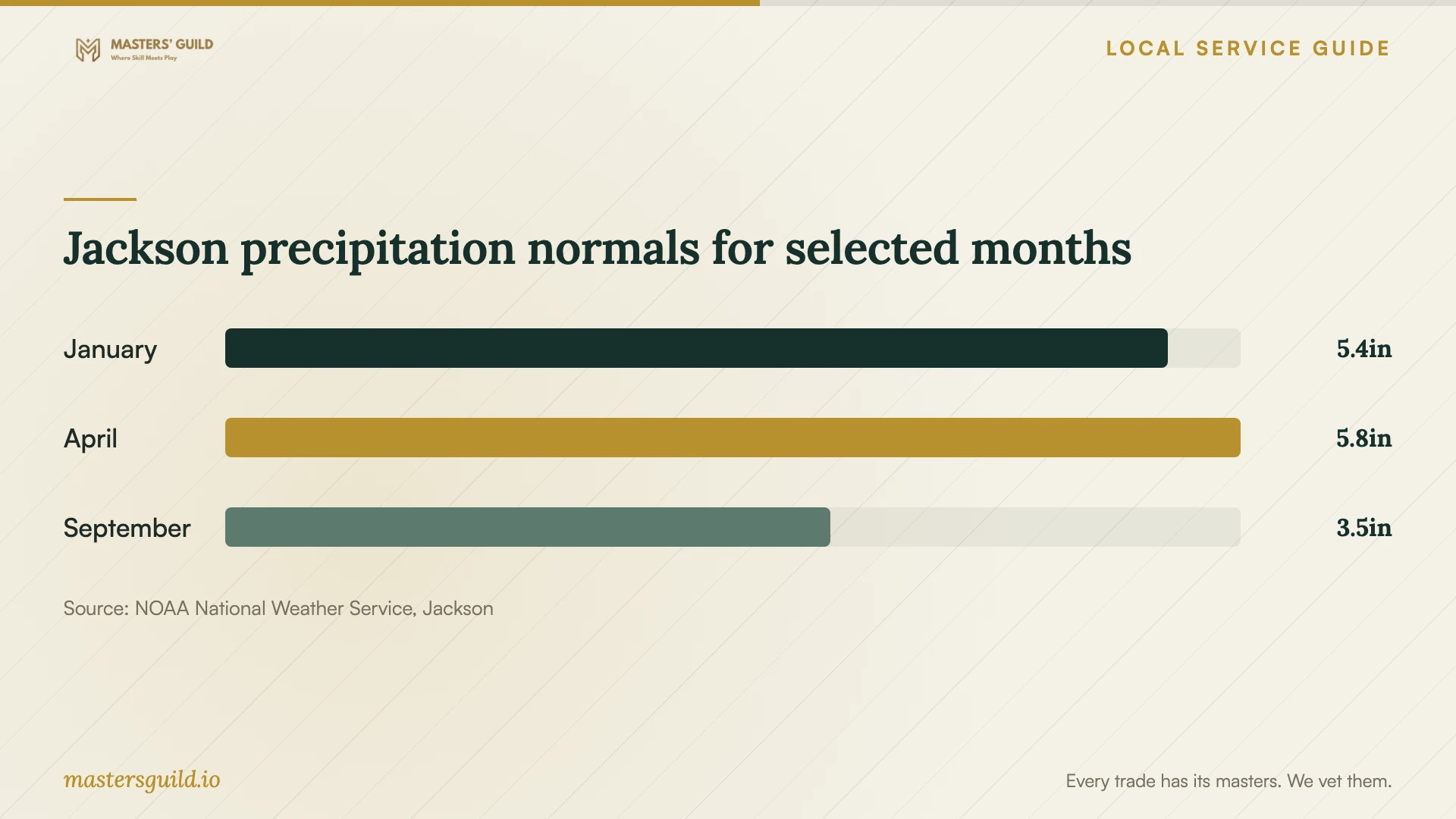
NOAA's Jackson climate normals report annual precipitation of 57.35 inches for 1991–2020. Use the monthly chart as context for discussing equipment placement and transport with your provider. For decisions about your property's flood exposure, use the city's address-specific map information rather than rainfall averages. [3] [2]
Jackson precipitation normals for selected months
Local details that affect your job
Check the business address before placing storage
The City of Jackson Engineering Division provides flood-map information for properties within city limits, including flood zone and base flood elevation. Call 601-960-1651 with the property address or parcel number, or visit 200 S. President Street, Suite 424. Use that information when discussing equipment placement and a backup copy at another location; do not assume two nearby premises have different exposure. [2]
Plan beyond a brief power interruption
Entergy's April 10, 2024 storm update named Jackson among areas where some customers would remain without power overnight. This is a historical example, not a current outage notice or a forecast of outage duration. Ask your provider to explain how you would shut down storage, reach a backup from another site, and resume work if battery runtime ends before utility service returns. [1]
Match the job to the provider's scope
| Your situation | Scope to request | Before approving |
|---|---|---|
| Missing files with a backup available | Assessment and controlled restore | Identify the backup date and a separate restore destination. |
| Damaged or unrecognized storage device | Specialist recovery assessment | Get handling instructions and approve an assessment spending limit. |
| Ransom note or active encryption | Incident response and clean-system recovery | Isolate affected systems and coordinate evidence preservation. |
| New or replacement backup system | Installation, monitoring, and restore testing | Specify offline encrypted protection, responsibilities, and acceptance checks. |
Your hiring checklist
- Record device symptoms and previous recovery attempts.
- List priority files and the last backup you believe is usable.
- Request itemized assessment, recovery, shipping, and return-media charges.
- Agree on the files or application functions you will check before acceptance.
- Document device custody, subcontracting permission, and deletion of working copies.
- Set acceptable data-loss and downtime targets for the backup proposal.
- Witness a restore test and keep the recovery instructions outside the protected system.
Frequently Asked Questions
How much should I budget for recovery?
Get a device-specific assessment and written estimate before setting the recovery budget. Ask for the assessment fee, approval limit, unsuccessful-recovery charges, return shipping, and delivery media. Price the ongoing backup service separately, including storage, support, and restore assistance.
Can I restore a backup after ransomware?
Have the incident-response provider confirm a clean recovery environment before reconnecting systems. CISA advises restoring from offline, encrypted backups and taking care to avoid reinfecting clean systems. Ask the provider how it will check the backup and address the original compromise. [4]
How do I know the backup installation is complete?
Make a witnessed restore part of acceptance. Ask the provider to recover representative files and any business application included in the scope, then verify that you can use them. Keep the test record, account ownership details, alert contacts, and recovery instructions.
Should I keep the backup at my business premises?
Ask for a design that includes a copy you can reach if the premises become inaccessible. For a Jackson address, obtain the city's flood-map information before discussing storage placement. Separately, require offline encrypted protection and restore tests consistent with CISA's guidance. [2] [4]
Sources and scope
This guide combines the sources below with practical planning guidance. Figures apply to the stated geography and period; request a written quote for your property.