
Local service guide
Software installation in Irving, TX
Software installation in Irving starts with deciding whether you want someone to complete the setup or teach you to use your device. For paid help, request a written scope covering the named programs, activation, updates, and a working demonstration. For basic app-download instruction, consider Irving Public Library’s Tech Help service; staff exclude device repair, infected software, and forgotten-account unlocking. [1]
Define the installation before comparing offers
Give each provider the same job description: device model, operating system, program names, number of devices, and the task you need to perform afterward. Mention error messages and whether you already own a license. Ask the technician to confirm compatibility before you buy software or authorize changes.
Separate a basic application install from an operating-system change, file transfer, or repair request. Ask the provider to identify which tasks the price includes and which require a separate approval. For a new computer, specify whether you want existing files, email settings, printers, and browser bookmarks included.
Choose instruction or hands-on installation
Irving Public Library’s Tech Help staff teach basic skills, including downloading apps to tablets or smartphones, using Microsoft Office applications, and navigating devices. Staff do not complete tasks on a patron’s behalf. Choose this route when you want to learn the steps and can practice them yourself. [1]
For paid service, ask whether the technician proposes a remote session, a home visit, or a drop-off appointment. Describe whether the computer starts and connects to the internet. Ask how you will approve access, handle restarts, and receive the device if the technician needs to keep it.
If the software already works and you need lessons, review the library’s Online Courses page before booking installation work. The city lists DigitalLearn for computer basics and LinkedIn Learning for instruction in software, programming, and business topics. Check access requirements for the resource you choose. [3]
Compare the complete quote
Request a total for your stated scope rather than comparing an unexplained starting price. Ask about minimum charges, travel, troubleshooting, backup work, and follow-up support. Have the provider explain what you owe if the software cannot run on your device or if account access prevents completion.
Ask who will purchase the software and which account will own the license. Request the subscription renewal amount and cancellation terms before approving a purchase. Keep receipts and activation information with your own records.
Texas law includes computer programs within tangible personal property, and its sales-price definition includes installation expenses for tangible personal property. Ask the seller to explain the tax treatment of the quoted work and purchases. Do not assume that listing labor separately makes it tax-free. [4]
Prepare your accounts and agree on completion
Back up the files you want to keep and open a few copies to check them. Tell the technician which folders matter and which changes require your approval. Before an operating-system replacement or reset, agree on what the technician will preserve and how you will recover it.
Sign into your accounts yourself where practical. Keep your recovery phone or email available, enter authentication codes yourself, and ask the technician to explain requests for administrator access. For remote work, agree on when access ends and whether the technician will remove the access software.
Before closing the appointment, open the installed program, confirm activation, and perform your original task. Try an existing file or send a test email if that matches the job. Request a short record of the changes, any remaining errors, and the agreed follow-up process.
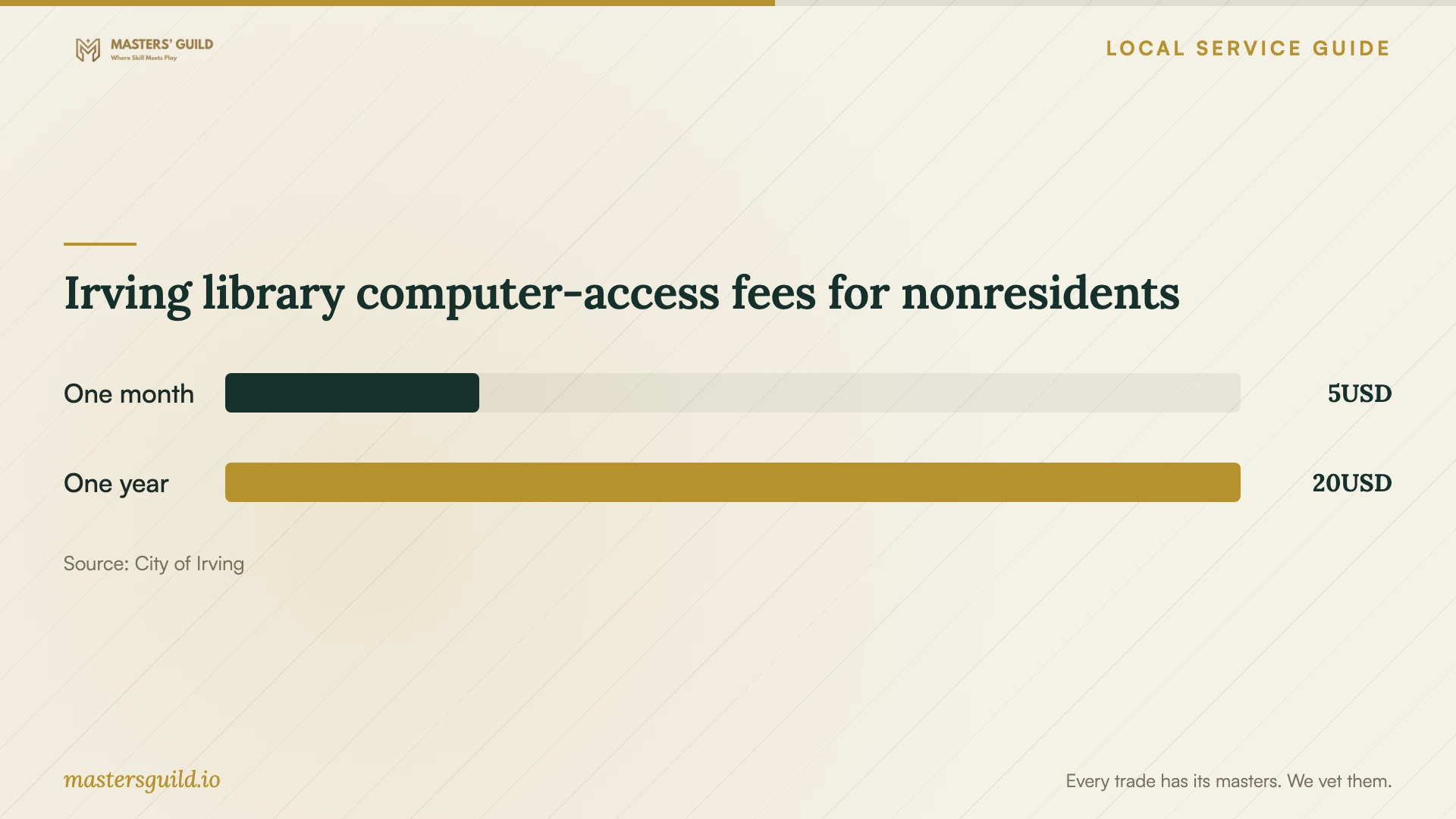
Irving library computer-access fees for nonresidents
Local details that affect your job
Choose a library appointment that fits your need
The Tech Help request form lets you select South Irving, Valley Ranch, or West Irving Library, state preferred days and times, and choose English or Spanish. Tech Help is unavailable on Sundays, and appointments depend on availability. For an urgent installation, arrange another service rather than relying on an unconfirmed library appointment. [1]
Check card privileges before planning a fallback
Irving residents can obtain a free Full Access library card. Adults seeking a Computer Use Card must present photo ID in person. A Computer Access Card excludes remote electronic-resource access, so do not assume it covers an online course from home. All Irving libraries offer free public Wi-Fi; confirm the privileges you need before making a trip. [2]
Match the help to the task
| Your need | Suggested next step | Confirm before proceeding |
|---|---|---|
| Learn to download a phone or tablet app | Request library Tech Help | Appointment availability and device details |
| Have someone install and configure programs | Request a paid installation quote | Programs, activation, testing, and ownership of licenses |
| Repair infected software or unlock a forgotten account | Describe the issue to a repair or account-support provider | Library Tech Help excludes these tasks |
| Learn software that already runs | Review the library’s online learning resources | Course suitability and access requirements |
Your hiring checklist
- List your device, operating system, software names, and desired result.
- Confirm compatibility and license ownership before purchasing.
- Request a written total covering labor, purchases, fees, and tax.
- Agree on approval for extra work and the charge for an incomplete job.
- Back up important files and check that you can open the copies.
- Prepare account recovery access and enter credentials yourself.
- Test activation and your intended task before ending the appointment.
Frequently Asked Questions
How much should I budget for installation?
Ask for an itemized quote for your devices and programs; compare totals for the same scope. Have providers identify software purchases, troubleshooting, travel, and follow-up charges. Confirm what you owe if the technician cannot complete the installation and how you will approve extra work.
Can Irving library staff install software for me?
Tech Help provides instruction, including basic app downloads and Microsoft Office use. Staff exclude completing tasks on your behalf, repairing malfunctioning or infected devices or software, and unlocking forgotten accounts. Use the appointment request to describe the instruction you need. [1]
What should I send a technician before the appointment?
Send the device model, operating system, program names, error text, and the result you want. State whether you own the licenses and need file transfer or backup work. Omit passwords, authentication codes, and private documents from the initial inquiry.
Should installation include a lesson?
Ask for a brief walkthrough and specify the task you want to practice. Agree on any training charge in advance. For further learning, Irving’s Online Courses page lists computer-basics tutorials and software instruction resources. [3]
Sources and scope
This guide combines the sources below with practical planning guidance. Figures apply to the stated geography and period; request a written quote for your property.