
Local service guide
Data Recovery and Backup in Irving, TX
For Data Recovery and Backup in Irving, hire a provider whose written scope covers your immediate priority: recovering missing files, restoring business operations, or setting up backups you can test. Before handing over equipment, agree on diagnostic charges, approval limits, data access, and return arrangements. For an outage-related failure, confirm power at your premises before scheduling powered onsite work.
Define the job before approving recovery
Write down the device model, storage type if known, symptoms, and the last time you accessed the required files. Tell the provider about any drop, liquid exposure, power interruption, or recovery attempt. List the folders and applications you need first, such as accounting records, current orders, or project files. Ask the technician what to leave untouched until assessment.
Request a diagnostic stage with a clear spending limit. Ask whether the provider will perform the work at your premises, at its own facility, or through another laboratory. Get the receiving location and responsibility for transport in writing. Define success by the files you can open and use, and ask how you will review results before accepting the job.
Agree on how the provider will return the original device and recovered files. Ask who supplies the destination drive, who checks the files, and how long the provider will retain working copies. Include a named business contact who can approve changes without delaying the assessment.
Compare complete quotes and data-handling terms
Ask each provider to itemize diagnosis, recovery work, transport, return media, onsite labor, backup configuration, and recurring storage. Request the charge if you decline the recovery proposal or the technician cannot recover your priority files. For urgent work, ask when assessment starts, when you should expect an update, and what the urgency fee covers.
The Texas Comptroller identifies storing and retrieving customer data as taxable data processing activities and distinguishes them from certain professional services. Ask the provider to identify applicable taxes and separate distinct services on the quote. Do not assume the provider will apply the same tax treatment to every part of a combined recovery and backup job. [3]
Before sharing credentials or equipment, request written terms covering authorized access, subcontractors, transfer methods, and deletion of retained copies. Ask how staff will record device handoffs and who will notify you if equipment goes missing. For sensitive business records, have your responsible manager review those terms before work starts.
Specify the restore you need from a backup
Describe the business task you need to resume after a failure. Ask the installer to demonstrate restoration of a representative folder and, where relevant, an application with its required data. Agree on the acceptable age of restored information and the time you can allow for recovery. Put those targets in the scope and test them before accepting the setup.
Ask the provider to document backup frequency, retained versions, storage locations, access permissions, and the person who receives failure alerts. Keep account ownership and recovery instructions under your business’s control. Request a separate price for monitoring and future restore assistance so you can compare the ongoing commitment.
Include equipment placement in the walkthrough. The National Weather Service reports a normal July high of 95.6°F at DFW for 1991–2020. Use that regional context to ask the installer to check the manufacturer’s operating limits for the proposed location and to explain the shutdown plan during loss of cooling. The outdoor normal does not establish the temperature inside your office. [5]
Treat suspected intrusion as a separate hiring need
If you suspect unauthorized access, tell the provider before authorizing cleanup or reinstalling systems. Ask for someone who can preserve relevant records and coordinate with your incident-response or legal adviser. Define who may change the affected equipment and who will document those changes.
The Texas Attorney General states that businesses and organizations must report a system-security breach affecting 250 or more Texans as soon as practicably possible and no later than 30 days after discovery. The office also states that organizations must notify affected consumers. Ask your attorney how the requirements apply to your incident; do not treat successful file recovery as completion of the breach response. [4]
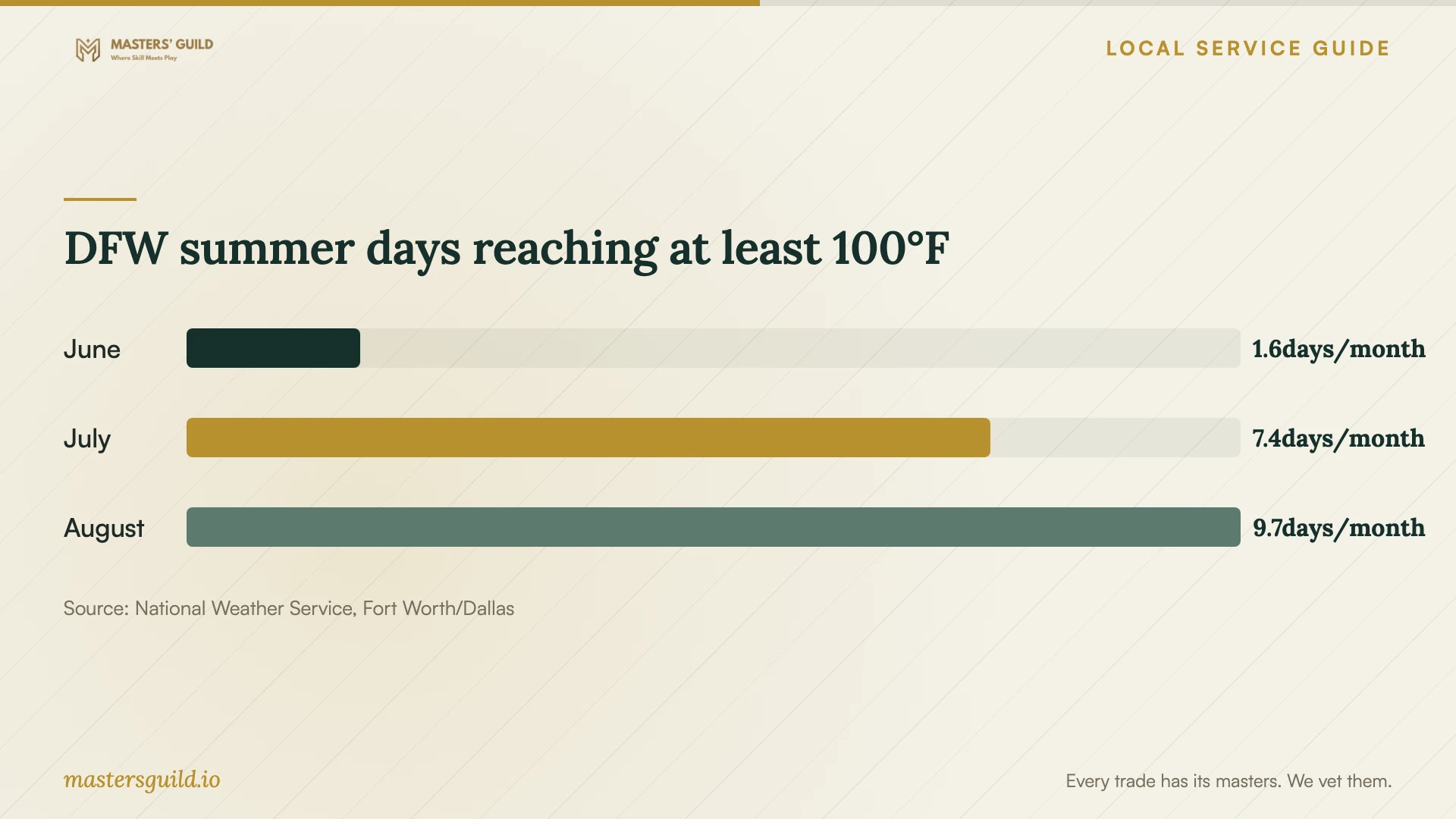
DFW summer days reaching at least 100°F
Local details that affect your job
Confirm power at the actual service address
For premises served by Oncor, check or report an outage through its reporting service or call 888-313-4747. Oncor explains that your neighbor may have power while your property uses a different circuit. Confirm your premises have power before scheduling powered onsite diagnostics. If you need documentation of the interruption, ask Oncor for a Power Outage Verification Letter; it provides one when outage information is available. [2]
Check the property before choosing backup locations
Irving’s Capital Improvement Program directs property owners to enter their address in FEMA’s mapping center to produce a Flood Insurance Rate Map and offers city assistance with the lookup. Review that address-specific information before approving a floor-level storage location. Ask the installer to explain equipment placement and propose a separate backup location. A citywide assumption cannot replace the property check. [1]
Choose the scope that matches your situation
| Your situation | Scope to request | Before approving |
|---|---|---|
| Missing files on a business device | Assessment and recovery of named priority files | Set a diagnostic spending limit and a usable-file acceptance check. |
| You have a backup to restore | Restore assistance and verification | Identify the required backup date and agree on a representative restore test. |
| You need a new backup arrangement | Configuration, documentation, and restore testing | Specify account ownership, alerts, retention, and ongoing support. |
| Equipment failed during a power interruption | Recovery assessment followed by continuity planning | Confirm power at your premises; request Oncor outage documentation if applicable. |
| You suspect unauthorized access | Evidence preservation and incident-response coordination | Consult your adviser about Texas breach notification and reporting obligations. |
Your hiring checklist
- Record symptoms, incident timing, and previous recovery attempts.
- List priority files and the business tasks they support.
- Confirm the diagnostic fee, approval limit, and unsuccessful-recovery charges.
- Identify the work location, transport arrangements, and any subcontractor.
- Agree on credential access, file delivery, retention, and deletion terms.
- Request itemized setup, hardware, storage, support, and tax charges.
- Witness a representative restore and retain the recovery instructions.
Frequently Asked Questions
How much should I budget for recovery?
Request a device-specific assessment and written quote. Set a diagnostic limit before handing over equipment, then review recovery, return media, transport, and taxes as separate charges. Ask what you owe if you decline further work or the provider cannot recover the files you named.
Can I arrange an onsite visit after a neighborhood outage?
Confirm power at your premises before booking powered diagnostics. Oncor explains that neighboring homes or businesses can use different circuits, so a neighbor’s restored service does not confirm yours. Ask the technician whether assessment requires power or whether you should arrange a device handoff. [2]
How do I accept a completed backup setup?
Ask the provider to restore representative files to an agreed destination and open them with you. Check any business application included in the scope. Retain the account details, recovery instructions, alert contacts, and a written schedule for future restore checks.
Does recovering files resolve a suspected data breach?
Include a separate incident-response review. The Texas Attorney General describes consumer notification requirements and reporting to its office for breaches affecting 250 or more Texans, with a deadline no later than 30 days after discovery. Ask your attorney to assess your obligations. [4]
Sources and scope
This guide combines the sources below with practical planning guidance. Figures apply to the stated geography and period; request a written quote for your property.