
Local service guide
Computer Virus Removal in Irving, TX: Hiring Guide
Arrange Computer Virus Removal in Irving, TX by asking a technician for a written diagnosis, a file-preservation plan and a total quote before approving cleanup or an operating-system reinstall. Describe what happened, whether the computer starts and which files you need to keep. Agree on remote help, drop-off or a home visit, and require your approval before anyone erases the drive. Plan temporary computer access before paying for urgent service.
Define the job before requesting quotes
Write down the symptoms in your own words: unwanted browser messages, unfamiliar software, a warning demanding payment or trouble starting the computer. Include the device model and operating system if you know them. Tell the technician what you clicked or installed before the problem began. Ask them to diagnose the cause before you approve a virus-removal package based on a warning alone.
Name the files you need to preserve, such as family photos, tax documents or schoolwork. Tell the technician whether you have a backup and ask how they will check it before making changes. Request separate approval for wiping the drive, reinstalling the operating system or replacing hardware. Ask what you would pay if the diagnosis identifies a different problem or you decline the repair.
Choose a repair arrangement you can manage
Ask a prospective technician whether they can assess your symptoms remotely and what access they would need. Establish the provider's identity and contact details before authorizing a session. Agree on how you will supervise the work, end the connection and confirm that the technician removes any temporary access software.
For drop-off service, request an intake receipt describing the computer and any charger or accessories you leave. Ask for a diagnosis deadline and a collection estimate. For a home visit, confirm the visit charge, any minimum billing period and whether the technician might need to take the device away. Compare complete written scopes before choosing a headline cleanup fee.
Make a downtime plan before booking. Irving Public Library allows adults to apply for a Computer Use Card in person with photo ID. Cardholders need their card and PIN to sign in; the city lists up to two daily sessions of up to 90 minutes each. Consider whether that access would cover essential forms or schoolwork while the technician holds your computer. [1]
Set boundaries for files and account access
Ask which files the technician needs to access, whether they will copy anything and how they will handle temporary copies after the job. Discuss sensitive documents before handing over the device. Request an explanation of any password or recovery key they need, and agree on how you will provide it. Keep banking credentials outside the repair handoff.
If you gave an unknown caller access or entered account details after a warning, tell the repair technician what you shared. Make account protection a separate task: use another device you trust to contact the affected account provider and ask what steps to take. If you sent money, contact the payment provider as well. Ask the affected providers about account recovery even after the technician completes the computer cleanup.
Interpret the Texas crime figures with care
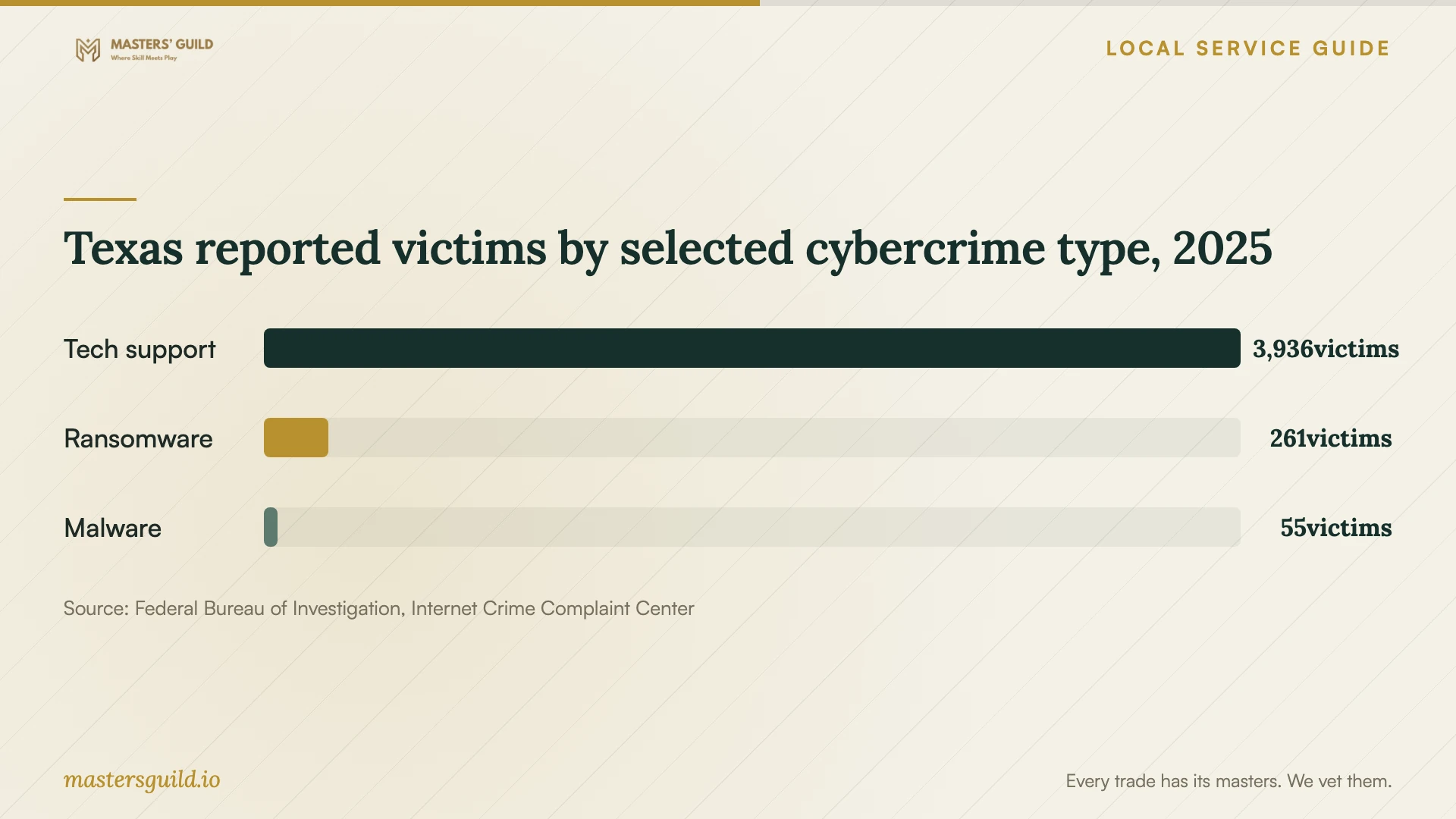
The FBI Internet Crime Complaint Center's 2025 Texas report lists 3,936 victims under tech support, 261 under ransomware and 55 under malware. The chart compares those reported victim counts across the state. Use this context when deciding how to establish contact with a technician: request a written scope from a provider you have chosen before approving work through a warning message. [3]
These figures cover Texas reports for 2025. They do not count infected computers in Irving, establish the quality of a repair business or provide a repair-price benchmark. [3]
Request an itemized quote for your device and ask whether diagnosis, file preservation, software and tax are included. Confirm the charge for an unsuccessful cleanup and the approval process if the technician recommends a reinstall. Keep a copy of the agreed scope so you can compare it with the final invoice.
Approve the handback or replacement plan
Before collecting the computer, ask the technician to explain what they found and what they changed. Request a written list of removed software, installed software and any remaining concerns. Have them demonstrate startup and the tasks that failed before repair. Open several important files with them, and confirm the location of any backup they created.
If you choose replacement, approve file transfer and drive sanitization as separate items. Ask how the technician will confirm completion, including what they can do if the old drive cannot start. Keep the old device until you check the transferred files and approve the handling of its storage.
Irving lists a household document-shredding and electronics-recycling event for November 7, 2026, at 9:00 am, for Irving residents with proof of residency. Confirm the location and accepted equipment before traveling. The city's Solid Waste Services department does not accept CRT monitors or televisions and directs residents to contact Best Buy for disposal options. [2]
Ask your technician to complete storage sanitization before you surrender the computer for recycling. Confirm who will handle the drive and what completion record you will receive.
Texas reported victims by selected cybercrime type, 2025
Local details that affect your job
Temporary computer access can support drop-off repair
Adults 18 and older can obtain an Irving Public Library Computer Use Card by presenting photo ID in person at a library location. Users need the card and PIN to sign in, and the city allows up to two sessions daily, each lasting up to 90 minutes. Nonresidents can pay $5 for one month or $20 for one year of computer access. This card excludes checkout privileges and remote electronic resources. Check your access needs before choosing a longer drop-off appointment. [1]
Replacement needs a separate local disposal plan
Irving lists a household document-shredding and electronics-recycling event for November 7, 2026, at 9:00 am. The event requires Irving residency and proof of residency. Solid Waste Services excludes CRT monitors and televisions. Call the department at (972) 721-8059 with acceptance questions, and arrange file preservation and storage sanitization with your technician before surrendering a computer. [2]
Choose the next step for your computer
| Your situation | Arrangement to discuss | Before approving |
|---|---|---|
| Computer starts and you can supervise a session | Ask whether remote assessment fits the symptoms | Confirm provider identity, access permissions and how to end access |
| Computer will not start or essential files need preservation | Discuss drop-off assessment or a home visit | Require a written preservation plan and approval before erasure |
| You need occasional computer access during drop-off | Consider Irving Public Library computer access | Bring photo ID to apply; plan around up to two daily sessions of up to 90 minutes |
| You decide to replace the computer | Separate file transfer and sanitization from disposal | Confirm Irving event requirements; Solid Waste Services excludes CRT monitors and televisions |
Your hiring checklist
- Record symptoms, warning text and the events that preceded the problem.
- List essential files and tell the technician where any existing backup lives.
- Request separate prices for diagnosis, cleanup, file preservation and a reinstall.
- Require approval before drive erasure, hardware replacement or extra charges.
- Agree on access permissions and the handling of temporary file copies.
- Set a diagnosis deadline and arrange temporary computer access.
- Check important files and repaired functions before accepting the handback.
- For replacement, confirm file transfer and storage sanitization before recycling.
Frequently Asked Questions
What should a virus-removal quote include?
Ask for the diagnosis charge, cleanup scope, file-preservation work and any proposed reinstall as separate items. Confirm the total, extra-charge approval process and what you owe if you decline repair. Request a handback check and the provider's terms for a return visit.
Should I approve an operating-system reinstall?
Ask the technician to explain why they recommend it and what they will preserve. Before approving, confirm your backup, required software and access to installation details. Require your approval before they erase storage, and check restored files before accepting the job.
Can I use a library computer while mine is being repaired?
Irving Public Library offers Computer Use Cards to adults 18 and older who present photo ID in person. The city lists up to two sessions per day, each up to 90 minutes. Bring your card and know your PIN. Nonresidents pay $5 for monthly access or $20 for annual access. [1]
Can I recycle the computer if I choose replacement?
Irving lists a residents-only electronics-recycling event on November 7, 2026, at 9:00 am, with proof of residency required. Confirm location and accepted equipment before attending. Solid Waste Services excludes CRT monitors and televisions. Arrange file transfer and drive sanitization with your technician before disposal. [2]
Sources and scope
This guide combines the sources below with practical planning guidance. Figures apply to the stated geography and period; request a written quote for your property.