
Local service guide
Cloud Service Setup in Irving, TX
For Cloud Service Setup in Irving, TX, hire a technician with a written scope covering your devices, folders, account permissions, and backup tests. Request prices for setup, migration, subscriptions, and follow-up help. Before approving completion, sign into your account, open selected transferred files, and restore a file from an existing backup. Keep account ownership, billing, and recovery information under your control.
Define the work and the completion tests
Describe what you want to do after the appointment. You might want to open household documents on a laptop and phone, share selected photos with family, move an existing collection, or prepare for losing a device. List the accounts and devices involved, and name the person who should own each account.
For shared folders, specify who should view, edit, and remove files. For migration, identify the source folders and the copies you want to preserve. For backup setup, agree on the folders to include, how you will check completion, and a selected file you will restore during handover.
If files are already missing, ask the technician to assess recovery before quoting new backup configuration. Ask them to identify any existing backup they propose to use and demonstrate that it contains the missing material. Keep this assessment separate from the work that prepares future backups.
Compare quotes and clarify Texas tax treatment
Obtain a quote for your specified devices, files, and work. Request separate prices for account configuration, migration, subscriptions, and follow-up help. State whether you want remote assistance or a visit, and ask who will check transfers that continue after the appointment.
The Texas Comptroller lists data storage and conversion as taxable data processing and consulting among nontaxable services. For mixed work, its guidance requires a qualifying nontaxable service to be distinct, identifiable, and of a type commonly provided by itself without another service. Calling part of the appointment consultation does not establish those conditions. [2]
The Comptroller generally directs providers to state reasonable taxable charges separately to collect tax only on those charges. It also describes exceptions: an unitemized taxable portion of 5 percent or less does not require collection under this mixed-service rule; when the taxable portion exceeds 5 percent, the total charge is taxable unless the provider separates the charges. The provider or purchaser may later establish the portion attributable to nontaxable unrelated services through documentary evidence. [2]
Ask the provider to explain the classifications and exceptions they use for your quote. Keep the written scope and invoice. Compare offers using the same requested work, including the subscription you will pay for and any agreed review period for missing files or access problems.
Preserve files and secure recovery information
CISA advises frequent backups to a secure external drive or vetted cloud service. It recommends disconnecting an external backup drive when you are not backing up data because ransomware could reach a connected drive and damage the backups. [3]
Agree on a preserved copy before the technician moves files or changes storage settings. Choose sample documents and photos from important folders for the completion test. Ask the technician to explain what they will retain, what they propose to remove, and when you should review those changes.
For encryption, CISA advises backing up data, selecting an encryption solution, securing the recovery key and password, then starting encryption. It warns that losing recovery information can cause permanent data loss. Ask the technician to help you follow that sequence and confirm that you can retrieve your recovery information. [3]
Arrange preparation access and the transfer connection
Irving Public Library offers free public Wi-Fi at all its libraries. Adults can register for a Computer Use Card by presenting photo identification in person at a library location. Computer users need their card and PIN to sign in. [1]
If you lack internet access at home, use a library visit to read setup instructions or prepare questions. Arrange the transfer around a device and connection you can keep available for the agreed work. Ask the technician to review that arrangement before starting the upload.
The library allows up to two computer sessions per day, each up to 90 minutes. Its Computer Access Card does not include checkout privileges or remote electronic-resource access. Plan within those restrictions; ask about any additional access you need before your visit. [1]
Verify the handover before closing the job
During handover, sign in yourself and open selected files from each configured device. Test family sharing with the intended accounts. For backup work, restore a selected file to a location you choose. Record unfinished transfers and agree on who will check them.
Request a short handover note naming the account owner, configured devices, included folders, subscription billing, and recovery steps. Keep old copies until you finish your review. Remove temporary technician access when the agreed assistance ends, and keep the recovery instructions somewhere you can reach without that technician.
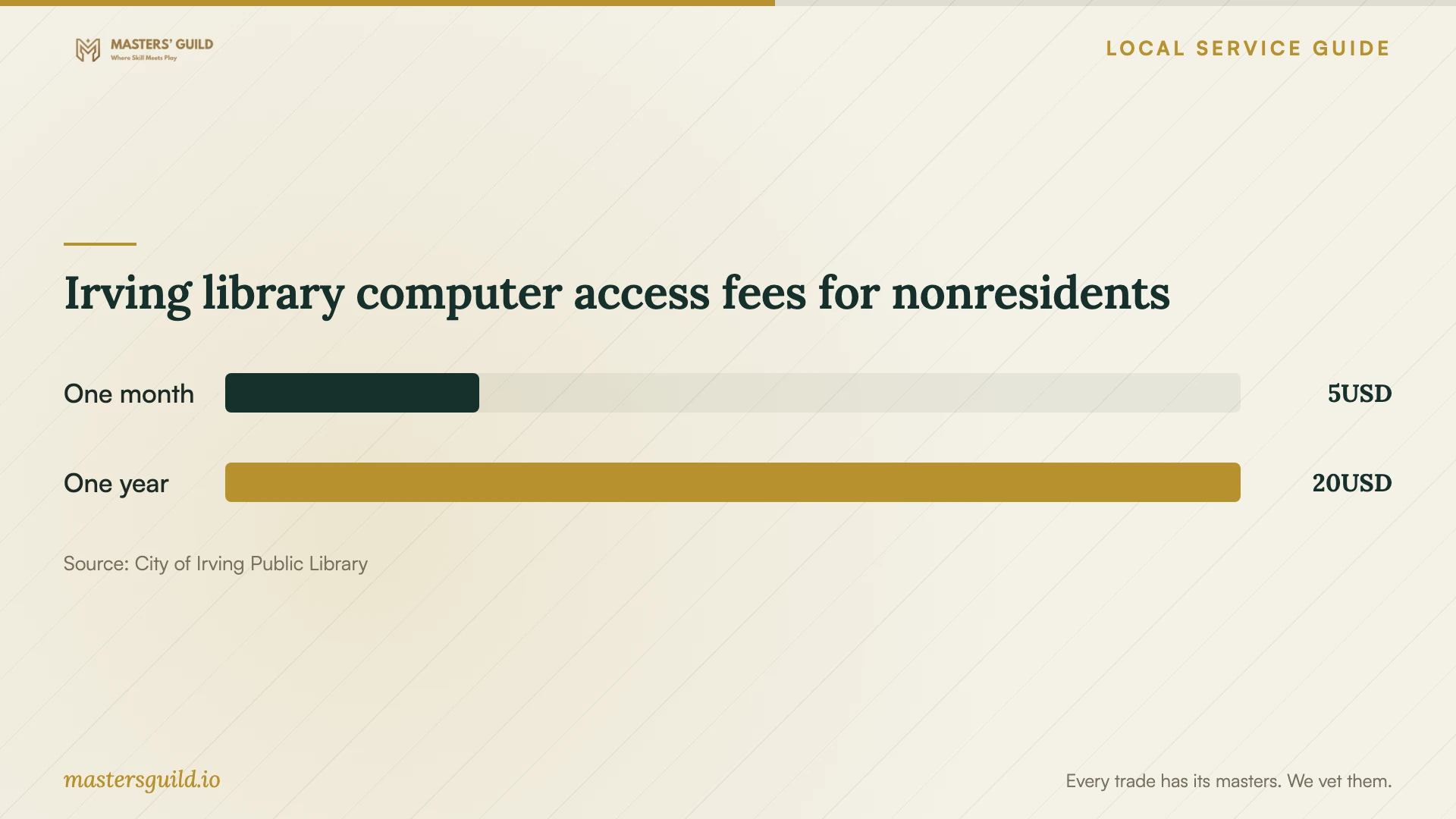
Irving library computer access fees for nonresidents
Local details that affect your job
Prepare for an Irving library computer visit
Adults must present photo identification in person to register for a Computer Use Card. Existing users need their card and PIN to sign in. Irving Public Library permits up to two daily computer sessions of up to 90 minutes each and offers free public Wi-Fi at all locations. Choose a preparation task that fits those limits and arrange the migration on a device you can keep available. [1]
Review mixed-service charges under Texas guidance
Ask your provider which charges involve taxable data storage or conversion and whether any nontaxable work meets the Comptroller's distinct, identifiable, independently provided-service conditions. Separate billing generally supports taxing only the taxable portion. The guidance includes a 5-percent-or-less exception for unitemized taxable work and allows later documentary evidence to establish the nontaxable unrelated portion. Request the provider's explanation before approving the quote. [2]
Match the appointment to your goal
| Your goal | Request in the scope | Completion check |
|---|---|---|
| Access household files | Configure selected devices and folders | Open a selected file from each device |
| Share with family | Set individual viewing and editing permissions | Test access with each intended account |
| Move a collection | Identify source files and preserve an agreed copy | Review transferred samples and unresolved items |
| Prepare for file loss | Configure backups and demonstrate restoration | Restore a selected file from the backup |
| Assess missing files | Identify any usable existing backup or request a recovery assessment | Confirm what the technician recovered before approving recovery work |
Your hiring checklist
- List the devices, accounts, folders, and family members included.
- Choose the account owner and enter your credentials yourself.
- Request prices for setup, migration, subscriptions, and follow-up help.
- Ask the provider to explain service tax classifications and applicable exceptions.
- Agree on a preserved copy before moving files or starting encryption.
- Choose sample files for access, transfer, and backup restoration tests.
- Confirm who will check unfinished transfers after the appointment.
- Collect handover instructions and remove temporary technician access when assistance ends.
Frequently Asked Questions
Can I handle the setup myself?
Consider doing it yourself if you can follow the service instructions, choose folders and permissions, and test access and backup restoration. Hire help for the tasks you want someone to configure or demonstrate. Write those tasks down before requesting a quote.
Should I give the technician my password?
Arrange to enter your credentials yourself. Ask the technician to explain any temporary access they need and agree on when you will remove it. Keep account ownership, billing, and recovery information under your control.
Can I prepare using an Irving library computer?
Adults can register in person with photo identification. Users need their card and PIN to sign in. The library allows up to two sessions daily, each up to 90 minutes. Use that time for a defined preparation task and arrange longer transfer work elsewhere. [1]
Does Texas tax the whole appointment?
Ask the provider to classify the work. The Comptroller lists storage and conversion as taxable and consulting as nontaxable. Qualifying nontaxable work must be distinct, identifiable, and commonly provided on its own. Separate billing generally matters, but the guidance includes a 5-percent-or-less exception and permits later documentary evidence of the nontaxable unrelated portion. [2]
Sources and scope
This guide combines the sources below with practical planning guidance. Figures apply to the stated geography and period; request a written quote for your property.