
Local service guide
Technical Skills Training in Irvine, CA
Arrange Technical Skills Training around a specific business task, such as preparing a spreadsheet report or managing shared files. Request a lesson plan and a written total price from a private instructor. Before paying for general computer instruction, compare Irvine Valley College’s tuition-free noncredit courses in office applications, Google Workspace, AI and cyber defense. Check course dates and additional fees before choosing that route. [1]
Define the task before choosing an instructor
Write down what you want to do without help after training. For example: create a monthly sales summary from a sample spreadsheet, organize shared folders with agreed access permissions, or update a page on your business website. Include your current skill level, software version, device and deadline.
Have the instructor explain how you will practice and demonstrate the result. For a staff group, identify differences in experience before agreeing to a shared lesson. Review a sample exercise and discuss how the instructor will help someone who needs more time.
For coding, AI or cybersecurity instruction, specify the boundary between teaching and implementation. State whether you expect explanations, supervised practice, a working deliverable or changes to business systems. Agree on permission and access before the instructor touches an account or device.
Compare private lessons with IVC noncredit classes
Irvine Valley College lists noncredit instruction in computers and keyboarding, word processing, Google Workspace, office applications, generative AI and cyber defense. It also lists Intro to Computers and Computing for Professionals certificates of completion. Check the class schedule for dates and times before planning around a listed course. [1]
Consider a college class when its subject and schedule fit your goal. Request a private training proposal built around your own workflow if you need help with a particular report, application or project. You can also plan a focused private lesson after completing a broader course.
IVC requires students taking noncredit classes to enter the CCC Apply system. Its noncredit career education course numbers fall in the 500s. Check the exact course number during registration so you do not confuse a tuition-free class with a credit course. [1]
Compare total costs before booking
Compare written quotes for the same task, learner count and session length. Have each trainer identify charges for assessment, preparation and follow-up time, and state whether you must purchase a lesson package. Include travel and software costs in your comparison.
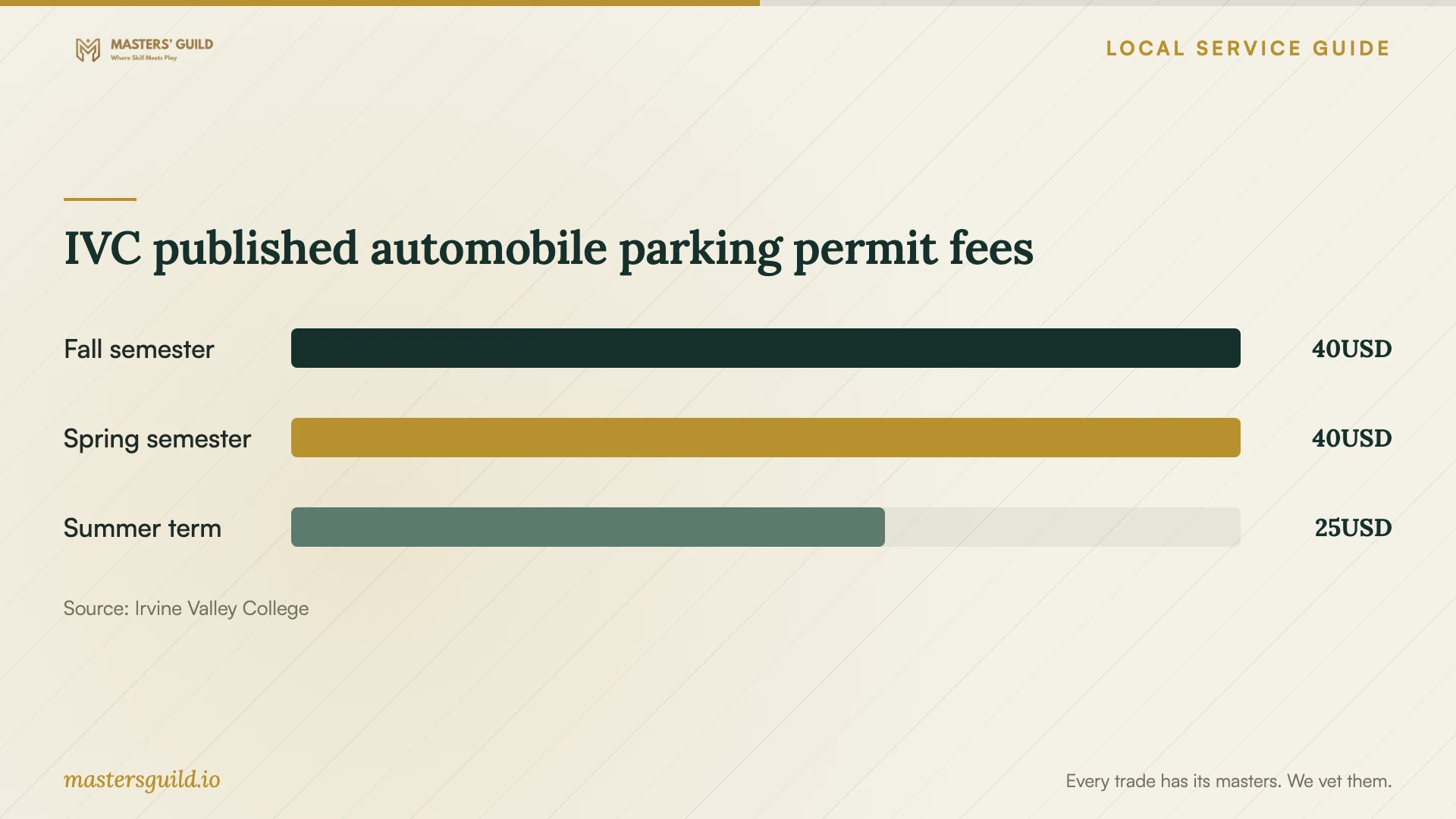
For college training, distinguish tuition from the full cost of attendance. IVC identifies possible noncredit expenses for books, program access, parking and health fees. Its Fall 2026 fee information lists a $28 fall or spring health fee, subject to exemptions, and standard automobile parking permits of $40 for a fall or spring semester. Verify which charges apply to your enrollment. [1] [2]
Review cancellation, rescheduling and package refund terms before paying for private instruction. Specify who purchases software subscriptions and whether the price includes practice files or written notes. Agree on a review point before committing to further sessions.
Arrange equipment and protect business information
Irvine Public Library gives cardholders two hours of public-computer access per day. Its computers include Word, Excel and PowerPoint, and its locations provide free public WiFi. Plan practice around that allowance, then check installation and account requirements with staff before relying on a library computer. [3]
Practice with sample customer records, dummy invoices and copies of files. Enter your own passwords and agree on whether anyone may record the session. For remote lessons, have the instructor explain any requested screen sharing or remote-control access before you enable it.
At the end of a lesson, complete the target task yourself while the instructor observes. Request a practice assignment and notes covering the steps you found difficult. For staff training, agree on who will answer questions after the session and whether that support costs extra.
IVC published automobile parking permit fees
Local details that affect your job
Prepare library access before your practice session
California residents can obtain a free Irvine Public Library card with government-issued photo identification and proof of California residence. Applicants must attend in person to receive the card, including after online preregistration. Users ages 13 and older may register for a Computer Use card for immediate public-computer access. Arrange access before scheduling practice that depends on library equipment. [4]
Check room rules before arranging a lesson
The library lists two reservable study rooms at Heritage Park and one at Katie Wheeler. Reservations cost nothing, require a valid card in good standing and allow up to two hours per day, with booking up to seven days ahead. The rooms are not soundproof. Check with staff that your proposed paid lesson fits the use guidelines before reserving a room. [3]
Investigate county training support for a career change
Orange County Workforce Solutions offers no-cost basic career services. Job seekers may qualify for occupational training based on assessment. If your goal involves finding or keeping employment, discuss eligibility and course approval with the program before paying a trainer. Obtain confirmation of funding before making a payment commitment. [5]
Choose a training route for your goal
| Your need | Route to consider | Check before committing |
|---|---|---|
| General computer or office skills | IVC tuition-free noncredit instruction | Course dates, CCC Apply registration and additional fees |
| Help with your own business workflow | A private lesson scoped around a sample task | Instructor approach, deliverables and total quoted cost |
| Computer access for Office practice | Irvine Public Library public computers | Card access, required software and the two-hour daily allowance |
| Training for an employment transition | Orange County Workforce Solutions assessment | Eligibility and training approval before payment |
Your hiring checklist
- Name the task you want to complete without help and prepare a sample file.
- List each learner’s experience, device and software version.
- Compare relevant IVC course content and dates with your deadline.
- Request an itemized quote with preparation, travel and follow-up terms.
- Confirm equipment, accounts and software access before the lesson.
- Replace confidential business information with practice data.
- Agree on a completion exercise and a review point before further sessions.
Frequently Asked Questions
Can I take computer classes without paying tuition?
IVC lists tuition-free noncredit computer courses, including office applications and Google Workspace. Budget for possible books, program access, parking and health fees. Check the course schedule and your applicable charges before enrolling. [1]
How should I compare private training quotes?
Give each instructor the same sample task, learner count and software details. Compare total teaching and preparation costs, cancellation terms, practice materials and follow-up support. Discuss how you will demonstrate the skill before buying a package.
Can I practice without owning a computer?
Irvine Public Library provides cardholders two hours of computer access per day, with Word, Excel and PowerPoint available. Check that the machine supports your planned task before arranging instruction that depends on it. [3]
Will workforce funding cover my chosen trainer?
Orange County Workforce Solutions says job seekers may qualify for training based on assessment. Have the program confirm eligibility and approval of your proposed training before you make a payment commitment. [5]
Sources and scope
This guide combines the sources below with practical planning guidance. Figures apply to the stated geography and period; request a written quote for your property.