
Local service guide
Software installation in Irvine, CA
Software installation in Irvine starts with a clear scope: name the programs, identify your computer and operating system, and ask for a written quote covering installation, activation and a working demonstration. Before authorizing an operating system reinstall, agree on backup and file restoration. For occasional Office use or help learning a program, consider the local library and older adult computer resources described below. [1] [2] [3]
Define the result before requesting quotes
Describe what you want to do after the appointment. For example, ask for an office application installed and activated under your account, an existing document opened, and a test file saved where you can find it. For email setup, include sending and receiving a test message. Ask whether the quote includes a short walkthrough.
Give the technician your computer model, operating system version, program names and any error messages. State whether you already own the software and can access the purchasing account. Ask the technician to confirm compatibility before you buy a license or approve removal of an existing version.
For remote service, ask how you will approve access, watch the work and end the connection. For an in-home appointment, describe the devices and peripherals you want tested. Choose a visit format that lets you demonstrate the problem and verify the result.
Compare the full charge
Request an itemized total rather than comparing hourly rates alone. Ask about minimum charges, travel, diagnostic work, software licenses, recurring subscriptions and follow-up support. Set a spending limit and require your approval before the technician adds work. Ask who pays if the proposed application cannot run on your computer.
California tax treatment depends on the transaction. CDTFA Regulation 1502 describes nontaxable electronic software delivery without tangible property and seller-installed software, with exceptions involving storage media or installation as part of a computer sale. It also identifies testing a prewritten program on the purchaser’s computer as nontaxable installation work. Ask the seller to identify taxable items and explain the tax on your quote. [5]
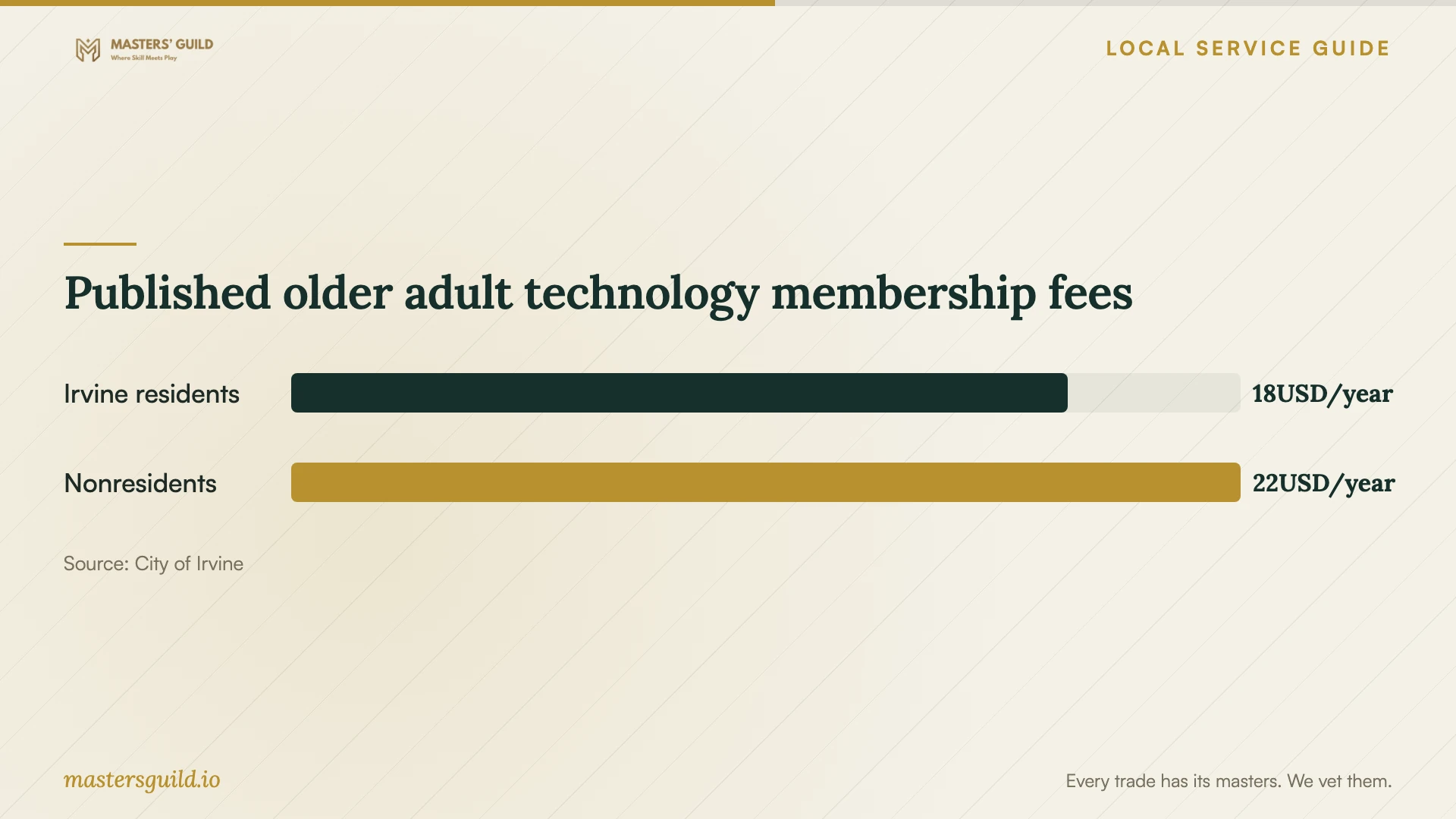
The published local fees in the chart cover older adult technology access memberships. Use them when considering temporary computer access; they do not establish a price for installing software on your own device. Obtain a job-specific installation quote. [2]
Agree on file protection and account access
Before an operating system reinstall, ask the technician to document what they will erase, preserve and restore. Make a backup and open a selection of files from it before authorizing the work. Include any documents, photos, email archives and application settings you need returned.
Keep control of your software account and recovery information. Enter passwords yourself where practical, and stay available for activation or sign-in approval. Ask the technician to explain any request to disable security controls. At handover, review remote access settings and remove access you no longer need.
Test the agreed tasks before closing the appointment. Restart the computer, launch the installed programs, open a familiar file and check any printer or email connection included in the scope. Keep the invoice, license details and a written list of unresolved issues.
Pause if installation becomes repair
Ask for a revised scope if the technician proposes hardware repair or additional troubleshooting. California’s Bureau of Household Goods and Services regulates repair dealers working on personal and home-office computers. Its consumer guide requires a written estimate including the total price before repairs and advance disclosure of any trip charge. [4]
Treat an app installation quote and a repair authorization as separate decisions. Ask what problem the technician found, what the proposed repair includes and whether you can recover your files before proceeding. The BHGS repair guidance does not establish a registration requirement for every standalone software installation. [4]
Published older adult technology membership fees
Local details that affect your job
Use library Office access for an occasional task
Irvine Public Library provides cardholders two hours of computer use per day, including Word, Excel and PowerPoint, and offers free WiFi at all its locations. If you only need to edit or print an occasional document, consider that access before purchasing software and installation. Heritage Park, Katie Wheeler and University Park libraries also support mobile printing; you must pay for and release the job at the library. [1]
Ask Lakeview about training before booking installation
Lakeview Senior Center, at 20 Lake Road, serves adults ages 50 and older and lists computer training and assistance at its Computer Lab. The City also lists a technology membership with Lakeview workstations and laptop lending at Rancho Senior Center and Trabuco Center. Call 949-724-6900 to confirm current access and assistance. These descriptions do not promise software installation on personal devices. [2] [3]
Choose the next step for your task
| Your situation | Next step | Confirm before proceeding |
|---|---|---|
| You want an application running on your own computer | Request an installation and activation quote | Compatibility, license ownership and a working demonstration |
| You need occasional Word, Excel or PowerPoint access | Consider Irvine Public Library computers | Cardholder access has a two-hour daily allowance |
| You want help learning computer tasks | Ask Lakeview Senior Center about computer training and assistance | Current sessions and suitability for your question |
| The technician proposes personal computer repair | Request a written repair estimate | Total price and any trip charge before the work |
Your hiring checklist
- List the programs, devices and tasks you want working at handover.
- Confirm compatibility and license ownership before purchasing software.
- Request an itemized quote and an approval limit for extra work.
- Verify a backup before authorizing erasure or an operating system reinstall.
- Arrange to enter passwords and approve account sign-ins yourself.
- Test the agreed tasks and review remote access before ending the appointment.
Frequently Asked Questions
Should I book remote or in-home installation?
Ask the technician to explain how they would complete and test your task in each format. Choose remote service only when you understand the access process and can participate. Consider an in-home appointment when you want the technician to test several devices or demonstrate the result beside you.
Does the installation fee include the software?
Ask for separate lines for labor, software and subscriptions. Confirm whose account owns the license, whether renewal charges apply and whether you already have access through an existing purchase. Do this before authorizing a new purchase.
Can I use a local computer while mine is unavailable?
Irvine Public Library offers cardholders two hours of public computer use per day. The City’s older adult technology membership includes Lakeview computer workstations and laptop lending at Rancho and Trabuco centers. Confirm current availability and membership requirements before planning around either option. [1] [2]
What should I ask before an operating system reinstall?
Ask what will be erased, who will verify the backup, which applications will be restored and how you will regain account access. Agree on a handover test that includes opening restored files and launching the programs you need.
Sources and scope
This guide combines the sources below with practical planning guidance. Figures apply to the stated geography and period; request a written quote for your property.