
Local service guide
Network Setup and Support in Irvine, CA
For Network Setup and Support in Irvine, ask for a diagnostic visit and a written scope before approving equipment purchases or wall openings. Describe the rooms and devices that need reliable service, then separate router configuration from installed cabling. For cabling work, review California’s C-7 classification and check the proposed installation against Irvine’s permit guidance, especially when the job includes powered equipment. [1] [2] [3]
Choose the scope before choosing equipment
Start your job description with the problem you want solved: interrupted calls at the desk, weak coverage upstairs, or a wired connection for a workstation. Include your current router model, internet plan, affected devices, and any equipment you want to keep. Ask the technician to explain which observations would justify a new router, mesh system, access point, or Ethernet run.
For the diagnostic visit, request a comparison between a wired connection and Wi-Fi at the problem locations. Ask the technician to record the test location and device, then repeat the same checks after the work. Agree on a practical acceptance task, such as completing a video call from your office while another household member streams.
Check service at your exact address
The FCC’s National Broadband Map lets you search an address and review providers, connection technologies, and maximum advertised download and upload speeds reported by internet service providers. Use that address-level information when discussing an internet-plan change, then confirm availability and installation arrangements with the provider. [4]
Treat the map as an availability reference. The FCC describes provider-reported service and advertised speeds; it does not report a test of your home’s Wi-Fi. For a move or provider change, arrange the internet activation and home-network work as separate appointments, with responsibility for each step in writing. [4]
Resolve cabling permissions before opening walls
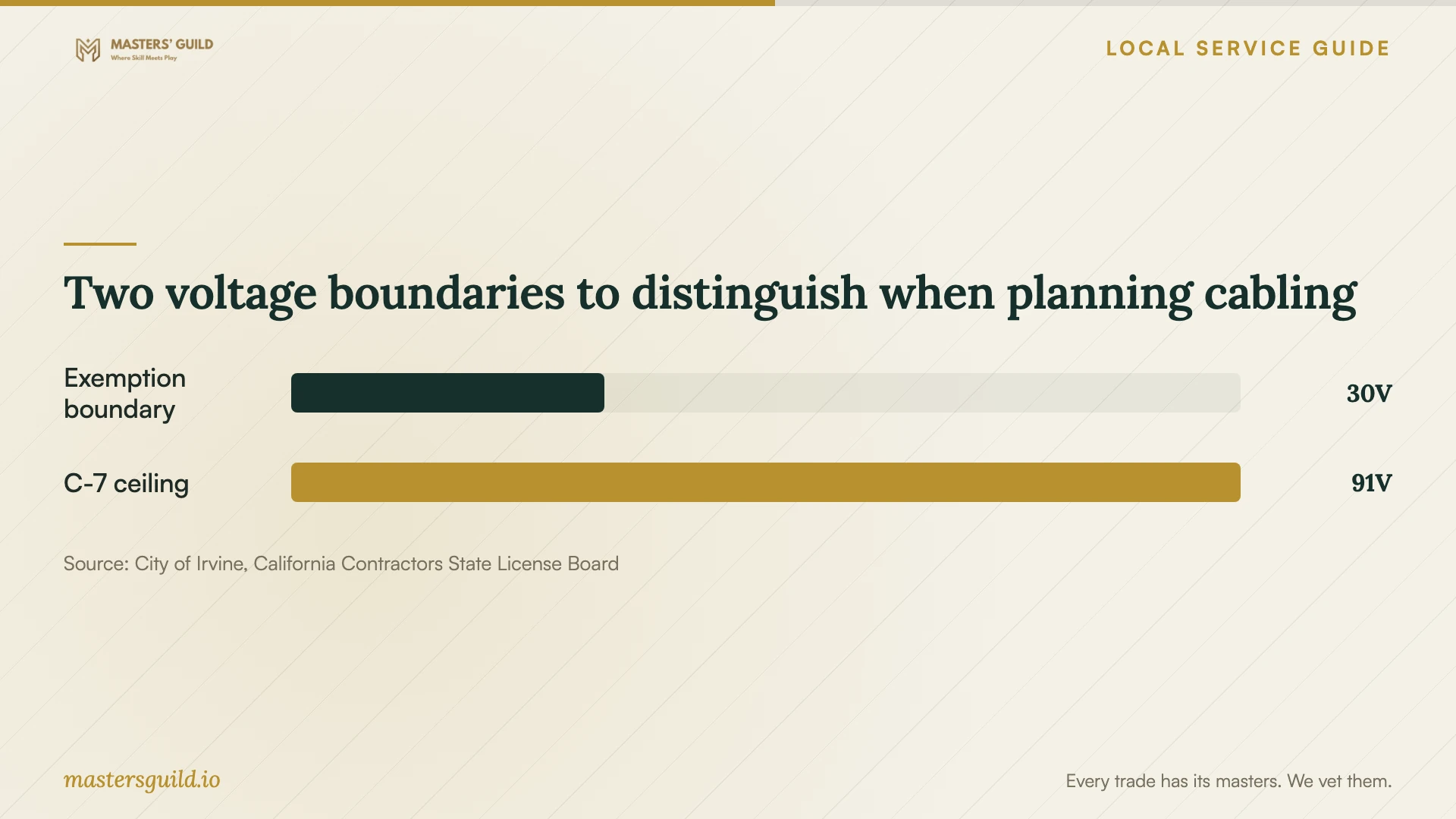
Irvine’s Self-Service Permits page lists installation of low-voltage telecommunications lines among minor residential projects that do not require permits. Its separate exemption page specifies electrical equipment operating below 30 volts and says exempt work must still meet applicable codes. Give the City the cable type, equipment voltage, power method, and proposed alterations if your scope leaves uncertainty. [1] [2]
For Power over Ethernet equipment, ask the installer to identify the operating voltage and obtain scope-specific guidance rather than assuming that the phrase low voltage settles the permit question. Irvine directs permit questions to 949-724-6313. The City also asks owners to consult their homeowners association about applicable restrictions. [1] [2]
Ask a cabling installer which license classification covers the proposed work and request the license details for review. CSLB defines C-7 work as communication and energy-limited low-voltage systems that do not exceed 91 volts. This source defines the classification; it does not establish that every router configuration visit requires a contractor license. [3]
Compare quotes and agree on the handover
Ask each bidder to separate diagnosis, configuration, equipment, cable installation, wall repair, and follow-up support. For cabling, request the route, endpoint locations, cable specification, termination method, labeling, and test results. Have the installer identify who will repair openings and who will resolve any permit questions before work begins.
Set a spending limit for changes discovered during the visit. Ask the technician to pause for approval before adding hardware or changing cable routes. Compare the total scope and exclusions alongside the price, including travel charges, equipment ownership, returns, and any charge for a return visit.
At handover, ask for a simple network diagram, labeled ports, equipment locations, and instructions for routine access. Keep administrator accounts under your control and arrange a private way to enter passwords. Agree on the support period and contact method, then complete the acceptance checks together before closing the job.
Two voltage boundaries to distinguish when planning cabling
Local details that affect your job
Use Irvine’s telecommunications exemption with a defined scope
The City lists low-voltage telecommunications lines as permit-exempt minor residential work, while its electrical exemption page uses a below-30-volt threshold. Before accepting a quote for powered access points or related alterations, ask the installer to document voltage and scope, then resolve uncertainty with Building and Safety at 949-724-6313. [1] [2]
Check association restrictions before approving a route
Irvine’s permit guidance asks homeowners to consult their HOA about CC&Rs and project restrictions. If you have an association, submit the proposed exterior cable route, visible mounting locations, or shared-area access for review before authorizing installation. Keep that review separate from the City permit question. [1] [2]
Match the proposed work to your next step
| Proposed work | Ask for | Before approval |
|---|---|---|
| Router configuration | A diagnostic visit and settings handover | Agree on tests and account access |
| New Ethernet lines | A route plan and cabling qualifications | Check the scope against Irvine’s telecommunications exemption |
| Powered access points | Equipment voltage and power method | Resolve any uncertainty about the City’s below-30-volt exemption |
| Internet-provider change | Address-level service review | Confirm provider-reported availability and installation arrangements |
Your hiring checklist
- List the rooms, devices, and activities that need service.
- Gather router details and internet-plan information without sharing passwords in the job description.
- Request wired and Wi-Fi checks before approving replacement equipment.
- Ask for cable routes, mounting positions, and repair responsibilities in writing.
- Resolve City and association questions for the proposed installation.
- Compare itemized quotes with the same equipment and testing scope.
- Agree on acceptance checks, account ownership, and follow-up support.
Frequently Asked Questions
Does Irvine require a permit for Ethernet installation?
The City lists low-voltage telecommunications lines among minor residential projects that do not require permits. Its electrical exemption guidance specifies equipment operating below 30 volts. Describe the full installation, including powered equipment and other alterations, when asking the City to clarify an uncertain scope. [1] [2]
Which qualification should I ask a cabling installer about?
Ask which contractor classification covers the work and request license details. California’s C-7 classification covers communication and energy-limited low-voltage systems up to 91 volts. Do not use that voltage ceiling as proof of a local permit exemption. [1] [3]
How should I compare network installation prices?
Request quotes against the same written scope. Separate equipment and labor, identify cable endpoints and wall repairs, and ask what testing and follow-up each price includes. Set an approval limit for additional work before the visit.
Can the FCC map tell me whether my Wi-Fi will work upstairs?
The FCC map describes provider-reported internet availability, technologies, and advertised speeds at an address. It does not measure coverage inside your rooms. Ask the technician to test the locations where you need service. [4]
Sources and scope
This guide combines the sources below with practical planning guidance. Figures apply to the stated geography and period; request a written quote for your property.