
Local service guide
Home Office Setup in Irvine, CA
For Home Office Setup in Irvine, hire for the work you need: desk assembly, equipment connection and cable organization, with a separate electrical scope if you want new outlets. Before booking, settle the desk location and identify any fixed wiring changes. Irvine offers a minor residential permit route for qualifying new electrical items, so resolve that scope before arranging the installation visit. [1]
Define the setup before comparing offers
Write a room-by-room task list, even if the project covers one desk. Include furniture model numbers, monitor quantities, the computer or dock, printer connections and your preferred cable route. State whether you want the provider to assemble items you own or supply equipment. Ask who handles packaging, missing parts and return visits.
Choose the desk position before requesting wall work. Mark the footprint with tape, pull the chair back and check access to doors, storage and existing outlets. For a standing desk, ask the installer to check cable reach through the desk’s full movement before securing cables.
Specify the mounting method. Send the monitor and arm model numbers, desk thickness and photographs of the proposed attachment area. Ask the provider to confirm compatibility and identify any wall inspection they need before quoting. Agree on responsibility for holes, patching and paint touch-ups.
Separate equipment setup from construction
Describe new outlets, fixed wiring and wall alterations as separate tasks when seeking quotes. For construction projects, CSLB says a contractor needs a current license when the project requires a building permit, uses employee labor or workers, or totals $1,000 or more in combined labor and materials. Do not use price alone to decide whether licensing applies. [2]
CSLB advises matching a single specialty job to the appropriate specialty contractor. For an outlet addition, ask the electrical provider to identify their license classification, permit responsibility and inspection arrangements. Verify the license before agreeing to construction work. [2]
Keep the equipment handoff specific. Ask the setup provider to connect the agreed devices, test the displays and demonstrate the dock, camera, microphone and printer functions you requested. Enter your own passwords and confirm whether your employer allows outside help with a managed computer.
Compare quotes without guessing a local price
Request a written total based on your item list and photographs. Ask whether the provider charges a fixed amount or bills for time, and how they approve additional work. Request separate amounts for supplied hardware, travel or parking, packaging removal and electrical work so you can compare the same scope.
Ask each provider to name the conditions that could change the quote: missing furniture parts, an unsuitable mounting surface, incompatible brackets or a different cable route. Agree on a pause-and-approve process before they buy materials or expand the work. Set the completion standard in writing, including which devices you will test together.
Choose monitors around the complete workstation
Check screen dimensions, resolution, mounting compatibility and the connections you need before buying. Ask the installer to review your intended computer, dock and display combination. If you want a single cable connection to a laptop, confirm the exact equipment specifications before ordering.
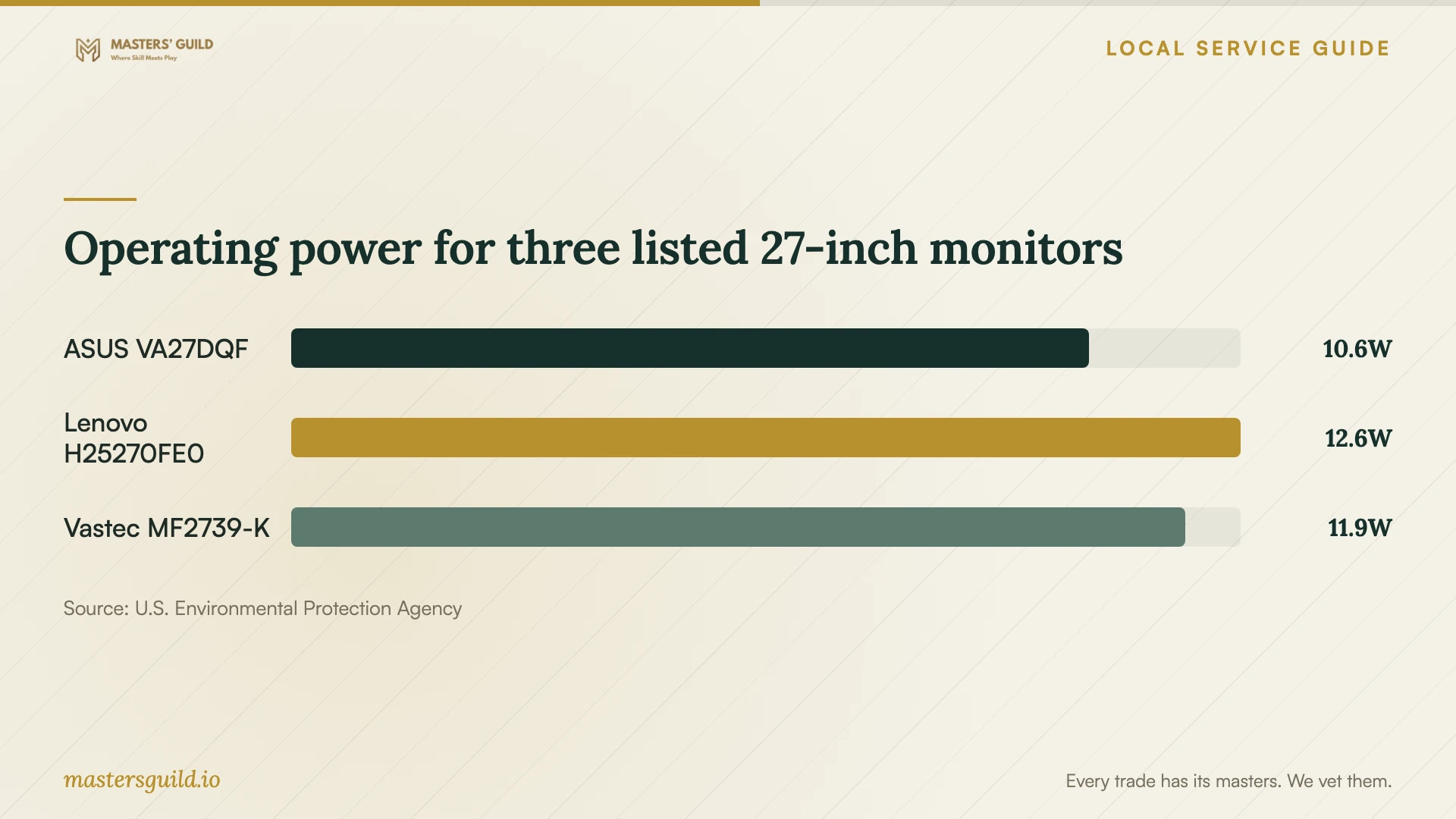
EPA’s ENERGY STAR Most Efficient 2025 display results include operating power, sleep power, resolution and screen size. The chart compares operating watts for three listed 27-inch, 1920 by 1080 models. Use it as one equipment comparison alongside fit and functionality, rather than as an estimate of installation cost or household electricity savings. [3]
Operating power for three listed 27-inch monitors
Local details that affect your job
Check eligibility before scheduling outlet work
Irvine offers an online small miscellaneous residential electrical, plumbing and mechanical permit for limited work that does not require plan review. The stated electrical allowance is up to 10 fixtures or outlets, indoors or outdoors. Applicants must meet the listed criteria; after acceptance, the City emails the permit and pertinent bulletins. Ask the electrical contractor to confirm that your office work qualifies and who will submit the application. [1]
Describe telecommunications work accurately
Irvine lists installation of low-voltage lighting or telecommunications lines among minor residential projects that do not require permits. Before commissioning a cable run, distinguish that task from adding a power outlet. For uncertainty about the proposed scope, the City’s page directs readers to call 949-724-6313. It also advises checking applicable homeowners association rules or restrictions. [1]
Account for a possible smoke-detector requirement
The City states that one- and two-family homes must receive smoke-detector retrofits when a building permit covers work valued at $1,000 or more. If your office project includes permitted construction at that value, ask the contractor to review the job card and include any required retrofit in the scope. [1]
Match the provider to the proposed work
| Your planned work | Provider to consider | Resolve before booking |
|---|---|---|
| Desk assembly and plug-in equipment | Furniture or equipment setup provider | Confirm models, included connections and completion tests. |
| Monitor arm or wall attachment | Installer who can assess the attachment surface | Confirm hardware compatibility and responsibility for wall repairs. |
| New electrical outlets | Appropriately licensed electrical contractor | Confirm permit eligibility, application responsibility and inspection arrangements. |
| Low-voltage telecommunications lines | Provider familiar with the proposed cable installation | Confirm the work fits Irvine’s listed permit exemption; separate power wiring. |
Your hiring checklist
- Measure the desk area, chair clearance and delivery path.
- Send furniture, monitor, dock and mounting hardware model numbers.
- Photograph existing outlets and mark proposed cable routes.
- List wall attachments and electrical changes as separate tasks.
- Confirm building access, parking and any applicable association approval.
- Agree on additional-work approval, cleanup and device tests in writing.
Frequently Asked Questions
Does adding an outlet belong in a basic setup quote?
Ask for a separate electrical scope. Irvine includes qualifying outlet additions in its minor residential permit route. California’s contractor licensing rule applies when construction work requires a building permit, regardless of whether the price falls below $1,000. [1] [2]
Can I arrange a network cable run without an electrical permit?
Irvine lists installation of low-voltage telecommunications lines among projects that do not require permits. Give the City an accurate description if the route also involves other alterations. Do not assume that the exemption covers a new power outlet. [1]
What should I have ready for the setup visit?
Gather the equipment, assembly instructions and mounting hardware. Clear the work area, confirm the delivery path and keep purchase information available for missing parts. Prepare a list of functions to test before the provider leaves.
Should I replace my monitor to reduce electricity use?
Compare the equipment you own with any proposed replacement before deciding. EPA lists operating and sleep power for individual models, but the chart alone cannot establish your savings or justify a purchase. Consider your actual usage, purchase cost and connection needs. [3]
Sources and scope
This guide combines the sources below with practical planning guidance. Figures apply to the stated geography and period; request a written quote for your property.