
Local service guide
Data Recovery and Backup in Irvine, CA
For Data Recovery and Backup in Irvine, ask a provider to separate file recovery, replacement storage, and ongoing backup setup in its quote. Before handing over a device, agree on diagnostic charges, the files you need, who may access them, and how you will check the result. Request a restore demonstration before accepting the backup setup.
Define the recovery job before handing over the device
Tell the provider what happened and what you have tried. List the device model, storage type if known, symptoms, and the last time you opened the missing files. Identify the folders that matter most, such as family photos or financial records. Ask the technician for handling instructions before attempting more recovery work.
Agree on what counts as a successful recovery. Ask whether you can review a file list and open representative files before accepting the work. Specify the destination for recovered data and whether the quote includes that storage. Request separate approval for any attempt that could alter the original device.
Compare complete quotes and data-handling terms
Request itemized charges for diagnosis, recovery, replacement media, shipping, and any urgent service. Ask what you owe if the technician finds nothing recoverable, retrieves only part of your requested files, or recommends sending the device elsewhere. Compare the same scope across offers and set a spending limit before work starts.
Ask who will hold the device, whether another company will receive it, and how the provider will document transfers. Request written terms for access to your files, delivery of recovered data, retention of working copies, and deletion after acceptance. Agree on a secure way to provide any required credentials.
Separate the diagnostic estimate from the recovery deadline. Ask when you will receive the first assessment, when you must approve further work, and how the provider will report delays. If you need a particular document sooner than the rest, name it in the scope and ask whether the technician can prioritize it.
Specify a backup you can restore
Ask the installer to document which devices and folders the backup includes, where copies will reside, how much history you will retain, and who will receive failure notices. Identify anything outside the agreed scope. Set a recurring cost limit for storage and support, then ask who will manage the account if you change providers.
During handover, restore a sample folder to a separate location and open its files. Ask the installer to show you how to retrieve an earlier version, check the last completed backup, and respond to a failed job. Keep the recovery instructions and account recovery information somewhere you can access without the original computer.
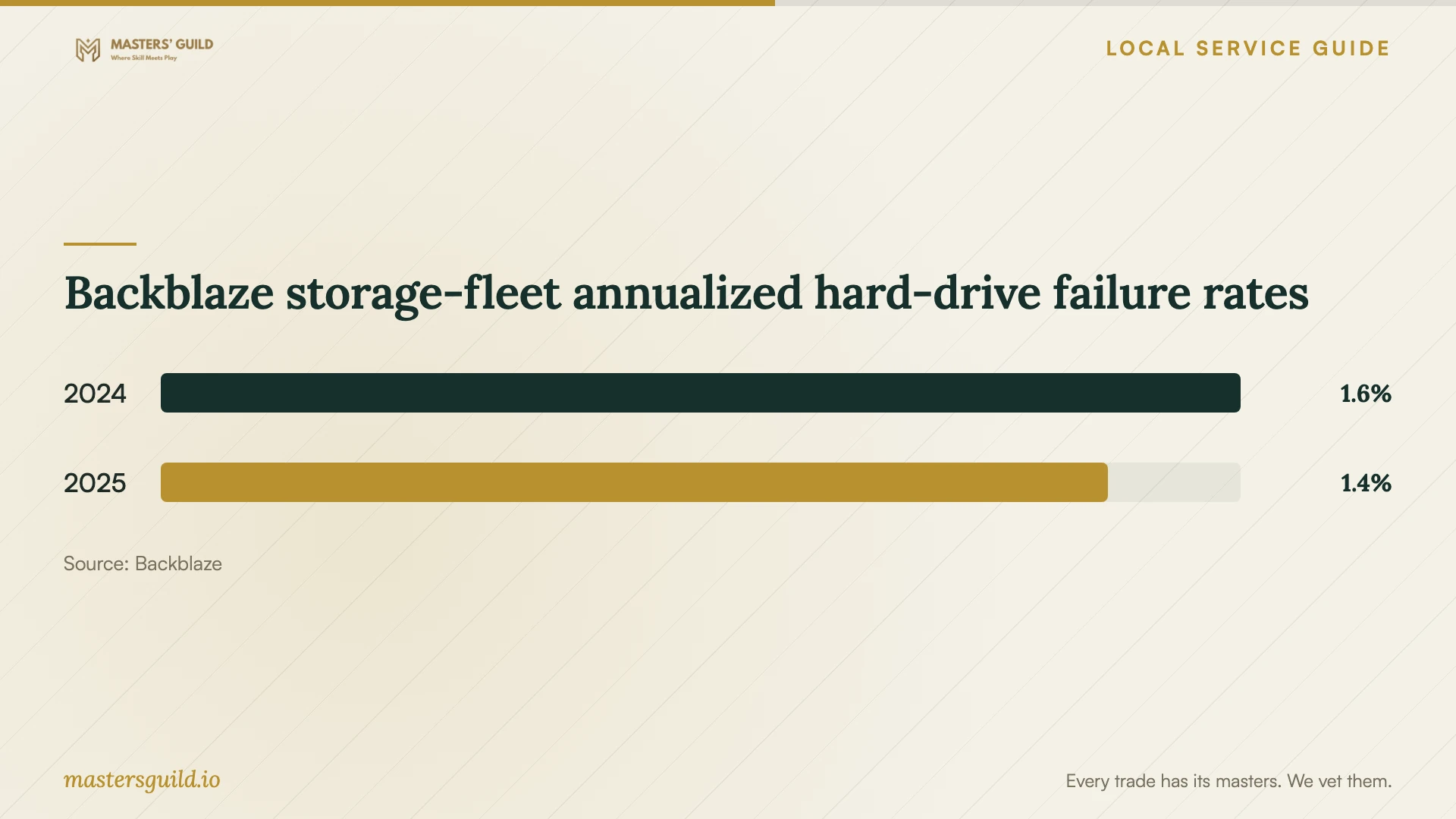
Backblaze reported annualized hard-drive failure rates of 1.55% for 2024 and 1.36% for 2025 in its storage fleet. These observations concern Backblaze's operating environment and drive selection. They do not establish a failure rate for Irvine households or the recovery prospects of your device. [5]
Plan for interruptions at your address
The City of Irvine identifies Southern California Edison as its electrical utility. SCE offers address-level public safety power shutoff alerts by text, email, or voice call and warns that an event may last over 24 hours. SCE also explains that homes near high-fire-risk areas can experience shutoffs because of the circuits serving them. [3] [4]
Ask the installer to explain what happens if power fails during a backup and how you will confirm completion after service returns. If you want backup power, request a device list and a runtime estimate for your equipment. SCE describes portable power stations as options for laptops and some routers; do not assume that a particular setup will cover an extended outage. [4]
Finish recovery before arranging disposal
Keep the original device until you have checked the recovered files and completed the agreed backup test. Then decide whether to retain, reuse, or dispose of it. If you choose disposal, ask the provider to quote data removal as a separate task and explain how you will confirm completion.
OC Waste & Recycling accepts household computers and other listed electronics from Orange County residents at its collection centers without a disposal fee. The county says it performs no device destruction on the premises and instructs residents to remove sensitive information before drop-off. Arrange that step before transporting equipment. [2]
Backblaze storage-fleet annualized hard-drive failure rates
Local details that affect your job
Use the Irvine household collection center after data removal
The county lists the Irvine Collection Center at 6411 Oak Canyon, 92618, with hours of 9 a.m. to 3 p.m., Tuesday through Saturday, excluding major holidays and rainy weather. Staff may request proof of county residence. The City reports a facility lease extension through December 31, 2026. Check arrangements before a later disposal trip. [1] [2]
Keep business equipment out of the household disposal plan
Orange County's household collection centers cannot accept waste from businesses, churches, schools, nonprofits, or government agencies. If your recovery job includes employer-owned equipment, ask the owner to arrange a suitable disposal route rather than including it with your household drop-off. [2]
Check power preparedness for the service address
Use SCE's address-level alerts and outage map when arranging a backup installation. SCE says nearby homes can have different power status because their circuits differ. Ask the installer to include shutdown and restart instructions for your equipment rather than basing the plan on a neighbor's outage history. [3] [4]
Choose the scope before comparing offers
| Your situation | Work to request | Acceptance question |
|---|---|---|
| You have a backup copy | Assess the copy and quote a restore | Can I open the priority files from the restored copy? |
| You cannot access essential files | Diagnosis with an approval point before recovery | What will I owe for no recovery or a partial result? |
| You want ongoing protection | Backup setup, account handover, and a restore demonstration | Can I repeat the restore without the installer? |
| You plan to recycle household equipment | Data removal before county drop-off; the county performs no on-site device destruction | How will I confirm data removal before disposal? |
Your hiring checklist
- Record the device model, symptoms, and previous recovery attempts.
- List priority files and any backup copies you already hold.
- Get diagnostic charges, a spending limit, and an approval point in writing.
- Confirm who will access the device and whether subcontractors will receive it.
- Agree on partial-recovery charges and a file acceptance check.
- Request a sample restore and written backup recovery instructions.
- Confirm retention and deletion terms for the provider's working copies.
- Arrange data removal before choosing a disposal destination.
Frequently Asked Questions
How much should I budget for recovery?
Request a diagnostic quote for your device and symptoms. Set a maximum charge before authorizing recovery, and ask the provider to separate diagnosis, recovery, return storage, and shipping. Confirm what you owe if it recovers only some of your priority files.
Can I recycle a computer at the Irvine collection center?
Orange County residents can use the household center at 6411 Oak Canyon for accepted electronics, including computers. Remove sensitive information first. The county does not destroy devices on site and excludes business waste from this program. [2]
Will a portable battery keep my backup running?
Ask the installer to assess your equipment and required runtime. SCE says portable power stations can run laptops and some routers, but it also warns that public safety power shutoffs may exceed 24 hours. Request a shutdown plan as part of the setup. [4]
How should I approve the finished backup setup?
Ask the installer to restore sample files to a separate location while you watch. Open them, check the included folders, and confirm who receives failure notices. Obtain written recovery steps and control of the backup account before accepting the work.
Sources and scope
This guide combines the sources below with practical planning guidance. Figures apply to the stated geography and period; request a written quote for your property.