
Local service guide
Home Office Setup in Indianapolis: Plan Your Job
Arrange Home Office Setup in Indianapolis by requesting separate quote items for furniture assembly, computer configuration, network troubleshooting, and proposed electrical changes. Send equipment models and room photos before booking. Agree on a working video call as part of completion, and ask an electrical contractor to assess any new outlets or wiring and confirm requirements for your address.
Define the work before comparing quotes
Describe the finished workspace you want: an assembled desk, connected monitors, working headset, accessible charging, and a tested work connection. Identify equipment you already own and purchases you want help choosing. Give each provider the same list and ask them to name exclusions.
Send the desk and monitor-arm model numbers with their installation instructions. Include photos of the desktop, proposed mounting points, and nearby outlets. Ask the provider to confirm compatibility before ordering accessories or accepting mounting work. If you rent, obtain the owner's permission for drilling or alterations.
Request separate charges for assembly, technical configuration, mounting materials, travel, and packaging removal. Agree on how you will approve extra work during the visit. Set your budget from written offers for your equipment and room rather than applying a general installation allowance.
Test your connection before buying upgrades
Try a normal work call at the proposed desk while household members use their usual devices. Check camera, microphone, and headset operation. Record interruptions and describe what you were doing when they occurred. Give the technician a specific problem to investigate.
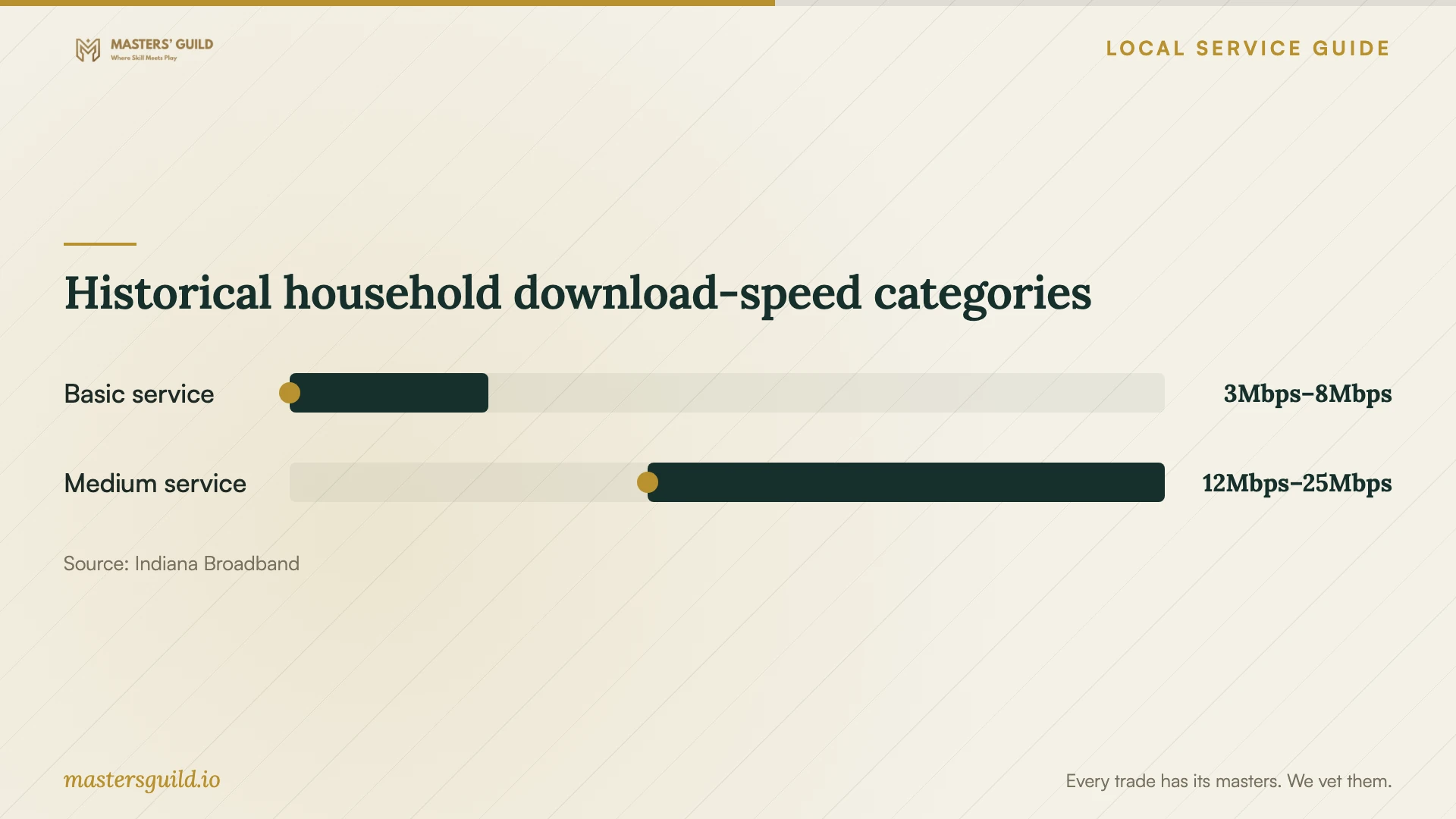
Indiana Broadband publishes household guidance that considers simultaneous devices and includes telecommuting among high-demand applications. It lists basic download service at 3 to 8 Mbps, medium at 12 to 25 Mbps, and advanced above 25 Mbps. The state attributes the guide to the FCC in 2020 and describes the figures as rough guidelines without survey or experimental support. [1]
Ask your employer for current connection requirements, including upload needs. Have the technician compare performance near the router with performance at your desk. Before approving a new plan or network equipment, request an explanation of the test results and the proposed remedy.
Resolve electrical questions before placing furniture
Mark existing outlets on a room photo and show the contractor your intended desk position. For a new outlet, changed wiring, or a concealed power route, request an assessment before finalizing the layout. Ask who will confirm requirements, submit any application, and arrange any required inspection.
The Indianapolis and Marion County citizen portal lists electrical permit and contractor services, plus a Permits and Contractors case-search area. You can research cases and run reports without registration. Applicants must register to submit applications for available online services. [2]
The city describes portal documents as reference information and says it has not reviewed the data for accuracy or legal sufficiency. Use records to prepare questions for the responsible department. Confirm requirements for your address and proposed work before treating an existing case or document as authorization. [2]
Configure equipment and plan running costs
Choose equipment around your work software and whether you carry the computer away from the desk. Ask the provider to confirm monitor, dock, charger, and peripheral compatibility. Get your employer's approval before an outside technician changes an employer-managed device or installs software.
ENERGY STAR's national computer guidance recommends low-power sleep when the computer is inactive and explains that screen savers do not save energy. Include sleep configuration in the visit, subject to employer restrictions. Test wake-up, monitor reconnection, and access to your work applications before the technician leaves. [4]
AES Indiana identifies the rate code under Metered Electric and Other Services and monthly usage under Meter Reading Detail on its bills. Its cited calculator estimates rate-change impacts using household usage; it does not calculate the operating cost of a computer or monitor. AES directs commercial and industrial customers to their account manager for account-specific rate guidance. [3]
Make completion observable
Before closing the job, sit at the desk and complete a normal work task. Check each monitor, camera framing, microphone input, headset output, and any printer included in the quote. Move a standing desk through the positions you intend to use and check cable movement.
Keep control of passwords and authentication codes. Ask the provider to label cables and explain changed settings. Collect an itemized invoice, equipment details, and the agreed route for reporting unfinished work. For electrical changes, request any applicable permit and inspection records from the contractor.
Historical household download-speed categories
Local details that affect your job
Prepare electrical questions through the city portal
Indianapolis and Marion County provide electrical permit and contractor services through Accela. Research cases and run reports without an account; register if you need to submit an available online application. Before accepting an electrical quote, use relevant records to ask the contractor and responsible department about your address, proposed work, application responsibility, and any inspection steps. The city cautions that its records are reference information. [2]
Identify your AES account before estimating equipment costs
If AES Indiana supplies your home, find the rate code under Metered Electric and Other Services on your bill. Use it to identify your account classification and ask AES for the applicable tariff before estimating equipment costs from power consumption and operating hours. The cited calculator estimates rate-change impacts, rather than equipment operating costs. AES directs commercial and industrial customers to their account manager. Check your actual account classification when working from home. [3]
Choose whom to approach for your task list
| Proposed work | Who to approach | What to request |
|---|---|---|
| Desk assembly and cable organization | Furniture assembler or setup provider | Model-specific scope, included materials, and cleanup |
| Monitors, dock, headset, and printer | Computer setup technician | Compatibility checks and a demonstration with your equipment |
| Interrupted calls at the desk | Network technician | Connection tests and an explanation before purchasing upgrades |
| New outlets or changed wiring | Electrical contractor and responsible local department | Confirmation of address-specific requirements and application responsibility |
| Employer-managed computer | Your employer's IT team | Approval for outside assistance and configuration changes |
Your hiring checklist
- Photograph the room, outlets, router location, and intended desk position.
- Send model numbers and installation instructions for furniture and equipment.
- Test a work call at the desk during normal household use.
- Confirm employer approval for device, software, and network changes.
- Separate assembly and technical configuration from electrical changes.
- Agree on materials, extra-work approval, cleanup, and completion checks.
- Test the finished workspace and collect an itemized invoice.
Frequently Asked Questions
Can one provider assemble furniture and configure my computer?
Ask the provider to confirm both tasks in writing. Send model numbers and request a working demonstration using your monitors, headset, and connection. If you want outlets or wiring changed, arrange an electrical assessment and define that work as a separate quote item.
Do I need a permit for a home office setup?
The Indianapolis and Marion County portal lists electrical permit services; confirm requirements for your address and proposed work with the responsible department. Describe the actual changes, including outlets or wiring, rather than asking about the service name alone. [2]
Should I upgrade my internet plan before booking?
Test your work applications at the desk and obtain your employer's current requirements first. Indiana's published categories derive from a 2020 FCC household guide and provide rough download-speed guidance. Use them as background for the conversation, then request troubleshooting before approving a purchase. [1]
How should I estimate electricity costs for the equipment?
Ask for equipment power-consumption information and estimate the hours you expect to use it. For an AES account, use your bill's rate code to request the applicable tariff. AES's cited calculator estimates rate-change impacts rather than individual equipment costs. Also ask the technician to configure low-power sleep, which ENERGY STAR recommends. [3] [4]
Sources and scope
This guide combines the sources below with practical planning guidance. Figures apply to the stated geography and period; request a written quote for your property.