
Local service guide
Computer Virus Removal in Indianapolis, IN
Arrange Computer Virus Removal in Indianapolis by asking a technician for a written scope covering diagnosis, file preservation, cleanup, and checks before returning the computer to work. If you suspect someone accessed customer information, ask for incident investigation before authorizing a wipe. Indiana’s Cybersecurity Hub advises organizations to follow their incident response plan and contact their cyber insurer first if their policy requires it. Tell the technician about those requirements before work begins. [3]
Choose the scope before booking cleanup
Describe the problem in observable terms: an unfamiliar login, a payment demand, inaccessible files, repeated warnings, or a computer that will not start. Tell the technician which business tasks you need restored and which files you cannot lose. Ask them to explain what they will investigate before changing the device.
For a single computer, request a quote for diagnosis and cleanup with a separate price for any proposed reinstallation. For suspected access to customer records or several affected devices, request an incident-response scope that includes documenting findings and coordinating recovery. Indiana’s Attorney General defines a covered security breach around unauthorized acquisition of computerized data that compromises personal information. [1]
Choose remote, drop-off, or on-site service after discussing access and confidentiality. Ask who will handle the computer, whether they will copy files, where they will store those copies, and when they will delete them. Agree on how you will provide access without handing over a list of business passwords.
Compare written quotes and recovery plans
Obtain written quotes for the same scope so you can compare the proposed work and total charges. Request separate charges for diagnosis, malware cleanup, file preservation, reinstallation, software setup, travel, and follow-up support. Ask whether the diagnostic fee applies toward the repair and what you owe if you decline the proposed work.
Before approving a wipe, identify the files and applications you need returned. Ask the technician how they will check your backup and demonstrate that you can open the restored files. Include accounting software, business email, printers, and any application needed to resume operations in the handover plan.
Agree on a completion check rather than accepting a promise that the computer is secure. Ask for a written account of findings, work performed, unresolved concerns, and recommended account-recovery steps. If the technician proposes replacement, request separate estimates for transferring required files and erasing the old device.
Handle payment demands with care
Verify anyone offering support through contact details you obtain yourself. The FBI advises against responding to callers who claim to represent a company and demand cryptocurrency or personal information. It also advises contacting the entity for verification. If someone directs you to a cryptocurrency kiosk to pay for supposed support, stop and verify the request before sending money. [2]
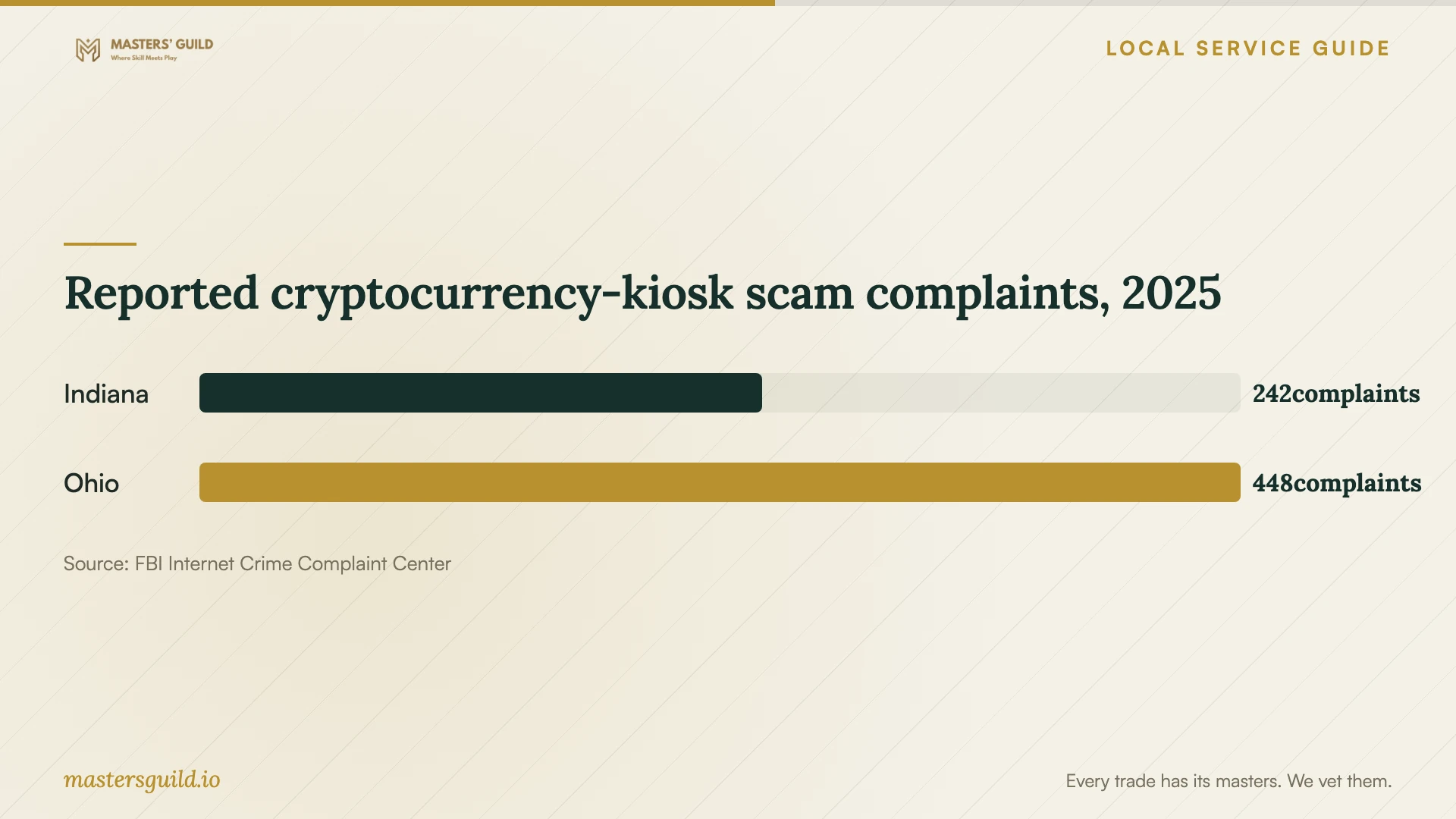
The chart compares Indiana and neighboring Ohio complaint counts for scams involving cryptocurrency kiosks in 2025. These figures cover kiosk-related scams of different kinds. They do not measure computer infections, technician misconduct, or the likelihood that your business will experience a support scam. [2]
If you sent funds through a kiosk, retain receipts and transaction documentation. The FBI asks complainants to supply available transaction IDs, destination wallet addresses, kiosk locations, and details about the person who contacted them. Ask your technician to preserve relevant messages before removing software or resetting the computer. [2]
Prepare for handover and return to work
Prepare a short timeline of the symptoms and any access you granted to another person. Record affected devices and accounts, and identify your last known usable backup. Ask the technician or incident responder for instructions about continued use, network access, and evidence preservation before you experiment with cleanup.
Give the technician a written authorization that identifies permitted work and requires your approval before erasure, replacement, or added charges. At collection, test the business functions you agreed on. Ask who will answer follow-up questions, what repeat work the quote covers, and how they will return or delete any copies of your data.
Reported cryptocurrency-kiosk scam complaints, 2025
Local details that affect your job
Indianapolis reporting contact for financial cyber incidents
Indiana’s Cybersecurity Hub lists the Indianapolis Cyber Fraud Task Force at 317-635-6420 for financially related cyber incidents. If your business lost money or suspects payment fraud, add that reporting contact to your response plan alongside technical recovery. The state also advises organizations to consult their incident response plan and contact their insurer first when their policy requires it. [3]
Indiana customer-data breach review
The Indiana Attorney General says businesses must notify affected consumers without unreasonable delay following discovery of a covered breach and notify the Attorney General’s office. Covered information includes a Social Security number or a name combined with specified financial or identification information. If you suspect acquisition of those records, ask for an investigation and legal review before approving routine erasure. A malware finding alone does not settle whether these duties apply. [1]
Indiana identity-theft documentation
If someone used your identity during the incident, the Indiana Attorney General offers online and printable identity-theft complaint options. The office asks you to submit supporting copies and retain originals. Keep your messages, receipts, and complaint copy together so computer cleanup does not become your only record of the incident. [4]
Replacement and Indiana E-Cycle
Indiana E-Cycle provides collection opportunities for small businesses as well as households and public schools. IDEM asks users to contact a collection site before visiting to verify accepted items and to ask collectors about data security. If you choose replacement, arrange file preservation and erasure before drop-off. IDEM does not accept electronics at its own offices. [5]
Choose the work to request
| Situation | Request | Before approving |
|---|---|---|
| Warnings or unexplained behavior on one computer | Diagnosis and a written cleanup proposal | Identify essential files and set an extra-work approval limit. |
| Files you need cannot open | A file-preservation and recovery assessment | Require approval before erasure or reinstallation. |
| Suspected acquisition of customer personal information | Incident investigation and Indiana breach-duty review | Coordinate evidence preservation with the responder and legal adviser. |
| Money lost after a support payment demand | Technical recovery plus financial cybercrime reporting | Keep transaction records and consult the Indianapolis Cyber Fraud Task Force contact. |
| You choose to replace the computer | File transfer and data erasure as separate work | Confirm accepted items with an Indiana E-Cycle collector before visiting. |
Your hiring checklist
- Record symptoms, affected devices, suspicious messages, and any access you granted.
- Identify essential business files, applications, and the backup you want checked.
- Review your incident response plan and insurance instructions before authorizing work.
- Request separate charges for diagnosis, cleanup, recovery, reinstallation, and travel.
- Require approval before erasure, added charges, or device replacement.
- Agree on data access, copy retention, and deletion in writing.
- Test restored business functions and collect a written service report.
Frequently Asked Questions
How much should I budget for cleanup?
Obtain a written quote after describing the symptoms and file-preservation needs. Ask for separate charges for diagnosis, cleanup, reinstallation, recovery, and travel. Compare providers using the same requested work and approval limit, and confirm what you owe if you decline the repair after diagnosis.
Should I allow the technician to wipe the computer?
Approve a wipe after agreeing on file preservation, application restoration, and any investigation needs. If you suspect someone acquired customer personal information, arrange incident and legal review first. Indiana’s breach guidance makes acquisition of covered information central to the notification question. [1]
Does finding a virus mean I must notify customers?
A malware finding alone does not establish a covered breach. Indiana’s Attorney General describes a breach as unauthorized acquisition of computerized data compromising personal information. Ask an incident responder and legal adviser to assess what someone acquired and whether notification duties apply. [1]
Can I recycle the computer after deleting my files?
Arrange data erasure before recycling. IDEM warns that deleting files does not remove them from the device. Ask your technician about preserving required files and erasing the old device, then confirm the collection site accepts your equipment and ask about its data-security process. [5]
Sources and scope
This guide combines the sources below with practical planning guidance. Figures apply to the stated geography and period; request a written quote for your property.