
Local service guide
Software Installation in Huntsville, AL
Arrange Software Installation in Huntsville, AL by giving the technician your device model, operating system, program names, and the tasks you need to complete. Ask for a written scope covering installation, activation, testing, and any file transfer. Before booking, agree on who buys the software, how you will enter account credentials, and what happens if the technician cannot complete the work.
Define the work before comparing offers
Describe the result you want in everyday terms, such as opening household documents, sending email from an existing account, or using a purchased photo editor. Include the program’s name and version if you know them. Ask the technician to confirm compatibility before you purchase a license or authorize changes.
Separate a new installation from troubleshooting. Tell the technician about failed attempts, error messages, missing files, or an account you cannot access. Request separate approval for removing existing programs, resetting the computer, or reinstalling the operating system. Agree on a spending limit for diagnosis if the cause remains uncertain.
Choose remote, home, or drop-off service
For remote service, ask what connection and access steps you must complete before the appointment. Arrange a time when you can stay at the computer, enter passwords, and approve changes. Ask the technician to explain how you will end remote access after the session.
For a home visit, list the devices and accessories you want tested together. Include a printer or scanner if using it forms part of the job. For drop-off service, confirm which charger or accessories to bring, the collection arrangements, and whether the technician needs you available for sign-in. Ask each provider about travel, diagnosis, cancellation, and return-visit charges.
Get an itemized quote and clarify tax
Request separate lines for installation labor, software licenses, subscriptions, file transfer, and other agreed work. Ask whether you are purchasing a subscription or a one-time license, who controls the account, and whether the provider includes follow-up help. Obtain an approval requirement for additional charges.
The Alabama Department of Revenue’s June 19, 2019 guidance says software transactions are taxable, while separately stated or invoiced services accompanying the software conveyance are not subject to state sales or use tax. Ask the seller to explain the treatment of your transaction; this guidance does not establish a blanket exemption from all taxes. [3]
The City of Huntsville warns that postal addresses do not establish city boundaries and directs sellers to its Address Locator when determining whether customers fall inside city limits. Give the seller the service address and request an explanation of the applicable jurisdiction and tax lines. [4]
Prepare your accounts and agree on completion
Back up the files you want to preserve before authorizing changes. Have your purchase receipt, account email address, and recovery method available. Enter passwords and verification codes yourself where possible. Keep license ownership in an account you control, and ask before the technician creates a new account or adds a payment method.
Agree on a completion test before work starts. Ask the technician to restart the computer, open the program, confirm activation, and help you complete a representative task. For email, send and receive a test message. For document software, open and save a sample file. Review any remaining errors together.
Before closing the job, request a brief record of the installed programs, account ownership, renewal terms, unresolved issues, and follow-up arrangements. Ask the technician to remove temporary installation files and review any remote-access software with you.
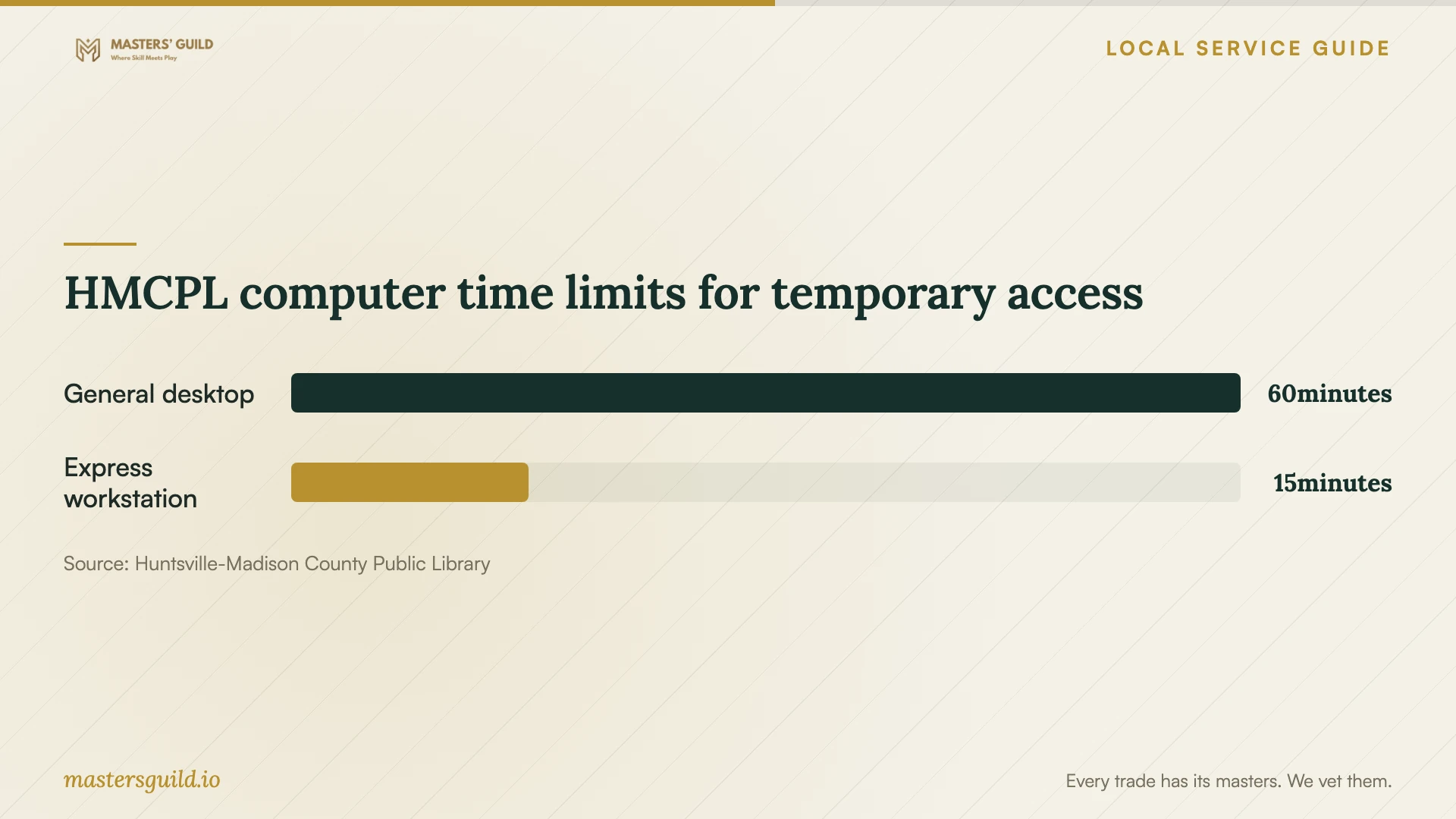
HMCPL computer time limits for temporary access
Local details that affect your job
Use local classes when you need instruction
Huntsville-Madison County Public Library offers free computer classes and public computers at its branches. Its Technology Training Center occupies the second floor of the Downtown Huntsville Library. If your program already works and you need help using it, check the class catalog before paying for installation. HMCPL requires sequence classes in order and completion of prerequisites within the preceding 18 months. [1]
Keep custom installations off library computers
HMCPL requires patrons to use the software already available on library computers. It prohibits loading software onto their hard drives or using personal software from USB storage. Before relying on a library computer for a task, confirm that the branch provides the program you need. Arrange installation of a custom application on your own computer. [2]
Match the help to the task
| Your situation | Next step | Confirm before proceeding |
|---|---|---|
| You need a program installed on your computer | Request installation and configuration | Compatibility, license ownership, activation, and testing |
| Installation fails or the computer shows errors | Request diagnosis before approving broader changes | Diagnostic charge, backup plan, and additional-work approval |
| The program works, but you need instruction | Check HMCPL’s free computer classes | Course content, sequence, and prerequisites |
| You need a custom program on a library computer | Plan to use your own device | HMCPL prohibits installing software or running personal USB software |
Your hiring checklist
- List each device, operating system, program, and error message.
- Ask the technician to confirm compatibility and license requirements.
- Choose the service format and confirm access or drop-off arrangements.
- Back up important files and prepare your account recovery method.
- Request itemized charges and approval before additional work.
- Agree on an activation check and a task you will test together.
- Record account ownership, renewal terms, and follow-up arrangements.
Frequently Asked Questions
What should a software installation quote include?
Ask for the named programs, device count, activation, configuration, testing, and any file transfer. Request separate license and subscription charges, plus a clear approval process for troubleshooting beyond the agreed scope.
Should I give the technician my password?
Arrange to enter passwords and verification codes yourself where possible. Ask what access the technician needs and why. Agree on how to remove temporary access after the work, and retain control of the software account and recovery details.
Can I install my own program on an HMCPL computer?
No. HMCPL prohibits patrons from installing software on library computers or running their own software from USB storage. Confirm the available software before planning a task there. [2]
Does a Huntsville mailing address determine city sales tax?
The City says postal addresses do not establish its geographic boundaries. Ask the seller to verify the transaction’s jurisdiction using the actual address and explain the tax charged. [4]
Sources and scope
This guide combines the sources below with practical planning guidance. Figures apply to the stated geography and period; request a written quote for your property.