
Local service guide
Arrange computer virus removal in Huntsville, AL
To arrange computer virus removal in Huntsville, choose a technician who will define the diagnosis, file-preservation plan and repair scope before starting. Agree on a spending limit and require your approval before drive erasure or system reinstallation. Describe the symptoms, available backups and any access you gave an unfamiliar caller so the technician can propose the next step.
Describe the problem before selecting a repair
Give the technician observations rather than a diagnosis. Write down warning messages, browser changes, missing files and startup problems, with the order in which you noticed them. Include recent downloads or support calls. Request an explanation of the proposed work before approving a cleanup package.
Name the files you want preserved, such as family photos or tax records, and describe your backups. If preserving those files matters more than restoring the computer, say so at intake. Have the technician explain the file-preservation approach before attempting a repair that could erase them.
Set boundaries for access and personal data
Discuss remote service, drop-off and a home visit in terms of your symptoms and schedule. For remote work, establish the appointment and connection method through contact details you obtained yourself. For drop-off, get a receipt identifying the device, charger and accessories you leave.
Have the provider identify who will access your files, whether they intend to make a working copy and when they will delete it. Discuss access without sharing passwords for unrelated accounts. Include the removal of service access in the handover plan, and keep a copy of your written authorization.
Compare scope, total charges and completion
Request a proposal that distinguishes diagnosis from the repair itself. Clarify whether the diagnostic fee counts toward further work, what you owe if you decline repair and whether travel or urgent scheduling adds a charge. For recovery work, establish what you would pay if the technician cannot retrieve the requested files.
Alabama’s Department of Revenue exempts labor to repair or install property when the seller lists it as a separate invoice item. Request distinct labor and hardware entries when a proposal includes a replacement drive or other parts. [1]
Agree on a diagnosis date, then obtain a repair timetable after the technician explains the findings. Define completion through checks you can review together: opening agreed files, starting required applications and testing the browser. Record unresolved problems and the provider’s follow-up terms before collecting the computer.
Include suspicious support contact in the intake
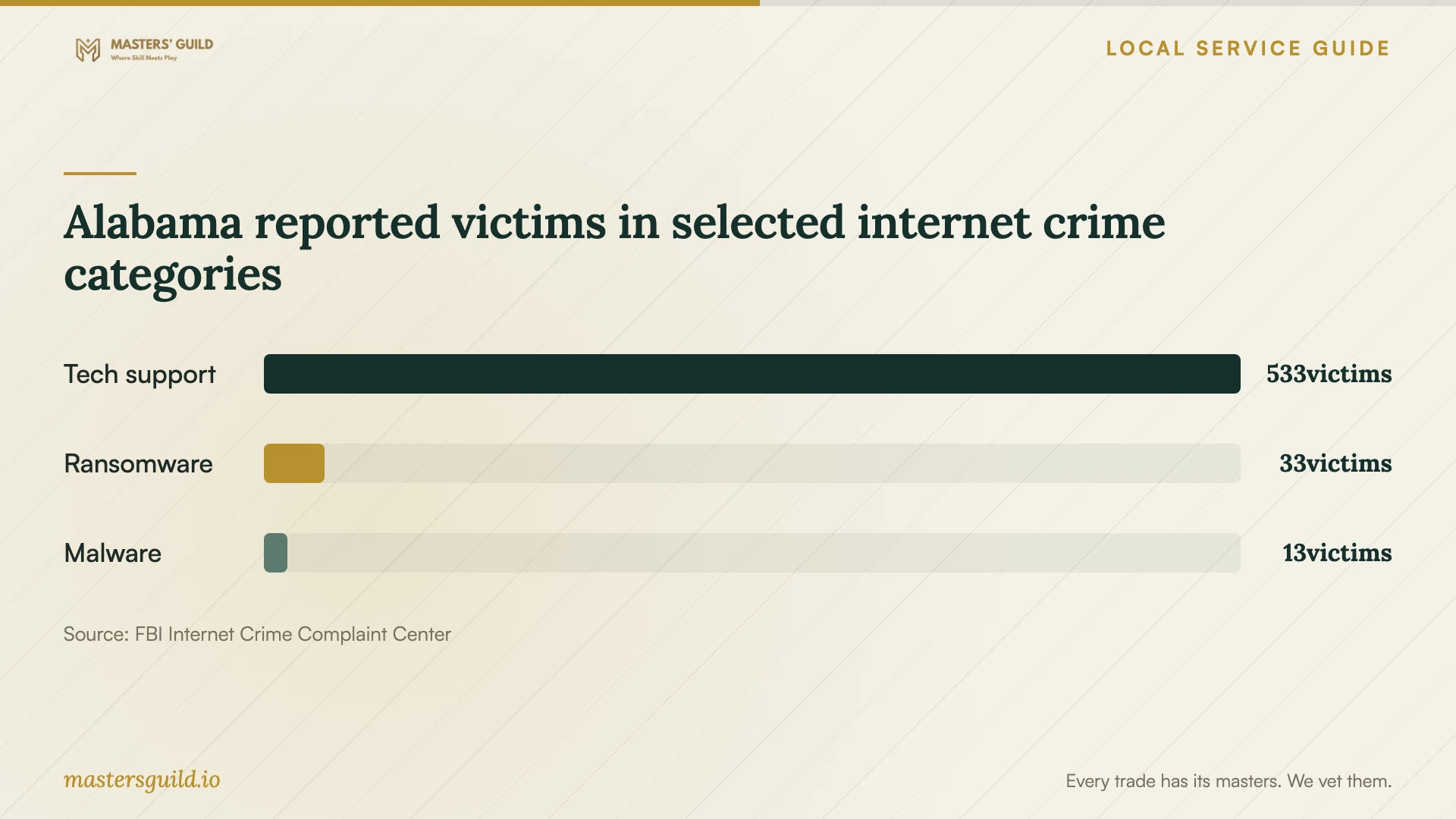
The FBI’s 2025 Alabama IC3 report lists 533 tech-support victims, 33 ransomware victims and 13 malware victims. These statewide reported counts provide context for discussing suspicious support contact; they do not establish Huntsville infection rates or diagnose your computer. [4]
If you allowed an unfamiliar caller to connect, record the software they requested, the information you shared and any payment you made. Give that account to your chosen technician. Arrange device repair and account-security follow-up as distinct tasks, with a clear explanation of what the technician will handle.
Compare repair with replacement before disposal
Before approving an extensive repair, compare the proposed total with a replacement plan that includes file transfer and application setup. Request a separate file-recovery proposal if you prefer to retire the device. Decide how to handle the old drive before releasing the computer for disposal.
In its September 27, 2024 article, the City of Huntsville described free electronics disposal for Madison County residents, including Huntsville and Madison, at 1055 A Cleaner Way. It listed Monday through Friday hours of 7 a.m. to 5 p.m. and appointment-free drive-through access. Confirm current eligibility, fees, location, hours and appointment requirements before planning a trip. [2]
Arrange recovery of wanted files and drive sanitization with your technician before disposal. Request confirmation of the agreed data work. Treat electronics collection and personal-data destruction as separate arrangements unless the receiving facility confirms otherwise.
Alabama reported victims in selected internet crime categories
Local details that affect your job
Check jurisdiction when buying replacement hardware
Huntsville publishes a 4.50% city general sales-tax rate on retail tangible personal property. This is the city portion, not a combined tax rate. The city warns that postal addresses do not establish its boundaries and directs sellers to its Address Locator. If your repair includes hardware, have the seller explain the transaction’s jurisdiction and applicable taxes. [3]
Review an Alabama repair invoice before authorizing a bundle
Alabama ties the repair-labor sales-tax exemption to a separate invoice entry. Before accepting one bundled price for cleanup and a replacement drive, request a breakdown that identifies repair labor and hardware. The state distinguishes repair or installation labor from fabrication labor, which it does not exempt. [1]
Match the proposal to your priority
| Your priority | Work to discuss | Decision before proceeding |
|---|---|---|
| Restore a usable computer | Diagnosis, cleanup and any system repair | Define the completion checks |
| Preserve files without a usable backup | File preservation or recovery | Approve the data plan before repair |
| Address an unfamiliar remote-access session | Device review and account-security follow-up | Identify who handles each task |
| Replace the computer | Recovery, transfer and drive sanitization | Compare the full replacement plan with repair |
Your hiring checklist
- Record the symptoms, message wording and sequence of events.
- List wanted files and describe available backups.
- Choose a service format and document device intake or remote access.
- Review the scope, spending limit and approval requirements.
- Confirm diagnosis timing and the checks you will review at completion.
- Keep the estimate, authorization and final service report.
Frequently Asked Questions
How much should I budget?
Obtain a written estimate based on your symptoms and file needs. Have the provider identify the diagnostic charge, included repair work and possible additions. Set a maximum authorization rather than leaving the total open-ended.
Can I request file recovery without repairing the computer?
Request that scope at intake. Specify which files matter, where you want the technician to place recovered copies and what charge applies if recovery fails. Keep any decision about restoring the old computer separate.
What should I do if the symptoms return?
Keep the completion report and note which symptoms returned and when. Contact the provider using the follow-up terms you agreed on. Clarify whether another diagnosis carries a charge before authorizing additional work.
Sources and scope
This guide combines the sources below with practical planning guidance. Figures apply to the stated geography and period; request a written quote for your property.