
Local service guide
Software Installation in Houston: Plan Your Setup
Arrange Software Installation in Houston by giving the technician your computer model, operating system, exact programs, and the task you want to complete. Request an itemized quote covering labor, software purchases, file transfer, travel, and tax. Agree on account access and a working demonstration before the technician starts.
Define the installation and its completion test
Give the technician the software name and edition, computer model, and operating-system version. Explain whether you already purchased the program and can access the purchasing account. Include any error message and the steps that trigger it. Keep passwords, recovery codes, and private documents out of your job description.
Separate application installation from an operating-system change, file migration, or removal of unwanted programs. Request a price for each task you need. On a shared household computer, identify who should own the purchase and which family members need access. Ask the technician to check compatibility before you authorize a software purchase.
Describe the task you expect to perform after installation. For office software, create, save, close, and reopen a document. For recording software, open a sample project and export a file. Include accessory setup in the quote if you need the application to work with a printer, scanner, microphone, or camera.
Choose remote, in-person, or drop-off help
Ask the technician whether they can complete your described work remotely and what you must do during the session. Agree on how to reconnect after a restart and what happens if you lose the connection. Choose an in-person appointment if you want someone beside you for accessory setup or an explanation you can follow on your own screen.
For drop-off work, obtain a receipt naming the device and accessories you leave. Set an approval limit for extra work and agree on collection arrangements. Ask about the technician's experience with your exact application, insurance, and follow-up terms. Request a clear answer about who can access your files while the device is in their care.
Compare itemized quotes and confirm tax
Request separate amounts for labor, software or subscriptions, backup, migration, travel, and tax. Ask whether the technician charges a fixed amount or bills by time, whether a minimum charge applies, and what you owe if installation fails. Require approval before they exceed your agreed budget.
In its April 2023 newsletter, the Texas Comptroller described a specific audiovisual and videoconferencing ruling that treated bundled software-and-hardware repair charges and certain communications-software migration charges as taxable. That transaction-specific ruling does not establish the tax treatment of every home installation. Ask the provider to explain the taxable items in your quote. [2]
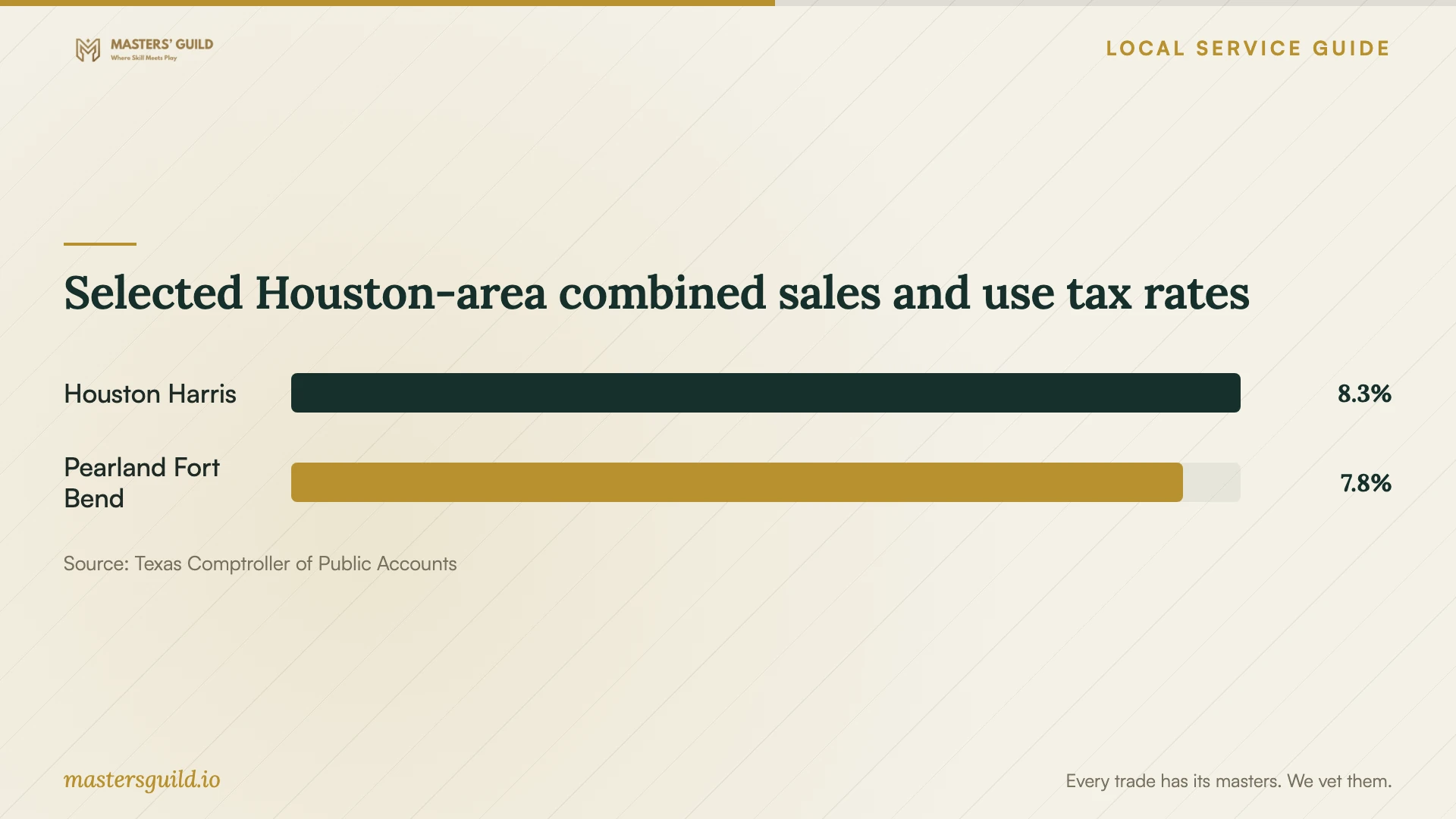
The Comptroller's city table lists 8.25% for Houston entries and 7.75% for the Pearland entry in Fort Bend County. It also lists other Pearland entries at 8.25%. Use the chart to identify a question for the provider: which taxing jurisdiction applies to this transaction? Avoid selecting a rate from the postal city name alone. [3]
Approve programs, settings, and account access
Ask the technician to name the programs they intend to install, where they will obtain them, and which settings they want to change. Discuss any remote-control tool before installation. Require your approval before they remove files or programs, change account recovery details, or add a subscription.
Texas Business and Commerce Code Chapter 324 prohibits specified deceptive software practices, including certain deceptive browser-setting changes and deceptive disabling of security software. It also contains section-specific exceptions for specified providers performing technical support, security work, and authorized management. Request an explanation of proposed changes and give explicit permission for the work you want. [4]
Back up the files you need before the appointment and open a few copies to check them. Keep recovery information available to you. Arrange to enter account credentials yourself and ask the technician to pause screen sharing while you view sensitive information. Decide how you will end remote access when the work finishes.
Test the result and collect a handover
Perform the agreed task yourself while the technician remains available. Reopen the program after a restart, check your files, and test any accessory included in the quote. Ask the technician to explain unfamiliar prompts and show you how to launch the program again.
Collect a handover note listing installed programs, purchases, account ownership, settings changed, and unresolved problems. Confirm whether remote access remains and who controls it. Record the follow-up contact and terms for correcting an installation problem. Keep the itemized invoice with your software receipts.
Selected Houston-area combined sales and use tax rates
Local details that affect your job
Try creative tools at Houston Public Library
Houston Public Library's TECHLink multimedia stations provide access to Adobe Creative Cloud, and its studios provide audio and video tools at library facilities. Free membership requires a MYLink library card, an in-person tour and orientation, and a signed membership agreement. After completing membership, you can book equipment or studio time; some equipment requires a workshop before use. For an occasional design or recording project, review the available facilities before buying software and commissioning a home setup. Ask TECHLink which location has the tools you need and which workshop requirements apply to your booking. [1]
Check jurisdiction when comparing Houston-area quotes
The Texas Comptroller lists Houston entries in Harris, Fort Bend, and Montgomery counties at an 8.25% total sales and use tax rate. Pearland entries include both 7.75% and 8.25%, depending on the listed jurisdiction. When comparing providers serving addresses across these boundaries, request the applicable taxing jurisdiction and an itemized tax amount. The published rate alone does not establish which installation charges are taxable or where the provider must source your transaction. [3]
Choose your next step
| Your situation | Next step | Question to ask |
|---|---|---|
| You want one application installed | Request an application-specific quote | Does the price include activation and a test using my account? |
| You want files moved to another computer | Add a written migration scope | Which files and settings will you move, and how will we check them? |
| You want occasional access to creative tools | Consider TECHLink software and studios at library facilities | Which location has the tools I need, and which membership or workshop steps apply? |
| You want unwanted programs removed | Agree on a removal list before work starts | Will you ask before removing software or changing security settings? |
| You are comparing Houston-area quotes | Request itemized totals and the applicable taxing jurisdiction | Which charges are taxable, and how did you determine the rate? |
Your hiring checklist
- List the computer model, operating-system version, exact software edition, and any error message.
- Find your purchase receipt and confirm you can access the purchasing account.
- Back up needed files and check that you can open the copies.
- Choose remote, in-person, or drop-off service and agree on access arrangements.
- Request an itemized quote, failure-charge terms, and an approval limit for extra work.
- Approve the installation list and permissions for removals, account changes, and remote access.
- Perform the completion test and collect the handover note and invoice.
Frequently Asked Questions
How much should I budget for installation?
Request an itemized quote for your exact device, software, and completion test. Compare labor, software purchases, migration, travel, and tax. Ask what you owe if the technician cannot complete the job and whether follow-up help costs extra.
Should I give the technician my password?
Arrange to enter it yourself where possible. Discuss account access before booking, including restarts and unattended work. Keep recovery codes under your control and confirm how you will end remote access after completion.
Can I use creative software through the library?
Houston Public Library offers access to creative software and equipment at TECHLink facilities. Membership requires a MYLink card, an in-person tour and orientation, and a signed agreement. Review equipment availability and workshop requirements before booking a session. [1]
Does Houston's 8.25% rate apply to my entire bill?
The Comptroller lists Houston entries at an 8.25% combined rate. Ask the provider which charges are taxable and which jurisdiction applies. Its April 2023 software-support ruling concerns specific transactions and does not establish taxability for every home installation. [2] [3]
Sources and scope
This guide combines the sources below with practical planning guidance. Figures apply to the stated geography and period; request a written quote for your property.