
Local service guide
Office Relocation and Setup in Houston
For Office Relocation and Setup in Houston, choose a mover after agreeing on the inventory, truck access, furniture assembly and IT responsibilities in writing. Confirm loading arrangements at both addresses before booking the crew. Give bidders the same scope and ask who will coordinate building access, arrange parking and check the finished workstations.
Define the moving and setup work
Prepare an inventory by room or department. Include desks, chairs, filing cabinets, monitors, printers, conference furniture and boxed supplies. Flag heavy items, fragile equipment and furniture that needs disassembly. Identify anything you will discard or leave behind so bidders quote the intended load.
Give the crew a destination plan with room names and workstation labels. Define setup through specific tasks: assemble desks, place cabinets, attach monitor arms, put shared supplies in cabinets and remove packing materials. Ask who supplies replacement hardware and who handles furniture that will not fit through a doorway.
List premises alterations as separate work. Ask your landlord and the appropriate authority about approval requirements before including changes to outlets, wiring or partitions. Assign those tasks to a named contractor instead of leaving responsibility open in the moving quote.
Compare quotes using the same access plan
Ask each mover to review both locations through a walkthrough or documented remote survey. Show the route from truck to suite, including stairs, doorways, elevators and the distance from the unloading point. Request written assumptions and exclusions alongside the price.
Ask bidders to itemize packing, labor, vehicles, furniture assembly, storage and packing-material removal. For an hourly quote, request the crew size, minimum charge, travel billing and waiting-time charges. For a fixed quote, ask which changes could increase the price and who must approve them.
Request insurance documents and ask each building manager whether they meet the property's requirements. Ask the mover to explain its damage-reporting process and coverage limits for furniture, equipment and building surfaces. Record cancellation, rescheduling and storage terms before paying a deposit.
Match building access to street restrictions
Ask both property managers to confirm freight-elevator bookings, loading-dock access, working hours, protective coverings and security arrangements. Give the mover the approved window and a contact at each building. Agree on an alternative if a dock or elevator becomes unavailable.
ParkHouston states that renting a meter does not remove existing parking restrictions. Its FAQ gives Louisiana Street's weekday restrictions from 7–9 a.m. and 4–6 p.m. as an example. Ask the mover to check signs at the proposed truck location before choosing an arrival time. [3]
If the crew needs more curb time than its loading-zone permit allows, ask ParkHouston about an eligible metered-space reservation or arrange another lawful loading location. Confirm the arrangement before fixing the crew's arrival and elevator booking. [1] [2] [3]
Assign IT work and reopening checks
Choose an IT lead before packing begins. Have that person assign equipment labels, confirm backups and document cable connections. Decide who will transport sensitive records and portable devices. Ask the mover how it will protect and track equipment, and identify items that need a separate specialist.
Agree on completion checks for the new office: furniture in the assigned rooms, hardware accounted for and equipment connected. Have your IT lead test internet access, phones, printing and shared systems before staff return. Record unresolved work and assign someone to complete each task.
Consider moving in stages if part of the business must keep operating. Ask bidders to price the extra visits and agree on which department moves first. Set a pause or rescheduling process for access problems, equipment delays or weather interruptions.
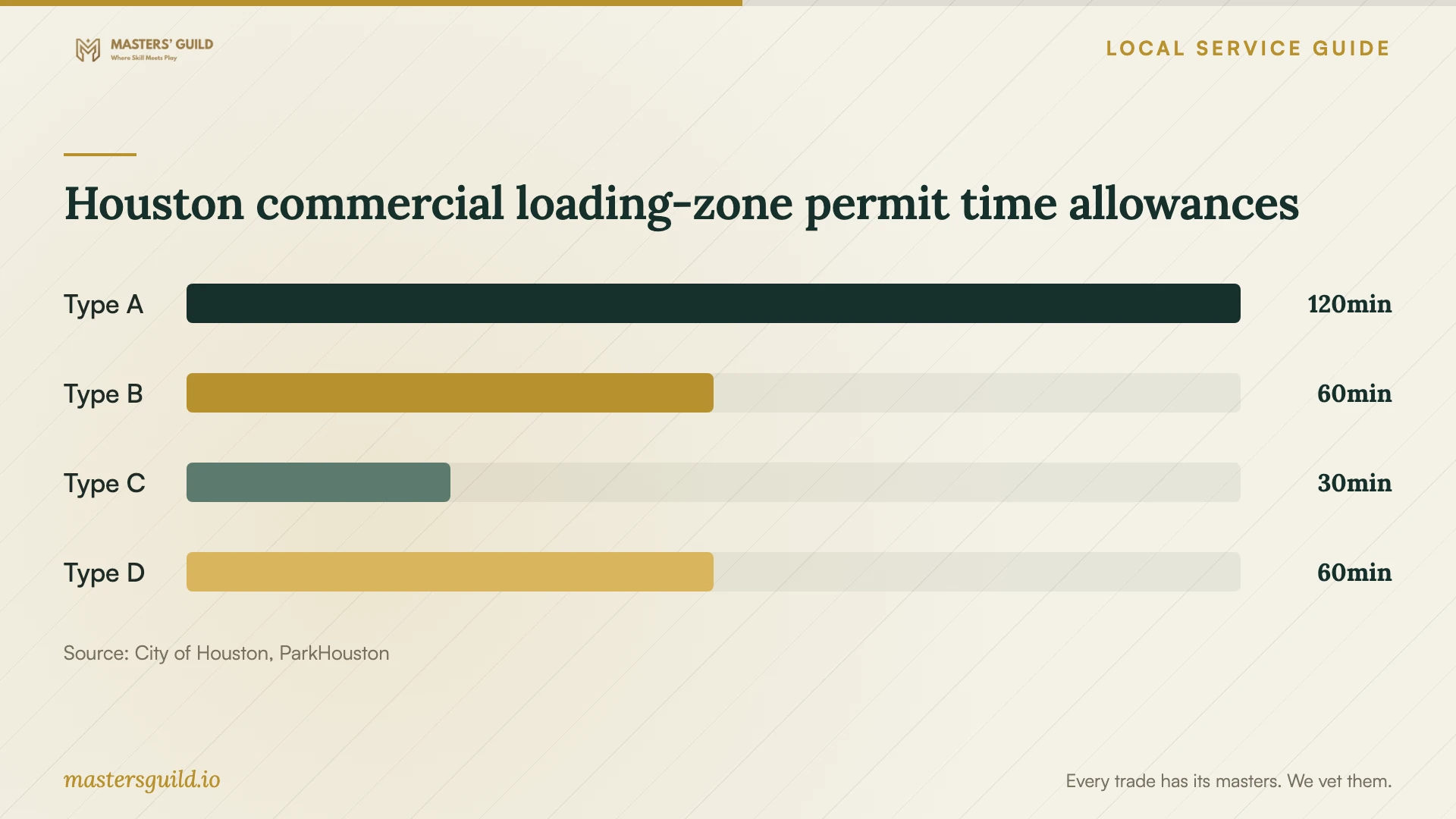
Houston commercial loading-zone permit time allowances
Local details that affect your job
Confirm meter bagging eligibility before applying
ParkHouston's meter bagging page lists moving as a use for reserving a metered space and requires 48-hour notice. Its FAQ lists narrower uses and gives different submission instructions. Confirm your office move's eligibility and the current application process with ParkHouston at 832-393-8690 before relying on a reservation. Assign the application and confirmation to your coordinator or mover. [2] [3]
Check the truck and loading-zone permit
ParkHouston lists maximum loading-zone parking allowances of two hours for Type A, one hour for Types B and D, and 30 minutes for Type C. It requires commercial identification on each side of the vehicle, with signs or lettering at least two inches high. Ask the mover which truck and permit it will use, then compare the allowance with the planned loading work. [1]
Distinguish a reservation from a loading zone
ParkHouston says commercial loading-zone meters are not available for rent. It reserves red-bagged meters for the permit holder's vehicles at all times. Give the driver the confirmed space location and applicable restrictions, and check that your reservation covers the vehicle the mover plans to send. [3]
Choose the moving scope and access arrangement
| Your situation | Arrangement to discuss | Confirm before booking |
|---|---|---|
| You will pack boxes and disconnect equipment | Transport and furniture placement | Packing standards, exclusions and responsibility for reconnection |
| You want help preparing and rebuilding workstations | Packing, transport and furniture assembly | Hardware handling, equipment labels and exact setup tasks |
| You need a metered curb space | Meter bagging eligibility with ParkHouston | 48-hour notice, application approval and street restrictions |
| You plan to use a commercial loading zone | A vehicle and permit suited to the loading window | Permit type, duration and commercial vehicle identification |
| You need the business to operate during the move | A move in stages | Department sequence, extra visits and IT checks |
Your hiring checklist
- Send bidders the same inventory, floor plan and setup task list.
- Confirm dock, elevator, security and working-hour arrangements at both buildings.
- Assign responsibility for checking truck parking and obtaining any reservation.
- Get written pricing assumptions, exclusions and change-approval terms.
- Review insurance documents and the damage-reporting process.
- Assign an IT lead and record equipment custody and reconnection duties.
- Walk through the finished office and record outstanding work before signoff.
Frequently Asked Questions
How should I budget for an office move?
Request a quote after the mover reviews your inventory and access at both locations. Ask for separate prices for packing, transport, assembly, storage and IT work. Have each bidder explain waiting-time charges, overtime, cancellation terms and how it will price changes.
Does renting a parking meter guarantee all-day truck access?
ParkHouston requires drivers to follow existing street restrictions at rented meters. Its FAQ gives Louisiana Street's weekday 7–9 a.m. and 4–6 p.m. restrictions as an example. Check the proposed space against your loading schedule and posted signs. [3]
Can we reserve a commercial loading-zone meter?
ParkHouston says commercial loading-zone meters are not available for rent. Ask about an eligible metered-space reservation or plan loading within the applicable loading-zone permit allowance. [1] [3]
Should the mover reconnect computers and phones?
Include reconnection after agreeing on the tasks and who will test the results. Assign your IT lead responsibility for backups, network readiness and testing. Ask the mover to identify the equipment services it includes and any tasks that need another provider.
Sources and scope
This guide combines the sources below with practical planning guidance. Figures apply to the stated geography and period; request a written quote for your property.