
Local service guide
Home office setup in Houston, TX
For home office setup in Houston, define the furniture, monitor, network and cable work before choosing a provider. Ask an assembler about furniture and mounting experience, a technology specialist about connectivity, and a licensed electrical contractor about new outlets or circuits. Keep electrical alterations as a separate quote item, and ask who will confirm local permit requirements before work starts.
Define the work before comparing offers
Write a room-specific scope: assemble the desk, install the monitor arm, connect the dock and displays, place the router, and secure the cables. Identify which equipment you already own and which accessories you expect the provider to supply. Ask whether the quoted work includes packaging removal and a return visit for missing parts.
Give providers desk and monitor model numbers, monitor weights, and photos of the desktop edge or proposed mounting wall. Ask them to check the manufacturer's mounting requirements before promising installation. For a standing desk, request a cable layout that accommodates the desk's full movement and leaves access to plugs.
Choose the desk position before buying longer cables or authorizing drilling. Sit in the proposed location during your normal working hours, check screen reflections, and leave room to move the chair. In a shared room, decide where equipment will stay when someone uses the space for another purpose.
Separate network cabling from electrical alterations
TDLR lists communications circuits, optical fiber cables and specified remote-control, signaling or power-limited circuits among its state electrician licensing exemptions. The agency also warns that municipal or regional regulations may override those exemptions. A provider's claim that cable work is exempt at the state level does not settle the local requirements for your proposed installation. [1]
Ask a network installer to describe the cable type, route, termination points and testing in writing. Distinguish exposed cable management from concealed wiring. If the plan includes new power outlets or circuits, ask a licensed electrical contractor to assess that portion and confirm the applicable local requirements.
For concealed routes, agree on who will make and repair wall openings. Request approval before the installer changes the route or adds chargeable work. If you use employer-owned equipment, check your employer's support rules before allowing changes to network or security settings.
Compare the complete quote
Request an itemized quote covering labor, supplied accessories, mounting hardware, cable runs, testing and cleanup. Ask about minimum visit charges, parking, stairs, additional helpers and charges for incomplete furniture kits. Compare offers against the same equipment list and finish standard.
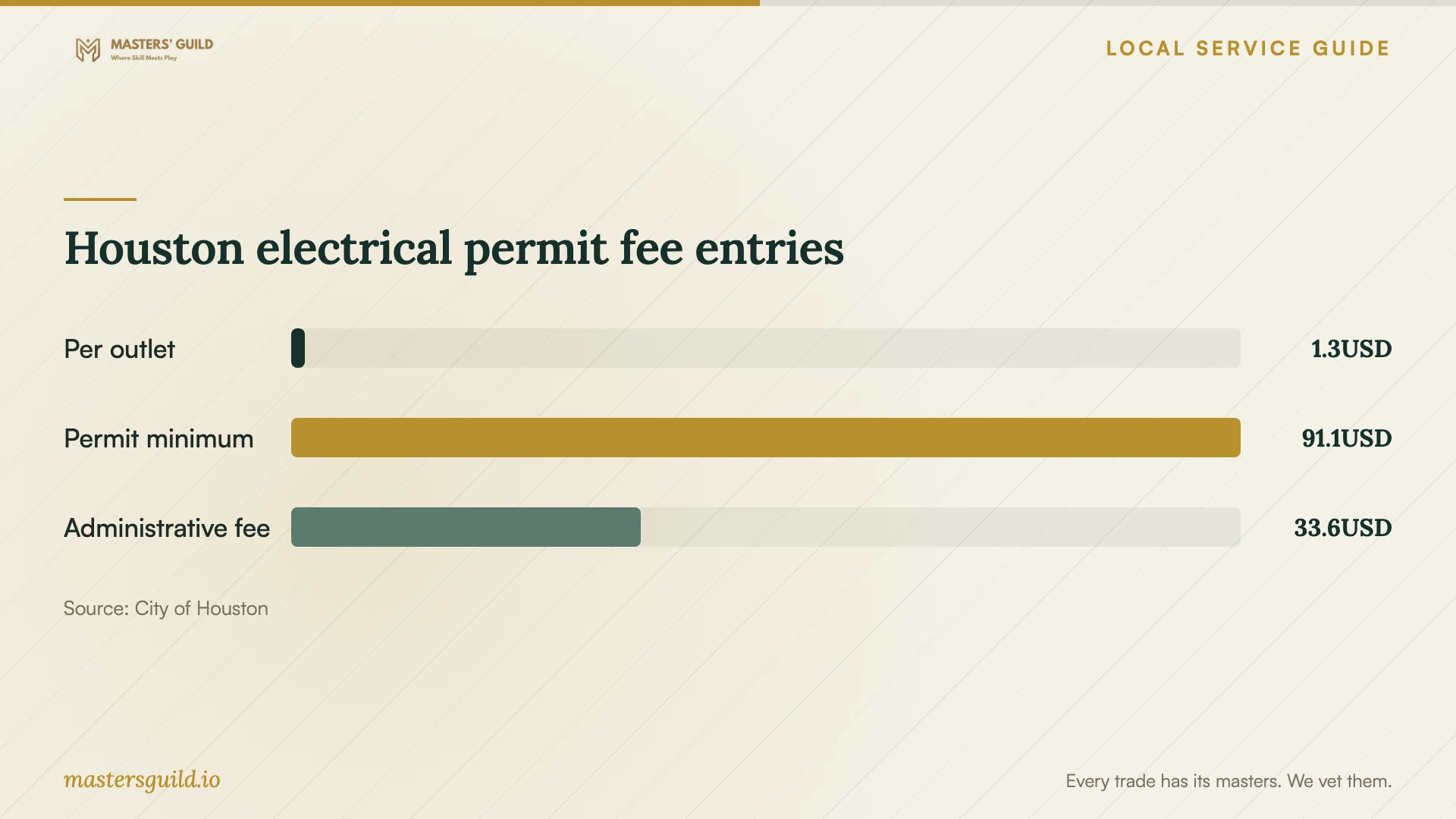
Houston's fee schedule lists an electrical outlet fee of $1.34 per outlet, an electrical permit minimum of $91.06, and a building-code permit or license administrative fee of $33.56, all dated January 1, 2026. Treat these as published municipal fee entries, not a home office installation estimate. Ask the contractor to identify the charges that apply to your permit. [2]
Keep permit charges separate from contractor labor and materials. Before accepting an electrical quote, ask who will handle the permit determination, application and any required inspection. For a property outside Houston's city jurisdiction, ask the provider to identify the responsible authority rather than applying the city's fee schedule.
Agree on a working handoff
Describe the tasks you need to perform before the provider leaves: join a video call, use both displays, charge the laptop through the dock, and print if needed. Ask the provider to test those tasks from the desk using your intended connection. Enter your own passwords and keep control of account recovery details.
Discuss whether you want battery backup for the workstation and network equipment. Ask the provider to check device compatibility and explain how to shut down during an interruption. Keep the modem, router and other required network equipment in that discussion; ask what connectivity will depend on service beyond your home.
Before signing off, move the standing desk through its travel, check cable slack, and confirm access to outlets and controls. Ask for cable labels and a short equipment list. Record any unfinished work, missing parts or agreed follow-up while the provider is present.
Houston electrical permit fee entries
Local details that affect your job
Use Houston's permit minimum when reviewing an outlet quote
The city lists both a $1.34 electrical outlet fee and a $91.06 electrical permit minimum for 2026. It also lists a $33.56 building-code permit or license administrative fee. If a quote cites only the per-outlet figure, ask for the complete applicable municipal charge and who will pay it. Do not add the listed entries into a project total without confirming how the city applies them. [2]
Enroll the correct CenterPoint address for outage alerts
If CenterPoint serves your home, its Power Alert Service can send outage notifications and estimated restoration times by text, email or phone. CenterPoint instructs customers to link the electric account using the eight-digit meter number, select Power Alert Service and confirm text enrollment by replying. After a move, link the new address and meter number; alerts stop when service disconnects at the old address. [3]
Choose help for the work you need
| Planned work | Provider to consider | Question before hiring |
|---|---|---|
| Desk assembly and cable tidying | Furniture assembler or setup provider | Will you follow the assembly instructions and check cable movement? |
| Monitor arm or wall mounting | Provider with relevant mounting experience | Will you check equipment compatibility and the mounting surface? |
| Network cable installation | Network cabling specialist | Which state exemption and local requirements apply to this route? |
| New power outlets or circuits | Licensed electrical contractor | Who will confirm permits and itemize applicable city charges? |
Your hiring checklist
- Photograph the room, existing outlets, router location and proposed mounting surfaces.
- List desk, monitor, dock and computer models, plus the accessories you already have.
- Choose the desk position and check chair movement, reflections and access to controls.
- Specify surface cable management or concealed routing, including wall repairs.
- Ask who will assess electrical alterations and confirm applicable permits.
- Request separate prices for labor, hardware, materials and applicable municipal charges.
- Agree on connection tests, cleanup and a written list of unfinished work.
Frequently Asked Questions
How much should I budget for the setup?
Build the budget from an itemized quote for your equipment and room. Separate furniture assembly, mounting, network work, accessories and electrical alterations. Houston's published permit fees cover municipal charges; they do not establish contractor labor rates or a complete setup price. [2]
Does a network installer need an electrician license?
TDLR exempts specified communications circuits, optical fiber and certain other circuit work from state electrician licensing. It warns that municipal or regional regulations may override exemptions. Ask the installer to identify the rule that applies to the proposed work and confirm local requirements. [1]
Can I arrange a setup without drilling?
Ask for a freestanding monitor arrangement or a compatible desk clamp, plus accessible surface cable routing. Check the desk manufacturer's restrictions before choosing a clamp. Confirm the proposed layout before the provider orders hardware, and obtain any required owner approval if you rent.
How do I activate CenterPoint text alerts?
Link your electric account in My Account using the eight-digit meter number, then select Power Alert Service. Reply to the first confirmation text. CenterPoint says customers who do not reply within five business days must repeat registration. [3]
Sources and scope
This guide combines the sources below with practical planning guidance. Figures apply to the stated geography and period; request a written quote for your property.