
Local service guide
Computer Virus Removal in Houston: Hiring Guide
Arrange Computer Virus Removal in Houston by choosing a technician through contact details you trust and requesting a written quote for diagnosis, cleanup and file preservation. Agree on approval before any drive erasure or operating-system reinstall. Tell the technician about existing backups and any remote access you granted. The Texas Attorney General warns that unexpected virus alerts with a support number can come from tech support scammers. [3]
Choose support without following a fake alert
Avoid the phone number in an unexpected security pop-up. The Texas Attorney General warns that unsolicited support callers can use computer access to inspect personal or financial information, install malware or add spyware. Contact a provider through details you trust and describe the warning before agreeing to a connection. [3]
If you granted access, write down what the caller asked you to install, which accounts you opened and whether you entered passwords. Give that account to the technician and request a review of remote-access software. Keep messages and payment records so you can explain what happened without relying on memory.
Keep financial concerns separate from the repair appointment. The FTC advises against moving money in response to an unexpected message claiming that a transfer will protect it. Hang up and contact the bank, company or agency through a known phone number or website. [4]
Compare quotes for the same repair scope
Ask each provider to itemize diagnosis, malware cleanup, operating-system repair, application installation and file preservation. Set a spending limit and require approval for additions. Compare the final written totals for the same work, including taxes, travel and any proposed subscriptions.
Describe symptoms rather than naming an infection yourself. Note the alert wording, recent downloads, applications that will not open and whether the computer starts. Ask what the technician will check during diagnosis, what would justify a reinstall and what happens if you decline further work.
Request an explanation of tax on a combined cleanup and backup package. The Texas Comptroller lists data storage, including offsite electronic-file backup, as taxable data processing and exempts 20 percent of that service charge. This exemption concerns the data processing charge; it is not a discount on the whole repair bill. [2]
Agree on file access and handover
List the photos, documents and application data you want preserved. Tell the technician where you keep backups, and ask them to assess the recovery approach before copying files. Agree on which folders they may access, where they will store copies and when they will delete those copies. Require permission before erasure or a reinstall.
Choose a service arrangement you can supervise and manage. For remote help, ask how you will approve and end the connection. For drop-off, request an intake receipt listing the device and accessories. For a home visit, confirm the arrival window, travel charge and whether you must approve taking the computer away.
After diagnosis, request a completion estimate and written follow-up terms. At handover, open the files you asked to preserve and test the applications you need. Ask the technician to explain remaining problems, software they installed and any access they retained. Record unresolved items before accepting the work.
Understand the national scam figures
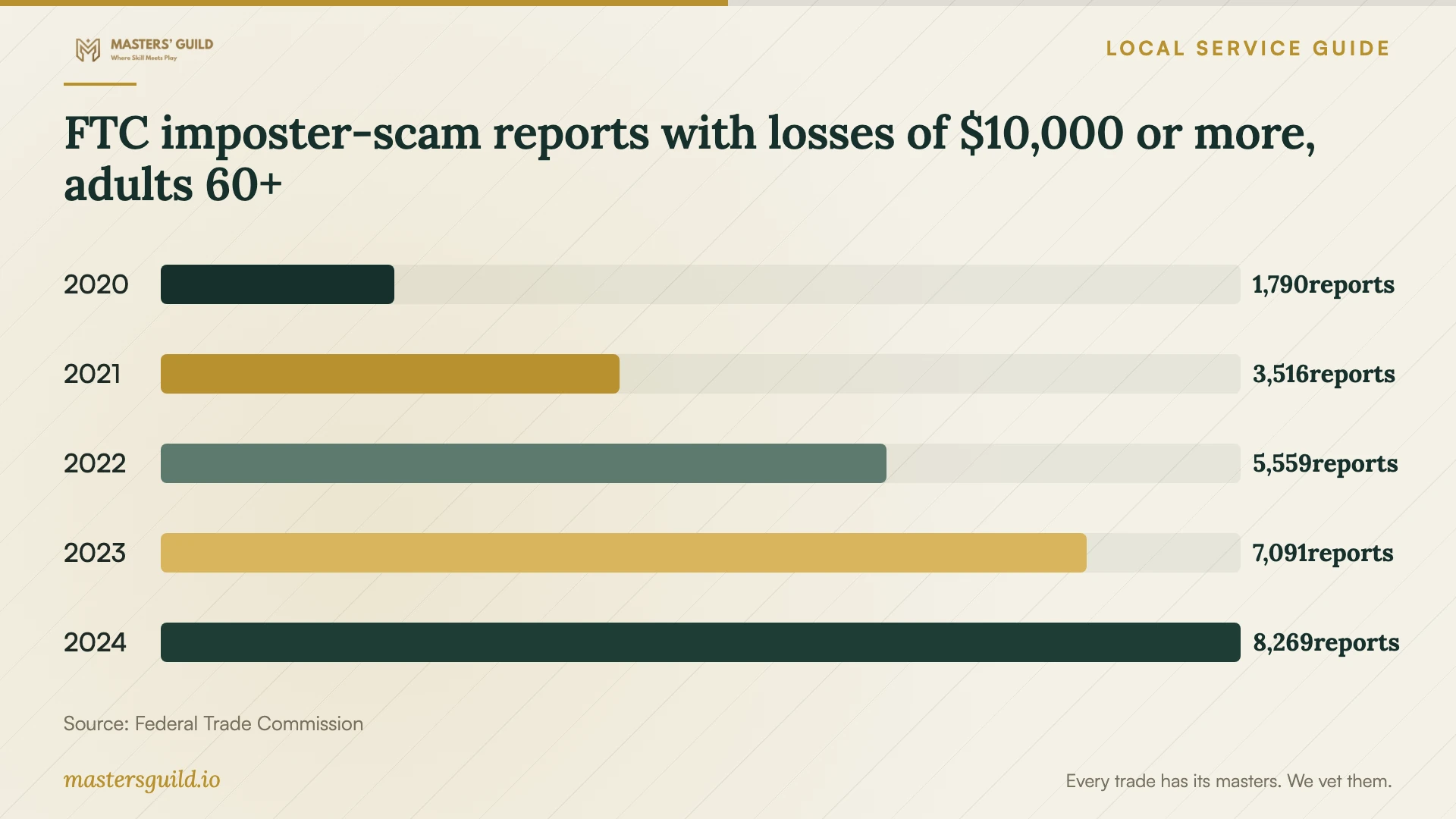
The FTC counted 1,790 reports in 2020 and 8,269 in 2024 from adults aged 60 and older reporting losses of at least $10,000 to business or government imposter scams. Its August 2025 report describes fake computer-security alerts as one starting point for these scams. The chart covers the broader imposter category, rather than virus-removal services. [4]
Use this context when an urgent computer warning comes with payment instructions. The FTC recommends hanging up and checking the story through known contact details. You can ask a family member to help review the messages while you arrange a separate technical assessment. [4]
Plan replacement before disposing of the device
If you are considering replacement, compare a repair quote with a separate file-recovery and transfer quote. Ask what the technician expects to preserve and what remains uncertain. Include data erasure in the disposal plan and request documentation of the method used before releasing the old computer.
Houston lists Westpark Consumer Recycling Center at 5900 Westpark for residential electronics at no additional charge. North and South Environmental Service Centers also accept residential electronic waste. Confirm current drop-off arrangements before traveling and complete your file-preservation and erasure plan first. [1]
FTC imposter-scam reports with losses of $10,000 or more, adults 60+
Local details that affect your job
Houston residential recycling affects the replacement plan
Westpark Consumer Recycling Center, 5900 Westpark, Houston, TX 77057, accepts residential electronics at no additional charge. Houston advises residents not to place electronics at the curb with garbage or heavy trash. If you retire a household computer, arrange file recovery and data erasure before drop-off. Do not assume the residential program accepts business equipment; confirm eligibility for that equipment before making the trip. [1]
Texas backup tax rules affect the final quote
For a Houston household purchasing cleanup plus offsite backup, request a separate backup charge and tax calculation. Texas classifies data storage, including offsite electronic-file backup, as taxable data processing, with 20 percent of the charge exempt from tax. Compare itemized final totals and ask the provider to explain how it treats each service. [2]
Choose your next step
| Your situation | Next step | Ask before approving work |
|---|---|---|
| An unexpected pop-up gives a support number | Choose support through contact details you trust | Can you assess this alert and explain whether cleanup is needed? |
| You granted an unsolicited caller access | Describe the session and request an assessment | Will you review remote-access software and document your findings? |
| You need photos or documents preserved | Agree on file preservation before approving a reinstall | Which files will you access, where will you store copies and when will you delete them? |
| The quote bundles cleanup and offsite backup | Request separate charges and a tax explanation | How did you apply Texas data processing tax rules to the backup charge? |
| You plan to replace a household computer | Arrange recovery and erasure before using residential recycling | Can you document erasure before I take the computer to Westpark? |
Your hiring checklist
- Record symptoms, alert wording and any access you granted to an unexpected caller.
- Choose support through contact details you trust.
- List essential files, applications and existing backups.
- Compare itemized written quotes, including tax and travel charges.
- Set a spending limit and require approval before erasure, reinstall work or subscriptions.
- Agree on file access, storage of copies and ending remote access.
- Confirm completion estimates and follow-up terms.
- Test preserved files at handover and document data erasure before recycling.
Frequently Asked Questions
Should I call the number in a virus warning?
Avoid the number in an unexpected security pop-up. Texas consumer guidance identifies these alerts as a tech support scam tactic. Contact support through details you trust and describe the warning before granting access. [3]
How should I budget for removal?
Compare written quotes for diagnosis, cleanup and your file-preservation needs. Request separate charges for backup, reinstall work, travel, software and taxes. Agree on a spending limit and require approval before the technician adds work.
Can I ask the technician to preserve my photos?
Yes. Identify the files and folders you need and request a preservation plan before approving work. Ask the technician to explain recovery uncertainty, access permissions and storage of copies. Require your approval before erasure or a reinstall.
Where can I take a computer I replace?
Houston lists Westpark Consumer Recycling Center at 5900 Westpark for residential electronics at no additional charge. Arrange file recovery and data erasure first, then confirm drop-off arrangements. Houston advises residents not to place electronics at the curb with garbage or heavy trash. [1]
Sources and scope
This guide combines the sources below with practical planning guidance. Figures apply to the stated geography and period; request a written quote for your property.