
Local service guide
Technical Skills Training in Honolulu: How to Choose
Arrange Technical Skills Training in Honolulu by naming the task you or your staff need to complete, then choosing instruction that matches that task. Consider the library’s free, 90-minute classes for computer basics before buying private lessons. For business software or a specific project, ask an instructor for a written lesson scope and a practical demonstration of progress. If you want career training, check eligibility and funding approval before committing to a course. [1] [3]
Choose the task before choosing the instructor
Write a short brief describing your starting point, software, device and desired result. For example: you can enter sales figures but want to create a monthly report without help. Ask the instructor to explain what you will practice, what you should prepare and how you will demonstrate the skill at the end.
For staff training, separate beginner needs from project work. Ask each participant to describe a task they struggle with. Decide whether you want a shared class, individual coaching or a session built around one business process. Avoid buying a broad course until you can connect its lessons to the work you need to do.
Check public learning options before buying lessons
The state library system describes free, in-person beginner classes covering computer basics, internet access, email and online safety. Its digital-skills page also lists Smartphone & Tablet Basics and Chromebook & Cloud Computing, including Google Drive. The system directs learners to island schedules or their local library for upcoming classes and registration. [1]
For someone unsure where to start, the library’s Northstar Digital Literacy Assessment identifies existing skills and areas to learn. You can take an assessment or create a learner account with a dashboard that tracks learning and online classes. Use your results to ask an instructor for help with specific gaps. [2]
Compare the class topic with your actual goal. A beginner email class may suit a staff member learning to send attachments. For a custom spreadsheet, website workflow or coding problem, ask a prospective instructor to review a sanitized example and propose a focused lesson.
Get a complete training quote
Request a written price that states the session length, number of learners, delivery format and included preparation. Ask whether the instructor charges for travel, software setup, practice materials or follow-up questions. Compare the total for the agreed work, rather than an hourly rate without a lesson scope.
Before buying a package, ask for a sample exercise using the software version you use. Request relevant teaching examples and ask how the instructor adapts a lesson when a learner gets stuck. Agree on a review point before committing to further sessions.
Use sample customer records and practice accounts during training. Keep control of passwords and account recovery details. If a lesson involves remote access, agree on its purpose and duration, and ask the instructor to explain each change before making it.
Check funding before enrolling in career training
UH Community Colleges lists information technology among the career areas supported through WIOA-eligible training. Its process starts with choosing a program, then working with an American Job Center case manager on the application and documents. Applicants must receive approval before starting through that funding pathway. [3]
Treat career-program assistance as a separate option from a private business lesson. Ask whether the exact course qualifies, what prerequisites apply and what you would owe. The Good Jobs Hawaiʻi FAQ says applications have no fee, some trainings require a co-pay, and participants must meet their course prerequisites. [4]
Plan for equipment before choosing an online course. Good Jobs Hawaiʻi says participants need a laptop or computer and that it can arrange laptop or Wi-Fi hotspot loans for learners without equipment or reliable internet. Ask about availability and arrangements before your course begins. [4]
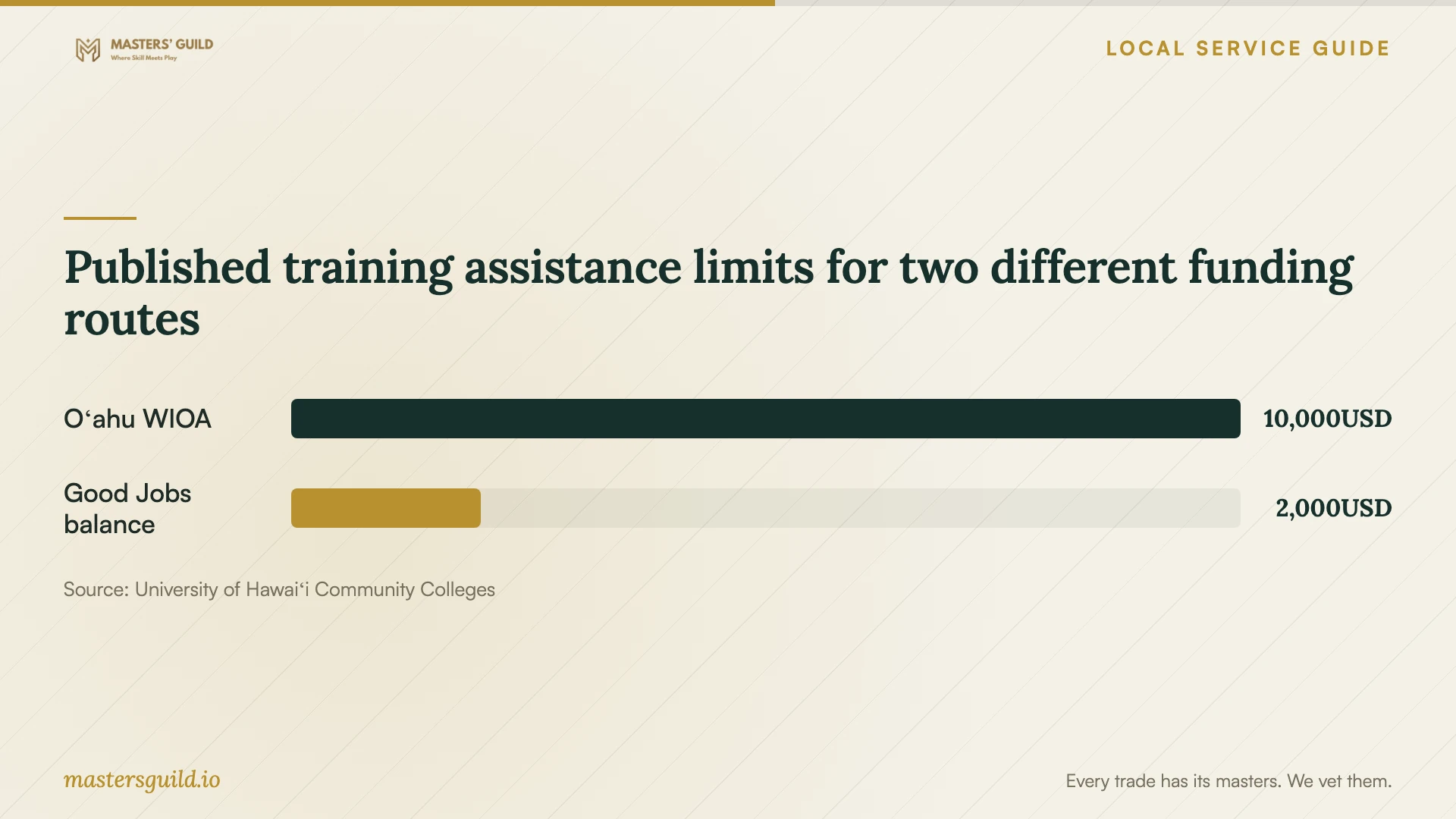
Published training assistance limits for two different funding routes
Local details that affect your job
Oʻahu funding starts with the Honolulu American Job Center
UH Community Colleges lists the Oʻahu American Job Center at Dole Cannery, 680 Iwilei Road, Suite 700, Honolulu, with phone number (808) 768-5705. It publishes an Oʻahu WIOA funding cap of up to $10,000. Ask a case manager to confirm your eligibility, course approval and covered expenses before making a payment; the cap does not establish your award. [3]
Use a Honolulu branch’s Northstar entry point
The library’s Northstar page provides entry links for Kaimukī, Mānoa, McCully-Mōʻiliʻili and other Oʻahu branches. Choose a branch link to start an assessment or learner account. This offers a concrete preparation step before discussing lesson scope with a private instructor; it does not establish that the branch has an in-person class on your preferred date. [2]
Match the training route to your goal
| Your goal | Route to consider | Confirm before committing |
|---|---|---|
| Learn computer, internet or email basics | Free library beginner class | Oʻahu dates, registration and the class topic |
| Find gaps in everyday digital skills | Library Northstar assessment and online learning | Assessment results and whether you want a learner account |
| Complete a specific business software task | Private instruction scoped around a sample project | Software version, teaching approach and full lesson price |
| Pursue an eligible career pathway | UH Community Colleges training with a WIOA eligibility review | Program eligibility, case-manager approval and uncovered costs |
Your hiring checklist
- Name the task you want to complete without instructor help.
- List each learner’s starting skills and any accessibility needs.
- Confirm device, operating system, software version and account access.
- Prepare a sample file with customer and financial details removed.
- Get the lesson scope, total price and cancellation terms in writing.
- Agree on a practice exercise and a review point before further sessions.
- For funded training, confirm approval and your remaining costs before enrolling.
Frequently Asked Questions
Should I book individual lessons or a staff class?
Choose based on the work and starting skills. Ask for individual coaching when you want help with a particular project. For a staff class, agree on a shared exercise and ask how the instructor will support learners who need extra practice.
Can I learn basic computer skills for free?
The state library system offers free, 90-minute beginner digital-literacy classes. Check its Oʻahu schedule or ask your branch about upcoming dates and registration. Match the advertised topic to the skill you need. [1]
Will WIOA pay for my chosen course?
Do not assume coverage. UH Community Colleges requires an eligible program, an application through an American Job Center case manager, supporting documents and approval. The published Oʻahu cap is up to $10,000, rather than a promised payment to each applicant. [3]
Can Good Jobs Hawaiʻi help if I lack a computer?
Its FAQ says it can arrange a laptop or Wi-Fi hotspot loan if you lack a computer or reliable internet. Confirm equipment availability and the requirements of your selected course before planning to participate. [4]
Sources and scope
This guide combines the sources below with practical planning guidance. Figures apply to the stated geography and period; request a written quote for your property.