
Local service guide
Software Installation in Honolulu: Plan Your Setup
For Software Installation in Honolulu, ask a technician to quote the named programs, device count, account setup and a working demonstration before you book. Choose remote or in-home help after discussing internet access and sign-in needs. If you mainly want instruction, consider the Hawaii State Public Library System’s free beginner digital-skills classes before paying for a private lesson. [3]
Describe the result you need
Write a short job description with your computer model, operating system, program names and the task you want to complete. For example, ask for an office application installation plus a demonstration of opening, editing and saving your own document. Tell the technician whether you already own the software or need help choosing a purchase.
Separate installation from file transfer, email setup, printer connection and instruction. Ask the technician to include each requested task in the written scope. For an operating-system change, request a backup plan and agreement on which files and settings you want retained before approving work.
Choose how the technician will help
For remote help, ask what connection method the technician proposes, whether you must stay at the computer and how you will end access afterward. Describe connection problems before booking. If you cannot reach the desktop or complete sign-in, ask the technician to assess whether an in-person appointment would suit the job.
For a home visit, give the technician your building’s entry instructions and ask about parking or travel charges. Confirm whether you need to provide a monitor, keyboard or other accessories. Agree on an arrival window and ask how the technician will seek approval if troubleshooting expands the original scope.
Compare complete quotes
Request a written total that distinguishes installation labor from software licenses, subscriptions, file transfer and follow-up help. Ask whether the technician charges a fixed amount or bills for time, and agree on a spending limit that requires your approval to exceed. Confirm who will purchase the software and whose account will hold it.
Hawaii’s Department of Taxation identifies GET as a tax on business activity, including services. The business owes the tax and may choose to pass its cost to customers. Ask whether the quoted total includes any GET pass-on rather than assuming the advertised labor amount equals your final payment. [2]
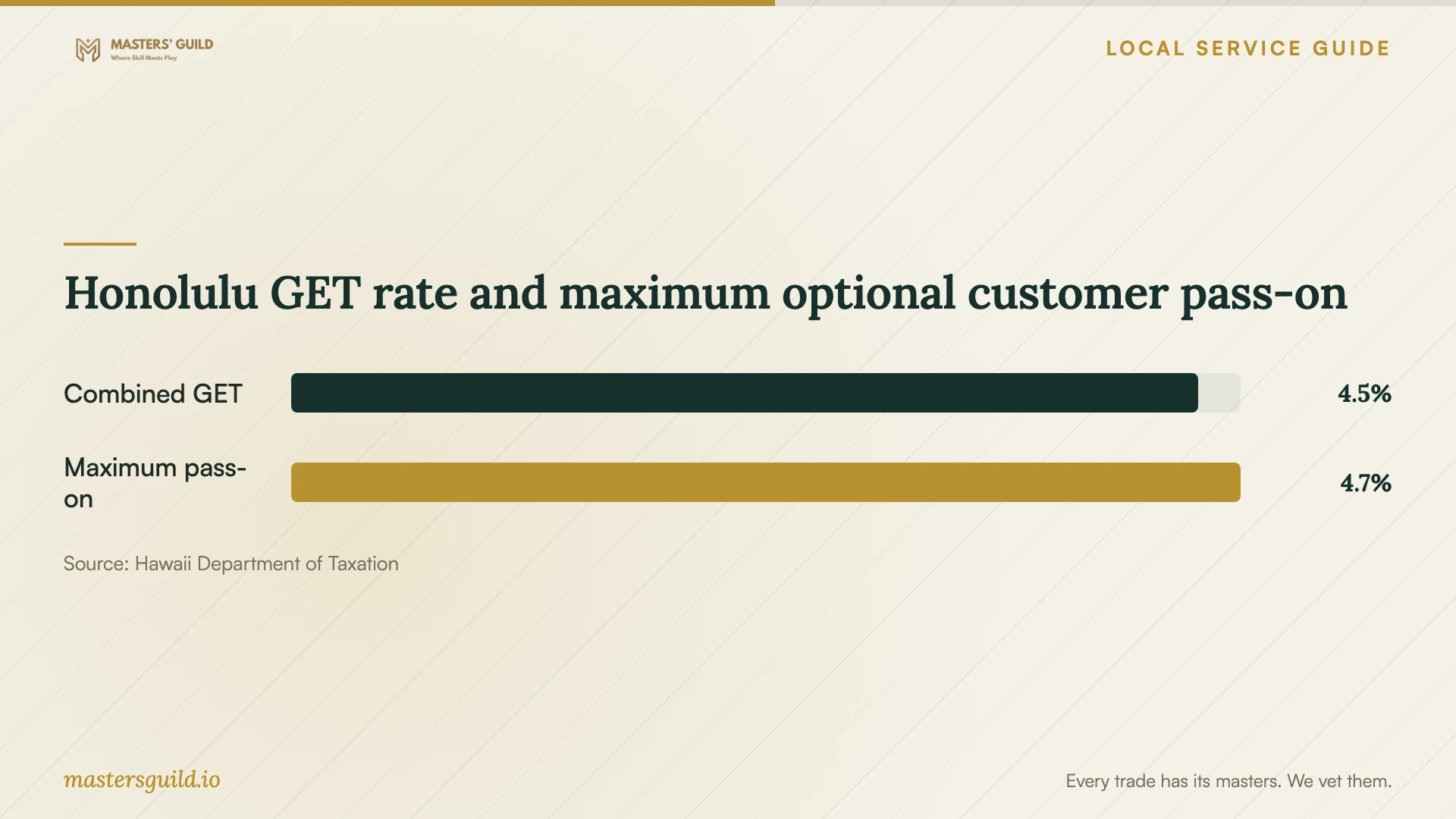
For Honolulu, the department lists a 0.5% county surcharge on activities taxed at the 4% rate and a maximum GET pass-on rate of 4.7120%. Ask the provider to explain its invoice treatment if it adds a separate tax line. These published tax figures do not establish a local installation labor price. [1]
Keep control of accounts and approve the handoff
Plan to enter your own passwords and verification codes during the appointment. Ask the technician to use your account for purchases and activation, and discuss any proposed remote-access software before installation. Keep a copy of the agreed scope and record the programs you authorize the technician to add or remove.
Before the appointment ends, restart the computer with the technician present and test your agreed task. Ask for a list of installed programs, purchase receipts and instructions for finding subscription settings. Confirm how you can report an installation problem and whether the quoted price includes a return visit or remote follow-up.
Honolulu GET rate and maximum optional customer pass-on
Local details that affect your job
Separate Honolulu’s tax rate from the customer pass-on
The state lists Honolulu’s county surcharge as 0.5% through December 31, 2030. For activities subject to the 4% GET rate, it lists a maximum optional customer pass-on of 4.7120%, including the surcharge. When comparing offers, ask each technician for a total with its chosen GET treatment included; do not add the surcharge again to that maximum pass-on rate. [1]
Consider Oʻahu library instruction before buying lessons
The Hawaii State Public Library System describes free, in-person, 90-minute beginner digital-literacy classes and directs residents to an Oʻahu schedule or their local library for registration information. It also lists Smartphone & Tablet Basics and Chromebook & Cloud Computing topics. If your goal is learning to manage apps or use cloud documents, check the current class schedule before including private instruction in an installation quote. The page describes classes, so confirm any request for individual device installation separately. [3]
Match the help to your goal
| Your goal | Planning choice | Confirm before booking |
|---|---|---|
| Install named programs | Request a defined installation scope | Device count, purchases, activation and completion test |
| Change the operating system | Request a separate system-change scope | Backup, retained files and recovery arrangements |
| Learn computer or app basics | Check the state library’s free digital-literacy classes | Current Oʻahu schedule, topic and registration |
| Compare installation offers | Request complete invoice totals | Labor, software and the provider’s optional GET pass-on |
Your hiring checklist
- List each device, operating system and program you want installed.
- Identify the account that should own each purchase or subscription.
- Agree on backup and file-retention steps before approving system changes.
- Confirm remote access arrangements or home-entry and parking details.
- Request a complete quote with software charges and any GET pass-on identified.
- Set an approval limit for troubleshooting beyond the agreed scope.
- Test your intended task and collect receipts before closing the appointment.
Frequently Asked Questions
How much should I budget for installation?
Request a quote for your exact devices and tasks. The supplied official sources do not publish Honolulu installation labor prices. Separate labor, software purchases, subscriptions and any travel or GET charge so you can compare offers on the same scope.
Should I give the technician my password?
Arrange to enter passwords and verification codes yourself. Ask how the technician will complete setup while you retain control of the account, and agree on ending any remote access when the appointment finishes.
Does the technician have to add GET to my bill?
Hawaii’s Department of Taxation says businesses may pass GET to customers but do not have to. Ask whether the quote includes it. The department lists Honolulu’s maximum pass-on rate as 4.7120%, including the county surcharge. [1] [2]
Can I get free help learning to use the software?
The state library system offers free beginner digital-literacy classes, including computer basics and topics involving mobile apps and cloud computing. Check the current Oʻahu schedule for a suitable class. Confirm individual installation assistance separately before bringing a device. [3]
Sources and scope
This guide combines the sources below with practical planning guidance. Figures apply to the stated geography and period; request a written quote for your property.