
Local service guide
Network Setup and Support in Honolulu
Arrange Network Setup and Support in Honolulu by asking for a written diagnosis and separate scopes for configuration, cabling, and electrical work. Describe the business tasks you need to protect, agree on a shutdown window, and require acceptance tests before handover. For contracting work, Hawaii DCCA identifies license requirements for projects exceeding $1,500 in labor and materials or requiring a building, electrical, or plumbing permit. [1]
Define the business problem before choosing equipment
Give prospective technicians a short description of the failure: where it happens, which devices lose service, and what employees were doing. Name the tasks that matter, such as taking payments, joining calls, printing orders, or accessing shared files. Ask the technician to propose a diagnostic visit with a written spending limit.
Request tests at the internet handoff and at the work areas you identify. Have the technician record the test device, connection method, location, and result. Ask them to explain what they can conclude from those checks and what still needs investigation before you approve routers, wireless access points, or new cable routes.
Separate configuration from installation work
Request separate quote lines for troubleshooting, equipment, configuration, cable installation, testing, and follow-up support. For cable work, ask the installer to identify endpoints, proposed routes, wall openings, finish repairs, and responsibility for any building approvals. Confirm access arrangements with your landlord or building manager before scheduling invasive work.
DCCA states that a contractor’s license is required for any project exceeding $1,500 in labor and materials and for any project requiring a building, electrical, or plumbing permit. Its guidance also says electrical contractors must employ licensed electricians for the actual electrical work. Apply that guidance to the proposed contracting scope; do not treat the dollar threshold as a determination of whether a particular cable installation needs a permit. [1]
Ask the installer to identify the credentials appropriate to the work and explain who will perform each part. DCCA advises consumers to obtain the contractor’s name and license number and provides online verification routes. Check the named business before you accept a substantial installation proposal. [1]
Investigate power-related resets before buying replacements
Hawaiian Electric identifies automatic resets, data errors, and UPS alarms as possible symptoms of power-quality problems. It describes causes that include circuit overloads, improper wiring, and the starting or stopping of heavy equipment. These possibilities justify investigation; they do not establish the cause of a particular network failure. [2]
Keep a disturbance log with the time, affected equipment, indicator lights, and any other electrical symptoms. For an Oahu voltage check, Hawaiian Electric directs customers to its trouble line at 1-855-304-1212. The utility recommends identifying the power-quality problem before major electrical changes or purchases of power-conditioning equipment. [2]
Specify backup power and a usable handover
Hawaiian Electric explains that surge suppressors reduce spikes, while power enhancers provide no help during a power outage. Its guidance describes standby supplies that switch to battery power and UPS designs with different operating arrangements. Ask the technician to match the proposed protection to the disturbance and the equipment you want to support. [3]
For a backup-power quote, list the devices you want covered and ask for the proposed load, runtime, maintenance requirements, and a demonstration of the intended behavior. Ask what happens to your payment or communications workflow if the upstream connection fails while your own equipment retains power.
Before completion, run the business tasks named in your scope. Request a labeled equipment list, cable-test results where applicable, configuration notes, and owner-controlled administrator access. Agree on how the technician will transfer credentials, remove temporary access, and handle a repeat fault after handover.
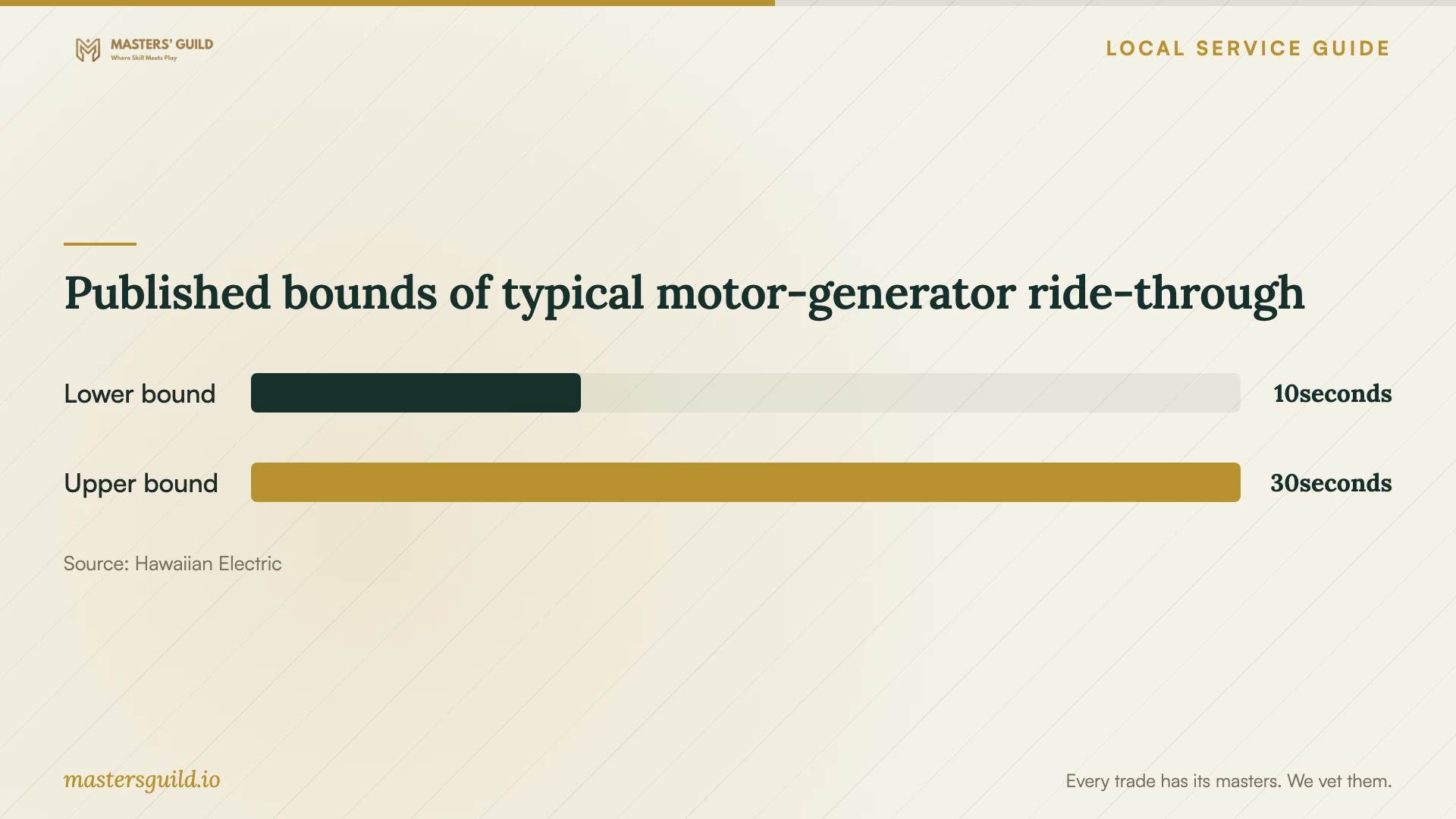
Published bounds of typical motor-generator ride-through
Local details that affect your job
Hawaii contractor checks affect installation hiring
DCCA’s statewide guidance applies to contracting work here: projects exceeding $1,500 in labor and materials, or requiring a building, electrical, or plumbing permit, trigger a contractor-license requirement. Obtain the contractor’s name and license number and use DCCA’s verification resources before accepting the installation scope. This source does not resolve permit requirements for a specific network cable route. [1]
Oahu has a utility route for voltage checks
If network resets coincide with electrical symptoms, include a utility check in the troubleshooting plan. Hawaiian Electric gives Oahu customers 1-855-304-1212 to request a voltage check and identifies 808-543-4756 for its power-quality engineers when further investigation is needed. Share your disturbance log with the network technician and utility. [2]
Choose the next step from the symptom
| Situation | Next step | Ask before approving |
|---|---|---|
| A work area loses connectivity | Request connection tests at that location and the internet handoff | Which findings support the proposed equipment or cabling? |
| The proposal includes installed cabling | Establish the contracting scope and check applicable credentials | Does the scope exceed DCCA’s $1,500 labor-and-material threshold or require a specified permit? |
| Resets coincide with dimming lights or UPS alarms | Log the events and consider an Oahu voltage check | Should the utility investigate before equipment replacement? |
| You need service during power interruptions | Request a load-specific backup-power proposal | Does the proposal provide auxiliary power, and how will you verify its operation? |
Your hiring checklist
- List affected devices, rooms, business tasks, and failure times.
- Photograph equipment labels and prepare a sketch of desired connection points.
- Request a diagnostic spending limit and itemized installation proposal.
- Ask who will confirm permit requirements and obtain building access approvals.
- Set a maintenance window and agree on a rollback plan.
- Define acceptance tests using your actual business tasks.
- Require documentation, owner-controlled credentials, and written follow-up terms.
Frequently Asked Questions
How much should I budget?
Build the budget from an itemized proposal after diagnosis. Ask for labor, hardware, cable work, repairs, and support as separate lines. The supplied sources do not establish local network-installation prices, so they cannot support a Honolulu price range.
Does the contractor threshold settle whether I need a permit?
No. DCCA lists exceeding $1,500 in labor and materials and requiring a specified permit as separate license triggers. Ask the installer to confirm the permit requirements for your exact scope before work begins. [1]
Will a surge protector keep the network running through an outage?
Hawaiian Electric says power enhancers, including surge suppressors, provide no help for loss of power during an outage. Ask about an appropriate standby supply or UPS and request an equipment-specific runtime assessment. [3]
Sources and scope
This guide combines the sources below with practical planning guidance. Figures apply to the stated geography and period; request a written quote for your property.