
Local service guide
Computer Virus Removal in Honolulu: Hiring Guide
Arrange Computer Virus Removal in Honolulu by requesting a written diagnosis and cleanup scope before authorizing repairs. Tell the technician which business files you need, what you clicked or downloaded, and whether you entered account credentials. Agree on file access, approval before erasing or reinstalling, the final price including any GET pass-on, and a return-to-work check.
Describe the incident before choosing a repair
Prepare a short timeline before contacting a technician. Record when you noticed the problem, the programs you were using, any warning text and what you did afterward. Describe the symptoms without deciding the cause yourself. Ask the technician to explain the diagnosis before you approve a cleanup or reinstall.
Hawaii's Office of Consumer Protection documented a 2019 phishing campaign aimed at local businesses that impersonated DCCA and OCP. The message used a supposed complaint and a password-protected download to pressure recipients. Treat this as a documented example, not evidence of a current outbreak. [3]
If your incident involved a similar message, tell the technician whether you received it, opened a link, downloaded a file or entered information. OCP advises recipients to avoid suspicious links and attachments and to contact the purported sender through a separate, direct channel. Preserve your description without reopening the attachment to demonstrate it. [3]
Choose the service format around access and files
Ask each provider whether they recommend remote assistance, a shop visit or an office appointment for your situation, and why. For remote work, agree on who will initiate the connection, how you will supervise access and how the technician will end it. Verify the provider through contact details you selected yourself.
For a drop-off, request an intake receipt identifying the computer and accessories. For an office visit, identify the affected computer and describe any shared storage or connected equipment you want included in the assessment. Confirm whether the quoted work covers one device or a broader review.
Name the files you need to preserve and describe your existing backups. Give written instructions requiring approval before the technician erases a drive, reinstalls the operating system or copies business files elsewhere. Ask who can access copied data, where they will store it and when they will delete their working copies.
Compare the full quote and return-to-work plan
Request separate descriptions for diagnosis, malware cleanup, operating-system repair, backup or restoration, and any replacement parts. Ask about the charge if you decline repairs after diagnosis. Set a spending limit and require approval before the technician adds work. Request an expected handover time and a plan for updates if it changes.
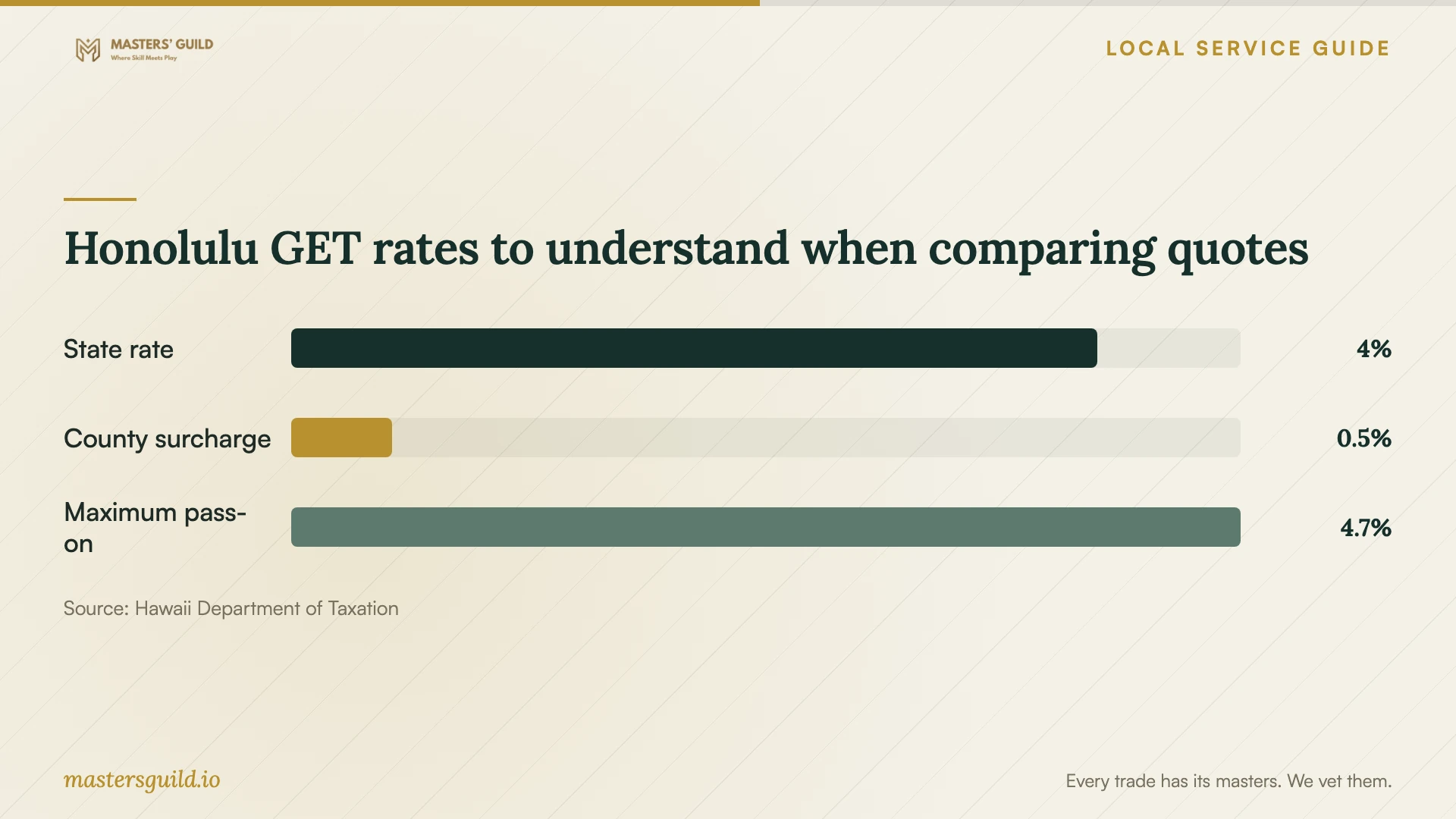
Hawaii's Department of Taxation says businesses may choose to pass GET and the applicable county surcharge to customers. Honolulu's county surcharge is 0.5% for activities taxed at the 4.0% rate, and the published maximum customer pass-on rate is 4.7120%. Ask providers to identify any pass-on in the final total so you can compare quotes on the same basis. [1]
Before accepting the computer, ask the technician to summarize what they found, what they changed and any unresolved concerns. Agree on a supervised check of the business applications and files you identified at intake. Request written follow-up terms, including whom to contact if the original symptoms return and what further work would cost.
Decide whether to repair or replace
Ask for a replacement option if the proposed repair exceeds your budget or you no longer want to keep the computer. Compare the repair quote with the full replacement plan, including file transfer, application setup and disposal. Require a separate decision about preserving or erasing the old drive before anyone takes it away.
The Hawaii Department of Health lists E-Opala at 2627 Kilihau Street in Mapunapuna and T & N Computer Recycling locations on South Beretania Street, Kapahulu Avenue and North King Street. The department lists pickup from E-Opala for a fee. Contact the collection provider to confirm acceptance, charges and arrangements before transporting equipment. [2]
Ask the recycler what data-erasure or drive-destruction service, if any, they provide and what documentation you can obtain. Keep the file-recovery decision with your repair technician until you approve disposal. Do not assume a collection listing includes the data-handling service your business needs.
Honolulu GET rates to understand when comparing quotes
Local details that affect your job
Compare Honolulu quotes after any GET pass-on
The state lists Honolulu's 0.5% county surcharge through December 31, 2030, and a maximum GET pass-on of 4.7120%. Businesses can choose whether to pass the tax on. Request the final payable total instead of adding the maximum rate to every advertised price yourself. [1]
Plan collection if replacement wins
The state's Oahu recycling directory lists E-Opala at 2627 Kilihau Street, with pickup available for a fee. It also lists T & N Computer Recycling at 1436 South Beretania Street and 548 Kapahulu Avenue. Compare drop-off with a pickup quote and confirm your data-handling arrangements before releasing the computer. [2]
Mention government-impersonation messages at intake
OCP's 2019 local-business alert describes malware-bearing messages posing as DCCA complaint notices. If that resembles your incident, explain the download and any information you supplied. Follow OCP's advice to verify a request through direct contact rather than through the suspicious message. [3]
Choose the next step for your situation
| Your situation | Request | Agree before work starts |
|---|---|---|
| You received a suspicious message | Describe what you opened or entered and request an assessment | How to preserve incident details without reopening attachments |
| You need files from the affected computer | A written file-preservation plan | Approval before erasure and rules for copied data |
| The technician proposes reinstalling | A scope covering files, applications and setup | What they will restore and what you must supply |
| You want remote assistance | An explanation of the access process | Who starts the session, how you supervise and how access ends |
| You prefer replacement | Separate transfer and disposal arrangements | What happens to the old drive and who documents completion |
Your hiring checklist
- Record symptoms and the sequence of clicks, downloads or information entry.
- Identify essential business files and describe available backups.
- Confirm which devices and accounts you want the technician to assess.
- Agree on access permissions and handling of copied files.
- Require approval before erasure, reinstallation or additional charges.
- Get the total payable price and expected handover time in writing.
- Request a repair summary, supervised handover check and follow-up terms.
Frequently Asked Questions
What should a virus-removal quote include?
Ask for the diagnostic charge, cleanup scope, file-handling plan and approval process for extra work. Have the provider identify any proposed reinstall or restoration work, the total payable amount and follow-up terms. Compare providers using the same requested scope.
Should I give the technician my passwords?
Ask which access they need and whether you can enter credentials yourself during a supervised session. Agree on a method before sharing access. Include an account-access review in the discussion if you entered credentials through a suspicious message.
Does a message using a Hawaii agency's name prove it is legitimate?
No. OCP documented a 2019 campaign impersonating DCCA and OCP to target local businesses. The agency advises avoiding suspicious links and attachments and contacting the purported sender through a direct channel to verify the request. [3]
Where can I take a computer I decide to replace?
The Hawaii Department of Health lists Honolulu collection options including E-Opala in Mapunapuna and T & N Computer Recycling locations. Confirm current acceptance and fees with the collector, and arrange file preservation and drive handling before disposal. [2]
Sources and scope
This guide combines the sources below with practical planning guidance. Figures apply to the stated geography and period; request a written quote for your property.